
Upgraded Watt Power Meter Plug
4.6Editor score
7 Display Modes
Overload Protection
Adjustable Backlight
Compare the top 10 energy consumption monitors for PC to track usage accurately and reduce electricity costs with our detailed expert analysis.
Finding the right energy consumption monitor for PC helps you understand exactly how much electricity your computer setup uses daily. These devices provide real-time data that can lead to significant savings on your monthly bills while promoting more sustainable computing habits.
We evaluated ten leading models based on accuracy, ease of use, data retention, and smart features. Our comparison covers plug-in meters, whole-home systems, and smart plugs that offer detailed insights into power consumption patterns for desktops and peripherals.
Each pick in this guide shows specific strengths for different user needs, from budget-conscious buyers to enthusiasts requiring granular circuit data. Please note that product availability and pricing may change, so verify details before making a purchase decision.
4.6Editor score

4.6Editor score

4.3Editor score
This side-by-side comparison highlights the key specifications and capabilities of each energy monitor to help you choose the right fit for your specific PC setup and monitoring needs.


The Emporia Vue 3 stands out as a robust solution for monitoring PC energy consumption alongside your entire home setup. With a rating of 4.6 stars, it offers reliable safety certification and precise data tracking that enthusiasts and homeowners appreciate.
We may earn a commission when you buy through this link, at no additional cost to you.
Its standout quality is the ability to provide live reporting through a dedicated app, letting you see exactly how much your PC rig draws during gaming versus idle states. The system supports solar net metering and comes with sixteen branch sensors for comprehensive coverage.
While it requires installation in a circuit panel, the precision of ±2% accuracy makes the effort worthwhile for users who need exact measurements. The app retains minute and hour data indefinitely, allowing for long-term trend analysis of your computing habits.
This monitor is ideal for serious PC users who want to optimize energy efficiency across all devices in their space. Its safety features and comprehensive data retention make it a top choice for anyone serious about reducing electricity waste.
The Vue system uses sensors to collect energy data accurate within ±2%. This data is accessible via iPhone, Android, or web apps with a 2.4 GHz internet connection.
Emporia Vue is UL Listed, meaning it has met rigorous safety standards for electrical products in the U.S. and Canada. This certification ensures that every component has been thoroughly tested to prevent hazards such as overheating.
We may earn a commission when you buy through this link, at no additional cost to you.
For budget-conscious users, this Upgraded Watt Power Meter Plug delivers essential monitoring capabilities without a complex setup. It provides a straightforward way to measure watts, voltage, and amps directly at the outlet where your PC connects.
We may earn a commission when you buy through this link, at no additional cost to you.
The 2.36-inch backlit screen ensures you can read data clearly in any lighting condition. You can switch between seven display modes to view parameters like power factor, cost estimates, and cumulative usage time easily.
While it lacks the cloud connectivity of more expensive models, it saves data automatically during power outages so you don't lose your tracking progress. The overload protection feature warns you if your PC setup draws too much power for a standard circuit.
This plug is perfect for quick checks of a single desktop tower or monitor. It is easy to use, portable, and gives you immediate insight into which components are the biggest energy hogs in your setup.
The power meter plug monitors power, energy, volts, amps, hertz, power factor, cost, and time. Switching display modes helps you know various parameters while the appliance is working.
The wattage meter records power consumption data when you remove it from the socket. You can see the last data when you use it next time, and it saves data during sudden power failures.
We may earn a commission when you buy through this link, at no additional cost to you.
The Meross Smart Home Energy Monitor is designed for tech-savvy users who want deep control over their energy data. With a 4.3-star rating, it offers precise monitoring and unique features like solar surplus detection for maximizing renewable energy use.
We may earn a commission when you buy through this link, at no additional cost to you.
Its integration with Home Assistant allows you to automate your PC or other devices based on real-time energy availability. All your data can stay local, ensuring privacy and eliminating subscription fees that other platforms might charge.
The system supports two main circuits and sixteen branch circuits, giving you granular insights into your entire home's power distribution. This level of detail helps identify inefficient peripherals or older components that could be upgraded.
If you use home automation or solar panels, this monitor provides actionable insights to cut your bill. It balances advanced features with reliability, making it a strong premium choice for dedicated enthusiasts.
All energy data stays local without cloud reliance, ensuring no delays or privacy concerns. It supports Open API and Web Control for advanced users who want full control.
This monitor integrates with Home Assistant to detect solar surplus and automatically power high-use appliances. You can stop wasting solar energy and use it yourself to cut electricity bills faster.
We may earn a commission when you buy through this link, at no additional cost to you.
The SURAIELEC Outlet Watt Meter offers a reliable balance of accuracy and functionality for basic tracking needs. Its 4.5-star rating reflects its ability to provide clear readings without needing a complex installation process or app.
We may earn a commission when you buy through this link, at no additional cost to you.
It supports a wide voltage range of 90 to 250 volts, making it versatile for different power environments. The built-in rechargeable battery backup stores data for up to 90 days during power outages, ensuring your records are safe.
The compact design allows you to plug it into the upper outlet while leaving the lower one accessible, which is useful for PCs with multiple power cords. It adheres to Class 1.0 accuracy standards for consistent measurements.
This meter is suitable for users who want dependable local monitoring without smart connectivity. It is straightforward to operate and ideal for tracking average energy costs over time.
The amp draw meter measures 90 to 250 Vac with Class 1.0 accuracy standard. This ensures precise readings for various appliances including computer setups.
Equipped with a built-in rechargeable battery backup, this meter stores data for up to 90 days during power outages. This makes it reliable for long-term use.
We may earn a commission when you buy through this link, at no additional cost to you.
This Smart Home Energy Monitor is a powerhouse for households needing to track usage across multiple areas. With 16 circuit sensors, it can distinguish between your PC, gaming console, and other devices easily.
We may earn a commission when you buy through this link, at no additional cost to you.
One of its strongest features is the Super Privacy Mode, which allows you to run on a local MQTT server without using the cloud. This is ideal for privacy-conscious users who want total control over their data.
The device supports customizable electricity rate templates including peak and off-peak pricing. This makes it perfect for rental properties where fair allocation of electricity costs is needed among roommates or tenants.
If you need to separate usage by room or circuit, this system provides the necessary precision. It balances advanced features with practical tools for shared living arrangements.
You can run without their cloud or app by using your own MQTT server only. This allows you to run in LAN without internet access for better privacy control.
Perfect for rental houses, shared apartments, and multi-room properties. You can track power usage for each bedroom or circuit to make billing transparent.
We may earn a commission when you buy through this link, at no additional cost to you.
The HBN Watt Meter Plug is praised for its user-friendly interface and clear display. With a 4.6-star rating, it offers a simple way to check power draw without needing technical expertise or complicated apps.
We may earn a commission when you buy through this link, at no additional cost to you.
Its upgraded backlit LCD provides a 160-degree viewing angle so you can read data from any angle. You can cycle through nine types of data including power factor, voltage, and current usage.
The device stores all non-real-time data so no information is lost during a power outage. It is designed to be safe with a rated voltage of 125VAC and handles standard residential loads well.
This plug is a solid choice for quick diagnostics of your PC components. It helps you identify devices that draw power even when turned off, saving you money.
The watt meter features an upgraded backlit LCD display with a 160-degree wide viewing angle. This provides clear and distinct data readings from any angle, day or night.
This energy meter plug monitors power, apparent power, energy consumption, usage time, frequency, power factor, voltage, current, and electricity cost. The interface allows easy reading.
We may earn a commission when you buy through this link, at no additional cost to you.
The KETOTEK Watt Meter Plug has earned a high rating of 4.7 stars due to its reliable performance and intuitive controls. It makes it simple to check how much energy your PC is using without digging through menus.
We may earn a commission when you buy through this link, at no additional cost to you.
You can switch interfaces with a one-click button to view KWH, watts, or costs easily. It also features multiple protection alarms to warn you about overload, KWH limits, or cost thresholds you set.
The built-in chip stores data in the event of a power failure so you don't lose your tracking history. Its wide viewing angle means you can read the screen from a distance without straining.
This plug is great for users who want straightforward local monitoring with safety features. It helps you keep an eye on usage without needing internet connectivity.
Choosing from five buttons allows quick access to different parameters. Press M to display KWH and electricity cost. Press + to display Watt and VA easily.
When load power exceeds the overload setting value, the LCD displays Overload and flashes to warn the user. This helps keep appliances safe and prevents circuit damage.
We may earn a commission when you buy through this link, at no additional cost to you.
Getting two watt meter plugs in one pack provides great value for monitoring both your PC and your gaming console. It has a rating of 4.6 stars, indicating consistent performance across both units.
We may earn a commission when you buy through this link, at no additional cost to you.
The display uses white backlight and black words for clear visibility even in dark rooms. It supports eight display modes to show parameters like power factor, voltage, and total electricity cost.
The device saves settings data like unit price and cumulative cost when unplugged so you do not have to reconfigure it. It also has a simple reset function where you press one button for five seconds.
This is an excellent budget option for multi-device setups. It allows you to compare energy consumption between your PC and peripherals without spending much money.
Our electric usage monitor can monitor power, electricity, voltage, frequency, current, power factor, unit price, and total cost. Switching display modes helps you know various parameters.
The watt meter plug will record your power consumption data when you remove it from socket. All setting data and cumulative data will be saved so you can see the last data.
We may earn a commission when you buy through this link, at no additional cost to you.
The P4400 Kill A Watt is a classic choice that has stood the test of time. With a rating of 4.6 stars, it remains popular for its simplicity and reliability in tracking household energy use.
We may earn a commission when you buy through this link, at no additional cost to you.
It connects to appliances and assesses efficiency through a large LCD display that counts consumption by the kilowatt-hour. You can choose from four settings to monitor your electrical usage by day, week, month, or year.
This device is compatible with inverters and designed for use with AC 115-volt appliances. It calculates electricity expenses simply, making it easy to understand how much your PC costs to run.
It is perfect for users who want a no-frills device to get a baseline of usage. While it lacks modern smart features, it delivers accurate results without requiring complex setup.
The monitor connects to appliances and assesses efficiency. You can monitor your electrical usage by day, week, month, or year easily.
The large LCD display counts consumption by the kilowatt-hour and calculates electricity expenses by the day, week, month, or year.
We may earn a commission when you buy through this link, at no additional cost to you.
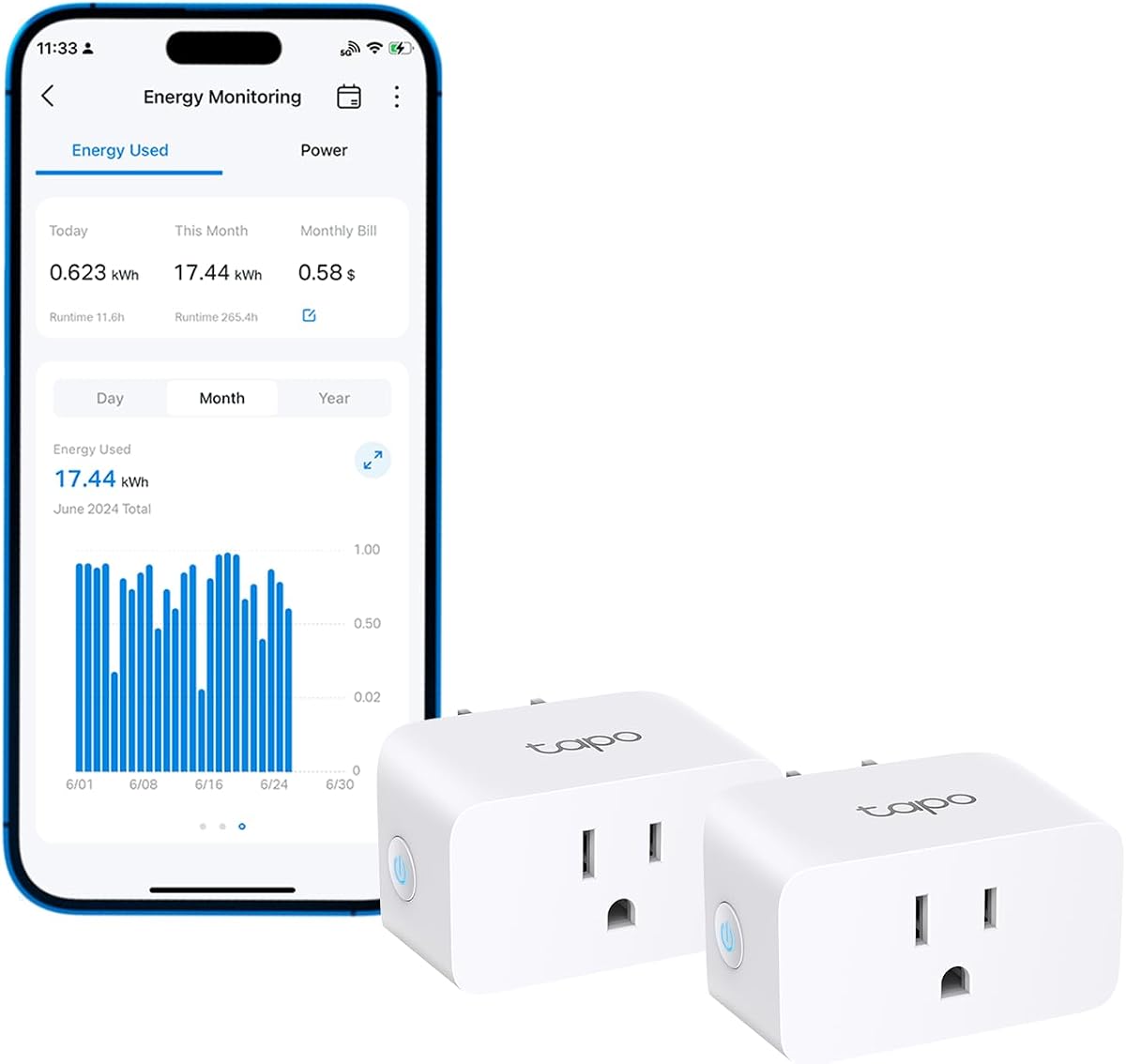
The Tapo Smart Plug offers energy monitoring combined with smart home convenience. With a rating of 4.5 stars, it is ideal for users who want to monitor usage and control their PC remotely.
We may earn a commission when you buy through this link, at no additional cost to you.
It provides insightful energy tracking with easy-to-understand statistics and intuitive charts that show your usage patterns. You can estimate your energy bill by integrating with billing systems for clear cost visualization.
The plug supports voice commands via Alexa and Google Assistant so you can access specific functions without lifting a finger. It also includes safety features like auto-shutoff to prevent electrical overload.
This is a great option for those who want to automate their energy use. It allows you to schedule high-consumption devices to run during off-peak hours automatically for savings.
Track your plug's energy use with clear and easy-to-understand statistics and intuitive charts. This helps you optimize power usage and reduce waste effectively.
With built-in support for both Alexa and Google Assistant, issue simple voice commands to adjust settings. Manage the Tapo P115 and its connected devices from anywhere.
We may earn a commission when you buy through this link, at no additional cost to you.
Selecting the right energy consumption monitor requires understanding your specific needs, from simple plug-in meters to advanced whole-home systems.
Accuracy is critical when monitoring energy usage to ensure your data reflects real consumption. Look for devices with a certified accuracy rating, typically around 1% to 2%, so you can trust the numbers you see.
Prioritize monitors that offer precise readings rather than rough estimates for budgeting.
Smart connectivity allows you to track power remotely and integrate with home automation systems. If you want to receive alerts on your phone or automate your PC based on energy availability, choose a Wi-Fi enabled model.
Ensure the device connects to your preferred network standard like 2.4 GHz Wi-Fi.
Plug-in monitors are the easiest to use as they simply sit between the outlet and your device. Whole-home monitors with circuit sensors require installation in your breaker panel and may need professional help.
Choose plug-in options if you rent or want immediate use without tools.
Data retention ensures you don't lose your usage history during power outages. Some models store data locally on a chip while others upload to the cloud for long-term access.
Check that the device retains data even when unplugged to maintain accurate records.
Safety certifications like UL or ETL are essential to ensure the device won't fail or cause a fire. Always verify that the monitor meets local safety standards before installing it.
Look for overload protection features that warn you of dangerous power levels.
A clear display with backlight helps you read readings even in dim lighting conditions. The ability to toggle through different data parameters easily is a sign of good usability.
Select models with adjustable backlight and easy button navigation for best experience.
Plug-in meters are affordable and suitable for most PC users, while whole-home systems cost more. Determine if you need just your PC monitored or your entire household usage.
Balance the initial cost with the potential savings you can achieve.
Privacy-conscious users may prefer devices that store data locally without uploading to a cloud server. Look for options that offer local MQTT support or offline modes.
Ensure you have control over where your usage data is stored and who can access it.
For plug-in monitors, simply insert the device into the wall outlet and plug your PC power cable into the monitor. Wait a few seconds for the screen to activate and begin displaying real-time wattage.
For whole-home systems, follow the manufacturer's instructions for installing sensors around your circuit breakers. Use the dedicated app to connect to Wi-Fi and pair each sensor with the correct circuit breaker.
To maintain accuracy, reset the device periodically and avoid overloading it beyond its rated capacity. Keep the monitor clean and dry to ensure it functions correctly over time.
Yes, reputable models with safety certifications like UL or ETL are safe to leave plugged in. They are designed to handle continuous operation without overheating or posing risks when used within their specified limits.
Yes, energy monitors measure electricity usage regardless of the device type. They work equally well with Macs, PCs, gaming consoles, and other electronics connected to standard outlets.
Most quality plug-in meters have an accuracy rating of about 1% to 2%. This level of precision is sufficient for tracking trends and identifying major energy hogs in your setup.
Only if the device is specifically rated for outdoor use. Most indoor monitors are not weather-resistant so avoid using them outside unless they have appropriate safety ratings.
No, basic plug-in meters do not require Wi-Fi and display data locally on a screen. Smart models with apps need a connection but offer additional remote monitoring features.
You can reset it whenever you want to start fresh or after a power outage. Some users reset monthly to track billing cycles while others leave it running continuously.
Yes, most monitors can detect even low standby power usage as long as it is above the minimum threshold like 1 watt. This helps you identify vampire loads draining your bill.
No, these devices consume very little power themselves, often less than 1 watt. The savings you gain from optimizing usage will easily outweigh any negligible power used by the monitor.
We covered ten excellent options ranging from basic plug-in meters to advanced whole-home systems. The Emporia Vue 3 offers the most comprehensive monitoring while simple plugs provide immediate insights at a low cost.
Prioritize accuracy, safety certifications, and data retention features when making your choice. Smart features are great but not required if you only need local data.
Remember that energy usage patterns vary so check current model availability and verify the features you need before purchasing. This guide helps you start smarter.