
OMTech K40+ 45W Desktop CO2 Laser
4.4Editor score
45W Enhanced Performance
LightBurn Compatible
Compact 12×8 Workspace
Explore our expert guide comparing the top CO2 Laser Cutters for professionals and hobbyists. We review power, speed, safety, and features to help you choose.
CO2 laser cutters have revolutionized how makers and businesses create intricate designs. These machines use high-powered gas lasers to cut and engrave non-metallic materials with incredible precision. Choosing the right one depends on your workspace, budget, and project goals.
We evaluated ten top models based on power output, work area size, software compatibility, and safety features. Our analysis covers everything from compact desktop units to industrial-grade systems. Each product offers unique strengths tailored to different user needs and production demands.
Every pick in this guide highlights key specifications and real-world performance insights. We focus on reliability, ease of use, and cutting quality. Remember that prices and availability change frequently, so check current listings before making your final purchase decision.
4.4Editor score

4.5Editor score

This side-by-side comparison highlights the key specifications and unique features of each model. Use this table to quickly identify which machine aligns best with your specific cutting and engraving requirements.



The xTool P3 is a flagship 80W CO2 laser cutter that offers industrial-grade performance in a desktop-friendly design. Rated 4.5 stars, it stands out for its intelligent automation system that simplifies setup. This machine is ideal for professionals needing speed and accuracy.
We may earn a commission when you buy through this link, at no additional cost to you.
Its Revolutionary Automated Creation System integrates LiDAR ranging for perfect autofocus and dual HD cameras for precise positioning. The 36 by 18-inch workspace is one of the largest available on the market. Users can cut up to 20mm wood or 25mm acrylic effortlessly.
While the price point is high, the efficiency gains justify the cost for serious makers. The Class 1 safety rating ensures a secure working environment with enclosed design and lid interlocks. Smart Nesting achieves 98.7% material utilization which reduces waste significantly.
Buyers looking for a reliable, high-performance CO2 laser cutter should consider the xTool P3. It balances power, safety, and smart features better than most competitors. Check availability for conveyor feeders and rotary options to expand production capabilities.
The LiDAR system automates focus and positioning so you save time on setup and get accurate cuts every time.
With Class 1 safety rating and multiple protection layers you can operate without constant supervision safely.
We may earn a commission when you buy through this link, at no additional cost to you.
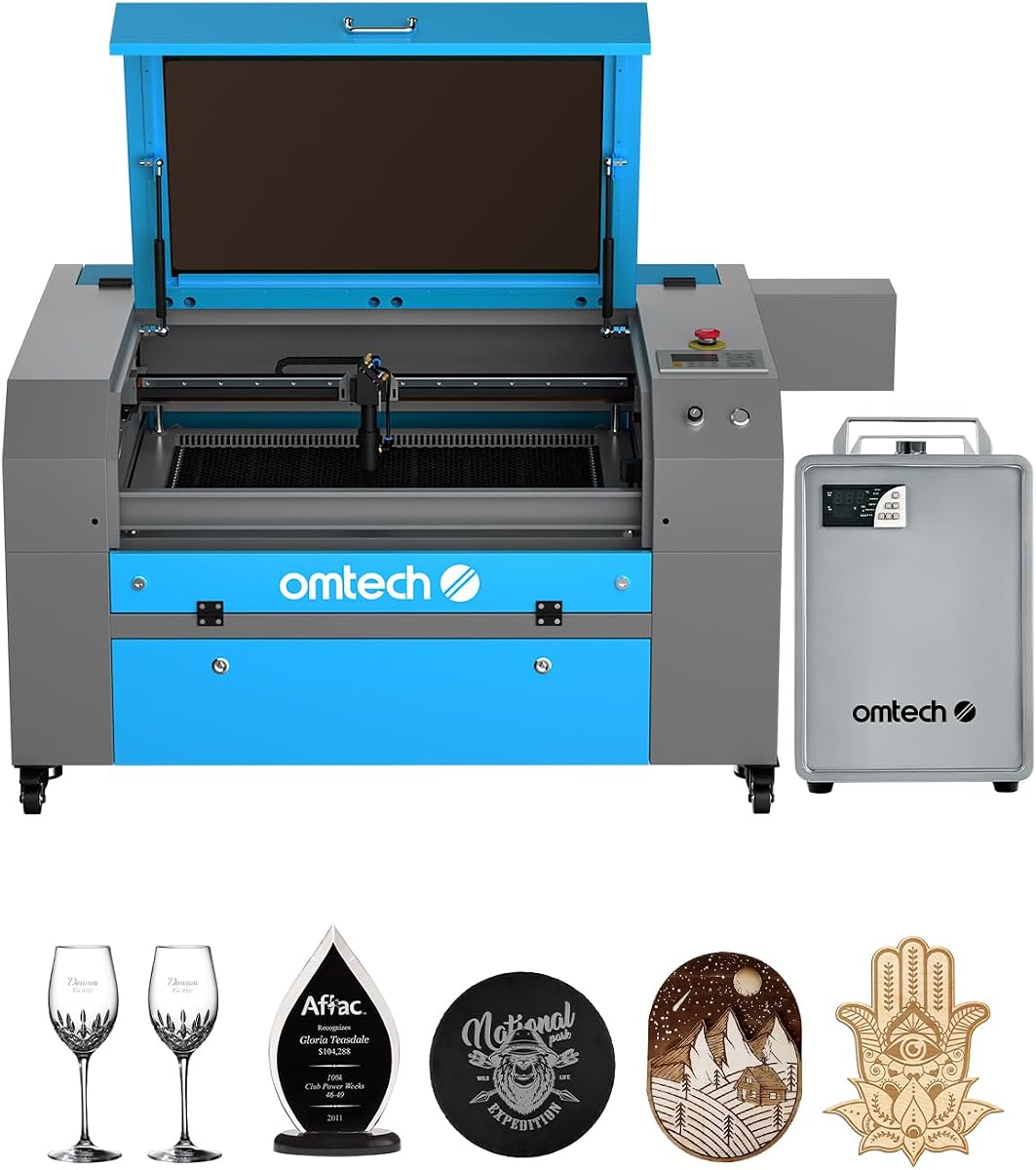
The OMTech K40+ is a powerful 45W desktop CO2 laser engraver that offers great value for hobbyists and small businesses. With a rating of 4.4 stars it delivers professional results at a competitive price. This model upgrades speed and depth significantly over older versions.
We may earn a commission when you buy through this link, at no additional cost to you.
Its 45W laser performance slices through 10mm acrylic and 8mm wood with ease. The high-speed engraving capability reaches 300 mm/s which is perfect for complex designs. The work area of 12 by 8 inches supports standard and irregular materials effectively.
Safety features include door protection and emergency stop functions to ensure user safety. The integrated air assist system reduces smoke and debris protecting the lens during high-power jobs. Software compatibility with LightBurn makes it flexible for various users.
For those entering the CO2 laser market on a budget this K40+ model is an excellent choice. It provides the necessary power and support to start your cutting journey. Check current listings for bundle offers with rotary axes.
The upgraded 45W tube boosts cutting speed and depth allowing you to complete projects faster than standard models.
Full support for LightBurn and LaserGRBL ensures you can use the software you already know.
We may earn a commission when you buy through this link, at no additional cost to you.
The OMTech Pro 130W is a high-performance CO2 laser engraver designed for professional and industrial use. It features a massive 55 by 35-inch workspace which accommodates large items effortlessly. The built-in CW-5200 water chiller maintains stable temperatures for consistent operation.
We may earn a commission when you buy through this link, at no additional cost to you.
Its 130W laser tube delivers enough power to engrave deep on wood and acrylic. High-speed servo motors allow engraving speeds up to 1200 mm/s. WiFi connectivity and touchscreen control make operation intuitive and modern. This machine is built for heavy daily production.
The tri-color status lights and flame-retardant window enhance safety and visibility. Pass-through doors enable processing of long materials without moving the bed. The Ruida 6445G controller ensures precise movement and reliable cuts. This level of engineering justifies the high-end price.
Investors seeking industrial-grade CO2 laser cutting should look at the OMTech Pro. It combines power speed and control in one unit. Ensure you have enough space for the unit as it requires a significant footprint in your shop.
With 130W power and 1200 mm/s speed you can complete large production runs efficiently.
WiFi control and touchscreen interface let you manage jobs remotely and monitor progress easily.
We may earn a commission when you buy through this link, at no additional cost to you.
The VEVOR 100W CO2 laser engraver offers a generous workspace and high-speed performance for serious creators. With a 5.0 rating it has impressed users with its stability and precision. The 24 by 35-inch bed allows for large-scale projects without frequent repositioning.
We may earn a commission when you buy through this link, at no additional cost to you.
Its intelligent laser head ensures smooth incisions without burrs on various materials. The digital control panel supports third-party software like LightBurn and CorelDRAW for flexible workflow. Red-dot pointers help frame project sizes accurately before cutting begins.
Security features include tinted windows for eye protection and power cutoff when the window opens. Movable wheels make it easier to move this heavier unit around. The 2-way pass air assist clears smoke effectively during operation.
Buyers needing a large work area for professional engraving will find this model suitable. It balances power and size well for commercial environments. Check dimensions before purchase to ensure your workspace can accommodate its height and width.
The 24 by 35 inch bed provides ample room for large sheets and multiple project layouts.
With speeds up to 19.7 IPS you can finish engraving tasks quickly without sacrificing quality.
We may earn a commission when you buy through this link, at no additional cost to you.
The OMTech Maker 90W is a commercial-grade CO2 laser engraver designed for consistent performance. It comes with a bundled water chiller to maintain optimal temperatures during extended sessions. The Yongli H2 tube provides reliable power output for thousands of hours.
We may earn a commission when you buy through this link, at no additional cost to you.
Its 20 by 28-inch work area fits most projects while the four-way pass-through doors accommodate longer items. Safety is prioritized with a widened flame retardant viewing window and cover interlocks that stop the beam when open. Air assist removes dust to protect optics.
This machine is ideal for small businesses needing continuous operation without downtime. The high-performance tube allows deeper engraving on wood and glass. Users appreciate the stable cooling system which prevents overheating issues.
For those needing durability in a CO2 laser cutter this Maker 90W is a strong candidate. Its features support heavy use in workshop environments. Verify the included accessories and software licenses before finalizing your order.
The Yongli H2 tube delivers consistent 90W power and lasts up to 8000 hours of use.
The bundled water chiller keeps the laser cool so you can run long projects without interruption.
We may earn a commission when you buy through this link, at no additional cost to you.
The OMTech Maker 60W offers a balanced bundle including LightBurn software and a water chiller. Rated 4.7 stars it provides ease of use with an autofocus system that finds the focal distance automatically. This reduces manual adjustments and setup time significantly.
We may earn a commission when you buy through this link, at no additional cost to you.
Its 20 by 28-inch work area with honeycomb and blade beds supports various material thicknesses. The flame retardant viewing window ensures lasting safe use during operation. Air assist helps keep lenses clean and cuts precise. The included software streamlines the workflow.
Ideal for makers who want an easy start without troubleshooting software issues. The autofocus feature is a major plus for consistency across different jobs. It is suitable for medium-volume engraving tasks.
Buyers prioritizing software bundles and ease of use will appreciate this setup. It delivers reliable CO2 laser cutting performance for home workshops. Check current bundle contents to confirm software versions included with the machine.
The preinstalled autofocus finds the right focal distance with a touch of a button saving setup time.
LightBurn is included so you can start cutting immediately with industry standard software.
We may earn a commission when you buy through this link, at no additional cost to you.
This OMTech K40+ variant provides a compact solution for small workshops or home studios. With a 4.5 rating it emphasizes reliable performance in a smaller form factor. The 45W power allows for efficient cutting of acrylic and wood materials.
We may earn a commission when you buy through this link, at no additional cost to you.
Global support ensures you have access to technical guidance and demos. The integrated air assist clears smoke effectively during jobs. Safety features include door protection and an emergency stop function. It fits easily on a standard table without needing a large room.
Ideal for hobbyists who need portability or limited space. The detachable base allows flexibility with cylindrical objects. It offers good value for entry-level users looking for brand reliability.
Buyers with space constraints should consider this model for desktop CO2 laser cutting. It brings essential features without demanding a large shop. Review the support terms to understand warranty coverage details.
24/7 support and local demos help resolve issues quickly so you keep working.
The smaller footprint fits on standard desks making it easy to integrate into any workspace.
We may earn a commission when you buy through this link, at no additional cost to you.
The OMTech Pronto 100W is designed for efficiency with speeds up to 39.4 inches per second. This allows you to transform creative visions into reality quickly. Its 100W power ensures clean cuts on wood and acrylic. The autofocus feature takes guesswork out of setup.
We may earn a commission when you buy through this link, at no additional cost to you.
The 40 by 24-inch work area fits most standard projects. The high-performance laser tube offers up to 12000 hours of usage with lower settings. Two-way pass-through doors make handling long items a breeze. Air pump and fan ensure clean cuts.
Safety features like water protection and temperature alarms keep operations secure. This machine is perfect for businesses needing higher throughput. The speed advantage provides a competitive edge in production environments.
For buyers prioritizing speed and output this model is ideal for CO2 laser cutting needs. Check power requirements before installation to ensure stability. Confirm accessory needs such as external chiller if required.
Experience speeds 37 percent faster than traditional models to finish jobs quicker and save time.
The autofocus finds the right focal distance so you get consistent results every time.
We may earn a commission when you buy through this link, at no additional cost to you.
The OMTech Pronto 130W offers a large format workspace with a 51 by 35-inch bed. Rated 5.0 stars it delivers impressive speeds and power for professional engraving. The 130W tube enables deep engraving on various nonmetallic materials effectively. It turns artistic visions into realities.
We may earn a commission when you buy through this link, at no additional cost to you.
Autofocus technology ensures consistent quality without manual adjustments. Two-way pass-through doors handle long items easily. The tube lifespan extends to 12000 hours for durability. Global support provides peace of mind during your investment.
Ideal for businesses needing to process larger panels or sheets. The speed and power combination improves production rates significantly. It is designed for creatives looking to expand capabilities.
For those investing in a large CO2 laser cutter this model is a strong choice. Ensure your space accommodates the footprint. Check support details to understand warranty terms for this unit.
The 51 by 35 inch bed lets you fit larger projects and work comfortably.
130W power handles thick materials and deep engraving to meet professional demands.
We may earn a commission when you buy through this link, at no additional cost to you.
The OMTech K40+ entry model provides an affordable way to start cutting with CO2 technology. Its 45W power handles common DIY materials well. The compact size fits on standard tables making it accessible for home use. It comes with basic safety features and air assist.
We may earn a commission when you buy through this link, at no additional cost to you.
This machine is designed for beginners learning the ropes of laser engraving. The air assist reduces debris and keeps the lens clean. It supports standard software workflows for easy integration into existing projects.
For hobbyists wanting to explore laser cutting without high costs this model is suitable. It offers the essentials needed for small projects. Expect to invest time in learning manual adjustments.
Buyers seeking an affordable CO2 laser starter should consider this unit. It provides a foundation for growing your skills. Verify accessories included with your specific bundle to confirm features.
Start your laser journey without breaking the bank with a reliable and affordable desktop unit.
Basic controls and air assist make it easy to start cutting safely and cleanly.
We may earn a commission when you buy through this link, at no additional cost to you.
Selecting the right CO2 laser cutter requires balancing power, workspace size, and safety features. This guide outlines the critical factors to evaluate before making your purchase decision.
Laser power determines how thick materials can be cut and how fast the machine operates. Higher wattage like 100W or 130W allows for deeper cuts and faster production runs compared to 45W models. Consider your primary materials to decide the necessary power output.
Choose a wattage that matches your typical project thickness for efficiency.
The work area defines the maximum size of material you can process without repositioning. Larger areas like 55×35 inches accommodate full sheets of wood or acrylic while desktop sizes are limited to small crafts. Measure your typical projects to ensure the bed fits.
Ensure the work area suits the size of your most common materials.
Speed affects production time while accuracy ensures clean edges on intricate designs. Machines with servo motors and linear guides offer higher precision for complex patterns. Look for models with high IPS or mm/s ratings for faster engraving.
Prioritize speed and accuracy if you need to complete bulk orders quickly.
Autofocus systems adjust the focal distance automatically saving time on setup. This feature is especially useful when working with materials of varying thicknesses. It reduces human error and ensures consistent results across different jobs.
Select a model with autofocus for easier operation and better consistency.
Software compatibility determines which design tools you can use with the machine. Support for LightBurn allows greater control over cutting paths and speed settings. Ensure the machine works with programs you are familiar with.
Verify software support to streamline your design and cutting workflow.
Safety features like enclosed designs and cover interlocks protect users from laser exposure. Air assist and temperature alarms prevent fires and equipment damage. Look for Class 1 ratings for highest safety standards in indoor environments.
Prioritize safety features to protect yourself and your workspace from hazards.
Cooling systems maintain optimal laser tube temperatures to prevent overheating. Built-in water chillers ensure stable performance during long engraving sessions. Some models may require external cooling depending on power and usage.
Check if the cooling solution is built-in or requires separate purchase.
Reliable support and warranty cover technical issues and parts replacement. Brands offering global support and local demos provide confidence in purchase. Review warranty terms for tubes and critical components before buying.
Choose brands with strong support networks for long-term reliability.
Begin by calibrating the machine and setting the correct focal length for your material. Use the autofocus feature or adjust manually until the beam focuses sharply on the surface.
Always use the air assist during cutting to clear debris and protect the lens. Monitor the machine frequently to prevent overheating and ensure safety protocols are followed.
Clean the lens and mirrors regularly to maintain optimal beam quality and longevity. Store materials in a dry environment and turn off the machine when not in use.
CO2 laser cutters handle non-metallic materials including wood, acrylic, leather, fabric, and cardboard. They cannot cut metals directly but can engrave coated metals. Always test material compatibility before cutting.
Yes if you follow safety guidelines. Enclosed machines with Class 1 ratings are safest. Always use ventilation and fire extinguishers. Never leave the machine unattended while running.
LightBurn is widely recommended for its powerful features and ease of use. LaserGRBL is a free alternative for simpler tasks. Most machines support these programs directly.
Use a soft cloth and lens cleaner specifically for optics. Avoid touching the surface with fingers. Clean regularly to prevent dust buildup that affects cut quality.
A standard tube lasts between 8000 and 12000 hours depending on usage and cooling. Lower power settings extend tube life. Proper cooling ensures consistent performance.
Yes CO2 lasers cut clear acrylic efficiently without discoloration. The beam interacts well with the material to produce clean edges. Ensure proper power settings to avoid cracking.
Yes an exhaust fan removes smoke and fumes during operation. Proper ventilation protects your health and keeps the lens clean. Install in a well-ventilated area.
Desktop models need at least a standard table plus clearance for ventilation. Large format machines require more floor space for pass-through doors. Measure your room before purchasing.
Choosing the right CO2 laser cutter depends on your project needs and budget. The xTool P3 leads in automation while the OMTech Pro delivers industrial power for heavy use.
Prioritize safety features and software compatibility to ensure a smooth experience. Selecting the correct wattage and work area will save time and money in the long run.
Check current prices and availability before making your decision. Each machine offers unique strengths tailored to different production goals and user levels.
