
VEVOR Portable Digital Magnifier
3.4Editor score
13MP dual lens system
AV and HDMI output support
Foldable stand included
Digital magnifiers are essential tools for individuals facing low vision challenges. These devices use cameras and screens to enlarge text and objects, making daily tasks like reading menus or labels much easier and more independent.
We evaluated ten top-rated models based on magnification power, screen quality, color options, and ergonomic design. Our analysis focuses on features that truly matter for users with macular degeneration, diabetic retinopathy, and other visual impairments.
Each pick highlights specific strengths and ideal use cases to help you find the right device. Please note that product availability and pricing can change over time, so always check the current listing before making a purchase decision.
3.4Editor score

4.6Editor score
4.0Editor score
As an Amazon Associate we earn from qualifying purchases.
The following table provides a side-by-side overview of all ten models reviewed in this guide, highlighting key specifications to help you compare features quickly and make an informed decision based on your specific visual needs.


The Eyoyo 3.5" Portable Digital Video Magnifier stands out as a top choice for users seeking a compact and effective solution for low vision challenges. With a strong rating from users, this device delivers reliable performance for everyday reading tasks without overwhelming complexity or cost.
We may earn a commission when you buy through this link, at no additional cost to you.
Its 2X to 25X magnification range covers most daily needs, from reading medication labels to following recipes. The eight adjustable color modes allow users to customize contrast levels, ensuring text remains clear regardless of lighting conditions or personal visual preferences.
While the 3.5 inch screen is smaller than some competitors, it enhances portability significantly, making it ideal for travel or quick tasks around the house. The lack of OCR is a trade-off, but the snapshot and screen lock features compensate by allowing users to save and review images later.
This magnifier is best suited for individuals who prioritize mobility and ease of use over advanced features like text-to-speech. It offers a balanced combination of functionality and simplicity that makes it a practical addition to any low vision toolkit.
The eight color modes include options like white on black and yellow on blue, allowing users to find the highest contrast setting that reduces eye strain during extended reading sessions.
The AV output feature lets users connect the device to a larger television screen, providing a more comfortable viewing experience for those who struggle with smaller displays.
We may earn a commission when you buy through this link, at no additional cost to you.
The Digital Magnifier 5 Inch focuses on simplicity, making it a strong contender for elderly users or those who find complex technology challenging. Its simplified button layout removes unnecessary clutter, allowing users to focus on reading without confusion or frustration during operation.
We may earn a commission when you buy through this link, at no additional cost to you.
With 26 color modes and a 5-inch screen, this device offers ample customization for different visual needs. The memory function is particularly helpful, as it remembers the last used settings so you do not have to adjust them every time you power the device on.
However, some users have reported lower satisfaction scores, which may relate to build quality or specific functionality issues not detailed in the product description. Despite this, the core reading experience remains solid for basic text enlargement tasks.
Ideal for users who need a straightforward magnification tool without extra bells and whistles, this model provides a reliable option for daily reading assistance. It balances affordability with essential features that address common low vision hurdles effectively.
Users can rely on the device to recall their preferred magnification and color settings after shutdown, streamlining the setup process for repeated use throughout the day.
The integrated handle and foldable bracket allow the device to rest at an angle on pages, reducing the need to hunch over and improving posture during extended reading sessions.
We may earn a commission when you buy through this link, at no additional cost to you.
This Portable Digital Video Magnifier stands out for its balance of screen size and image quality, featuring a 5.0 inch LCD display with high resolution. The device aims to provide clear and crisp text enhancement, which is critical for users managing macular degeneration or similar vision impairments.
We may earn a commission when you buy through this link, at no additional cost to you.
The inclusion of 26 color modes ensures that users can tailor the visual output to their specific needs, whether they require high contrast or specific color filters. The ergonomic handle and foldable bracket add to the usability, making it comfortable to hold or place flat on surfaces.
While it lacks OCR technology, the advanced image processing DSP helps maintain image integrity even at higher zoom levels, preventing distortion that can strain the eyes. The option to connect to a TV expands its utility for those who prefer larger viewing areas.
Best for users who need a reliable, mid-range magnifier with a larger screen for better text visibility, this model delivers strong performance for reading books, newspapers, and documents. Its design prioritizes comfort and clarity for long-term daily use.
The DSP technology ensures that colors and details are restored accurately, preventing the deformation of fonts that often occurs with traditional magnifying glasses or lower-quality digital aids.
The foldable handle allows the user to adjust the device to an optimal angle, reducing neck strain and making it easier to read from a seated position comfortably.
We may earn a commission when you buy through this link, at no additional cost to you.
This model shares many core features with similar devices but emphasizes ease of use through simplified buttons and a user-friendly interface. It is designed to meet daily reading needs without overwhelming the user with complex menus or excessive controls.
We may earn a commission when you buy through this link, at no additional cost to you.
The 5.0 inch screen provides a generous viewing area, supported by 26 color modes to enhance contrast and reduce eye strain. The memory function remembers user habits before shutdown, ensuring consistency and convenience each time the device is used.
While some users report mixed experiences with reliability, the fundamental reading aid functions perform well for those needing quick access to magnified text. It is particularly suitable for amblyopic children or elderly users who prefer straightforward operation.
Ideal for households seeking a no-frills electronic magnifier, this product offers essential features like high magnification and color customization at a competitive price point. It serves as a practical tool for shopping, cooking, and reading printed materials.
By removing redundant buttons, the device focuses on essential functions, making it easier for users with dexterity issues or cognitive load to operate the magnifier independently.
The high-resolution screen and image processing help maintain clarity over time, reducing the fatigue that can come from squinting at smaller or dimmer text sources.
We may earn a commission when you buy through this link, at no additional cost to you.
The VEVOR Portable Digital Magnifier offers an impressive range of features for its price point, including a high zoom range of 2X to 48X. This makes it a versatile tool for users who need both near and far vision assistance, such as reading fine print or viewing signs across a room.
We may earn a commission when you buy through this link, at no additional cost to you.
Its 13MP near and far dual lens system adds versatility, allowing users to switch between lenses depending on their specific task. The inclusion of HDMI and AV outputs ensures compatibility with larger displays, enhancing accessibility for those who require bigger screens.
However, user ratings suggest there may be inconsistencies in build quality or battery performance. Despite this, the core functionality remains solid for budget-conscious buyers who prioritize zoom capability and connectivity options over premium materials or advanced software features.
Best for users seeking an affordable entry-level solution with extensive zoom capabilities, this model provides good value. It is a practical choice for casual reading and shopping needs where budget is a primary concern alongside basic functionality.
The dual lens design allows the device to serve as both a close-up reader for books and a distance viewer for signs, reducing the need for multiple devices.
AV and HDMI outputs allow the magnified image to be projected onto a television, providing a larger viewing area for shared reading or group activities.
We may earn a commission when you buy through this link, at no additional cost to you.
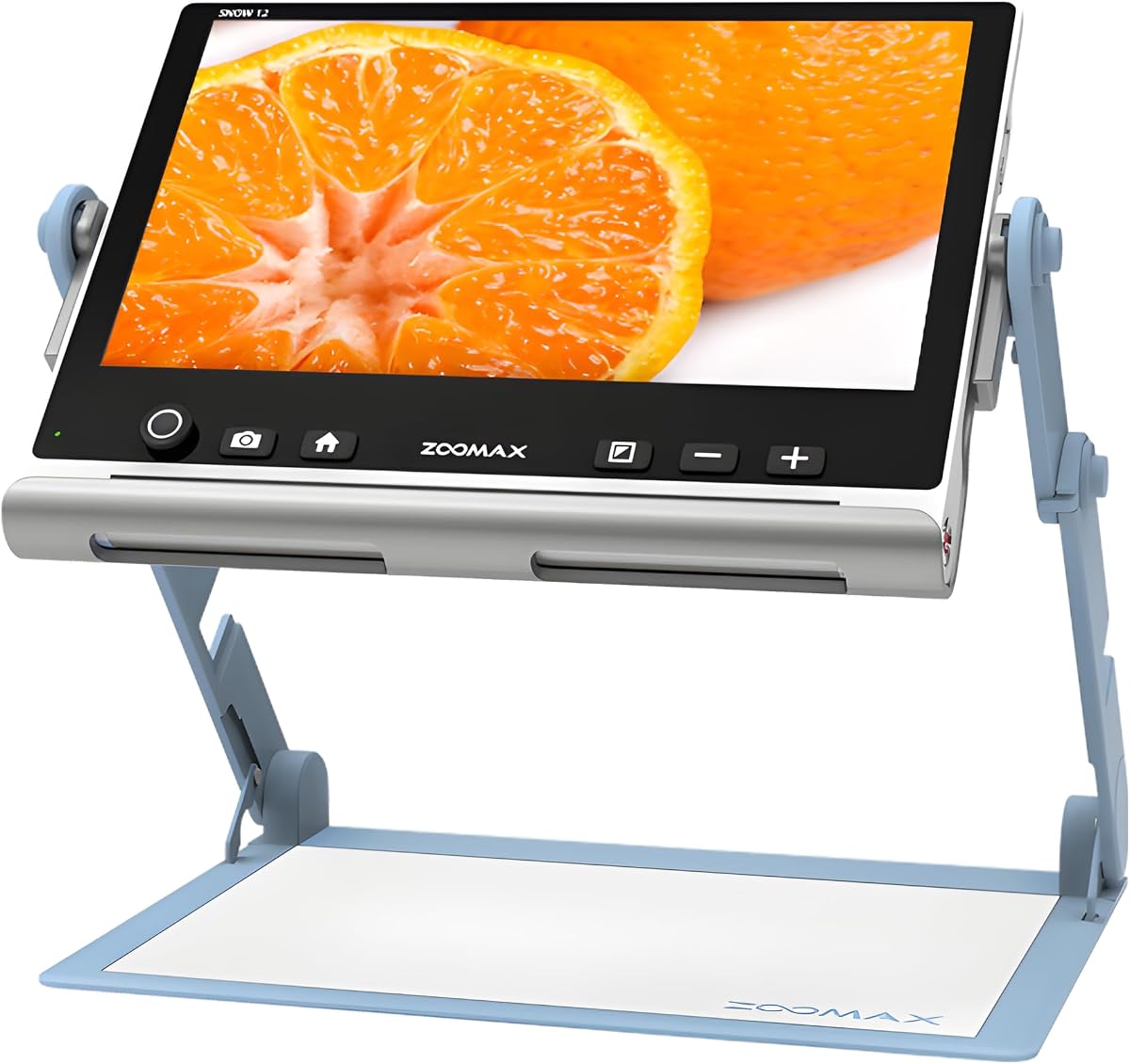
The Zoomax SNOW 12 is a premium option designed for users who need more than just visual magnification. With its 12-inch HD display and built-in OCR, it stands out for converting printed text into spoken words, offering a unique layer of accessibility for severe low vision.
We may earn a commission when you buy through this link, at no additional cost to you.
The multilingual text-to-speech function supports over 20 languages, making it a powerful tool for diverse households or travelers. Its ultra-portable design ensures that users can carry this advanced device with them wherever they go, maintaining independence in different environments.
While the magnification maxes out at 19X, which is lower than some competitors, the combination of screen size and speech output compensates by providing a richer reading experience. It is particularly valuable for those who may benefit from auditory reinforcement of text.
Ideal for users seeking a high-end device that bridges visual and auditory reading methods, this magnifier is a significant investment in accessibility. It provides genuine visual independence through its advanced OCR technology and large, clear display.
Optical character recognition allows the device to read text aloud, enabling users to access written material even when their vision cannot resolve the characters clearly.
Support for over 20 languages ensures that the device can be used effectively by non-native speakers or in multilingual households without requiring multiple tools.
We may earn a commission when you buy through this link, at no additional cost to you.
This Eyoyo model prioritizes long-term usability with a robust 4500mAh battery, offering over four hours of continuous operation. This extended power supply is crucial for users who need to read for lengthy periods without interruption or concern about recharging frequently.
We may earn a commission when you buy through this link, at no additional cost to you.
The 4X to 32X zoom range covers a broad spectrum of needs, while the 17 color modes and five brightness levels allow for precise customization. The device automatically saves preferred settings, streamlining the experience for daily use.
The foldable handle adds ergonomic value, allowing the user to hold or rest the device comfortably. Connecting to a TV enhances its utility for those who struggle with the handheld screen size, offering flexibility in how the content is viewed.
Best for users who prioritize battery endurance and comfort during extended reading sessions, this model delivers reliability. It is a strong choice for individuals who need a dependable tool for hobbies or reading materials that require sustained attention.
With over four hours of continuous use, the device supports long reading sessions or travel without the need for frequent recharging, enhancing convenience for active users.
Multiple brightness levels and color modes ensure that the display remains comfortable to view under various lighting conditions, reducing eye strain during use.
We may earn a commission when you buy through this link, at no additional cost to you.
This model offers a versatile combination of a high-resolution 5.0 inch screen and 26 color modes, ensuring that users can find the optimal viewing setup. The simplified button layout with large and prominent controls makes navigation easy for those with limited dexterity.
We may earn a commission when you buy through this link, at no additional cost to you.
The memory function recalls user preferences, reducing the effort needed to set up the device each time. This feature is particularly beneficial for elderly users or those who need quick and consistent access to their preferred magnification settings.
The ability to connect to a television via cable enhances visibility further, providing a larger canvas for text and images. While it lacks OCR, the robust visual customization and ergonomic design make it a strong contender for daily reading assistance.
Ideal for users who need a reliable visual aid with extensive customization options, this model balances simplicity with performance. It serves well for those managing visual impairments who value comfort and ease of use in their device.
With 26 color modes, users can experiment with different high-contrast combinations to find the most comfortable and clear view for their specific type of low vision.
The foldable bracket allows the device to be positioned at an angle on pages, promoting better posture and reducing neck strain during extended reading sessions.
We may earn a commission when you buy through this link, at no additional cost to you.
Eschenbach is a well-respected name in optical aids, and the SmartLux Digital Portable Magnifier reflects this reputation with reliable performance and quality construction. It is designed for users who value a reputable brand and proven technology in their visual assistive devices.
We may earn a commission when you buy through this link, at no additional cost to you.
While its zoom range of 5X to 12X is lower than many competitors, it offers distinct viewing modes tailored for different tasks. The lightweight handheld design ensures that it is easy to carry and use for short to medium duration tasks without fatigue.
The inclusion of a cleaning cloth indicates attention to detail and long-term maintenance support. This model is particularly suitable for those who need a simple, high-quality magnifier for quick tasks or travel, where brand reliability is a priority.
Best for users who prefer established brands and straightforward operation, this model provides a premium experience. It is ideal for those who need a reliable companion for reading labels, menus, or short documents while on the go.
Eschenbach's long history in optical solutions ensures that the device meets high standards of reliability, giving users confidence in its durability and performance.
The device offers five viewing modes that allow users to switch between different zoom levels easily, streamlining the interaction process for those who need quick adjustments.
We may earn a commission when you buy through this link, at no additional cost to you.
This model stands out for its exceptionally high zoom range of 3X to 48X, making it one of the most powerful tools for extreme magnification needs. The 5.0 inch HD screen supports this zoom level while maintaining clarity for users with severe visual impairments.
We may earn a commission when you buy through this link, at no additional cost to you.
The simplified button design ensures that the device is accessible to users with limited dexterity or those who prefer minimal complexity. The memory function recalls preferences, so settings are consistent every time the device is powered on.
While the product notes it is not recommended for long books, it excels at tasks requiring high detail, such as examining small labels or intricate maps. The external battery lasting over four hours supports moderate usage without constant recharging.
Ideal for users with specific needs for high magnification, this model delivers significant optical power in a portable package. It is best suited for individuals who require maximum zoom for detailed tasks rather than extended reading sessions.
With zoom capabilities reaching up to 48X, this device allows users to see details that are otherwise impossible with standard aids, helping with extreme vision loss.
The simplified button layout reduces the cognitive load required to operate the device, ensuring that users can focus on reading rather than fumbling with complex controls.
We may earn a commission when you buy through this link, at no additional cost to you.
Selecting the right digital magnifier involves understanding your specific visual needs, lifestyle preferences, and the features that will make reading and viewing easier. We break down the critical factors to consider before making a decision.
The screen size directly impacts how much of the text or image you can view at once. Larger screens, such as 5 inches or 12 inches, provide a more comfortable reading experience but may reduce portability. Resolution is equally important; HD displays ensure text is sharp and clear, preventing eye strain over long periods.
Magnification power typically ranges from 2X to 48X depending on the model. While higher zoom allows you to see finer details, it often narrows the field of view. It is essential to balance high magnification with a comfortable view of entire words or sentences to avoid constant scrolling.
Different users require different color contrasts to read comfortably. Models offering multiple color modes, such as white on black or yellow on blue, allow customization based on personal vision preferences. This flexibility helps reduce eye fatigue during extended reading sessions.
If you plan to use the device outside the home, portability is key. Lighter, handheld models are easier to carry and use while traveling or shopping. However, larger models often provide better screens but are bulkier, so consider where you will use the device most frequently.
A long-lasting battery ensures the device remains usable during extended reading sessions or outings. Look for models that offer at least four hours of continuous use to avoid interruptions. Some devices also support external power sources for added convenience.
Advanced features like Optical Character Recognition (OCR) and text-to-speech can significantly enhance accessibility for those with severe vision loss. These tools convert printed text into spoken words, offering an alternative reading method. Consider whether these features align with your specific needs.
Simplified buttons and intuitive interfaces are crucial for elderly users or those with cognitive limitations. Devices that remember user settings reduce the need for constant adjustments, making daily use more convenient. Always check how easy it is to navigate the controls.
Some devices offer AV or HDMI outputs to connect to larger screens like televisions. This feature is beneficial if you need an even larger display for better visibility. Ensure your chosen model supports the outputs you need for your home setup.
To begin, place the device directly over the text or object you want to read. Use the zoom buttons to adjust the magnification level until the text is clear and comfortable to view. Start at a lower zoom level to see more of the page and increase gradually as needed.
Customize the color modes to find the setting that provides the best contrast for your eyes. Most devices allow you to switch between high-contrast options like white text on a black background. Save your preferred settings if the device has a memory function for quicker access.
To maintain your device, store it in a protective case when not in use and keep the lens clean with a soft microfiber cloth. Avoid exposing it to extreme temperatures or moisture. Check the battery levels regularly and recharge fully before long trips to ensure uninterrupted use.
A digital magnifier is an electronic device that uses a camera to capture images of text or objects and displays them on a screen at a larger size. This helps individuals with low vision read books, menus, and other printed materials more easily and comfortably.
Digital magnifiers offer adjustable magnification, color contrast options, and often larger screens compared to traditional glass magnifiers. These features make them more versatile and easier on the eyes for extended reading sessions, especially for those with progressive vision loss.
Many models come with AV or HDMI output ports that allow you to connect the magnifier to a television. This connection projects the magnified image onto a larger screen, providing better visibility for users who struggle with handheld displays.
The right magnification depends on your specific vision needs and the type of text you are reading. A range of 2X to 10X is usually sufficient for books, while higher power like 20X to 48X is better for fine details. Test different settings to find what works best for you.
Yes, digital magnifiers are designed to assist with reading books and documents. However, some compact models may require sliding the device along the page to read full sentences, whereas larger models can display more text at once for a smoother experience.
Battery life varies by model, but most offer at least four hours of continuous use. Some premium devices may offer longer durations, while others may rely on external batteries. Always check the specifications to ensure it fits your usage patterns.
Many digital magnifiers include multiple color modes that can enhance contrast for users with color blindness. By altering the background and text colors, these devices help distinguish information more easily than standard printing would allow.
Yes, some advanced models feature Optical Character Recognition (OCR) and text-to-speech technology. These functions convert printed text into spoken words, providing an alternative way to access written content for those with severe visual impairments.
Choosing the right digital magnifier depends on your specific needs, whether you require high zoom power, a large screen, or advanced features like OCR. The models reviewed range from budget-friendly portable units to premium devices with text-to-speech capabilities.
Prioritize features that enhance your daily life, such as long battery life for travel or simplified controls for ease of use. Testing different settings and models can help you find the most comfortable solution for reading and viewing tasks.
Remember that product prices and availability may change, so check current listings before making a purchase. Investing in a reliable digital magnifier can significantly improve your independence and quality of life by making the world easier to read.