
Creality Laser Engraver Enclosure 2.0
4.4Editor score
Universal compatibility
Dual-window design
4000 RPM fan
Foldable assembly
Protecting your workspace is essential when using laser engravers. A good enclosure contains smoke, reduces noise, and filters harmful light. This ensures a safer environment for you and your family while keeping the air clean during operation.
We evaluated ten top-rated models based on compatibility, ventilation power, and build quality. Our analysis covers universal fits, premium cabinetry, and budget-friendly tents. Each product was reviewed for safety features, ease of assembly, and user satisfaction ratings.
Every pick below highlights key specs, pros, and cons to help you decide. Prices fluctuate often, so check current listings before buying. This guide updates regularly to reflect the latest models and safety standards available in the market today.
4.4Editor score
4.2Editor score

4.0Editor score
As an Amazon Associate we earn from qualifying purchases.
The table below offers a side-by-side look at the ten selected models. Compare dimensions, materials, and special features to find the enclosure that matches your specific laser engraver and workshop requirements.


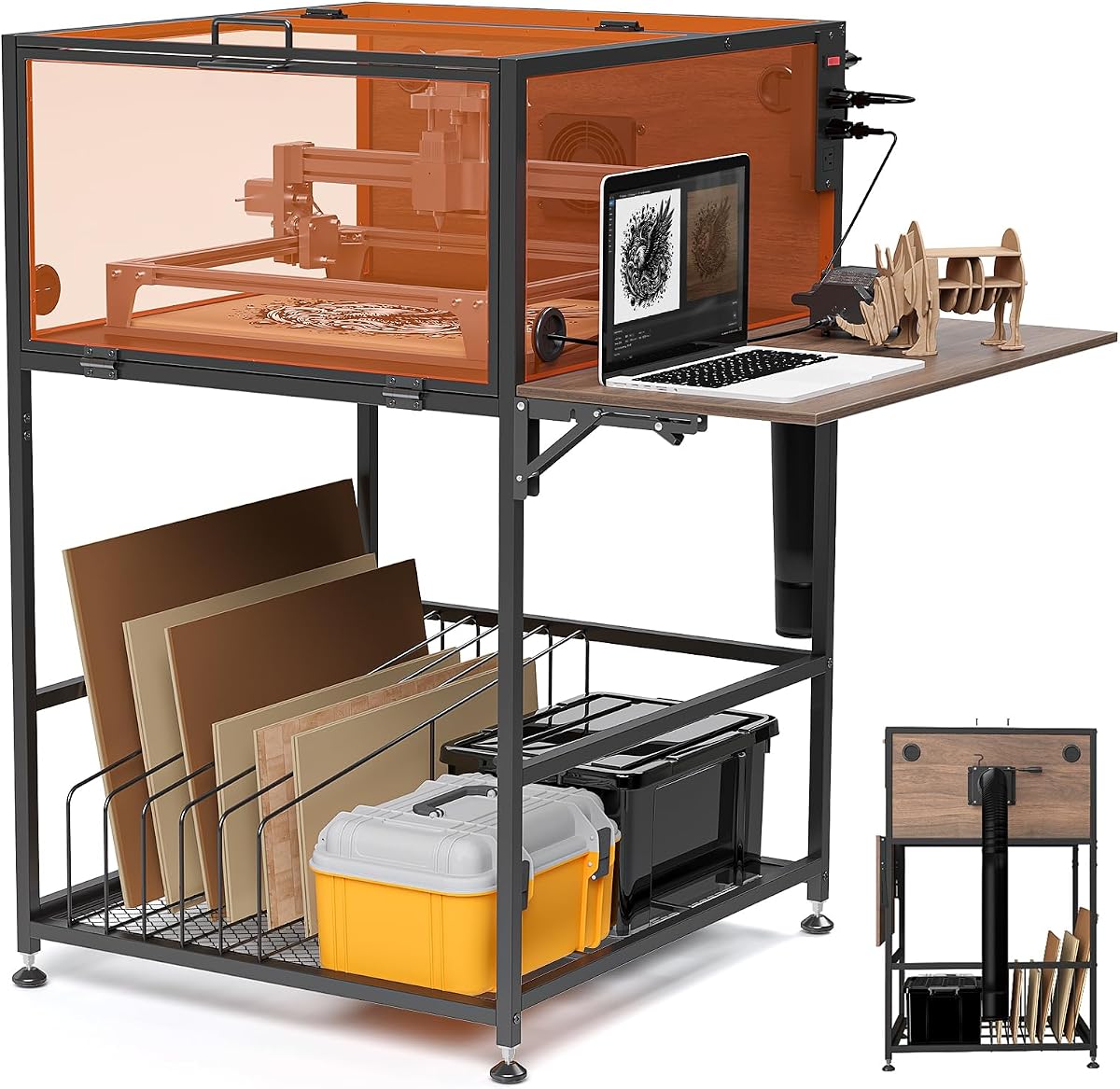
The Crafit Laser Engraver Enclosure Cabinet stands out as a top choice for serious crafters. With a solid 4.2 rating, it offers a professional-grade solution that combines safety with convenience. Its design focuses on containment, filtration, and workspace organization.
We may earn a commission when you buy through this link, at no additional cost to you.
This model features a generous interior space of W24.8"xD27.1"xH12.6", making it suitable for most standard laser engravers. The heavy-duty enclosure effectively contains sparks and dust while reducing noise levels significantly. It includes a 20W high-efficiency fan and a flexible exhaust pipe to clear smoke and odors quickly.
One of its most practical features is the integrated switch-controlled power strip with three AC outlets. This allows you to power your engraver, fan, and laptop simultaneously with one button. The foldable side panel supports equipment, while the bottom rack stores materials neatly. Semi-transparent panels let you monitor work without glare.
While it costs more than simple fabric tents, the Crafit cabinet is worth the investment for those who value durability and organization. It is best suited for users who need a permanent, sturdy setup. The easy-grip handles and magnetic doors add to the usability during daily operations.
The 20W ventilation fan paired with a 2m flexible pipe ensures smoke does not linger. This protects your health and keeps the room smelling fresh during long sessions.
The switch-controlled power strip and foldable laptop shelf mean you do not need extra cables or tables. Everything you need is contained within the unit for a cleaner desk.
We may earn a commission when you buy through this link, at no additional cost to you.
The Creality Laser Engraver Enclosure 2.0 is an excellent choice for hobbyists watching their budget. It carries a 4.4 rating from satisfied users. This protective cover tent offers essential safety features like smoke containment and eye protection without a high cost.
We may earn a commission when you buy through this link, at no additional cost to you.
Its spacious design measures 720x720x400mm, fitting 95% of machines including the Falcon series. The dual-window design uses blue light-blocking PVC to protect your eyes while letting you see progress. The fan runs at 4000 RPM to extract smoke effectively, keeping air fresh and isolating noise.
Safety is key here with flame-retardant fabric and high-strength steel pipes. It is waterproof, fireproof, and resists deformation. The foldable assembly makes storage easy, and the unit is lightweight for portability. Customers appreciate the quick setup and reliable performance for casual engraving.
While it lacks the rigid frame of expensive cabinets, it provides excellent value. It is ideal for users with limited space or those who move their setup often. This model proves you do not need to spend a lot to get effective smoke and light protection.
Compatible with over 95% of laser engravers, this tent adapts to various brands like Creality and others easily. It saves you from buying model-specific enclosures.
The 4000 RPM fan and blue light PVC windows ensure a safe environment. You can engrave confidently without worrying about fumes or eye strain.
We may earn a commission when you buy through this link, at no additional cost to you.
The Laser Engraver Enclosure with Green Acrylic panels is a premium solution for specific desktop models. With its rigid construction, it offers superior containment compared to fabric tents. It aims to create a cleaner, safer workspace for dedicated crafters.
We may earn a commission when you buy through this link, at no additional cost to you.
This model measures 29.9 x 16.9 x 26.7 inches, designed specifically for certain desktop engravers. The green acrylic panels help reduce smoke diffusion and debris splashing. It is built on a sturdy black aluminum alloy frame with thickened panels for long-term durability. A hinged front door and magnetic stop make access easy.
The enclosure also includes cable threading holes to manage wires neatly. It helps isolate smoke, dust, and debris effectively. While it is specific to certain machines, users who fit the size report high satisfaction. It provides a stable, rigid structure that fabric cannot match.
This option is best for those who want a solid, permanent cover. It costs more but delivers better protection and longevity. Always check your machine dimensions before purchasing to ensure a proper fit and optimal safety.
The thickened acrylic and aluminum frame resist damage and provide a solid barrier against sparks and debris. It feels more like a real workstation cover.
Cable holes and magnetic door stops keep your area organized. You avoid messy wires and the door stays open when you need it to.
We may earn a commission when you buy through this link, at no additional cost to you.
The Laser Engraver Integrated Enclosure with LED Light offers a feature-rich experience at a mid-range price. With a 4.4 rating, it addresses common user needs like visibility and smoke removal effectively. It is a robust choice for those wanting light and ventilation.
We may earn a commission when you buy through this link, at no additional cost to you.
Its update integrated bottom design seals the base, preventing smoke escape and collecting dust. The LED light strip provides ample brightness to see details. The PVC visual window filters blue light for eye safety. Upgraded materials include aluminum mold Oxford cloth and iron support rods.
The 4000 RPM fan is powerful, quickly extracting smoke and dust. The exhaust pipe uses three-layer composite material to reduce residual odor. Assembly is easy due to the foldable design. This model is compatible with most machines on the market like xtool and Ortur.
It balances features well without the high cost of rigid cabinets. The LED light and sealed bottom are standout benefits. While not as sturdy as hard-shell options, it offers reliable protection. It is a top pick for those who prioritize visibility and airflow.
The built-in LED strip ensures you can see every cut clearly. You do not have to rely on external lighting during dark engraving tasks.
The sealed bottom and 4000 RPM fan keep smoke contained. This helps maintain clean air and prevents dust from settling around your machine.
We may earn a commission when you buy through this link, at no additional cost to you.
The Creality Laser Engraver Enclosure 2.0 with Vent is praised for its ability to handle noise. It holds a 4.2 rating. This cover focuses on creating a quieter workspace by dampening the sound of cooling fans and operation.
We may earn a commission when you buy through this link, at no additional cost to you.
It features a spacious 28.3×28.3×15.7 inch design that works with 95% of machines. The smoke ventilation system expels dust quickly to keep air clean. The large viewing window filters blue light to protect your eyes. Setup takes only a few steps, and it folds for easy storage.
The cover is lightweight yet durable. It is made of flame-retardant and dustproof materials. Users find it very easy to carry and store when not in use. It offers solid protection against smoke and odors without taking up permanent room.
For those sensitive to noise, this model is a strong contender. The ventilation keeps the air clear while reducing sound. It is a practical choice for home offices where quiet matters. Always check compatibility with your specific model before buying.
The cover significantly reduces the noise from laser engraver cooling fans. This makes your workspace much more pleasant for long periods of use.
Installation takes just a few steps. You can be ready to engrave safely without needing tools or help.
We may earn a commission when you buy through this link, at no additional cost to you.
The LONGER Laser Engraver Large Size Enclosure is perfect if you need extra room. With a 4.4 rating, it delivers a spacious setup for most machines. Its size makes it versatile for larger projects and rotary attachments.
We may earn a commission when you buy through this link, at no additional cost to you.
Measuring 31 x 28.7 x 20.8 inches, this housing is made of premium fire-retardant materials. The built-in smoking fan ensures airflow and odor removal. It effectively isolates fumes and noise. The large transparent design lets you monitor your engraving progress easily.
LONGER provides professional customer service and a one-year parts replacement warranty. The enclosure is durable and easy to clean. It protects your machine from dust and debris effectively. The dimensions are ideal for those needing more height or width for rotary rollers.
If your machine is slightly larger than average, this model fits well. It combines safety with capacity. While it takes up more space, the benefits of roominess are worth it. It is a reliable choice for serious engravers.
The larger height and width allow installation of rotary rollers. This expands your capabilities for engraving cylindrical items like bottles or pipes.
Fire-retardant properties and sturdy construction protect your home. It keeps debris and fumes contained effectively during operation.
We may earn a commission when you buy through this link, at no additional cost to you.
The Creality Laser Engraver Cover V2.0 is an upgraded version of the classic tent. It holds a 4.5 rating from users. This model improves structure with metal rods and fan power to match modern safety standards.
We may earn a commission when you buy through this link, at no additional cost to you.
It offers a 720x720x400mm space compatible with most machines. The square appearance aids observation. The fan speed is 4000 RPM for efficient smoke extraction. Dual-view windows protect eyes while making progress visible. It supports installing rotary rollers easily.
The exhaust pipe uses composite materials to reduce odor. The foldable design saves space when stored. It resists smoke and odors effectively. Users appreciate the sturdier build thanks to upgraded metal support rods.
This cover is ideal for those who want the latest version. It balances performance and price well. The dual-view windows are a thoughtful addition. It provides good protection without requiring a permanent installation.
The metal support rods make the structure more robust than earlier models. This adds stability and confidence during use.
The 4000 RPM fan extracts smoke faster than standard fans. This keeps the air cleaner and safer for you to breathe.
We may earn a commission when you buy through this link, at no additional cost to you.
The Creality Laser Engraver Enclosure is rated highly for safety features. It has a 4.5 rating. This cover isolates smoke, noise, and fire risks effectively while offering a clear view of your work.
We may earn a commission when you buy through this link, at no additional cost to you.
Its large 700x720x400mm space fits most engravers. The enclosed design keeps dust and odors contained. A light-filtered viewing window protects your eyes from blue light during operation. The built-in ventilation system expels smoke quickly to keep air clean.
Installation requires caution with pipes to avoid pressure on the body. Once set up, it provides a comfortable engraving experience. The transparent design lets you observe progress at any time. It is a practical choice for daily users.
This model is great for those prioritizing eye safety. It works well with Creality and xTool machines. The light-filtering glass is a valuable feature. Follow instructions carefully to ensure safe assembly and use.
The large viewing window filters blue light to protect your eyes. You can monitor your work without risking eye strain or damage.
The fully enclosed design keeps smoke inside the cover. This improves air quality in your workspace significantly.
We may earn a commission when you buy through this link, at no additional cost to you.
The Creality Laser Engraver Enclosure designed to isolate smoke offers high temperature resistance. With a 4.5 rating, it is made of flame retardant material that withstands heat up to 1000 degrees Celsius. This ensures effective fire prevention and safety.
We may earn a commission when you buy through this link, at no additional cost to you.
It has a large 27.5×28.3×15.7 inch space compatible with many brands. The big viewing window is made of light-filtered material to protect eyes. A built-in exhaust fan and pipe help expel smoke to keep air clean. It isolates noise and odors efficiently.
Installation is easy with no tools required. It folds for storage, saving space in small rooms. The unit is lightweight and durable. Customers appreciate the balance of safety features and ease of use.
This cover is ideal for those worried about fire risks. The high-temperature resistance gives peace of mind. It works well for Creality and xTool users. Its portability makes it a flexible choice for any workshop.
The flame retardant material withstands up to 1000 degrees C. This prevents burning and keeps your workspace safer during high-power engraving.
Compatible with Creality, xTool, and other brands. This flexibility means you can switch machines without buying new enclosures.
We may earn a commission when you buy through this link, at no additional cost to you.
The VEVOR Laser Engraver Enclosure offers generous dimensions and unique storage features. It has a 4.1 rating. This model focuses on usability with fastener strips for tools and flexible exhaust ports for placement options.
We may earn a commission when you buy through this link, at no additional cost to you.
Its interior space is 31.5 x 31.5 x 19.6 inches, suitable for most machines. The fastener strips on each side help organize tools easily. It uses a 4000 RPM fan to remove smoke, noise, and dust. Exhaust ports on both sides allow flexible placement.
The fully enclosed design prevents smoke leakage. The cover is flame retardant and fireproof. It is lightweight and folds up quickly without re-installation. This is great for users who move their setup often or have limited space.
If you need extra storage and a wide workspace, this model fits well. The fastener strips save desk space. It provides good protection at a mid-range price. Always check if your machine dimensions match before purchasing.
The 19.69 inch fastener strip on each side lets you hang tools. This keeps your workspace organized and accessible during work.
Exhaust ports on both sides give you options on where to route smoke. This makes installation easier regardless of your wall layout.
We may earn a commission when you buy through this link, at no additional cost to you.
Choosing the right enclosure involves considering size, materials, and ventilation. Below are key factors to help you make an informed decision for your workspace.
Always measure your laser engraver including any attached rotary rollers before buying an enclosure. Ensure there is enough clearance for the machine to move without hitting the sides. Check if the product lists compatibility with your specific model.
Look for enclosures with high-RPM fans (ideally 4000+) and flexible exhaust pipes. Proper airflow is essential to remove harmful smoke and particles. Ensure the exhaust outlet can connect to a window or outdoor vent easily.
Ensure the enclosure is made of flame-retardant materials to prevent fire hazards. Acrylic and metal frames offer rigid protection while fabric tents may be lighter. Check safety certifications if available to ensure fire safety standards are met.
Laser engraving emits blue light that can damage eyes over time. Choose models with tinted or blue-light-blocking windows. Transparent designs are good for visibility but must still offer eye-safe levels of protection.
If you move your setup often, foldable fabric tents are more practical than rigid cabinets. Check if the product includes necessary hardware for assembly. Lightweight models save storage space and allow quick setup in different areas.
Laser engravers can be noisy due to cooling fans. Enclosures with thick walls or fabric layers help dampen sound. If you work from home, noise reduction is a valuable feature for a quiet environment.
Some models include built-in lighting or storage shelves. Integrated power strips help manage cables. Look for features that simplify your workflow such as magnetic doors or cable holes for a cleaner workspace.
Fabric tents are affordable but may not last as long as rigid units. Consider how often you use your machine before investing. A higher initial cost for a sturdy cabinet may save money on replacements in the future.
First, place your laser engraver inside the enclosure ensuring all cables pass through designated holes. Secure the vents or doors properly to maintain a sealed environment during operation. Always check that the exhaust fan is plugged in and turned on before starting engraving.
Second, clean the interior regularly to remove dust and debris that could affect performance. Wipe down the windows to maintain clear visibility. If using a fabric tent, vacuum the sides to prevent clogged airflow vents.
Third, inspect the seals and corners for wear over time. Replace damaged parts immediately to maintain safety. Ensure all ventilation pipes are clear and not bent sharply, which reduces airflow efficiency.
Most modern enclosures come with built-in fans and exhaust pipes designed to capture smoke. For best results, connect the exhaust to a window or outdoor vent. The efficiency depends on the fan speed and seal quality of the model.
Many enclosures use flame-retardant materials that resist catching fire but are not completely fireproof. Avoid leaving the machine running unattended. Always follow safety guidelines provided by both the enclosure and laser machine manufacturers.
Allow the machine to cool completely before cleaning. Use a soft cloth or vacuum to remove dust from surfaces. Avoid using harsh chemicals that might damage light-filtering windows or sensitive materials.
Yes, many enclosures offer enough height and width for rotary rollers. Check the internal dimensions carefully. If the cover is too low, a rotary roller might not fit inside without adjustment.
Yes, most fabric tents and rigid cabinets require assembly. However, many are designed with tools-free steps. Keep the instructions handy and check all parts before starting to ensure a smooth setup process.
Enclosure windows often filter blue light but you should still wear proper laser safety glasses. The cover reduces direct exposure but does not replace personal protective equipment. Safety glasses add an extra layer of protection.
Yes, enclosures can significantly reduce operational noise by dampening sound waves. This is especially useful for home offices. However, the machine's internal fan noise may still be audible without additional soundproofing.
It is crucial to measure your machine including attachments before purchasing. If your machine is too large, consider a custom build or a larger model. Overcrowding the enclosure can damage the cover or cause safety hazards.
We have reviewed ten top options ranging from budget tents to premium cabinets. The Crafit Cabinet offers robust features while the Creality tents provide affordability. Each model has unique strengths like ventilation power or storage features.
Prioritize safety features such as flame resistance and light filtering when making your choice. Ensure the dimensions match your workspace needs for easy operation. Investing in a quality enclosure protects your health and prolongs your machine's life.
Prices change frequently so check current listings for the latest deals. Always verify compatibility with your specific engraver model before buying. Use these insights to pick the enclosure that best suits your workspace needs.