
VSDISPLAY H/D VGA DVI LVDs Controller Board 40Pin
4.4Editor score
Supports VGA and DVI inputs
40-pin LVDS interface ready
Includes speaker connector option
Finding the right LCD controller board for laptop screen projects can be challenging due to the wide variety of panel types and interfaces available on the market today.
We evaluated ten top-rated driver boards based on compatibility, resolution support, ease of installation, and user feedback to ensure you get a reliable solution for your needs.
Each pick highlights specific strengths and limitations so you can match the board to your exact screen model without guesswork or returning items due to incompatibility.
4.4Editor score

4.4Editor score

4.1Editor score
As an Amazon Associate we earn from qualifying purchases.
The following table provides a side-by-side overview of each controller board including interface type supported resolutions and key compatibility notes to streamline your selection process.


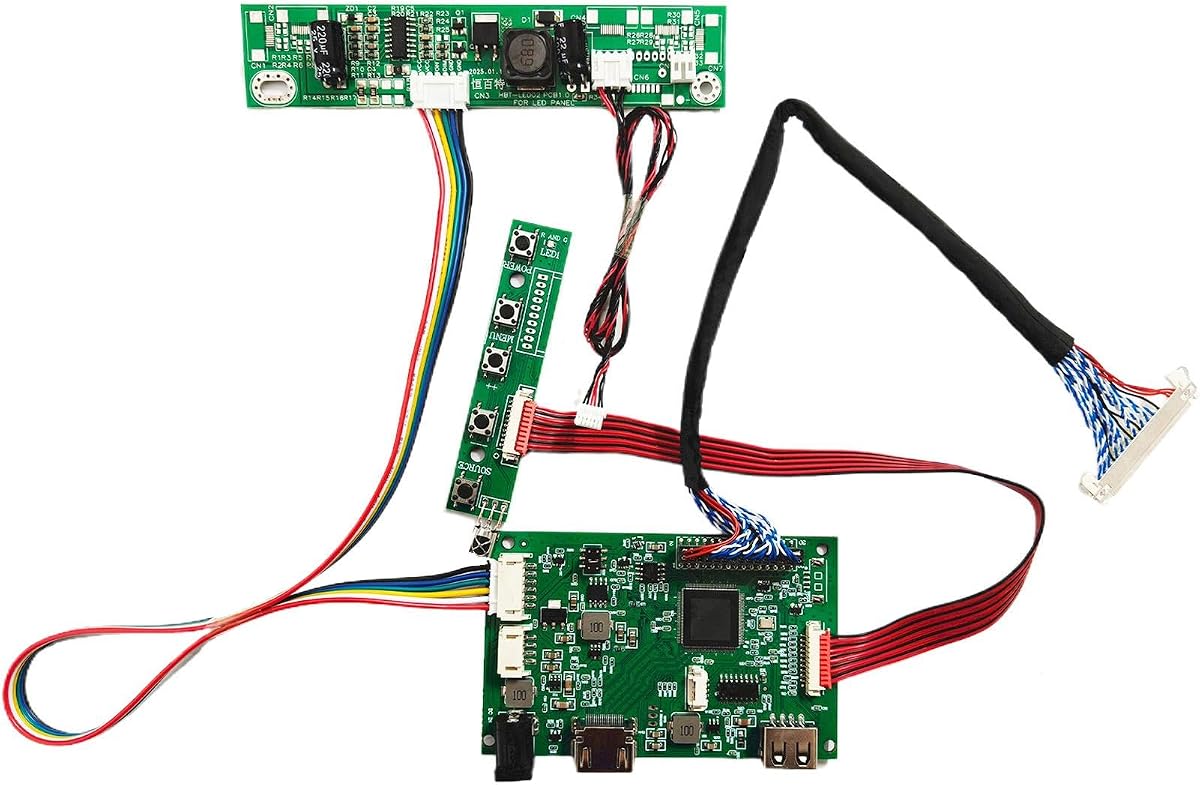


This controller board stands out as a reliable choice for users working with standard HD laptop screens ranging from 11.6 to 15.6 inches. It carries a solid user rating reflecting consistent performance in DIY monitor builds and screen replacements.
We may earn a commission when you buy through this link, at no additional cost to you.
The board is optimized specifically for 1366×768 resolution panels with a 30-pin eDP interface ensuring stable signal transmission without the need for complex configuration. Its pre-connected signal cable simplifies installation significantly while the LED indicators help confirm power and signal status quickly.
One trade-off is that this board will not work with Full HD 1080p panels so verifying your screen model before purchase is critical to avoid returns. Additionally you will need to source a 12V 2A power adapter separately which is common but requires extra attention to power specifications.
If you have a compatible HD panel this board offers a straightforward and stable solution for converting laptop screens into standalone monitors. We recommend checking your exact screen model number against the listed compatible list to ensure a seamless experience.
The board is designed strictly for 1366×768 panels ensuring that users do not accidentally purchase a board that cannot support their screen resolution.
By requiring a 12V 2A adapter the design minimizes flickering and rebooting issues that often plague underpowered DIY display setups.
We may earn a commission when you buy through this link, at no additional cost to you.
This budget-friendly controller board offers excellent value for users working with 15.6 inch LVDS panels. It supports both VGA and DVI inputs making it versatile for connecting older computers or devices without HDMI ports while maintaining a stable display output.
We may earn a commission when you buy through this link, at no additional cost to you.
The board includes a speaker connector allowing for basic audio output which is a nice touch for multimedia use. Its LED status indicators help users quickly diagnose power or signal issues reducing the frustration often associated with DIY electronics projects.
While the board works well for its intended use you must ensure you provide a separate power adapter with sufficient current to prevent restart loops. The need for an insulated environment also means you should plan for proper enclosure or casing when mounting the board.
For those needing a cost-effective solution for standard laptop panels this board delivers reliable performance without unnecessary complexity. It is an ideal entry point for hobbyists who want to repurpose laptop screens into functional monitors at low cost.
Support for both VGA and DVI means you can connect a wider range of source devices without needing additional adapters or converters.
The included speaker connector allows you to add sound to your DIY monitor making it suitable for video playback or presentations.
We may earn a commission when you buy through this link, at no additional cost to you.
This controller board is tailored for users seeking high-definition performance from laptop screens ranging from 11.6 to 15.6 inches. It explicitly supports 1920×1080 resolution making it a premium choice for those who need sharp images for work or entertainment projects.
We may earn a commission when you buy through this link, at no additional cost to you.
The pre-connected signal cable ensures that users do not have to fiddle with delicate wires during installation which reduces the risk of damage to the panel. Additionally the board supports a wide range of popular laptop screen models providing confidence in compatibility before purchase.
Users must be aware that this board will not work with lower resolution 1366×768 panels so double-checking your screen type is essential. It also requires a 12V 2A power adapter which is standard but must be sourced separately to ensure stable operation.
If you have a Full HD panel this board delivers crisp image quality and reliable performance for standalone monitor builds. We recommend verifying your screen model against the supported list to ensure you get the best results from your DIY project.
Designed for 1080p panels this board ensures that you get the full detail and clarity your screen is capable of showing.
The pre-connected cable and clear Pin 1 markings make the physical setup quick and reduce the chance of connection errors.
We may earn a commission when you buy through this link, at no additional cost to you.
This controller board is an excellent option for users working with larger laptop screens including models up to 17.3 inches. It supports 1920×1080 resolution and requires no driver installation making it ready to use immediately upon connection.
We may earn a commission when you buy through this link, at no additional cost to you.
The board is compatible with a vast list of screen models providing flexibility for users who might not have the exact model listed in a narrower product description. Its simple self-check system helps identify power or signal issues quickly reducing troubleshooting time.
A notable limitation is that the power adapter is not included so you must ensure you have a compatible 12V supply to avoid flickering or restart issues. Additionally if the screen does not light up you may need to verify cable connections and resolution settings carefully.
For those with larger or non-standard panels this board offers a versatile and robust solution for display projects. We suggest checking your screen model number against the provided list and preparing a reliable power source before starting installation.
Designed for screens up to 17.3 inches this board accommodates larger panels that many other boards do not support comfortably.
The board works out of the box without requiring software drivers allowing you to focus on hardware setup and configuration.
We may earn a commission when you buy through this link, at no additional cost to you.
This controller board is specifically tailored for gaming screen panels ranging from 17 to 19 inches with 1280×1024 resolution. Its design focuses on stability and low latency making it suitable for users who want to repurpose gaming laptops into dedicated displays.
We may earn a commission when you buy through this link, at no additional cost to you.
The board supports both VGA and DVI inputs allowing you to connect various source devices easily. It is built to handle higher power requirements ensuring that the screen remains stable during extended use without flickering or unexpected restarts.
Users should note that a 12V 3A power adapter is required which is more than some other boards demand so plan accordingly for power supply. The board also requires an insulated environment which means proper casing is necessary for safe long-term operation.
If you have a gaming panel this board delivers reliable performance with clear signal handling and strong compatibility. We recommend verifying your screen model against the provided list and securing a suitable power adapter before beginning installation.
This board is tuned for gaming screens ensuring that you get stable performance during long sessions without signal dropouts.
Supporting a 12V 3A input ensures that the board can handle the power needs of larger panels without instability or issues.
We may earn a commission when you buy through this link, at no additional cost to you.
This controller board is an ideal solution for users with larger 21.5 to 23.8 inch laptop screens requiring 1920×1080 resolution. It includes an inverter board and a USB cable for touch functionality which makes it stand out for multi-touch repurposing projects.
We may earn a commission when you buy through this link, at no additional cost to you.
The board supports both VGA and DVI inputs allowing you to connect various source devices without additional adapters. It is optimized for specific models ensuring compatibility and reducing the risk of display issues after installation.
Users must ensure they have a separate 12V power adapter with at least 3A output to support the larger screen size. Additionally compatibility is limited to specific models so you must verify your screen number against the provided list before purchasing.
For those with 23.8 inch panels this board offers a comprehensive kit that simplifies the conversion process. We recommend checking your exact screen model and preparing the required power supply to ensure a smooth setup experience.
The included USB cable for touch panels makes this board a strong choice for users who want interactive displays.
Designed for screens up to 23.8 inches this board handles the power and signal needs of larger displays effectively.
We may earn a commission when you buy through this link, at no additional cost to you.
This controller board is a solid choice for converting common laptop screens into standalone monitors with 1080p resolution. It is field-tested and works with a wide range of popular models ensuring that users have confidence in its compatibility.
We may earn a commission when you buy through this link, at no additional cost to you.
The board features a pre-connected signal cable and clear Pin 1 alignment markings making installation straightforward. It is designed to deliver vibrant color reproduction and crisp image quality which is essential for both professional and personal use cases.
One trade-off is that this board will not work with 1366×768 panels so you must ensure your screen matches the supported resolution. Additionally you will need to source a 12V 2A power adapter separately which is standard but requires attention.
If you have a compatible 1080p panel this board provides a stable and reliable solution for your DIY project. We recommend verifying your screen model against the provided list to ensure seamless integration and avoid compatibility issues.
This board has been tested with popular models ensuring that it works reliably without unexpected compatibility issues.
Designed for 1080p panels the board delivers sharp and clear images suitable for work or entertainment uses.
We may earn a commission when you buy through this link, at no additional cost to you.
This universal controller board stands out for its ability to support screens ranging from 10 to 65 inches with HDMI DVI and VGA input options. It is an excellent choice for users working with non-standard sizes or who want a versatile solution for different projects.
We may earn a commission when you buy through this link, at no additional cost to you.
The board includes an OSD system supporting multiple languages which makes it accessible to a global user base. Its simple key functions allow for easy menu navigation and adjustment of display settings without requiring complex software.
Because this board is designed for universal use you may need to verify compatibility with your specific screen model more carefully than with dedicated models. The power adapter is not included so you will need to source a suitable supply separately.
For those seeking a flexible board that can handle various screen sizes this kit offers strong versatility. We recommend reviewing the chipset details and input options to ensure they match your source devices and panel requirements.
Supporting screens from 10 to 65 inches makes this board a flexible choice for many different display sizes.
The board includes multiple language options for the OSD menu making it easier to use across different regions.
We may earn a commission when you buy through this link, at no additional cost to you.
This controller board is designed for users who want to create media-centric displays with USB playback capabilities alongside HDMI inputs. It supports 1080p resolution and allows for image rotation which is useful for signage or vertical display projects.
We may earn a commission when you buy through this link, at no additional cost to you.
The board includes a speaker output allowing you to connect basic audio without needing external speakers. It supports a wide range of screen models ensuring that you can use it with various laptop panels for DIY builds.
A limitation is that the power adapter is not included and you must ensure you have a 12V supply to avoid operational issues. Additionally compatibility is limited to specific models so checking your screen number is essential before purchase.
For those wanting a board that supports USB playback this is an excellent choice for media displays. We recommend verifying your screen model and preparing a suitable power adapter to ensure smooth operation.
This board supports USB video and picture playback allowing you to display media directly without a computer.
Image rotation support lets you orient the screen vertically which is useful for kiosks or signage.
We may earn a commission when you buy through this link, at no additional cost to you.
This controller board is tailored for users with LP156WH4 and similar panels offering stable signal transmission and adjustable image parameters. It supports HDMI and VGA inputs making it versatile for various source connections while maintaining high image fidelity.
We may earn a commission when you buy through this link, at no additional cost to you.
The board is optimized to reduce signal loss and ensure smooth viewing making it suitable for both static displays and motion content. Its design allows you to adjust brightness contrast and color to match your visual preferences easily.
One consideration is that there are no user ratings available for this product yet so you rely on its technical specifications for decision-making. Additionally you should verify whether a power adapter is included or must be sourced separately.
For those with LP156WH4 panels this board offers a reliable solution for display conversion. We recommend checking compatibility details and preparing a suitable power supply to ensure a successful installation.
The board is designed to minimize signal loss ensuring that your display remains clear and consistent.
Adjustable parameters for brightness and color let you tailor the display output to your preferences.
We may earn a commission when you buy through this link, at no additional cost to you.
This controller board is designed for 17.3 inch laptop panels offering strict adaptability to specific models and high interface matching. It supports 1920×1080 resolution ensuring that you get full detail from your display without compromise.
We may earn a commission when you buy through this link, at no additional cost to you.
The board integrates power management functions which can help maintain stable operation. Its compact size makes it suitable for integration into tighter spaces compared to larger external boards.
One limitation is that this board is focused on specific models so compatibility must be verified carefully before purchase. The power adapter is not included so you will need to source a suitable 12V supply separately.
For those with 17.3 inch panels this board provides a high-quality solution for standalone monitor builds. We recommend checking your screen model number against the provided list to ensure seamless integration and optimal performance.
This board ensures high accuracy by matching specific screen models to avoid display issues.
The small size allows for easier integration into enclosures or tight spaces.
We may earn a commission when you buy through this link, at no additional cost to you.
Selecting the right controller board requires attention to your screen model resolution and interface type to ensure a successful DIY conversion.
The most critical factor is verifying that the controller board supports your exact screen model number and panel type. Manufacturers use different chips and timings for panels that may look similar so matching the model ensures the board will drive the screen correctly without signal errors.
Always check your screen model before purchasing and compare it against the board's supported list to avoid returns and frustration.
Controllers are often optimized for specific resolutions such as 1366×768 or 1920×1080. Using a board designed for 768p on a 1080p panel or vice versa will result in no display or incorrect output.
Confirm your panel resolution and choose a board explicitly designed to support it to ensure sharp images and proper scaling.
Laptop screens use interfaces like 30-pin eDP or 40-pin LVDS and mismatching these will prevent the display from working. Check your connector pin count and layout to match the board interface exactly.
Match the pin count and interface standard to your panel to ensure physical and signal compatibility.
Most boards require a 12V DC power adapter often with 2A to 3A output. Insufficient power leads to flickering restarts or blank screens so verify the board needs and source a suitable adapter.
Ensure your power adapter meets or exceeds the board requirements to maintain stable operation.
Consider what devices you plan to connect. Boards offer HDMI VGA DVI or USB inputs so pick one that matches your source devices like computers or gaming consoles.
Choose a board with inputs that match your source devices to avoid needing extra adapters.
Some boards include speaker connectors or headphone jacks which let you add sound to your DIY monitor. If audio is important for your project check whether the board supports audio output.
Look for speaker connectors or audio outputs if you plan to use the display for media or presentations.
Boards with pre-connected cables and clear Pin 1 markers simplify the installation process reducing the risk of damaging delicate display connectors.
Preferring boards with clear labeling and pre-wired cables can speed up setup and reduce errors.
Reliable sellers offer technical support or replacement options if the board fails or compatibility issues arise. Check seller ratings and support policies before purchasing to protect your investment.
Select sellers with strong support reputations to ensure help is available if problems occur.
Begin by connecting the signal cable to the board's port aligning Pin 1 with the corresponding mark on the panel to ensure correct orientation. Secure the cable firmly but avoid over-tightening which can damage the connector pins.
Plug in the 12V DC power adapter and verify that the LED status light turns solid green to confirm the board is receiving power. If the light is red or blinking consult the troubleshooting guide or contact the seller.
Connect your source device via HDMI VGA or USB cable and power on both the board and the source. Adjust resolution and display settings in your computer to match the panel native resolution for best results.
Check your screen model number printed on the panel back and compare it with the boards supported list. Ensure the interface type such as 30-pin eDP or 40-pin LVDS and resolution match exactly to guarantee proper signal and display output.
Most boards require a 12V DC power adapter with at least 2A output though some may need up to 3A for larger panels. Always verify the specific power requirements of your board and ensure the adapter meets those specs to avoid flickering.
No these boards are model-specific and will not work with screens that have different connectors or resolutions. Matching the panel model and interface is critical for successful operation and avoiding compatibility issues.
Common causes include mismatched resolution settings incorrect cable alignment or insufficient power. Check that the board LED is solid green and that your source output matches the panel resolution before troubleshooting further.
Most boards do not include a power adapter so you must source a suitable 12V DC supply separately. Always verify what is included in the packaging and plan to purchase an adapter if needed.
Some boards support multiple inputs like HDMI and VGA allowing you to switch between devices using the OSD menu. Check your boards specs to see if it supports input switching and which ports are available.
Choosing the right controller board comes down to matching your screen model resolution and interface type to the board capabilities. Our top picks offer reliable performance across different panel sizes and resolutions to meet varied DIY needs.
Prioritize compatibility and power requirements over price to ensure stable operation and avoid the hassle of returns. Boards with clear labeling and pre-connected cables make installation easier especially for first-time users.
Prices and availability change frequently so check current listings and verified seller support before purchasing to get the best value and service for your project.