
CENMATE Aluminum 4 Bay Hard Drive Enclosure
4.3Editor score
Supports up to 80TB capacity
Built-in cooling fan system
USB 3.0 with UASP support
This guide compares the top 4 Bay Hard Drive Enclosure with Cooling Fans for performance speed and reliability helping you choose the best external storage
When managing large data sets or media libraries, a reliable 4 Bay Hard Drive Enclosure with Cooling Fans is essential for maintaining system stability and drive longevity. These enclosures provide an efficient way to expand your storage capacity without investing in a full network attached storage system. Proper cooling ensures that your drives operate within safe temperature ranges during extended use periods.
We evaluated the market to identify the most capable models based on transfer speeds, build quality, and thermal management features. Our analysis focused on units that support both 2.5 and 3.5 inch drives while offering robust connectivity options like USB 3.2 Gen 2. Each product was reviewed for its ability to handle high capacity drives and maintain consistent performance under load.
Each pick in this guide highlights specific strengths such as speed, compatibility, or advanced cooling mechanisms to help you make an informed decision. Note that prices and availability can change frequently so checking the current listing is recommended before purchase. We aim to provide clear technical details to simplify your selection process for external storage needs.
4.3Editor score
4.1Editor score
4.1Editor score
The following table provides a side-by-side comparison of all ten selected models highlighting their key specifications and unique features to help you find the perfect match for your storage requirements.


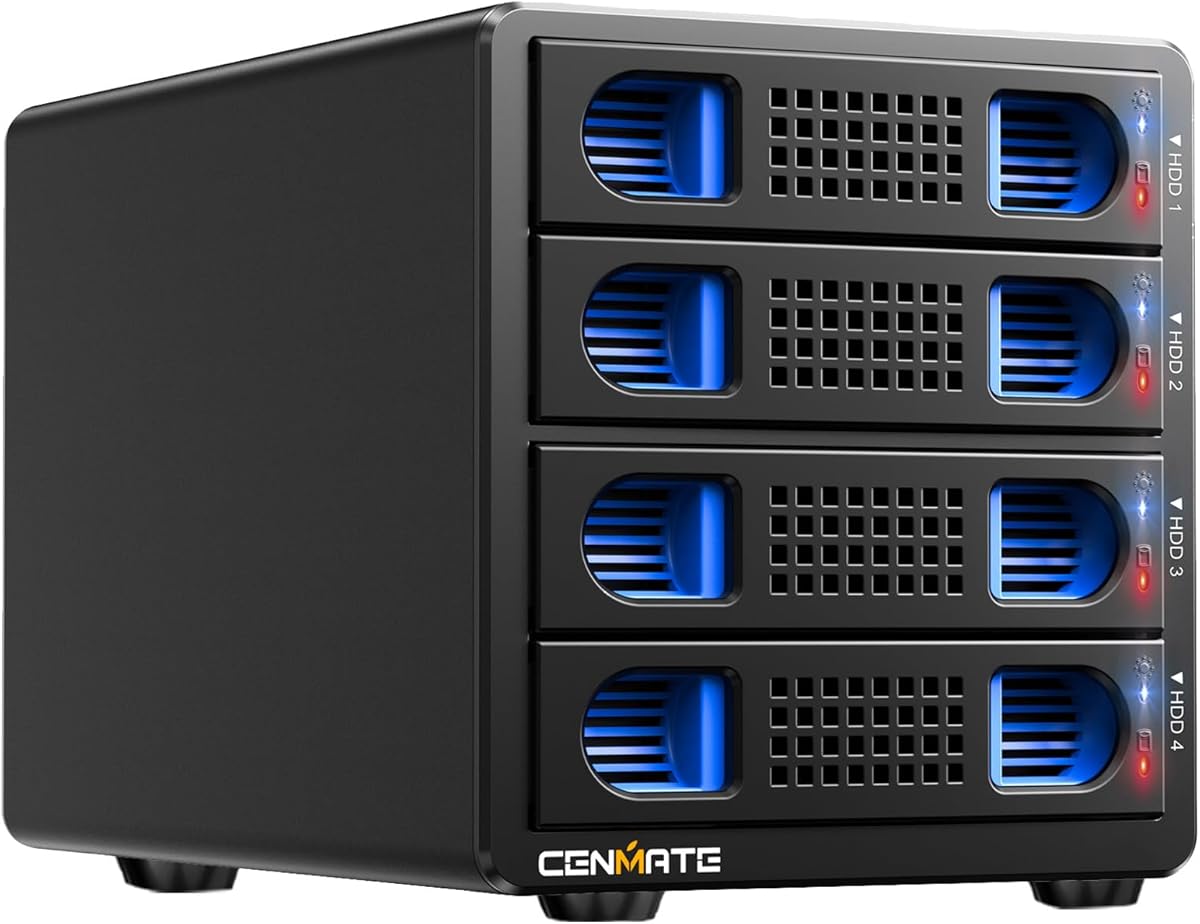
The CENMATE Aluminum 4 Bay Hard Drive Enclosure is a top budget choice for users needing reliable external storage. It holds four drives in a sturdy aluminum case with a built-in fan to prevent overheating. Its 4.3 rating reflects consistent performance and ease of use for home or small office setups.
We may earn a commission when you buy through this link, at no additional cost to you.
This enclosure uses USB 3.0 to deliver speeds up to 5Gbps which is ten times faster than USB 2.0. The design supports both 2.5 and 3.5 inch drives up to 20TB each for a total of 80TB. It also includes a DC power adapter to ensure stable power for high-capacity drives.
While the fan is effective its noise level may bother very sensitive users in quiet environments. The lack of USB 3.2 Gen 2 means it is slower than newer models but remains fast enough for most storage tasks. Hot swapping is supported for convenient drive changes without power off.
If you want a dependable and affordable way to expand storage without breaking the bank this model is an excellent pick. It balances cost and functionality well for basic external storage needs. We recommend it for anyone prioritizing value and simplicity over maximum transfer speeds.
The design supports both 2.5 and 3.5 inch drives up to 20TB each for a total of 80TB making it versatile for various storage needs.
The aluminum alloy build and built-in fan work together to keep drives cool and secure during extended periods of data transfer and storage.
We may earn a commission when you buy through this link, at no additional cost to you.
The CENMATE Aluminum 4 Bay 10Gbps Hard Drive Enclosure is a solid upgrade for users who need faster data transfer rates. It supports four drives with a maximum capacity of 80TB and features a cooling fan to protect against heat buildup. The USB 3.2 Gen 2 interface offers double the speed of standard USB 3.0.
We may earn a commission when you buy through this link, at no additional cost to you.
It includes both USB-A and USB-C cables ensuring compatibility with a wide range of devices and ports. The enclosure allows you to swap drives without powering off which is great for busy workflows. It is compatible with Windows Mac and Linux operating systems for broad accessibility.
The fan helps keep drives cool but produces around 50 decibels of noise which might be noticeable in quiet spaces. While the price is higher than slower models the performance gain justifies the cost for professionals handling large media files. The tool-free design makes installation straightforward without extra hardware.
If you need high-speed external storage that is easy to set up and use this model is a strong contender. It offers a great balance of speed capacity and convenience for demanding tasks. We suggest it for users who prioritize fast transfers and modern connectivity options.
It supports USB 3.2 Gen 2 for transfer speeds up to 10Gbps which is twenty times faster than USB 2.0 for quick file transfers.
The device is plug and play compatible with Windows 7 and above Mac 9.1 and above and Linux for immediate use without drivers.
We may earn a commission when you buy through this link, at no additional cost to you.
The MAIWO 4 Bay Hard Drive Enclosure stands out with its unique HD-TV port which lets you connect directly to a television. This feature makes it ideal for media enthusiasts who want to store and stream movies. It supports four drives with a total capacity of up to 96TB for massive storage libraries.
We may earn a commission when you buy through this link, at no additional cost to you.
The unit includes two cooling fans that activate automatically when drives exceed a safe temperature threshold. It also supports daisy chaining to expand storage further by connecting multiple devices together. The 84W power supply ensures stable operation even with multiple high-capacity drives installed.
The auto fan system saves energy by only running when needed but the lower rating score suggests some variability in user experiences. The HD-TV port is a great bonus for entertainment but requires a compatible setup to function properly. Independent power switches give you control over each drive bay.
If you want a storage solution that doubles as a media streaming hub this model offers unique capabilities. It is worth considering for home theater setups or users who need to share large files on big screens. We recommend it for those who value multimedia features alongside storage.
The included HD-TV port lets you connect directly to a television for 4K video output and easy media sharing on big screens.
Two cooling fans activate automatically when drive temperature exceeds 48C to keep hardware safe and save energy during idle periods.
We may earn a commission when you buy through this link, at no additional cost to you.
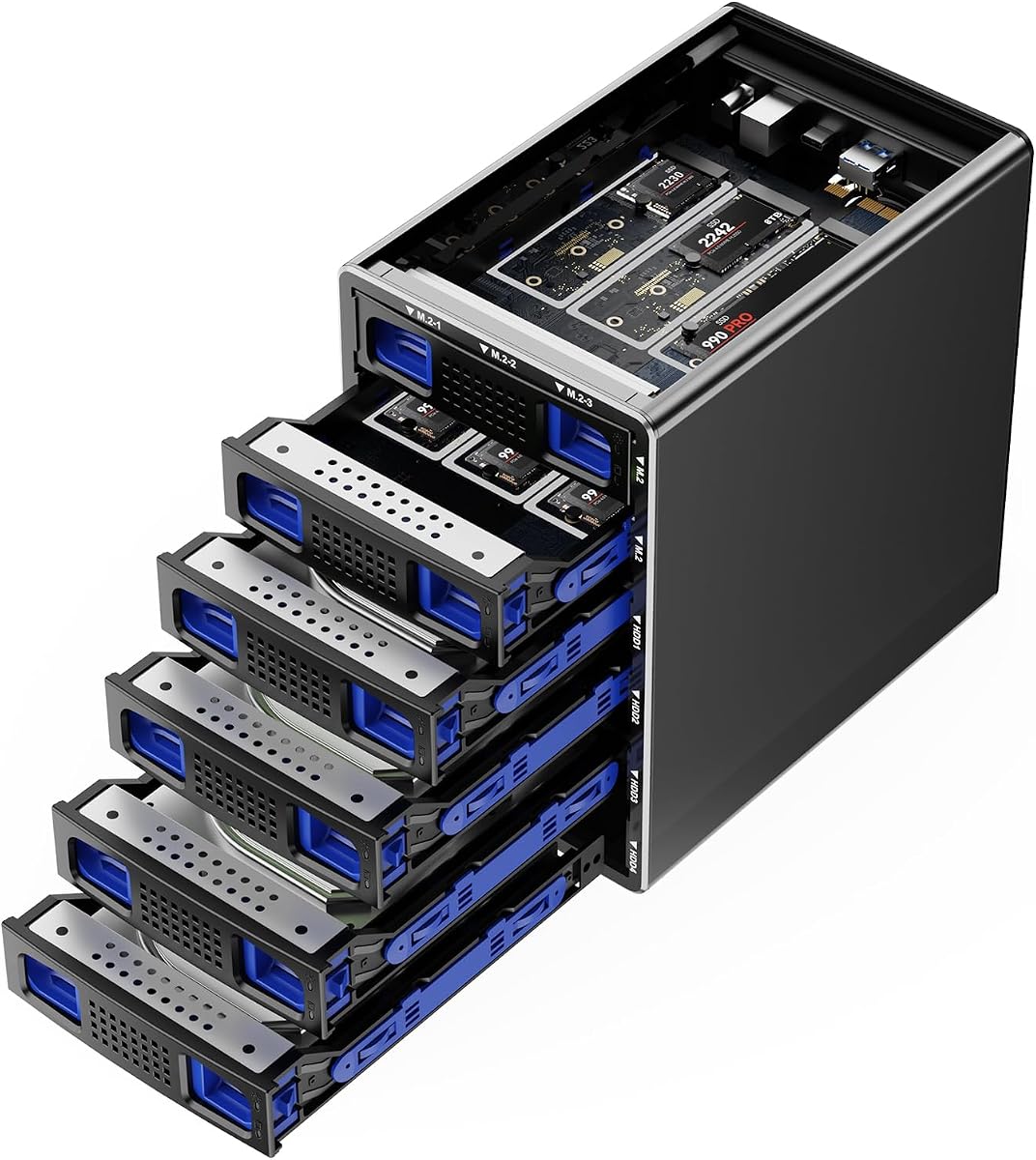
The CENMATE Hybrid Enclosure is a unique solution that supports both traditional SATA drives and modern NVMe SSDs in one unit. It can hold four SATA drives and six M.2 NVMe drives for a combined capacity of up to 136TB. This makes it perfect for users who want massive storage plus fast access to frequently used files.
We may earn a commission when you buy through this link, at no additional cost to you.
It uses USB 3.2 Gen 2 for fast data transfer and includes a silent fan to manage heat without too much noise. The tool-free design allows you to install drives easily without screws or extra tools. It works with Windows Mac and Linux so you can use it with any computer setup.
The fan is designed to run continuously to protect data which helps prevent overheating but may still be heard in very quiet environments. While the price is higher than single-drive type enclosures the flexibility and capacity justify the cost for power users. It supports a range of M.2 sizes from 2230 to 22110.
If you have both SATA and NVMe drives and want a single enclosure for all of them this model is an ideal choice. It offers the best of both worlds with massive capacity and high-speed access. We recommend it for professionals who need to manage diverse storage requirements efficiently.
This unique design supports four SATA HDDs and six M.2 NVMe SSDs allowing users to combine high capacity with high-speed performance in one box.
Aluminum alloy materials and a silent fan work together to cool drives continuously ensuring data security even during intense use.
We may earn a commission when you buy through this link, at no additional cost to you.
The WAVLINK 4-Bay Hard Drive Enclosure offers a sleek aluminum design with 4K HDMI output for displaying content directly. It supports four drives for a total of 88TB and uses USB-C 10Gbps for fast transfers. The dual fans kick in at 48C to keep your drives cool and running smoothly.
We may earn a commission when you buy through this link, at no additional cost to you.
Each of the four bays has an independent power switch so you can control drives individually without turning off the whole device. It also includes a second USB-C port for daisy chaining or connecting peripherals. This makes it a great all-in-one docking station for storage and connectivity.
To use the HDMI feature your host computer must support video output and you need to use a USB-C to C cable. For 2.5 drives you will need extra brackets which are not included in the box. Despite these minor details it remains a strong option for versatile desktop storage.
If you want a storage dock that can also connect to a monitor for easy viewing this model is a top pick. It combines high-speed storage with multimedia features to create a better workflow. We suggest it for users who need flexible connectivity and display options.
Constructed from high-quality aluminum with dual built-in fans that activate at 48C to ensure your drives remain cool and perform optimally.
Features a second USB-C port for daisy chaining or connecting peripherals along with HDMI for 4K display support to create an efficient workspace.
We may earn a commission when you buy through this link, at no additional cost to you.
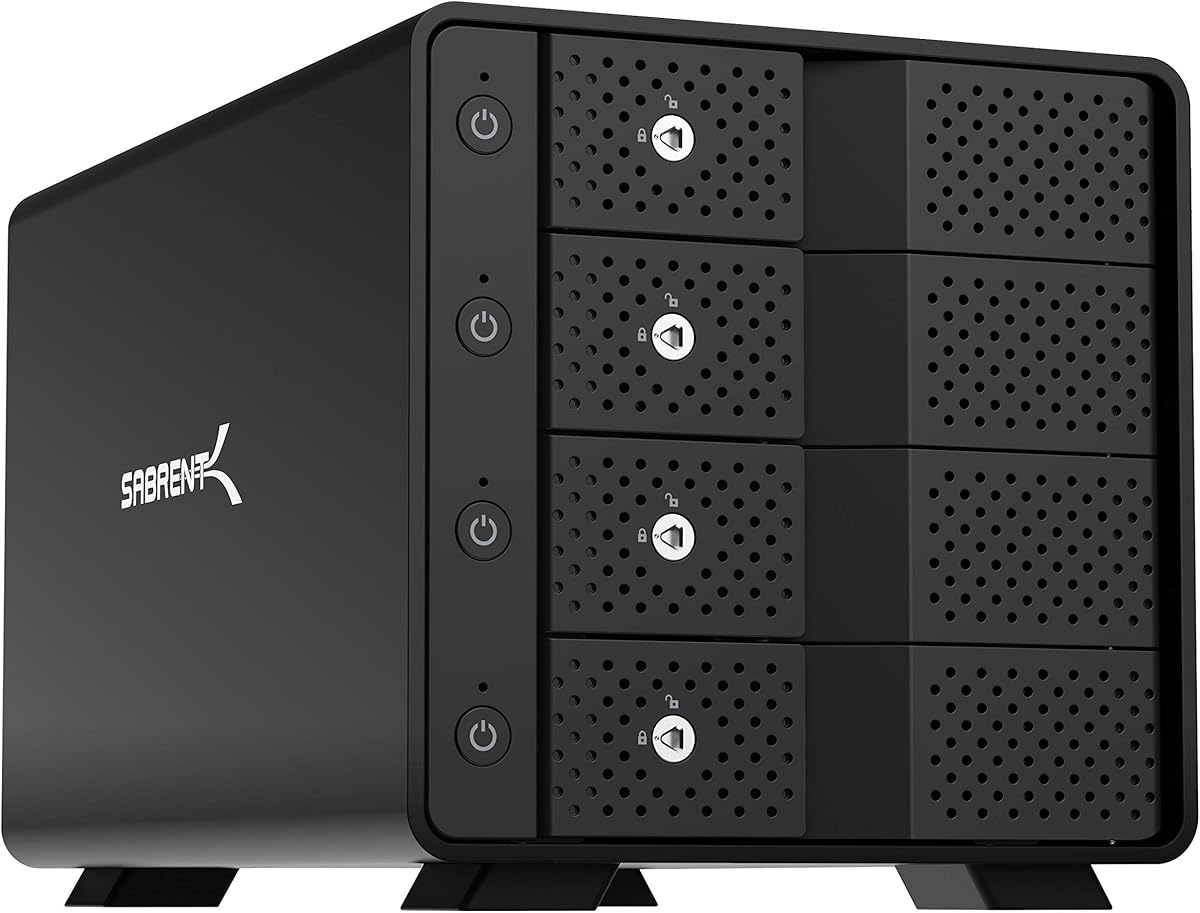
The SABRENT USB 3.0 4-Bay 2.5in SATA SSD/HDD Docking Station is designed for those who need a compact storage solution. It supports four 2.5 inch drives up to 16TB each and features a whisper-quiet fan to keep things cool. The magnetic cover makes it easy to access your drives whenever you need.
We may earn a commission when you buy through this link, at no additional cost to you.
It uses a standard USB 3.0 interface which delivers speeds up to 5Gbps for fast file transfers. The design is tool-free so you can swap drives quickly without needing screws. It is engineered for continuous operation which makes it reliable for servers or always-on storage needs.
This unit is limited to 2.5 inch drives and does not support 3.5 inch disks which may be a constraint for larger drives. It also lacks a USB-C port so you will need a USB-A port on your computer. Still it is a solid choice for portable and quiet storage.
If you prioritize a small footprint and quiet operation over maximum capacity this docking station is a great option. It is perfect for users who mainly work with laptop-sized drives. We recommend it for those who value compact design and ease of access.
Quickly swap drives with no screws required using the magnetic cover design that ensures fast and convenient access to your data.
Built-in whisper-quiet fan keeps drives cool and healthy with an optional on/off switch for noise and power control.
We may earn a commission when you buy through this link, at no additional cost to you.
The CENMATE 4 Bay Hard Drive Enclosure is a reliable choice that offers both USB 3.0 and eSATA connectivity for flexibility. It holds up to 80TB across four drives and comes with a cooling fan to prevent overheating. The aluminum body helps dissipate heat and protects your drives during use.
We may earn a commission when you buy through this link, at no additional cost to you.
It supports 2.5 and 3.5 inch drives and includes a 12V power adapter for stable power during high-speed transfers. The unit is plug and play compatible with Windows Mac and Linux so you can use it right out of the box. Hot swapping is supported for easy drive changes.
The eSATA port has some limitations such as not supporting computer SATA adapters and requiring RAID support for multiple bays. The fan can be noisy at around 50 decibels which might not suit quiet environments. Despite these points it offers a good balance of features and value.
If you want a versatile enclosure that gives you multiple connection options this model is a strong pick. It is suitable for users who need both modern and legacy ports. We recommend it for those who value flexibility in how they connect their storage.
Equipped with USB A/C 3.0 and eSATA cables compatible with Windows 7 and above Mac 9.1 and above and Linux for broad use.
Equipped with DC 12V power adapter to provide stability for high-speed transmission and ensure your drives stay safe and reliable.
We may earn a commission when you buy through this link, at no additional cost to you.
The WAVLINK 4-Bay Hard Drive Enclosure supports up to 128TB total capacity making it ideal for massive storage needs. It uses USB-C 10Gbps for fast transfers and includes 4K HDMI output for direct display connections. Dual fans activate at 48C to keep your drives cool and secure.
We may earn a commission when you buy through this link, at no additional cost to you.
Each bay has an independent power switch so you can manage drives individually without shutting down the whole unit. The aluminum shell ensures durability and helps with heat dissipation during heavy workloads. It works well for both professional and personal storage projects.
You may need extra brackets for 2.5 drives and your computer must support video over USB-C for the HDMI feature to work. These are small trade-offs for the high capacity and multimedia features you get. The 4.2 rating indicates solid user satisfaction with performance and reliability.
If you need a large capacity dock that can also serve as a display hub this model is a top choice. It offers excellent flexibility and speed for demanding users. We suggest it for those who want to maximize storage without sacrificing functionality.
Supports up to 128TB total capacity with four SATA bays giving you ample space for critical data multimedia and game libraries.
Features additional USB-C and HDMI interfaces for connecting peripherals or displays to create a seamless workspace experience.
We may earn a commission when you buy through this link, at no additional cost to you.
The CENMATE Aluminum 4 Bay Hard Drive RAID Enclosure supports eight RAID modes for flexible data redundancy and performance. It holds four drives up to 80TB and includes both USB 3.0 and eSATA ports for connectivity. The aluminum case and fan help keep your drives cool and protected.
We may earn a commission when you buy through this link, at no additional cost to you.
You can switch RAID modes using a paddle and reset button which gives you control over how your data is stored. The enclosure is plug and play with Windows Mac and Linux for broad compatibility. It is a good option if you need basic RAID features without buying a full NAS.
The eSATA port has some limitations requiring specific computer support for multiple drives to be recognized. The fan noise is around 50 decibels which might be loud in quiet areas. The rating is slightly lower which suggests some users experienced issues with RAID configuration.
If you want to add RAID capabilities to your external storage at an affordable price this model is worth considering. It provides more flexibility than simple DAS enclosures. We recommend it for users who need redundancy but prefer to stay outside of NAS systems.
Supports eight RAID modes including 0 1 3 5 10 CLONE LARGE and NORMAL allowing you to customize your data protection and performance.
Ideal for personal or enterprise use with 80TB total capacity and a stable aluminum build to secure your data over time.
We may earn a commission when you buy through this link, at no additional cost to you.
The SABRENT 4-Bay USB-C 10Gbps Hard Drive Enclosure is a premium choice that delivers high reliability with a dedicated controller for each bay. It supports four 3.5 inch drives up to 80TB and uses USB-C for fast 10Gbps transfers. The metal housing and auto-cooling fan ensure durable 24/7 operation.
We may earn a commission when you buy through this link, at no additional cost to you.
It features tool-free trays with locking keys and a Kensington slot for security on the go. The USB-C port works with USB 3.0/2.0 for broad compatibility but full speed needs a USB-C connection. It works with Windows Mac and Linux without extra drivers for simple setup.
The higher price reflects its build quality and advanced features like per-bay stability which is rare in this category. You may need to use USB-C for best performance but the port is common on modern laptops. The one-year warranty can be extended to two years with registration.
If you want a high-end docking station that prioritizes data safety and build quality this model is a top pick. It is ideal for professional users who need stable connections for all their drives. We recommend it for those willing to pay more for reliability.
A dedicated controller for each of the four bays gives every drive its own stable and independent connection for maximum reliability.
Tray-less hot-swap design with tool-free insertion activity LEDs per bay and a locking key for secure and convenient drive management.
We may earn a commission when you buy through this link, at no additional cost to you.
Choosing the right enclosure involves looking at several factors that affect performance ease of use and longevity. This guide helps you understand what to consider when selecting a model for your needs.
Transfer speed determines how fast you can move large files to or from the enclosure. Look for USB 3.2 Gen 2 which offers 10Gbps versus USB 3.0 at 5Gbps. Faster speeds save time when working with video or large datasets.
Choose a speed that matches your workflow needs and your computer's port capabilities.
Make sure the enclosure supports the drive sizes you own such as 2.5 or 3.5 inch SATA drives. Some models also support NVMe SSDs for added speed and storage options. Check the maximum capacity per drive to ensure it fits your plans.
Verify that the unit works with both HDD and SSD types you plan to use.
Cooling fans are critical to keep drives from overheating during long transfers or storage. Look for units with temperature-controlled fans that turn on only when needed. Some models offer silent fans which reduce noise in quiet environments.
Prioritize models with good airflow and fan control to protect your data and drives.
A stable external power adapter ensures your drives get enough power especially with high capacity models. Look for adapters that support a wide voltage range if you travel. Proper power reduces the risk of data loss due to sudden shutdowns.
Always use the included adapter and avoid relying on USB power for multiple 3.5 drives.
Hot swapping lets you remove or insert drives without turning off the enclosure or computer. This is useful if you frequently change drives or need quick access. Check if the model supports this feature in your operating system.
Enable hot swap in your system settings if needed for safe drive changes.
A strong aluminum or metal build helps dissipate heat and protects drives from physical damage. Look for units with sturdy trays and secure drive locking mechanisms. Better materials often mean longer life and more reliable operation over time.
Choose a solid metal enclosure over plastic for better durability and heat management.
Some enclosures offer extra ports like HDMI for video output or eSATA for older systems. Others include multiple USB ports for daisy chaining or connecting peripherals. Decide if these extras add value to your specific use case.
Consider HDMI or daisy chain options if you need display or multi-device support.
Ensure the enclosure is plug and play with your OS such as Windows Mac or Linux. Some units may need drivers for RAID or advanced functions. Check compatibility notes to avoid setup issues after purchase.
Select a model that works with your current system without requiring extra software.
Connect the enclosure to your computer using the provided USB-C or USB-A cable. Use the power adapter and plug it into a stable power source. Wait for the indicator lights to show that the drives are detected and ready.
Insert drives into the trays carefully and slide them in until they click into place. Some models have tools to secure drives. Ensure the drives are seated firmly to avoid connection issues.
Keep the enclosure on a flat surface with good airflow around it. Do not cover the fan vents and clean dust regularly. Monitor drive temperatures if possible to avoid overheating during heavy use.
Some models in this guide offer RAID support with multiple modes such as RAID 0 1 5 and others. However many are designed as DAS and do not include hardware RAID. Check the product details to confirm RAID features before buying.
Most 4-bay enclosures support both 2.5 and 3.5 inch drives. You may need to use the included brackets or mounts to secure smaller drives. Verify the specs to ensure proper fit for your drive size.
Total capacity depends on the drives you install and the enclosure limits. Some units support up to 128TB while others support 80TB or more. Check the max capacity per drive and total limit in the product data.
Yes most of these enclosures work plug and play with Windows Mac and Linux without drivers. You may need to format the drives for use on specific systems. Some advanced features might require manual setup.
Most enclosures in this guide support SATA HDDs and SSDs only. One hybrid model supports both SATA and NVMe drives. Check the specs to confirm NVMe compatibility if you plan to use those drives.
Fan noise varies by model but many run at around 40 to 50 decibels. Some have silent fans or auto control to reduce noise. If you are noise sensitive look for units with better sound dampening.
Some models include a second USB port that supports daisy chaining to other devices. This allows you to connect multiple enclosures to one port. Verify the product specs for daisy chain support.
All models come with an external power adapter rated for the device. Most use a 12V adapter to ensure stable power for drives. Check the adapter specs if you plan to use it while traveling.
The models in this guide offer a wide range of features to fit different storage needs from basic to advanced. The CENMATE 4 Bay 10Gbps Hard Drive Enclosure stands out for speed and value while the SABRENT 4-Bay USB-C Hard Drive Enclosure offers premium reliability for professionals.
When choosing prioritize transfer speed and cooling to ensure your drives stay fast and safe. If you need HDMI or NVMe support look for specialized models like the WAVLINK 4-Bay Hard Drive Enclosure or the CENMATE Hybrid 4*2.5/3.5 SATA HDD/SSD+6 M.2 NVMe Enclosure.
Remember that prices and availability can change so check the current listing before you buy. We hope this guide helps you pick the best enclosure for your home or business storage needs.