
Logitech for Creators Litra Glow
4.5Editor score
TrueSoft technology for natural tones
Plug and play USB powered
Monitor mount included
Choosing the right live streaming LED lighting is essential for creators who want to look professional on camera. Good lighting eliminates harsh shadows, improves skin tones, and ensures your content stands out in a crowded digital landscape. Whether you are streaming on Twitch, recording for YouTube, or hosting Zoom meetings, the right lights make a huge difference.
We have carefully evaluated the top options available in the market today to help you find the perfect setup for your needs. Our analysis covers brightness levels, color accuracy, ease of use, and overall value for money. We looked at kits ranging from affordable desk lights to high-end professional panels used by industry experts.
Each pick in this guide showcases specific strengths that cater to different creators and budgets. You will find detailed breakdowns of features, pros, cons, and real-world use cases for every product. Please note that prices and availability change frequently, so check the current listings before making your final decision.
4.5Editor score

4.5Editor score

4.7Editor score
As an Amazon Associate we earn from qualifying purchases.
The following table provides a side-by-side comparison of all ten products featured in this guide. Look for the key specifications that matter most to your streaming setup, such as brightness output, color temperature range, and included accessories like stands or controllers.



The Torjim 12 Inch Video Light Kit stands out as the top pick for creators who need a reliable and complete lighting solution without breaking the bank. With a strong 4.5 star rating from satisfied users, this kit delivers consistent performance for YouTube videos, live streaming, and product photography. It includes two bright lights, tripods, and phone holders, making it ready to use right out of the box.
We may earn a commission when you buy through this link, at no additional cost to you.
One of the standout features is the 30W high brightness output which effectively solves the problem of dim room lighting. You can adjust the color temperature from warm 3000K to cool 6500K and control brightness levels from 1 to 9 to match any scene. The in-line controller allows you to change settings during recording without touching the lights, ensuring a smooth workflow for live streamers.
While the build quality is functional with some plastic components, the stability of the tripod stands is sufficient for most home studio setups. The phone holders are compact and might not fit larger phones with thick cases, but they get the job done for vertical content creation. The included carrying bag makes it easy to transport between rooms or store away when not in use.
This kit is perfect for beginners, small business owners, or anyone upgrading from poor lighting to a professional look. If you need a complete package that covers all bases for streaming or video calls, this is the best value option on the market today. We highly recommend checking current listings to ensure you get the full bundle with all accessories included.
Unlike buying lights and stands separately, this kit includes everything needed for immediate production. The two lights and stands allow for a dual light setup that eliminates shadows effectively.
The ability to switch between warm and cool light helps match ambient lighting or create specific moods. This flexibility is rare at this price point and adds significant value.
We may earn a commission when you buy through this link, at no additional cost to you.
The NiceVeedi Studio Light Kit is an excellent choice for creators who prioritize color accuracy in their videos. With a high Color Rendering Index of 97+, this light ensures that skin tones and product colors appear true to life on camera. It is a great option for makeup tutorials, product reviews, or any content where precise color representation is critical.
We may earn a commission when you buy through this link, at no additional cost to you.
Each panel offers 15W of power which is lower than some competitors but sufficient for close-up shots or fill lighting. The convenience of USB-C adapters allows you to power the lights with a phone charger or power bank, making it ideal for on-the-go content creators. The tripods are lightweight yet sturdy, extending up to 60 inches for versatile positioning.
The light panel design includes a thickened shell that acts as a diffusion source, softening the light to reduce harsh shadows on faces. While the brightness is adjustable via remote, the lower wattage means it might struggle in large rooms without natural light. You should plan to plug it into a power bank or laptop if you are away from a wall outlet.
This kit is best suited for streamers or vloggers who need a portable and color-accurate light for desktop or close-up streaming. If you value the ability to get natural colors and a compact setup over raw power, this is a solid investment. The included storage bag helps keep everything organized during transport or storage.
The ability to run on USB power means you are not tethered to a wall outlet. This makes it easier to set up in different spots around a room quickly.
The panel shell helps soften the light output which is flattering for portraits and video calls. It reduces the need for extra softbox accessories in many cases.
We may earn a commission when you buy through this link, at no additional cost to you.
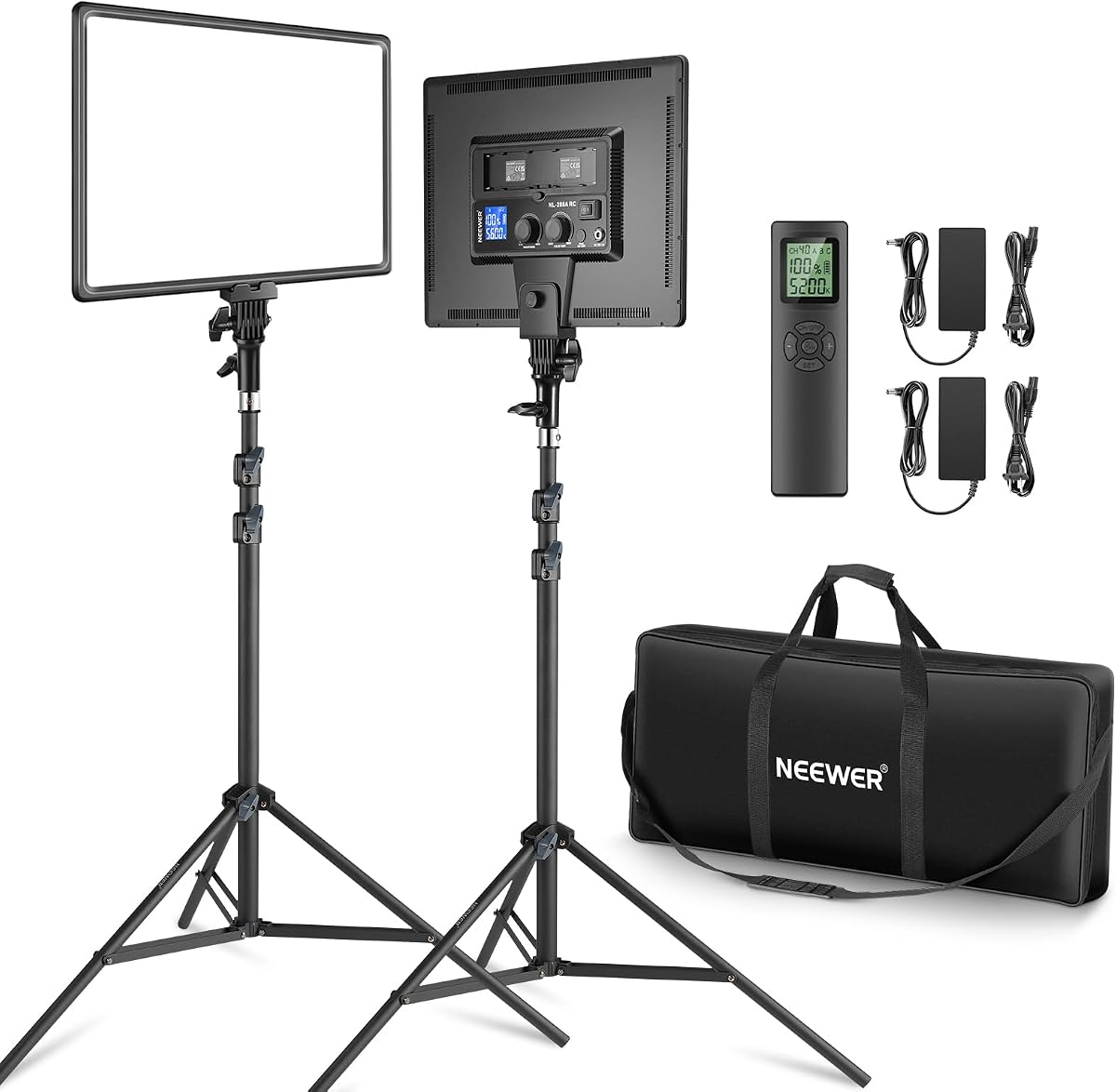
Neewer is a trusted name in photography lighting, and this 18 inch LED kit maintains that reputation with robust performance. It is designed for creators who want more power than basic kits but do not need the full expense of professional cinema lights. The 45W output provides strong illumination suitable for larger rooms or full-body shots.
We may earn a commission when you buy through this link, at no additional cost to you.
The inclusion of a 2.4GHz remote control is a huge plus for managing lighting settings from your desk or camera chair. You can control up to four groups of lights, which is useful if you plan to expand your setup later. The lights are dimmable from 1% to 100% and offer a wide color temperature range for different moods.
Power options are versatile allowing you to plug into AC or use NP-F batteries for mobility. While batteries are not included, this feature means you can record outdoors or without access to an outlet. The aluminum alloy stands are stable and professional looking, adding to the premium feel of the kit.
This kit is ideal for YouTube creators or podcasters who need reliable, high-quality lighting for longer recording sessions. If you value a brand with a strong reputation and features like remote control and battery compatibility, this is a smart buy. It balances cost and performance better than many other options in its class.
The remote allows you to adjust lights without getting up or interrupting your flow. This is particularly useful during live streams or long interviews.
Supporting battery power means you are not limited by cable length. This is perfect for outdoor shoots or mobile studio setups.
We may earn a commission when you buy through this link, at no additional cost to you.
The NEEWER 660 PRO II RGB offers creative possibilities that standard white light panels cannot match. It provides a full 360-degree RGB color range which allows you to tint your background or add visual flair to your streams. This makes it a standout choice for gamers, entertainers, and content creators who want to add personality to their setup.
We may earn a commission when you buy through this link, at no additional cost to you.
You can control the light using the NEEWER app on your smartphone, which allows you to adjust settings from up to 49 feet away. There are nine preset scenes like Police Car, Fireworks, or TV Screen that you can activate with a tap to create dynamic lighting effects. This feature is engaging for live streaming audiences and adds variety to pre-recorded videos.
The build quality is robust with an aluminum alloy panel that dissipates heat effectively, ensuring long working hours without overheating. The stands are flexible and allow tilting up to 180 degrees so you can position the light exactly where needed. Barn doors help modify the beam angle for more precise control over the light spread.
While the price is higher than basic kits, the versatility and advanced features justify the cost for serious creators. If you want a light that serves as both a functional key light and a creative tool for effects, this is a top-tier option. Check the latest listings to ensure you get the full stand and control kit.
The built-in special scenes allow you to change the vibe instantly without manual tweaking. This is great for variety in your content and keeping viewers interested.
Controlling lights via smartphone is intuitive and allows for saving favorite presets. It removes the need for complex physical controls during recording.
We may earn a commission when you buy through this link, at no additional cost to you.
UBeesize is known for versatile accessories, and this video light kit brings that utility to your studio. It offers a strong 3000 lumens of soft light which is excellent for illuminating faces and products clearly. The 26W output is a solid middle ground for brightness without the heat of higher wattage models.
We may earn a commission when you buy through this link, at no additional cost to you.
One unique selling point is the tripod stands which extend up to 72 inches tall. This height allows you to position the light higher for overhead shots or better angles for standing presentations. The stands fold down to a compact 15.5 inches, making storage easy in tight spaces or closets.
The kit includes phone holders which are very practical for creators who film vertical content on their phones. The in-line controller gives you quick access to power and brightness adjustments without reaching for the light itself. The color temperature range covers warm to cool options so you can match your room lighting effectively.
This kit is perfect for streamers who need tall stands to position lights above their monitor or desk level. If you have limited floor space but need height for better lighting angles, this kit offers a smart solution. Check current availability to ensure all stands are included in the bundle you purchase.
The 72 inch height gives you freedom to angle lights down from above. This helps reduce glare on monitors and creates better depth in your shot.
Having phone holders included saves you from buying separate mounts. It simplifies the setup for mobile-first creators and vertical video makers.
We may earn a commission when you buy through this link, at no additional cost to you.
For streamers who work from a desk setup, the Logitech Litra Glow is a specialized and efficient solution. It is designed to sit directly on your monitor, saving desk space and providing light from the perfect angle. With a 4.5 star rating, users appreciate its ability to deliver natural skin tones using TrueSoft technology.
We may earn a commission when you buy through this link, at no additional cost to you.
The frameless diffuser radiates wide soft light that eliminates harsh shadows and creates a flattering look for video calls. It is USB powered which means you can plug it into any available port and start using it immediately without adapters. The G HUB desktop app lets you save and load presets so you can switch lighting looks quickly.
While it does not offer the raw power of a floor-standing panel, its purpose is to provide quality lighting for webcam feeds. The mount allows for rotation, tilt, and height adjustment so you can fine-tune the light for your face. It is UL tested for all-day streaming, ensuring it is safe for long gaming or work sessions.
This light is best for people who stream from a laptop or desktop monitor and want a minimal setup. If you prioritize a clean look and natural colors over adjustable brightness ranges, this is a perfect choice. Always verify the mount fits your monitor thickness before ordering to ensure compatibility.
The monitor mount means you do not need floor stands or desk clamps. This keeps your workspace clean and uncluttered for a professional look.
This specific tech optimizes color accuracy for faces and makes you look natural. It is a key feature for professional video conferencing.
We may earn a commission when you buy through this link, at no additional cost to you.
This NEEWER Pro 600W is a professional-grade tool designed for advanced studios and serious content creators. With a massive 600W COB output, it delivers intense brightness that can light up large rooms or outdoor sets. It is one of the few options on this list that supports DMX control for integration into complex lighting setups.
We may earn a commission when you buy through this link, at no additional cost to you.
The brightness reaches up to 52,500 lux at 1 meter which is powerful enough to overpower sunlight in some scenarios. You have full RGB capabilities and 18 built-in scene effects to add creative flair to your videos. The Bowens mount allows you to attach softboxes or snoots for precise shaping of your light.
Cooling is managed with an intelligent fan system that adjusts modes based on temperature to ensure quiet operation. It supports multiple control methods including app, 2.4G wireless, and panel controls for maximum flexibility. The XLR power input with cable lock ensures your power stays secure even during long shoots.
If you are running a production company or need high-end studio lighting that rivals cinema gear, this is the right pick. The price is high but the performance and versatility justify it for professional users. Check the listings for battery options or accessories if you need mobility.
DMX control allows integration into larger studio systems. This is essential for advanced setups requiring synchronized lighting.
The Bowens mount lets you add modifiers like softboxes and snoots. This increases versatility for portrait and product photography.
We may earn a commission when you buy through this link, at no additional cost to you.
The Zoom Lighting for Computer is a specialized desk lamp designed to improve video call quality and reduce eye strain. It uses edge-lit technology to provide even and gentle illumination that makes you look natural on screen. With a high CRI of 97.8, it renders colors accurately which is important for professional appearances.
We may earn a commission when you buy through this link, at no additional cost to you.
The height is adjustable from 22 to 32.5 inches so you can position the light at the perfect level for your face. It rotates 360 degrees allowing you to angle the light from any direction. This flexibility helps eliminate shadows and glare on your computer monitor or face.
It is powered by a USB supply which is convenient for plugging into laptops or wall adapters. The base is sturdy with non-slip pads to keep it stable on your desk. A phone holder is included to help with vertical content creation without needing extra gear.
This is an ideal solution for remote workers and streamers who spend hours on video calls. The design prioritizes comfort and consistent lighting which helps you look better and stay comfortable. Verify the desk footprint before buying to ensure it fits comfortably in your workspace.
Edge-lit technology reduces harsh glare and protects your eyes during long sessions. This is critical for anyone working from home daily.
The stand height adjusts to fit your chair and desk setup. This ensures the light is always at the correct angle for your face.
We may earn a commission when you buy through this link, at no additional cost to you.
This Torjim Softbox Kit uses traditional 16×16 softboxes to create large soft light sources that are flattering for portraits. Softboxes diffuse light to reduce harsh shadows and provide even illumination on subjects. It is a classic choice for photography and video where a soft and professional look is desired.
We may earn a commission when you buy through this link, at no additional cost to you.
The bulbs are 85W energy saving CFL bulbs which are bright enough for indoor shooting while saving energy. The softboxes have silver particle baffles that maximize reflectivity to ensure even light spread. The stands are made of high quality aluminum alloy with independent locking knobs for stability.
The head rotates 210 degrees so you can adjust the angle to suit your shot. It comes with a diffuser and remote to help you control the lighting effectively. While the setup is larger than panels, the quality of light is superior for portraiture and product photography.
If you want the softest light possible for a home studio without spending a fortune, this kit is a great option. It is especially useful for photographers who already use DSLR cameras and need larger light modifiers. Check the package contents to ensure you get the full double softbox bundle.
The 16×16 softbox spreads light over a large area to soften shadows. This creates a professional studio look on a budget.
The locking knobs on the tripods ensure the light stays where you put it. This stability is important for consistent shots.
We may earn a commission when you buy through this link, at no additional cost to you.
This single softbox kit from Torjim is an affordable entry point for photographers and streamers wanting soft light. It includes one 16×16 softbox with an 85W energy saving bulb. It is perfect if you only need one fill light or key light for a simple setup.
We may earn a commission when you buy through this link, at no additional cost to you.
The softbox is foldable which makes it easy to store or transport when needed. The tripod stand is sturdy and ensures the light stays stable during recording. The head rotates to let you adjust the direction of the light to hit your subject at the best angle.
While a single light is less powerful than a two-light setup, it is a great start for those on a budget. You can always add another light later to match this unit. The included diffuser helps soften the light output further for better results.
Choose this if you are starting a home studio and want to try softbox lighting before committing to a larger kit. It is also ideal for product photography where one large soft light is all you need. Check the current price and bundle details before purchasing.
This kit is perfect for beginners who want professional soft light on a small budget. It allows you to learn lighting basics easily.
As your needs grow you can buy another unit to match this. The design ensures consistency across your lighting setup.
We may earn a commission when you buy through this link, at no additional cost to you.
Choosing the right lighting can feel overwhelming with so many options available. This guide breaks down the key factors you should consider to find the perfect light for your streaming and video needs.
Brightness is measured in lumens or watts and determines how much light the fixture produces. For small rooms or desk setups, lower wattage may suffice but larger spaces require higher output. Always check the lux or lumen rating to ensure the light is bright enough for your specific environment.
Look for lights with adjustable brightness so you can adapt to different times of day.
Color temperature affects the mood of your video and is measured in Kelvin. Lower values like 3000K create warm light while higher values like 6500K create cool light. Adjustable ranges are ideal so you can match your room lighting or create specific effects.
Pick lights that offer a broad range of color temperature for flexibility.
CRI measures how accurately a light renders colors compared to natural light. A CRI of 90+ is recommended for video to ensure skin tones look natural. High CRI is essential for product photography where color accuracy is critical.
Always check for CRI ratings of 95+ if color accuracy is a priority.
Consider how you will power your lights. Some options work on AC power which is reliable for home use while others support battery or USB power for mobility. Battery power is useful for on-the-go content or if outlets are scarce.
Ensure the power method matches your workflow and location needs.
You can control lights via physical buttons, remotes, or smartphone apps. Apps and remotes offer convenience and allow you to change settings without touching the light. This is useful for live streaming when you need to adjust lighting discreetly.
Choose controls that fit your comfort level and budget.
Many kits include tripods while others require you to buy stands separately. Ensure the stand is sturdy and height adjustable to avoid wobble during recording. Some lights are designed for monitors or desks for space-saving setups.
Verify that the stand matches your needs before purchasing.
If you plan to move your setup or store lights in a closet, weight and size matter. Portable kits with carrying bags make travel easier. Lighter materials like aluminum are easier to handle than heavy steel.
Prioritize portability if you need to move gear frequently.
Check the build quality and warranty offered by the brand. Brands like Neewer and Logitech have strong reputations for durability. A good warranty protects your investment against defects.
Research the warranty terms to ensure peace of mind.
To get the best results, position your lights at a 45 degree angle from your face. This creates dimension and reduces shadows. Use a diffuser if the light feels too harsh to soften the output. Always test your camera settings before going live to ensure exposure is balanced.
Keep your lights clean by wiping them gently with a dry cloth. Dust can accumulate on panels and reduce brightness over time. Avoid touching the LED beads with bare hands to prevent damage. If you use bulbs, check them periodically to ensure they are secure in place.
Store your lights in a cool dry place away from moisture. If you have stands, fold them carefully to avoid bending the rods. Use the included carrying bags to protect equipment during transport. Proper care extends the life of your gear significantly.
Yes, LED lighting is generally better because it runs cooler and uses less energy. LEDs last longer and provide consistent output without flickering. They also offer adjustable color temperatures which are essential for professional looking video.
The ideal height is slightly above eye level pointing down at a 30 degree angle. This mimics natural sunlight and eliminates under-eye shadows. Adjust based on your camera angle to ensure balanced illumination on your face.
Softboxes are not strictly necessary but they help create softer and more flattering light. If your room light is harsh, a softbox or diffuser can improve results. For tight spaces, smaller panel lights with built-in diffusion often work well.
RGB lights are great for entertainment streams or background accents. However, for skin tones, you should rely on a white key light. Use RGB for color effects or to match a specific brand theme during your broadcast.
Look for lights that support wireless control or a central remote. Some systems allow you to group lights so you can change brightness for all at once. Apps are also a convenient way to manage settings from your device.
Soft light comes from a larger source or diffuser and reduces shadows on your face. Hard light comes from a small source and creates sharp shadows. For most streaming, soft light is preferred for a more natural look.
We hope this guide helped you narrow down the best lighting options for your needs. The Torjim 12 Inch kit offers great value for beginners while the Logitech Litra Glow is perfect for desk setups. If you want professional power, the NEEWER Pro 600W is a strong choice.
When deciding prioritize what matters most to you whether it is brightness, color accuracy, or portability. A light that fits your workflow will help you create content more consistently. Do not overlook the accessories like stands that ensure your gear stays stable.
Prices and availability change often so always check current listings before buying. Our links take you directly to verified products to help you save time. Happy streaming and may your video quality shine bright.