
SABRENT 74 in 1 3.5 Inch Internal Flash Media Card Reader/Writer with USB Port (CR-USNT)
4.0Editor score
Supports 74 card types
Includes USB 2.0 port
Compatible with Windows and Mac
This guide compares the top internal media card reader options for desktop PCs in October 2026 to help you choose the best one for your needs.
Internal media card readers provide convenient front access for transferring files from cameras and devices directly to your desktop computer without external hubs. They integrate seamlessly into your PC case for a cleaner setup and faster data connections through dedicated internal headers. Selecting the right model ensures compatibility with your specific card types and delivers reliable performance for creative workflows.
We evaluated ten leading internal card readers based on compatibility, build quality, connection speed, and ease of installation. Our analysis covers models ranging from budget-friendly 3.5 inch bays to premium 5.25 dashboards with USB 3.0 and eSATA support. Each product was assessed for its ability to handle modern high-capacity cards and simultaneous multi-card access requirements.
Every pick in this list highlights key strengths like supported card formats, transfer speeds, and additional features such as audio jacks or extra USB ports. While prices may fluctuate based on availability and promotions, the models below represent the best value and performance options currently available. Always verify your case bay size and motherboard headers before purchasing to ensure a smooth upgrade experience.
4.0Editor score

4.5Editor score

3.8Editor score
The table below provides a quick side-by-side overview of all ten internal media card readers evaluated in this guide. It highlights essential specifications such as supported card types, interface speeds, and form factor to help you narrow down your choice based on your specific hardware requirements.


The StarTech Internal Card Reader stands out as the most reliable option for professionals needing fast and flexible card access. With a strong 4.5 rating, it delivers consistent performance across a wide range of formats. Its USB 3.0 connection ensures you can move large media files quickly without bottlenecks.
We may earn a commission when you buy through this link, at no additional cost to you.
Key strengths include its ability to access four different card slots simultaneously. This feature is invaluable for photographers transferring images from multiple cards in one session. The wide compatibility list covers everything from CF to xD Picture cards, making it future-proof for older gear.
Trade-offs include the internal installation requirement which might deter casual users. Additionally, the price is higher than basic models. However, these are acceptable given the professional-grade reliability and the time saved during high-volume transfers.
This reader is ideal for videographers, IT professionals, and anyone with a workflow involving frequent large file transfers. If you need a durable solution that handles modern and legacy cards alike, this model is the top recommendation for internal integration.
Accessing four different card slots at once lets you copy files between cards instantly without swapping them physically. This saves significant time during busy editing sessions.
Built-in OS independence means it works seamlessly with Windows macOS and Linux without needing extra drivers. You get plug-and-play convenience across all major desktop environments.
We may earn a commission when you buy through this link, at no additional cost to you.
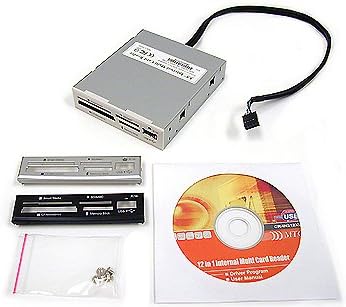
For those on a tight budget, the SABRENT 74 in 1 reader offers an incredible amount of value. It supports an impressive 74 types of memory cards ensuring you can handle almost any format you might encounter. While not the fastest, it gets the job done reliably for occasional transfers.
We may earn a commission when you buy through this link, at no additional cost to you.
The inclusion of a USB 2.0 port adds extra utility for connecting other peripherals directly to your PC case. This versatility makes it a great multi-tasking device beyond just card reading. Its broad operating system support ensures compatibility even with legacy systems.
The main trade-off is the slower USB 2.0 speeds which may take longer for large files. The build is also simpler than premium models. However, for basic home use, these limitations are minor compared to the affordable price.
Buyers should choose this if they need a simple no-fuss solution that covers all bases without breaking the bank. It is perfect for home users who need occasional access to SD CF or Memory Stick cards.
With support for 74 different memory card types, this reader ensures you can use old and new cards without buying multiple adapters. It is a true universal solution for home offices.
Adding internal card reading capability without spending a fortune is rare. This model allows you to keep your desktop organized and efficient at a fraction of the cost of other options.
We may earn a commission when you buy through this link, at no additional cost to you.
This media dashboard transforms your PC front panel into a comprehensive I/O station. It goes beyond simple card reading to offer a full hub experience. With a mix of USB 3.0 eSATA and audio ports, it is designed for power users who want maximum accessibility.
We may earn a commission when you buy through this link, at no additional cost to you.
The standout feature is the combination of high-speed data transfer and multimedia connectivity. You can connect headphones directly to the front while transferring massive files internally. The durable ABS construction and black finish match modern builds well.
A trade-off is the requirement for a 5.25 drive bay which many modern cases lack. Also, some users report mixed experiences with build quality. Despite this, the feature set is unmatched for those who have the space.
If you are building a custom PC and want a premium all-in-one front panel, this is the best choice. It turns your case into a convenient workstation hub without cluttering the desk with external boxes.
Combining card reading USB hubs and audio jacks into one panel reduces desk clutter and streamlines your workflow. Everything you need is right at your fingertips.
USB 3.0 support ensures that moving large media files is fast and efficient. This is crucial for professionals who handle high-resolution video or RAW photo batches daily.
We may earn a commission when you buy through this link, at no additional cost to you.
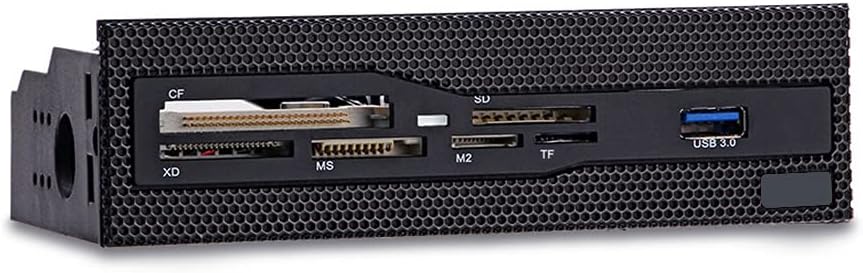
This 5.25 inch reader balances speed and durability effectively. The USB 3.0 interface ensures you get faster data rates compared to older standards. It supports common formats like CF XD and M2 making it suitable for general creative tasks.
We may earn a commission when you buy through this link, at no additional cost to you.
The copper-plated card slots provide better stability during transmission which helps reduce errors during writes. The durable grid panel design allows it to blend well with mesh cases. It is a solid middle-ground option for those needing fast access.
Trade-offs include the lack of extra USB ports or audio jacks. It is focused purely on card reading. For many users this simplicity is acceptable as long as the core function performs well and quickly.
It is ideal for users who have a 5.25 bay and need faster transfer speeds without paying for premium extras. This model delivers reliable performance for everyday photo and video workflows.
Copper plating on the slots ensures a stable connection during data transfer. This reduces the chance of corruption and extends the life of the reader itself.
USB 3.0 support means you can move large files much faster than with USB 2.0. This efficiency is key when dealing with modern high-capacity storage cards.
We may earn a commission when you buy through this link, at no additional cost to you.
The Vantec Link UGT-CR940 is an exceptional choice for professionals who need maximum compatibility. With a rare 5.0 rating it shows consistent satisfaction. It supports CF v6.0 and SDXC up to 2TB ensuring you can use the latest storage without issues.
We may earn a commission when you buy through this link, at no additional cost to you.
Its Multi-LUN feature allows simultaneous access to multiple cards which is a huge time saver. The detailed support for MS PRO-HG with quad data access enhances transfer rates significantly. It is built for those who rely on storage performance daily.
Trade-offs include the lack of an internal USB port which limits additional connectivity. Installation requires a specific 20-pin header. However for pure card reading performance it is hard to beat this model.
Choose this if you need a reliable card reader for high-end workstations. It handles extreme capacity cards and offers advanced features that cater to power users.
Supporting SDXC up to 2TB ensures you won't outgrow this reader anytime soon. It is built to handle the growing sizes of modern memory cards efficiently.
Multi-LUN technology allows you to read multiple cards at once without swapping. This streamlines your workflow when working with multi-camera setups or large archives.
We may earn a commission when you buy through this link, at no additional cost to you.
This dashboard offers a comprehensive set of ports including SATA and eSATA which is rare for card readers. It supports fast USB 3.0 transfers alongside audio front ports. It is a robust choice for those needing both storage and audio connectivity.
We may earn a commission when you buy through this link, at no additional cost to you.
The included cables cover all necessary connections making installation complete. LED indicators help monitor status easily. The wide OS support ensures compatibility with older systems as well as newer ones.
Trade-offs include the complexity of installation due to many cables. Also the lack of ratings makes it a bit of a gamble. However the feature set is very complete for a single panel unit.
If you need a panel that connects drives and provides card reading and audio this is a strong option. It is best for DIY builders who want everything in one place.
Having SATA and eSATA ports on the front allows direct drive access without opening the case. This makes swapping external or internal drives much more convenient.
This unit combines audio card reading and USB in one panel. It reduces cable clutter behind your PC by centralizing all your front connections.
We may earn a commission when you buy through this link, at no additional cost to you.
Sony is a trusted name in memory cards and this reader reflects that quality. It supports 17 card types covering most needs for older formats. It is ideal for those using specific Sony cameras or legacy devices.
We may earn a commission when you buy through this link, at no additional cost to you.
The drive letter recognition software makes setup smoother on older Windows systems. The faceplate options allow some customization to match your PC. It is a reliable solution for those who need standard card reading.
Trade-offs are that it may not support the very latest high-capacity cards fully. If you are using newer equipment check compatibility first. But for its target niche it performs well.
Choose this if you trust the Sony brand and need a straightforward reader for specific formats. It remains a solid choice for users with established legacy workflows.
The included drive letter recognition software ensures your cards show up correctly in Windows. This simplifies the initial setup process significantly.
With black and ivory faceplates you can match the reader to your PC aesthetic. This small detail adds a nice touch to the overall build.
We may earn a commission when you buy through this link, at no additional cost to you.
This compact reader fits into 2.5 inch bays which are common in smaller PCs. It offers a perfect 5.0 rating showing high satisfaction. The multiple bezel colors make it easy to match your system style.
We may earn a commission when you buy through this link, at no additional cost to you.
The build quality is highlighted as high which is rare for budget units. It provides reliable reading for standard formats. Its size makes it versatile for cases that lack 3.5 bays.
Trade-offs include limited detail on specs which means you should check compatibility. It is also limited to 2.5 bays. For those with the right space, it is an excellent fit.
Buyers with tight spaces should consider this model. It brings internal card reading to compact builds without taking up much room.
This reader is designed for 2.5 inch bays making it perfect for small form factor cases. It ensures you don't lose card reading capability in compact builds.
With black silver and white bezels you can customize the look to your preference. This attention to detail helps it blend seamlessly into your setup.
We may earn a commission when you buy through this link, at no additional cost to you.
The Akasa reader stands out for its 6 ports which are designed to minimize adapter use. It supports SDHC directly and includes an extra USB port for other devices. It is a practical choice for multi-device workflows.
We may earn a commission when you buy through this link, at no additional cost to you.
LED indicators for power and data transfer help you see status at a glance. The black and white panels give you design flexibility. It fits standard 3.5 bays making it easy to install.
Trade-offs include the mid-range price which might be higher than basic models. However the convenience of dedicated ports justifies the cost. It is a reliable solution for frequent users.
If you juggle many cards and USB drives this model simplifies your desk. It keeps all your peripherals accessible without clutter.
Having dedicated ports for adapters removes the need to keep separate dongles. This streamlines your workflow and reduces lost components over time.
LED indicators light up during data transfer so you know when it is safe to remove cards. This small feature prevents data loss due to accidental unplugging.
We may earn a commission when you buy through this link, at no additional cost to you.
This MTG reader offers a classic metal case build which is durable. It supports 22 card types ensuring broad compatibility. Its USB 2.0 speed is sufficient for smaller files and occasional use.
We may earn a commission when you buy through this link, at no additional cost to you.
The metal case provides better shielding and longevity compared to plastic. Plug and Play capability ensures it works instantly without drivers. It is a sturdy choice for those who prefer simplicity.
Trade-offs are the slower speed which might not suit large modern files. If you need fast transfers consider newer models. But for reliability and build quality this is strong.
Buyers looking for a durable and simple solution should consider this. It is a great fit for older PCs or basic setups.
The metal casing protects the internal components better than plastic. This ensures a longer lifespan for your reader in a high-use environment.
Since it runs on bus power you do not need any extra power supply. This simplifies installation and keeps your PC interior clean.
We may earn a commission when you buy through this link, at no additional cost to you.
Selecting the right internal media card reader involves checking your PC case bay size, connection speeds, and card formats. This section explains the key factors to consider before making a purchase.
Check whether your PC case has a 3.5 inch or 5.25 inch bay available. Many modern cases only have 3.5 bays for drives while some older or gaming cases have 5.25 bays for fans or hubs. Ensure you buy a reader that fits your specific slot size.
Always measure your available slot before purchasing to avoid buying a unit that does not fit your case.
Look for USB 3.0 support if you transfer large files regularly as it offers speeds up to 5Gbps. Older USB 2.0 models are cheaper but slower which may slow down your workflow with high capacity cards.
Prioritize USB 3.0 models for faster transfers especially when handling RAW photos or video files.
Ensure the reader supports the specific card types you use such as SDXC CF or Memory Stick. Some models cover a wide range while others focus on common formats only. Check the list of supported cards carefully.
Choose a reader that lists your card format explicitly to avoid compatibility issues.
Internal readers connect via a 20-pin header on your motherboard and a power cable. Verify your motherboard has the required header and that your power supply has a free SATA or Molex connector. Installation may require opening the PC case.
Confirm your motherboard has the internal USB header and power connector before buying.
Models with metal cases or copper plated slots tend to last longer and offer better signal stability. Plastic units are lighter but may feel less robust over time. If you plan to use the reader daily consider a sturdier build.
Opt for metal casing or plated slots if you need long term reliability.
Some readers include extra USB ports audio jacks or eSATA connections. These can turn a card reader into a full front panel hub. If you want audio access or extra USB ports these features add value.
Decide if you need audio or extra USB ports alongside card reading.
Most modern readers are OS independent and work with Windows macOS and Linux without drivers. However older models might need specific drivers for legacy systems. Check the supported OS list to ensure your computer works with it.
Ensure the reader supports your current operating system for plug and play use.
Basic models cost significantly less than premium multi-function hubs. Consider how often you will use the reader to justify the cost. If it is for occasional use a budget option may suffice.
Match the reader features to your budget and usage frequency for best value.
To install your internal reader power down your PC and open the case. Locate an empty 3.5 or 5.25 bay and slide the reader into place. Connect the 20 pin USB header on your motherboard to the reader cable and attach a power cable from your PSU.
Once installed close the case and turn on your computer. The OS should automatically detect the reader as a new drive. Insert your memory card into the slot until it clicks and wait for the LED to indicate activity.
To care for your reader avoid inserting cards with sharp edges or dirt on the contacts. Keep the interior of your PC clean from dust which can affect connections. If you notice slow speeds try cleaning the card slots with compressed air.
Internal card readers are installed inside your PC case and connect directly to the motherboard which makes them more secure and faster than external models. They require more effort to install but reduce desk clutter. External readers are USB powered and portable but take up a port and are easier to lose.
Most internal readers draw power from your PC's power supply unit via a SATA or Molex connector so they do not need external power. This means you can plug in cards without any extra cables. However some budget models may use USB headers that also provide power.
Most internal readers support SD SDHC SDXC CF and Memory Stick formats which cover the majority of consumer cameras. Some also include XD Micro SD and M2 support. Always check the specific model's support list if you have rare cards like SmartMedia.
Many modern internal readers support simultaneous card access meaning you can have multiple cards inserted and read at the same time. This allows for faster file transfers between cards without removing them. Check if the model supports multi-LUN access for this feature.
If the reader is not detected check that the internal cables are securely connected to the motherboard and power supply. Ensure you have the correct drivers installed if your OS is older. Also verify that your PC's BIOS has USB headers enabled for internal ports.
Most internal readers support hot swapping but it is safer to eject the card properly from the OS first before removing it physically. This prevents data corruption on the card. Some models have activity LEDs to show when the card is safe to remove.
The StarTech 35FCREADBU3 leads as the Editor's Choice due to its speed reliability and simultaneous slot access. For budget conscious buyers the SABRENT 74 in 1 offers impressive format support at a low price. Those needing a full panel experience should consider the 5.25inch Media Dashboard.
Prioritize USB 3.0 support and proper bay fit when making your choice to ensure fast and easy installation. The right internal reader streamlines your workflow by putting card access directly in front of you. Look for models that match your specific card types and budget.
Remember that prices may change over time so always verify current offers before buying. Your perfect reader is the one that fits your PC and workflow perfectly. With the right choice you can transfer files efficiently without cluttering your workspace.