
Acer 13-in-1 Laptop Docking Station
4.5Editor score
Triple display support via MST
110W power adapter included
Security slot for physical lock
This guide compares the top 10 docking stations with 2 HDMI ports for dual monitor setups, focusing on compatibility, display quality, charging power, and
Finding the right docking station with 2 HDMI ports can transform your laptop into a powerful desktop workstation. These devices allow you to connect multiple external displays, peripherals, and network cables through a single USB-C connection. Whether you work from home or in a busy office, the right dock streamlines your workflow and reduces cable clutter significantly.
We evaluated ten leading models based on display output capabilities, power delivery ratings, data transfer speeds, and overall build quality. Our analysis covers a wide range of options from budget-friendly hubs to premium triple-display solutions. We considered real-world performance factors like heat management, compatibility across operating systems, and ease of setup for diverse user needs.
Each product in this list offers unique strengths tailored to specific workflows and device types. You will find detailed breakdowns of port configurations, video resolutions, and charging efficiency for every model. Please note that product availability and pricing can fluctuate frequently on online marketplaces, so verify current details before making your final purchase decision today.
4.5Editor score

4.5Editor score

4.4Editor score
The following table provides a side-by-side comparison of all ten docking stations analyzed in this guide. It highlights key specifications such as port count, maximum video resolution, power delivery capabilities, and special features like Ethernet or card readers. This overview helps you quickly identify which model aligns best with your specific hardware requirements and workflow needs without reading every detailed review.


The Anker Laptop Docking Station Dual Monitor stands out as a top choice for users seeking reliable dual display connectivity. With a strong rating of 4.5 stars, it offers a balanced mix of video output, charging, and data ports. Its ability to drive two HDMI displays simultaneously makes it ideal for professionals who need extended screen real estate.
We may earn a commission when you buy through this link, at no additional cost to you.
This device features an 8-in-1 design that includes two HDMI ports capable of 4K resolution. It supports Power Delivery charging up to 85W ensuring your laptop stays powered during heavy workloads. The inclusion of an Ethernet port and card reader adds significant versatility for network connections and media access without needing additional dongles.
While it performs well on Windows systems, macOS users should note that it only supports screen mirroring rather than extended desktop mode for dual HDMI outputs. Linux is also not supported. These limitations are acceptable trade-offs considering the robust performance and build quality on supported operating systems.
If you need a dependable hub for Windows or ChromeOS laptops with USB-C DP Alt Mode, this Anker model is highly recommended. It delivers consistent performance and keeps your desk organized. We suggest verifying your laptop compatibility before purchasing to ensure full functionality across all ports.
This dock supports 4K at 60Hz on a single HDMI or 4K at 30Hz on two HDMI ports allowing smooth video playback and multitasking.
With 85W pass-through charging you can use a single USB-C cable to power your laptop while connected to multiple peripherals simultaneously.
We may earn a commission when you buy through this link, at no additional cost to you.
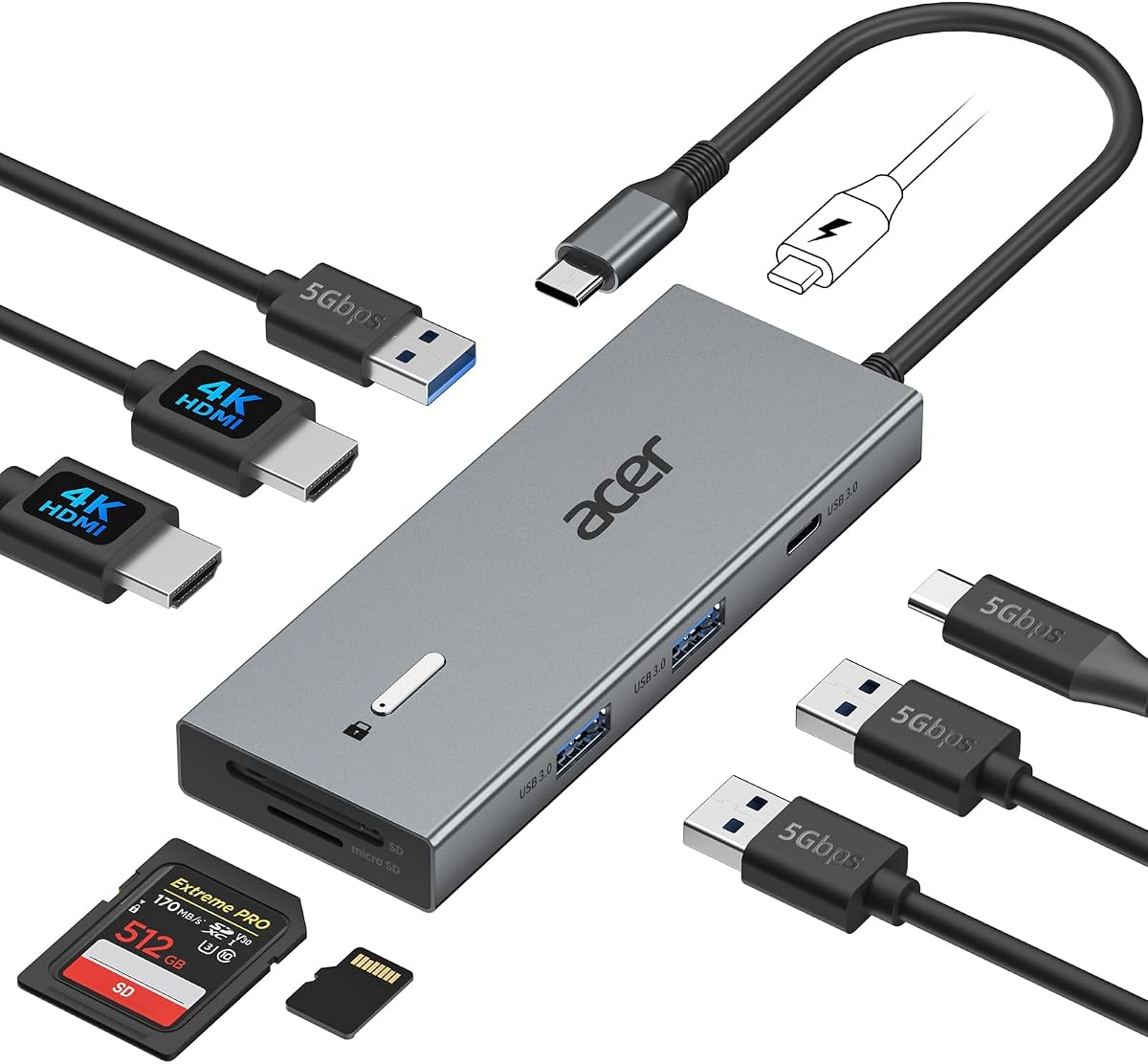
The Acer 13-in-1 Laptop Docking Station is a premium solution for users needing extensive connectivity and triple monitor support. Boasting a 4.5 rating it exceeds standard dual HDMI hubs by adding an extra DisplayPort output. This makes it perfect for power users who manage complex projects across multiple screens.
We may earn a commission when you buy through this link, at no additional cost to you.
It comes with a robust 110W power adapter that delivers up to 100W to your laptop ensuring stable performance even under heavy loads. The aluminum body helps dissipate heat effectively during prolonged use. Additionally the included security slot allows you to lock the dock to your desk in office environments.
Triple 4K output depends on your host GPU supporting Display Stream Compression. Also macOS users are limited to mirroring rather than extended desktop. These technical requirements are standard for multi-monitor setups but require checking your device specs beforehand.
For Windows professionals seeking a clutter-free workspace with three screens this dock is a superior choice. It consolidates networking storage and video outputs into one unit. We recommend it for those who prioritize screen real estate and stable power delivery over compactness.
Use MST technology to extend your desktop across two HDMI ports and one DisplayPort for maximum productivity in financial or coding work.
The 110W adapter ensures sufficient power for high-performance laptops while the Kensington lock slot keeps your equipment secure in shared spaces.
We may earn a commission when you buy through this link, at no additional cost to you.
The Selore USB C Docking Station Dual Monitor offers exceptional value for budget-conscious buyers needing dual HDMI connectivity. With a rating of 4.4 it delivers solid performance without breaking the bank. It is an excellent entry point for creating a dual monitor workspace at home or in small offices.
We may earn a commission when you buy through this link, at no additional cost to you.
This hub supports dual 4K@60Hz displays on compatible laptops providing crisp video quality for content and and productivity. It includes a 100W PD charging port to keep your laptop powered while in use. Multiple USB ports and an SD card reader ensure versatile connectivity for peripherals and storage.
Windows users benefit from MST for extended displays but macOS users can only mirror screens. The power charger is not included so you will need your own 100W adapter. These are minor trade-offs given the low cost and high performance for supported systems.
If you want an affordable way to add dual monitors without spending hundreds this Selore adapter is a smart pick. It works well with most USB-C laptops and simplifies your cable management. Check your laptop specifications to confirm it supports video output via USB-C before buying.
Enjoy smooth 4K video at 60Hz on both monitors if your laptop supports DP 1.4 making it great for media consumption and design work.
Its lightweight build and plug-and-play nature make it easy to carry between work and home while keeping your desk tidy.
We may earn a commission when you buy through this link, at no additional cost to you.
The Acer USB-C Docking Station Dual Monitor is a solid 9-in-1 solution for those needing high-resolution video and multiple ports. Rated at 4.2 stars it delivers reliable performance for daily work tasks. The dual HDMI support at 4K 60Hz ensures sharp visuals for presentations and media.
We may earn a commission when you buy through this link, at no additional cost to you.
It features a dedicated lock button for Windows and Mac security allowing quick screen locking. Three USB-A ports and SD card slots provide plenty of space for peripherals and files. The aluminum alloy body helps with heat dissipation ensuring stable performance during long sessions.
You will need to supply a separate 100W+ adapter as none is included in the box. Also macOS users cannot extend desktops across both HDMI ports. These constraints are manageable for most users seeking a straightforward hub for Windows systems.
Choose this dock if you value a balance of video quality and physical security features. It is well-suited for office environments where quick access locking is useful. Verify your power supply compatibility to ensure full functionality with your laptop.
Both HDMI ports support 4K at 60Hz allowing you to work with detailed graphics without compromising on refresh rate.
The single click lock button secures your Windows session quickly enhancing data privacy in shared office spaces.
We may earn a commission when you buy through this link, at no additional cost to you.
The Dell D3100 is a well-established docking solution for users with USB 3.0 ports who need multiple displays. Rated at 4.2 it remains relevant for older laptop models or specific business environments. It supports three monitors using a combination of HDMI and DisplayPort outputs.
We may earn a commission when you buy through this link, at no additional cost to you.
This dock includes two HDMI ports and one DisplayPort for flexible video routing. It also offers audio jacks and Ethernet for complete workstation connectivity. The package includes an HDMI to DVI adapter providing extra flexibility for various monitor types.
Because it relies on USB 3.0 rather than USB-C it may not suit modern laptops lacking USB-A ports. The 65W power might not be enough for high-performance machines but is adequate for standard office laptops. Compatibility is best with specific Dell Latitude models.
Select this option if you have legacy hardware that requires USB 3.0 connectivity. It is a robust choice for stable multi-monitor setups where USB-C is not available. Check your laptop model compatibility to ensure seamless integration with this dock.
Ideal for older laptops that do not have USB-C ports but still need multiple display outputs and network connectivity.
Included audio input and output jacks allow you to connect speakers and microphones directly to the docking station.
We may earn a commission when you buy through this link, at no additional cost to you.
The listing for this product currently lacks detailed public information regarding its features or specifications. With no available data we cannot evaluate its performance or suitability for dual HDMI needs. Buyers should approach this option with caution and verify details directly on the vendor page.
We may earn a commission when you buy through this link, at no additional cost to you.
Since no specs are listed it is difficult to determine compatibility or video output capabilities. It may be an older or discontinued item with limited support. Checking user reviews and seller ratings might offer additional insight if available.
Without confirmed specs this dock cannot be recommended over verified alternatives. It is best to choose models with clear documentation and support. Ensure any purchase meets your required HDMI and power delivery needs before buying.
If you still consider this option verify the seller is reputable and check for return policies. However for reliable dual HDMI performance other choices in this guide are better supported. Always confirm technical details before finalizing your order.
Due to missing specifications and lack of verified data we recommend exploring other fully documented models in this guide.
We may earn a commission when you buy through this link, at no additional cost to you.
The Anker 7-in-1 USB-C Hub is a compact choice for users needing dual displays without extra bulk. Rated at 4.2 it focuses on high-speed data and charging while supporting 1080p video. It is ideal for portable setups where full 4K is not required.
We may earn a commission when you buy through this link, at no additional cost to you.
This hub offers a blazing-fast 10Gbps data port for large file transfers. It supports 100W input and 85W output for fast laptop charging. Two HDMI ports allow for extended screens at 1080p 60Hz which is sufficient for many productivity tasks.
The main trade-off is the lack of Ethernet and lower video resolution compared to other models. If you rely on wired internet or 4K visuals this hub may fall short. However it excels in speed and portability for travelers.
Pick this Anker hub if you need a lightweight dual monitor solution with fast USB data speeds. It works well with Macs and Windows laptops that prioritize speed over extra ports. Verify your display requirements before choosing this over higher-resolution models.
The 10Gbps USB-C port moves large files quickly making it excellent for photographers and developers handling big datasets.
Its slim profile and fewer ports make it easy to carry in a laptop bag for work on the go.
We may earn a commission when you buy through this link, at no additional cost to you.
The MOKiN USB C Docking Station offers extensive connectivity with multiple USB-C ports and dual HDMI support. Rated at 4.3 it is a strong contender for users with many peripherals. Its 13-in-1 design covers most workstation needs effectively.
We may earn a commission when you buy through this link, at no additional cost to you.
You get two HDMI ports supporting 4K at 60Hz alongside four USB-C ports for versatile connectivity. A privacy lock button lets you quickly turn off screens to protect sensitive information. The dock includes Ethernet and a 100W PD port for complete setup power.
As with many docks macOS users are limited to mirroring and must provide their own power adapter. The sheer number of USB-C ports may confuse some but offers great flexibility. Ensure your laptop supports full function USB-C for all features.
Select this dock if you have many USB-C devices and need dual 4K displays. It is particularly useful for Dell HP or Lenovo laptops with ample ports. Verify your power needs and OS compatibility before purchasing for best results.
Multiple USB-C and USB-A ports allow you to connect keyboards mice drives and more without adapters.
The screen lock button provides quick visual privacy useful in public spaces or shared offices.
We may earn a commission when you buy through this link, at no additional cost to you.
This Selore docking station delivers a robust 10-in-1 layout including HDMI DP and VGA for maximum display flexibility. Rated at 4.5 it is a favorite for budget users needing three monitors. It supports 8K on DP which is a standout feature in this price range.
We may earn a commission when you buy through this link, at no additional cost to you.
The monitor control button lets you toggle modes instantly or wake screens up with one click. It also includes Ethernet and supports triple 4K on Windows. With 100W PD input it provides stable power while connected to multiple devices.
VGA is legacy technology but useful for older projectors. macOS limits to mirroring as usual. While 8K is high most users will find 4K sufficient. These trade-offs are minor given the comprehensive port selection.
Choose this for cost-effective multi-monitor setups in trading or design. It works well with Windows laptops needing diverse video inputs. Check your laptop compatibility to ensure it supports MST for extended displays across three screens.
In addition to HDMI and DP the VGA port allows connection to older monitors and projectors seamlessly.
A dedicated button cycles through display modes or saves power by waking or turning off monitors quickly.
We may earn a commission when you buy through this link, at no additional cost to you.
The Anker 13-in-1 USB C Docking Station is a comprehensive solution for those wanting triple displays and abundant ports. Rated at 4.0 it offers a full desktop replacement experience. Its vertical design saves valuable desk space while offering extensive connectivity.
We may earn a commission when you buy through this link, at no additional cost to you.
It supports three external monitors at 1080p or one 4K display. A 135W adapter comes included allowing 85W charge to laptop and 18W to phone simultaneously. USB ports include 10Gbps transfer and Ethernet for complete networking.
Mac users can charge and connect peripherals but video output remains limited to mirror mode. While triple screens are limited to 1080p this is fine for productivity. The included adapter eliminates extra purchases needed for high-power laptops.
Pick this if you need a complete workstation setup with minimal desk footprint. It is excellent for home offices needing reliable Anker support. Verify your laptop power needs to ensure the included adapter meets your wattage requirements.
Charge your laptop and a phone at the same time with the included 135W power adapter for a clean setup.
The vertical build minimizes footprint keeping your desk organized and freeing up room for writing or other tools.
We may earn a commission when you buy through this link, at no additional cost to you.
Selecting the right docking station requires understanding your display, power, and connectivity needs. This guide breaks down the essential factors to consider for making an informed decision.
Check the resolution and refresh rate supported by the HDMI ports. Many stations support 4K at 60Hz on one port but drop to 30Hz on dual outputs. Ensure your laptop supports DP Alt Mode for video over USB-C.
Prioritize docks that match your monitor needs whether for 4K design work or 1080p office use.
Look for a dock that supports USB-C Power Delivery matching your laptop's power requirements. High-performance laptops may need 100W input while others function with 65W. Some include adapters while others require you to supply one.
Always verify if the dock passes enough wattage to your laptop while connected to peripherals.
Consider what peripherals you need beyond video. Many hubs include Ethernet for stable internet USB ports for drives and card readers for media. Select a layout that minimizes the need for extra dongles.
A balanced selection ensures you can connect everything without overloading your laptop's native ports.
Most docks support Windows and ChromeOS well but macOS often limits dual HDMI outputs to mirroring due to system settings. Linux compatibility varies by model and driver support. Check the vendor documentation for OS specifics.
Choose a dock confirmed to work with your specific operating system to avoid display issues.
Aluminum bodies tend to dissipate heat better than plastic which is important during long work sessions. Look for docks that mention thermal management features to prevent throttling.
Sturdy construction also improves longevity and protects your investments from wear over time.
Understanding MST and SST is crucial for multi-monitor setups. MST allows extended desktops on Windows while SST mirrors screens often used by Mac. Ensure your GPU and dock support the same protocol.
Mismatched protocols can result in identical displays on all monitors instead of extended workspaces.
Some docks come with short built-in cables which may limit placement options. Others include detachable USB-C cables allowing flexible desk layouts. Check if the cable length suits your workspace.
Longer cables can reduce clutter by allowing the dock to sit farther from the laptop if needed.
Higher cost often brings better build quality and more ports. Evaluate if extra features justify the price for your needs. Look for warranty terms like 18 months for peace of mind.
Investing slightly more can yield better reliability and support if issues arise later.
Connect your laptop to the docking station using a high-quality USB-C cable that supports data and video. Plug both HDMI monitors into the dock ensuring they are powered on before connecting the laptop.
Adjust your display settings in your operating system to arrange screens or mirror content. Install any required drivers if the system does not recognize external monitors automatically.
Keep the dock ventilated and avoid covering it with heavy items to prevent overheating. Regularly check cables for damage and clean ports with compressed air to maintain stable connections.
Not all laptops support video output over USB-C. Your laptop must have a USB-C port that supports DP Alt Mode or Thunderbolt 3 4. Check your manufacturer specifications to confirm this feature is available on your device.
macOS typically supports screen mirroring via MST for USB-C docks rather than extending the desktop across dual HDMI outputs. You may see identical screens on all external displays unless using a single DisplayPort output.
Yes if the docking station supports Power Delivery pass-through. Ensure the dock can deliver enough wattage to your laptop while also powering connected peripherals. Check the PD wattage rating before purchasing.
Many modern docks offer HDMI which works with most HDMI-enabled monitors. For older VGA monitors look for hubs with a VGA port or use an adapter. Compatibility depends on your specific monitor inputs.
4K at 30Hz offers lower refresh rates causing visible stutter in motion while 60Hz provides smoother visuals. For productivity both work well but 60Hz is better for video or dynamic content.
Some docks include adapters while others rely on your laptop's USB-C power. If the dock requires external power it will specify this. Ensure your adapter meets the wattage needs to avoid low power issues.
HDMI transmits both video and audio so you do not need separate cables for audio. Set your audio output in system settings to the desired monitor speakers if you wish to use them.
Docks can generate heat under heavy loads especially with multiple displays. Ensure proper airflow and avoid placing the dock under objects. Aluminum docks generally handle heat better than plastic ones.
The top picks in this guide offer reliable dual HDMI connectivity for various user needs. Whether you choose the Anker 8-in-1 for general use or the Acer 13-in-1 for triple displays each model provides robust performance and stability.
Prioritize features like power delivery and OS compatibility based on your specific workflow. A dock that supports 4K@60Hz and passes enough power will enhance your productivity without interruptions.
Remember to verify current availability and details before purchasing as models and specs change frequently. Taking time to compare options ensures you find the perfect docking solution for your workspace today.