
TP-Link AX5400 WiFi 6 Router (Archer AX73)
4.5Editor score
Up to 2000 sq ft coverage
4T4R technology for strong signal
Affordable price with great performance
This guide compares the top long range WiFi routers for 2026 to help you choose the best model for large homes, high device counts, and seamless connectivity.
Finding a reliable long range WiFi router is essential for modern homes with multiple devices and large layouts. You need strong signals that penetrate walls and deliver consistent speeds across every room without interruption or dropouts.
We evaluated ten top models based on coverage area, speed performance, security features, and ease of setup. Each product offers unique strengths for different needs ranging from budget friendly options to premium mesh systems for whole home coverage.
Our list shows detailed reviews with pros and cons to help you decide. Prices change frequently so check current deals before purchasing. Select the router that matches your home size and internet plan for optimal performance.
4.5Editor score

4.3Editor score
4.2Editor score
This table provides a side-by-side overview of the ten selected routers to highlight key specifications and features for easy comparison during your research.






The TP-Link BE6500 stands out as a top pick for long range performance with Wi-Fi 7 capabilities. It delivers optimized connectivity for latest devices while offering robust coverage for large homes up to 2400 sq ft.
We may earn a commission when you buy through this link, at no additional cost to you.
Its Multi-Link Operation ensures data transfers across bands simultaneously for lower latency and better throughput. The six high performance antennas combined with beamforming concentrate signal toward your devices ensuring reliable connections even at distance.
While it lacks the 6 GHz band found in other Wi-Fi 7 models the dual-band design keeps costs manageable without sacrificing much speed. The trade-off is acceptable for most users who prioritize coverage and stability over cutting-edge frequency bands.
This router is ideal for households upgrading to Wi-Fi 7 devices or needing strong long range signals. Its combination of speed coverage and security makes it a smart investment for future proof home networks.
MLO allows simultaneous data transfers across frequency bands which improves speed and reduces latency significantly during heavy usage periods like gaming or streaming.
The inclusion of 2.5G WAN and LAN ports ensures your router can handle multi-gig internet plans without becoming a bottleneck for high-speed wired devices.
We may earn a commission when you buy through this link, at no additional cost to you.
The TP-Link AXE5400 offers the benefit of the 6 GHz band which provides more bandwidth and near-zero latency. It is ideal for users who have compatible devices and want to avoid interference from older networks.
We may earn a commission when you buy through this link, at no additional cost to you.
With tri-band design it splits traffic across three bands allowing more simultaneous connections without slowdown. The unique housing design helps dissipate heat ensuring long term reliability even under heavy load conditions.
While many users may not yet have Wi-Fi 6E devices the future proofing aspect is appealing. The main trade-off is limited compatibility which might reduce immediate benefits until more devices support this newer standard.
This router suits tech enthusiasts or households with newer laptops and phones ready for 6 GHz connectivity. Its award winning status and robust features make it a strong contender for advanced home networks.
The 6 GHz band offers wider channels and less congestion leading to faster speeds and lower latency especially valuable for VR gaming and video conferencing.
The unique housing design optimizes airflow to keep components cool ensuring consistent performance during extended periods of high usage.
We may earn a commission when you buy through this link, at no additional cost to you.
The TP-Link AX5400 delivers great performance for a budget friendly price point. It covers up to 2000 sq ft with strong 4T4R technology making it ideal for medium sized homes needing reliable range.
We may earn a commission when you buy through this link, at no additional cost to you.
Equipped with HE160 on the 5 GHz band it supports ultra-fast connections and handles multiple devices well. The USB 3.0 port adds versatility for media sharing or private cloud storage options.
While coverage is a bit lower than some competitors the performance per dollar remains excellent. The lack of tri-band is acceptable for most users since dual-band WiFi 6 suffices for typical home needs.
This router is perfect for cost conscious buyers who still want quality WiFi 6 performance. Its high rating and versatile features make it a practical choice for everyday household internet demands.
4T4R uses four transmit and four receive streams to maximize throughput and stability on the 5 GHz band improving overall network efficiency.
The USB 3.0 port allows you to connect external drives for media sharing across devices making it useful for households with shared media libraries.
We may earn a commission when you buy through this link, at no additional cost to you.
The TP-Link AX6000 features eight high-gain antennas which help deliver vast coverage across larger homes. Its 6000 Mbps combined speeds ensure that streaming and gaming remain smooth even with many devices connected.
We may earn a commission when you buy through this link, at no additional cost to you.
Support for a 2.5G Multi-Gigabit port means this router can handle faster internet plans without bottleneck. The inclusion of OneMesh allows adding compatible extenders to eliminate dead zones seamlessly.
The extra antennas add bulk but provide significant range improvements over standard routers. Some users may find the price higher than basic models but the performance justifies the investment for demanding networks.
This router is suitable for households with larger square footage or needing wired multi-gigabit connections. Its blend of speed and range makes it a strong option for future-proofing home networks.
Eight high-gain antennas with beamforming concentrate signals to devices improving both range and reliability across multiple floors and rooms.
The 2.5G port unlocks speeds beyond traditional Gigabit limits allowing you to take full advantage of faster ISP plans.
We may earn a commission when you buy through this link, at no additional cost to you.
The NETGEAR Nighthawk RS90 provides straightforward access to Wi-Fi 7 speeds with easy setup via the Nighthawk app. It covers up to 2000 sq ft which is sufficient for most average sized homes and apartments.
We may earn a commission when you buy through this link, at no additional cost to you.
Its dual-band design handles streaming and gaming well with 3.6 Gbps total throughput. The dedicated 2.5 Gig WAN port ensures that faster internet plans are fully utilized without bottleneck on the wired side.
While it lacks some advanced customization options it offers a clean user-friendly experience. The trade-off is less control for users who prefer more settings but simplicity benefits most general users.
This router fits households wanting modern speeds without complexity. Its solid performance and ease of use make it a reliable choice for those upgrading to Wi-Fi 7.
The Nighthawk app guides you through setup and management allowing you to pause devices or run speed tests from anywhere easily.
Security features are enabled out of the box with automatic updates helping keep your network safe from threats without extra effort.
We may earn a commission when you buy through this link, at no additional cost to you.
The NETGEAR Nighthawk WiFi 7 model offers tri-band speeds reaching up to 9.3 Gbps for exceptional bandwidth. It covers up to 2500 sq ft making it suitable for larger homes needing strong long range performance.
We may earn a commission when you buy through this link, at no additional cost to you.
Adding a dedicated 6 GHz band gives your fastest devices their own lane preventing congestion during peak usage. Multiple 2.5G ports enable high-speed wired connections for gaming rigs or NAS drives.
The higher cost and size may be a consideration for smaller setups but performance justifies it for power users. Trade-offs are acceptable for those needing maximum speed and connectivity options.
This router is ideal for households with many high-bandwidth devices. Its combination of tri-band speed and robust wired options makes it a powerful solution for demanding network environments.
Tri-band allows you to separate traffic across three bands reducing congestion and improving speed for multiple simultaneous activities.
Multiple 2.5G ports allow you to connect high-performance devices directly without compromising speed or stability over the network.
We may earn a commission when you buy through this link, at no additional cost to you.
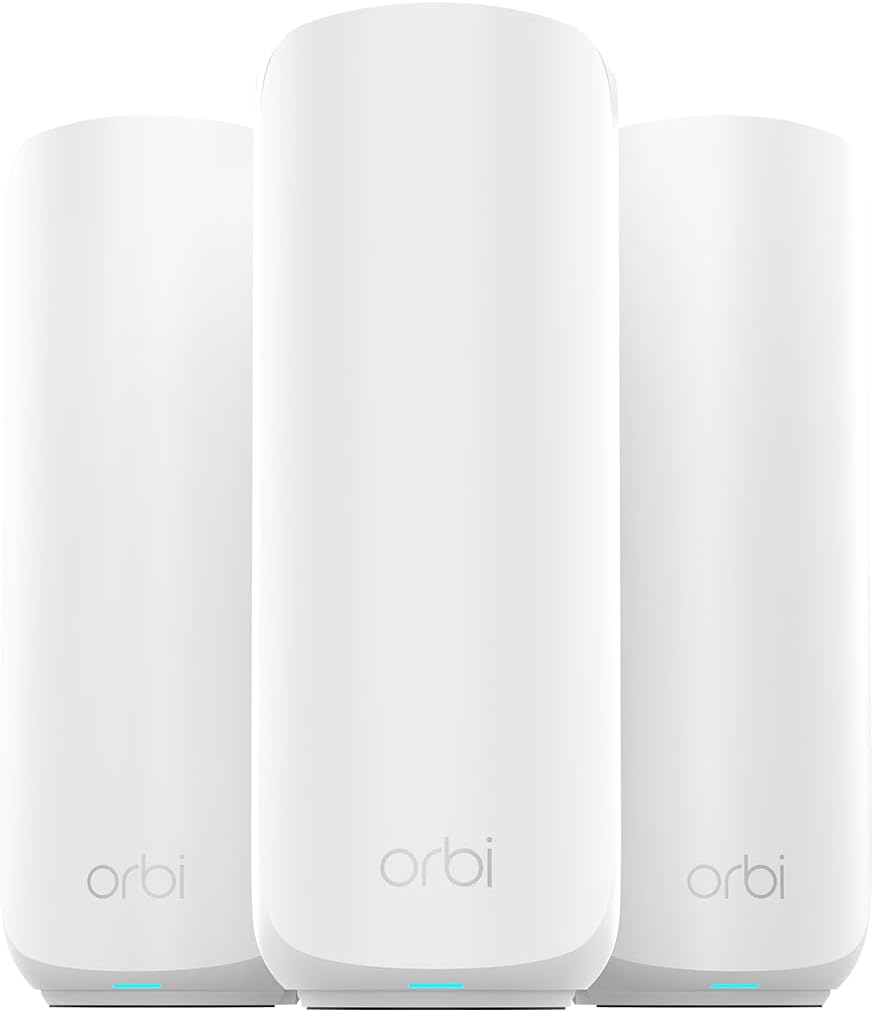
The NETGEAR Orbi 370 Series provides whole-home coverage up to 6000 sq ft using a router and satellite setup. This eliminates dead zones and ensures consistent fast WiFi across every room and basement.
We may earn a commission when you buy through this link, at no additional cost to you.
Its dual-band technology with enhanced backhaul maintains high speeds on every device simultaneously. Supporting 70 devices on one network makes it suitable for large households with many connected gadgets.
While the price is higher the coverage and reliability justify the investment for large homes. The trade-off is needing more physical space for the units but the benefits are clear for expansive layouts.
This system is perfect for multi-story homes needing seamless coverage. Its robust performance and scalability make it a top choice for premium long range WiFi solutions.
Enhanced backhaul technology ensures fast communication between router and satellites keeping WiFi speeds high even as you move around.
Adding satellites is straightforward allowing you to cover more area without complex configuration or extra hardware hurdles.
We may earn a commission when you buy through this link, at no additional cost to you.
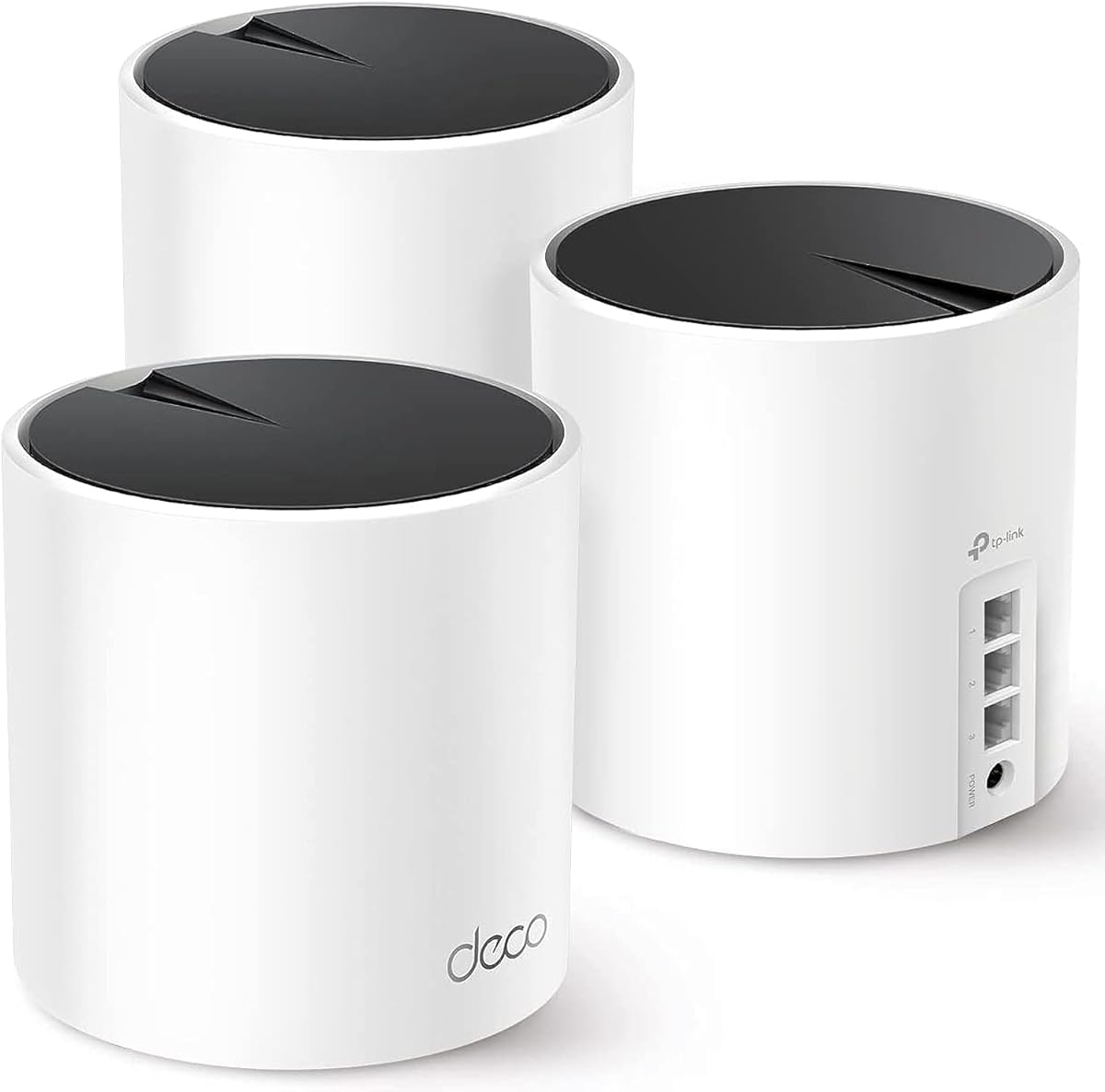
The TP-Link Deco X55 offers exceptional coverage up to 6500 sq ft with a three-pack mesh system. It supports up to 150 devices making it ideal for large households with many gadgets needing connection.
We may earn a commission when you buy through this link, at no additional cost to you.
AI-Driven mesh technology learns your environment to optimize routes and improve performance. The Deco app provides easy setup and management so you can control your network remotely with minimal effort.
While it uses WiFi 6 instead of newer WiFi 7 the speed is sufficient for most streaming and gaming needs. The trade-off is acceptable given the wide coverage and device support at a reasonable price.
This system is perfect for large homes wanting seamless WiFi everywhere. Its balance of range capacity and ease of use makes it a strong contender for whole home networking.
AI learns your network environment to create ideal routes for devices ensuring consistent performance across all rooms.
The Deco app lets you set up manage and monitor your entire mesh network from a single interface easily.
We may earn a commission when you buy through this link, at no additional cost to you.
The TP-Link Archer BE550 offers tri-band speeds reaching 9300 Mbps with Multi-Link Operation for optimized data transfer. Its standout feature is nine Ethernet ports providing plenty of wired connections for various devices.
We may earn a commission when you buy through this link, at no additional cost to you.
Advanced features like private IoT network and VPN support add layers of security and flexibility. The tri-band design ensures your fastest devices use dedicated 6 GHz lanes while others share remaining bands.
While the price is higher the extensive port availability and performance are appealing. The trade-off is a more complex setup for some users but the rewards are significant for power users.
This router suits households needing numerous wired connections and top speeds. Its blend of advanced tech and connectivity options makes it a versatile solution for demanding networks.
Nine Ethernet ports including multiple 2.5G options allow you to connect many wired devices without additional switches.
Separate WiFi for IoT devices protects main network from threats enhancing overall security posture effectively.
We may earn a commission when you buy through this link, at no additional cost to you.
The TP-Link Archer A6 provides reliable performance at an entry-level price point. With four external antennas and beamforming it delivers decent range for smaller homes and apartments needing solid connectivity.
We may earn a commission when you buy through this link, at no additional cost to you.
Full Gigabit LAN ports ensure wired devices get consistent speeds without slowdown. The OneMesh compatibility allows adding extenders later if coverage needs grow over time.
Speeds are lower than newer Wi-Fi 6 models but adequate for basic streaming and browsing. The trade-off is less future-proofing but the cost savings are substantial for budget-conscious users.
This router is ideal for small households or those needing a secondary access point. Its balance of price and reliability makes it a practical choice for essential networking needs.
At a low price point this router offers reliable connectivity suitable for everyday internet needs without unnecessary complexity.
OneMesh lets you expand coverage later with compatible extenders making this a flexible starting point.
We may earn a commission when you buy through this link, at no additional cost to you.
Choosing the right router depends on several factors including home size number of devices and internet plan speed.
Evaluate your home's square footage and layout to determine required coverage. Large homes may need mesh systems or high-gain antennas to eliminate dead zones effectively.
Look for models specifying coverage range and ensure it matches your needs.
Newer standards like Wi-Fi 7 offer faster speeds and better handling of multiple devices. Older standards may suffice for basic use but limit future upgrades.
Select a standard compatible with your devices and internet plan.
Count your connected devices including phones TVs and smart home gadgets. Routers vary in how many they can handle without slowing down.
Choose a model that supports your device count comfortably.
Check for available Ethernet ports to connect devices like gaming consoles or PCs. Multiple Gigabit or Multi-Gigabit ports ensure wired devices get full speed.
Select a router with enough ports for your wired needs.
Look for built-in security like firewalls and automatic updates to protect your network. Some models offer premium services with additional controls and monitoring.
Prioritize routers with robust security to safeguard your data.
Apps that guide setup make installation easier for non-tech users. Simple management interfaces help you control settings without complexity.
Choose models with intuitive setup and management tools.
Determine how much you are willing to spend on a router. Higher priced models offer more features but budget options can suffice for simpler needs.
Balance cost against required features for best value.
Check if the router supports mesh systems or extenders to grow coverage later. Compatibility ensures you can add hardware without replacing the main router.
Select models with flexible expansion capabilities.
Place your router in a central elevated location away from walls and metal objects to maximize coverage. Avoid placing it near microwaves or cordless phones to reduce interference.
Update firmware regularly through the manufacturer app to ensure security and performance. Enable automatic updates if available to stay protected against new threats.
Monitor connected devices and remove unknown ones to maintain network security. Use guest networks for visitors to keep your main network secure and organized.
The best range depends on your home size. For small apartments a single router covers 1500 sq ft. Larger homes need mesh systems or routers with high-gain antennas to reach 5000+ sq ft effectively.
Yes, WiFi 7 routers are backward compatible with older WiFi standards. Your older devices will connect normally but won't benefit from the new speed improvements unless they also support WiFi 7.
Mesh systems provide seamless coverage across large homes without dead zones. Single routers are simpler but may struggle with multi-story layouts or thick walls where signals weaken.
Modern routers can handle 50 to 150 devices depending on specs. Choose one that exceeds your device count to avoid slowdowns during peak usage times.
WiFi 7 offers faster speeds lower latency and better device handling. If your devices support it it is better but most users can still enjoy WiFi 6 speeds today.
Yes, central placement and elevation improve range significantly. Keep it away from obstructions and interference sources to maintain strong signal strength across rooms.
Beamforming directs WiFi signals toward your devices instead of spreading them everywhere. This improves speed and range by focusing strength where it is needed most.
Add mesh nodes or range extenders to cover additional area. Ensure they are placed halfway between router and dead zones to maintain strong signal strength.
Our top picks include the TP-Link BE6500 for future proof Wi-Fi 7 performance and the TP-Link AX5400 for value. For large homes the NETGEAR Orbi 370 mesh system provides unmatched coverage.
Prioritize coverage area device capacity and security features based on your household needs. Consider expansion options and wired ports to ensure flexibility for future upgrades.
Prices change often so check current deals before purchasing. Select the router that best fits your home size and budget to enjoy seamless reliable connectivity.