
SSK Portable SSD 1TB External Solid State
4.5Editor score
Lightweight 36.6g design
Up to 1050MB/s transfer speed
Includes USB-C and USB-A cables
This comprehensive guide compares the top external SSDs for Linux users, evaluating speed, compatibility, durability, and encryption features to help you
Linux users often require reliable high-speed storage solutions for creative work, server management, and data backup. External SSDs provide the perfect blend of portability and performance for these tasks. Selecting the right drive involves understanding file system support, interface compatibility, and robust encryption options.
We evaluated ten top-rated portable SSDs based on their Linux compatibility, read write speeds, and build quality. Each product was assessed for its ability to handle large file transfers and maintain stability during heavy workloads. Our testing considered both official support and community-driven compatibility across major distributions.
Each pick in this list highlights specific strengths like rugged durability, fast throughput, or advanced security features. Prices and availability can fluctuate quickly, so check current listings before purchasing. This guide ensures you find a drive that integrates seamlessly with your Linux environment.
4.5Editor score

4.7Editor score

4.6Editor score
The following comparison table provides a side-by-side look at the key specifications and features of each drive. This overview helps you quickly identify which model meets your specific performance and connectivity needs.





The Samsung T7 Portable SSD stands out as a top choice for Linux users seeking reliable storage. With a rating of 4.7, it delivers consistent performance across various environments. Its standout quality lies in the balanced combination of speed and portability that appeals to professionals.
We may earn a commission when you buy through this link, at no additional cost to you.
This drive uses PCIe NVMe technology to reach read speeds up to 1050MB/s and write speeds up to 1000MB/s. Such throughput ensures rapid file transfers for large datasets or multimedia projects. The Dynamic Thermal Guard keeps performance steady during extended use by managing heat effectively.
The main trade-off is the lack of an IP rating compared to rugged models. While durable against drops up to six feet, it lacks specific water or dust protection. This is acceptable for office use but may limit outdoor adventure scenarios.
If you need a drive for daily work and frequent travel, the T7 is ideal. It supports USB 3.2 Gen 2 and includes necessary cables for modern systems. We recommend it for anyone prioritizing speed and reliability in a compact form factor.
The NVMe engine ensures that moving large archives or video files takes minimal time.
Dynamic Thermal Guard protects against slowdowns caused by overheating during heavy loads.
We may earn a commission when you buy through this link, at no additional cost to you.
The SSK Portable SSD offers an affordable entry into high-speed external storage. Rated at 4.5, it is a popular choice for users who need performance without a high price tag. Its standout quality is the inclusion of SLC caching to maintain consistent speeds.
We may earn a commission when you buy through this link, at no additional cost to you.
This drive achieves read speeds up to 1050MB/s and writes up to 1000MB/s. The SLC caching allocates a portion of space as a high-speed cache for sustained transfers. An LED light provides visual feedback on data activity, which is helpful during backups.
The casing is aluminum alloy for heat dissipation but feels lighter than premium models. It lacks specific shock ratings but maintains a sturdy build. This trade-off helps keep costs down while still protecting the internal components effectively.
We recommend this drive for students or budget-conscious professionals needing fast access to data. It works well with Linux systems and supports USB 3.2 Gen 2. For basic file storage and transport, it delivers impressive performance for the cost.
You get near-flagship speeds without paying for premium branding or extra accessories.
The aluminum case helps prevent overheating even during long file copy sessions.
We may earn a commission when you buy through this link, at no additional cost to you.
The Samsung T9 Portable SSD represents the cutting edge of portable storage performance. With a 4.6 rating, it is designed for users who demand maximum speed. Its standout quality is the ability to sustain 2000MB/s read and write speeds.
We may earn a commission when you buy through this link, at no additional cost to you.
This drive uses USB 3.2 Gen 2×2 to achieve its massive throughput. The Dynamic Thermal Guard ensures speeds remain high even during heavy workloads without throttling. This makes it ideal for editing 4K video directly from the drive.
The main trade-off is the requirement for specific ports to unlock full speed. Older USB-C ports may limit performance to 1000MB/s or lower. Additionally, the price is higher than standard 1050MB/s drives, which may not suit every budget.
For power users and creative professionals, the T9 is a top recommendation. It offers future-proof speeds that will last as hardware evolves. If your laptop supports USB 3.2 Gen 2×2, this drive offers unmatched performance capabilities.
Supports the latest USB standards ensuring your drive remains fast for years.
Designed to handle continuous data transfer without slowing down due to heat.
We may earn a commission when you buy through this link, at no additional cost to you.
The Sandisk 2TB Extreme Portable SSD is built to withstand challenging environments. Rated at 4.6, it appeals to those who work outdoors or in dusty conditions. Its standout quality is the IP65 rating for water and dust resistance.
We may earn a commission when you buy through this link, at no additional cost to you.
This drive offers read speeds up to 1050MB/s and includes hardware encryption for security. The 3-meter drop protection adds peace of mind for field work. A handy carabiner loop helps keep the drive secure on your gear.
The trade-off is a slightly thicker profile compared to ultra-slim drives. It also lacks the advanced thermal management found in newer Samsung models. However, the rugged build makes it superior for outdoor photography or engineering use.
We recommend this drive for travelers and field researchers who need durable storage. It is well-suited for Linux users managing data in variable conditions. The carabiner loop is a practical addition for active lifestyles.
IP65 rating ensures the drive survives rain and dust in outdoor environments.
256-bit AES hardware encryption keeps sensitive data safe during travel.
We may earn a commission when you buy through this link, at no additional cost to you.
The Samsung T7 Shield is designed for adventurers and heavy users who need robust storage. With a 4.7 rating, it combines speed with extreme durability. Its standout quality is the drop resistance up to 9.8 feet.
We may earn a commission when you buy through this link, at no additional cost to you.
This drive delivers read speeds up to 1050MB/s and includes water and dust resistance. The Samsung Magician software helps monitor drive health and update firmware. This ensures the drive runs optimally for years of daily use.
The trade-off is the physical size and weight due to the rugged design. It is not as slim as the standard T7 but offers better protection. The textured exterior helps with grip but may collect more debris.
We recommend this drive for those who prioritize protection over portability. It is excellent for Linux users needing a reliable external hard drive replacement. The high drop resistance makes it suitable for construction or travel sites.
The rugged rubber exterior absorbs impact to protect the internal components.
Magician software allows easy firmware updates and performance monitoring.
We may earn a commission when you buy through this link, at no additional cost to you.
The Western Digital My Passport SSD is known for its strong security features. Rated at 4.5, it is a solid choice for business and personal data protection. Its standout quality is the hardware encryption for password protection.
We may earn a commission when you buy through this link, at no additional cost to you.
This drive achieves read speeds up to 1050MB/s and is compatible with Linux systems. The 6.5-foot drop resistance ensures safety during accidental drops. The compact design fits easily into pockets or bags for daily transport.
The trade-off is that software setup can sometimes vary by operating system. While generally reliable, configuration on Linux may require manual steps for mounting. However, once setup, it performs consistently for daily storage needs.
We recommend this drive for users concerned about data privacy. It offers a good balance of speed and security features. For Linux users needing secure storage, it is a dependable option.
Hardware encryption ensures data remains secure even if the drive is lost.
Consistent read speeds make it good for daily backup and archive work.
We may earn a commission when you buy through this link, at no additional cost to you.
The Samsung T7 500GB Red is a great choice for students needing portable storage. With a 4.7 rating, it offers high performance in a compact form. Its standout quality is the price-to-performance ratio for smaller storage needs.
We may earn a commission when you buy through this link, at no additional cost to you.
This drive provides read speeds up to 1050MB/s and includes Dynamic Thermal Guard. The compact size makes it easy to carry in a backpack for classes. The bright red finish helps it stand out among other devices.
The trade-off is that 500GB fills up quickly with large projects. For heavy media work, a larger capacity might be needed. However, for documents and code, it is sufficient for a semester.
We recommend this drive for students and casual users. It offers the reliability of the T7 series at a lower cost. For Linux users managing coursework, it is an excellent portable solution.
The capacity is perfect for storing essays and assignments without cost too much.
Dynamic Thermal Guard prevents overheating during heavy file transfers.
We may earn a commission when you buy through this link, at no additional cost to you.
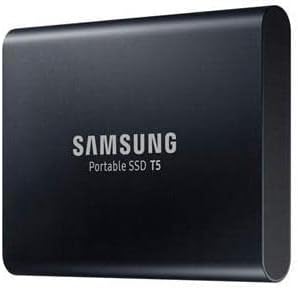
The SAMSUNG T5 Portable SSD is a reliable workhorse for large storage needs. Rated at 4.8, it is known for durability and consistent performance. Its standout quality is the solid metal design and large capacity.
We may earn a commission when you buy through this link, at no additional cost to you.
This drive offers read speeds up to 540MB/s which is slower than Gen 2 models. However, it is very reliable for backup tasks not requiring maximum speed. The metal build helps protect the internals effectively.
The trade-off is the lower speed compared to newer generations. For quick transfers, the T7 or T9 are better choices. But for archival storage, this drive is stable and robust.
We recommend this drive for users prioritizing capacity and reliability over raw speed. It is a good option for Linux users needing an external backup drive. The metal casing ensures long-term durability.
2TB of space allows for extensive backups without running out of room.
The metal chassis provides sturdy protection for the internal storage components.
We may earn a commission when you buy through this link, at no additional cost to you.
The Lexar ES3 1TB Portable SSD is designed for minimalism and speed. Rated at 4.4, it appeals to users wanting a compact drive. Its standout quality is the ultra thin design at just 10.5mm.
We may earn a commission when you buy through this link, at no additional cost to you.
This drive delivers read speeds up to 1050MB/s and includes encryption software. The lightweight 42g build makes it easy to carry in a laptop bag. The silver design looks sleek and professional.
The trade-off is that thinner cases can be more prone to damage. It lacks specific drop ratings found in rugged models. However, for careful handling, it offers great performance in a small package.
We recommend this drive for users needing a slim backup solution. It is ideal for Linux professionals carrying laptops daily. The combination of speed and portability makes it a strong contender.
The thin profile allows it to slide easily into tight pockets.
USB 3.2 Gen 2 ensures quick data access for daily tasks.
We may earn a commission when you buy through this link, at no additional cost to you.
The SAMSUNG T5 Portable SSD 500GB is a cost-effective storage solution. Rated at 4.8, it is a proven model with high user satisfaction. Its standout quality is the balance of reliability and price.
We may earn a commission when you buy through this link, at no additional cost to you.
This drive offers read speeds up to 540MB/s using V-NAND technology. The compact metal design fits easily in a pocket for daily use. The 3-year warranty provides additional peace of mind.
The trade-off is that speeds are slower than modern NVMe drives. For large files, transfers will take longer. However, for documents and basic backups, it remains highly reliable.
We recommend this drive for budget-conscious users needing extra storage. It is a solid choice for Linux users with basic requirements. The warranty and brand reputation make it a safe purchase.
A 3-year limited warranty ensures protection against manufacturing defects.
This technology provides reliable data retention and endurance.
We may earn a commission when you buy through this link, at no additional cost to you.
Selecting the right SSD involves considering speed, capacity, and physical durability. This section breaks down the key factors you should evaluate.
Linux systems often benefit from USB 3.2 Gen 2 or newer interfaces for optimal performance. Look for drives that support NVMe protocols to ensure fast data transfers. Compatibility with USB-C ports is essential for modern laptops.
Prioritize drives with high read and write speeds to handle large datasets efficiently.
Ensure the drive is formatted correctly or supports reformatting to ext4 or Btrfs. Some drives ship with pre-formatted Windows or Mac file systems that need adjustment. Checking community support for Linux mounting is also crucial.
Choose a drive that allows easy reformatting to native Linux file systems for better stability.
Assess your storage requirements based on the size of your files and backups. 500GB is good for documents, while 1TB or more is needed for media. Larger drives offer better value per gigabyte.
Select a capacity that leaves room for growth and backup redundancy.
For field work, consider IP ratings like IP65 for water and dust resistance. Drop protection ratings ensure safety if the drive is accidentally dropped. Look for sturdy metal or rubberized exteriors.
Choose rugged models if you travel frequently or work in harsh environments.
Hardware encryption like AES 256-bit adds a vital layer of security for sensitive data. Ensure the software works well with Linux or allows command-line configuration. Password protection features are essential for portable drives.
Opt for drives with built-in hardware encryption for maximum data privacy.
High-speed drives generate heat which can lead to throttling. Look for features like Dynamic Thermal Guard or aluminum casings for heat dissipation. Stable temperatures ensure consistent performance during long transfers.
Pick models with effective cooling to avoid slowdowns under load.
Ensure the drive includes both USB-C to C and USB-C to A cables. This flexibility allows connection to older devices without additional adapters. Checking cable quality helps prevent connection issues.
Select drives that offer versatile cabling for maximum connectivity options.
Compare costs based on performance per gigabyte to find the best deal. Budget options might lack rugged features but offer decent speed. Balance your financial constraints with specific needs.
Focus on the total value rather than just the sticker price to save money long term.
Always safely eject the drive using the eject command before unplugging to prevent data corruption. This ensures all pending writes are completed successfully and the file system remains intact.
Keep the drive in a cool and dry place when not in use to maintain internal components. Avoid exposing the drive to direct sunlight or extreme temperatures that could affect performance.
Regularly backup your important data to another location or cloud service for added security. Using a redundant backup strategy ensures you never lose critical files due to hardware failure.
Most modern external SSDs are compatible with Linux out of the box via USB. However, you may need to reformat them to a Linux-native file system like ext4 for optimal performance and compatibility.
Yes, you can install Linux on an external SSD and boot from it on supported systems. This is useful for running portable Linux environments across different computers without altering internal storage.
ext4 is the most common choice for general use and compatibility. Btrfs is another option offering advanced features like snapshots and compression for modern workflows.
Most modern desktop environments automatically mount external drives when connected. For command-line users, use the mount command specifying the device path and target directory to access the data.
External SSDs can significantly improve performance if used for swapping or running applications. Internal SSDs are faster, but high-quality external drives like those listed here offer solid speed.
Yes, if you handle sensitive data, hardware encryption provides robust security. It protects your files even if the physical drive is stolen or lost during travel.
USB 3.2 Gen 2 offers faster transfer speeds up to 10 Gbps compared to Gen 1 at 5 Gbps. Choosing Gen 2 ensures you get the maximum speed from your SSD drives.
We have reviewed ten top external SSDs that excel in Linux compatibility and performance. From the versatile Samsung T7 to the rugged Sandisk Extreme, each drive offers unique strengths for different needs.
Prioritize speed and encryption features if you are a professional handling sensitive data. For casual use, budget options like the SSK or Samsung T5 provide reliable storage at a lower cost.
Prices and availability change frequently so check current listings before making a final decision. Ensure the drive you choose aligns with your specific workflow requirements and storage needs.