
CyberPower ST625U Standby UPS Battery Backup and Surge Protector
4.5Editor score
Six hundred twenty five volt ampere rating
Eight power outlets total for flexibility
Two USB charging ports included
This guide compares the top ten Cyberpower UPS battery backup models to help you find the right power protection for your home office and critical electronics
Power outages and surges can damage expensive electronics and cause frustrating data loss. A reliable uninterruptible power supply keeps your devices running safely through electrical disturbances.
We evaluated ten top-rated Cyberpower models based on their output capacity, surge protection, runtime, and smart management features. This list covers various needs from basic home office use to advanced server setups.
Each pick highlights key strengths and potential trade-offs to help you choose wisely. Prices and availability change frequently so check current listings before making your final purchasing decision.
4.5Editor score

4.5Editor score

4.6Editor score
The following table provides a side by side view of all ten models. Compare their capacities, outlet counts, warranty periods, and special features to decide which fits your specific power needs.




The CyberPower CP1500PFCLCD stands out as the top choice for users needing reliable protection for modern computers with Active Power Factor Correction. It delivers a true sine wave output which ensures compatibility with high efficiency power supplies that often reject simulated waveforms.
We may earn a commission when you buy through this link, at no additional cost to you.
Its color LCD panel provides immediate and detailed information on battery conditions and power status helping you stay informed about system health. The automatic voltage regulation corrects minor fluctuations without draining the battery significantly extending its operational life.
While it carries a higher price tag and occupies more desk space than smaller units its performance justifies the investment for critical workloads. Users seeking peace of mind for their expensive hardware will appreciate its robust build and safety certifications.
This model is ideal for gamers content creators and professionals whose downtime costs money. If you need dependable power protection that works seamlessly with modern PC components this unit is the recommended choice.
Active PFC power supplies require pure sine wave power to operate correctly without triggering safety shutdowns during a blackout event.
The color screen alerts users to potential issues early preventing unexpected shutdowns and data loss during critical tasks.
We may earn a commission when you buy through this link, at no additional cost to you.
The CyberPower ST625U is an excellent entry level solution for users needing basic protection for smaller setups like gaming consoles or internet routers. It offers a low cost way to safeguard your gear from sudden outages without breaking your budget.
We may earn a commission when you buy through this link, at no additional cost to you.
Despite its size it includes practical features like USB charging ports that keep your phone charged even when the power is down. The GreenPower design ensures it runs efficiently consuming less energy than older standby models.
Because it is designed for light loads it is not suitable for powering high wattage desktop PCs or workstations. However for routers or media players it provides reliable backup power for enough time to prevent connection drops.
Choose this unit if you need a simple reliable backup for essential peripherals. It is the perfect choice for renters or anyone needing a no fuss power protector.
The high efficiency design reduces power consumption during normal operation saving energy and lowering electricity costs.
Integrated USB ports allow you to keep smartphones and tablets powered during an outage without using wall adapters.
We may earn a commission when you buy through this link, at no additional cost to you.
The CyberPower EC850LCD focuses on energy efficiency by using ECO controlled outlets to manage peripheral power. When your computer goes to sleep or powers off the connected peripherals also shut down automatically reducing waste.
We may earn a commission when you buy through this link, at no additional cost to you.
This model offers a generous twelve outlets giving you plenty of space for monitors speakers and other accessories. The LCD panel keeps you updated on battery status and estimated runtime so you know when to save your work.
The ECO feature is great for reducing your carbon footprint and monthly electricity bills. However you must plug peripherals into the correct outlets to ensure the feature functions as intended.
Ideal for home offices with multiple devices this unit balances performance with smart energy management. If saving power is a priority for you this is a strong contender.
ECO outlets automatically cut power to non essential devices when the main computer sleeps saving significant energy.
With twelve total outlets you can connect almost everything in your setup without needing extra power strips.
We may earn a commission when you buy through this link, at no additional cost to you.
The CyberPower CP1500AVRLCD3 delivers high capacity power protection at a reasonable price making it a great value. Its fifteen hundred volt ampere rating handles multiple devices simultaneously while maintaining stable output during fluctuations.
We may earn a commission when you buy through this link, at no additional cost to you.
The color LCD interface offers detailed information allowing you to monitor system health easily. Automatic Voltage Regulation corrects minor issues without using battery power which extends the unit service life significantly.
While it uses a simulated sine wave it works well with most standard electronics. High end gaming PCs with specific requirements might need a true sine wave model instead for perfect compatibility.
This model is perfect for users wanting maximum capacity without a premium price. If you need to power a full workstation setup this unit is a smart choice.
The 1500VA capacity supports heavy loads ensuring your main computer and monitor stay powered during an outage.
The intelligent LCD keeps you informed of battery life and load status for proactive maintenance.
We may earn a commission when you buy through this link, at no additional cost to you.
The CyberPower AVRG900LCD is distinguished by its built in telephone line protection safeguarding modems and fax machines. This feature makes it ideal for older setups that still rely on copper phone lines for internet or data.
We may earn a commission when you buy through this link, at no additional cost to you.
It offers twelve outlets which is generous for its size and allows flexible device connections. The LCD panel provides essential status information keeping you aware of any electrical issues affecting your system.
While the wattage is lower than top models it is sufficient for standard office computers and accessories. The lack of USB ports is a minor downside compared to newer models that charge devices directly.
This unit is a strong choice for offices with legacy communication gear. If protecting phone lines is a priority this model offers necessary coverage and solid reliability.
Phone and coax protection prevents surges from traveling through data lines and damaging sensitive network equipment.
Twelve outlets provide ample connection points for computers monitors printers and other office peripherals.
We may earn a commission when you buy through this link, at no additional cost to you.
The CyberPower PR1500LCD is designed for high demand environments where uptime is critical. Its robust build and high capacity rating make it suitable for department servers and storage appliances that cannot afford downtime.
We may earn a commission when you buy through this link, at no additional cost to you.
It features true sine wave output ensuring seamless operation with active power factor correction systems. The extended LCD panel allows for flexible installation in hard to reach places keeping important status information visible.
While expensive this model offers enterprise level features like remote management card support for larger networks. The reliability and safety certifications provide peace of mind for business critical applications.
This unit is best suited for small businesses or server rooms. If you need dependable power protection for professional gear this premium model is the top choice.
Optional remote management cards allow administrators to monitor UPS status and control power from afar easily.
The relocatable display helps users see critical alerts even when the UPS is installed in a rack.
We may earn a commission when you buy through this link, at no additional cost to you.
The CyberPower CP1500AVRLCD is a reliable choice for home entertainment setups requiring consistent power. It supports gaming consoles and home theater systems with enough capacity to keep them running briefly during outages.
We may earn a commission when you buy through this link, at no additional cost to you.
The intelligent LCD displays estimated runtime and battery capacity helping you know exactly how much time you have. This feature is useful for saving work and shutting down safely before the battery runs out.
Its twelve outlets allow you to connect multiple devices in one cluster. The automatic voltage regulation extends battery life by correcting fluctuations without switching to battery unnecessarily.
Ideal for gamers and movie buffs this unit offers solid protection without a premium price. It is a reliable choice for protecting your living room electronics effectively.
The smart LCD provides real time estimates of remaining runtime helping you plan safe shutdowns.
High wattage capacity ensures your console and TV stay powered during short interruptions.
We may earn a commission when you buy through this link, at no additional cost to you.
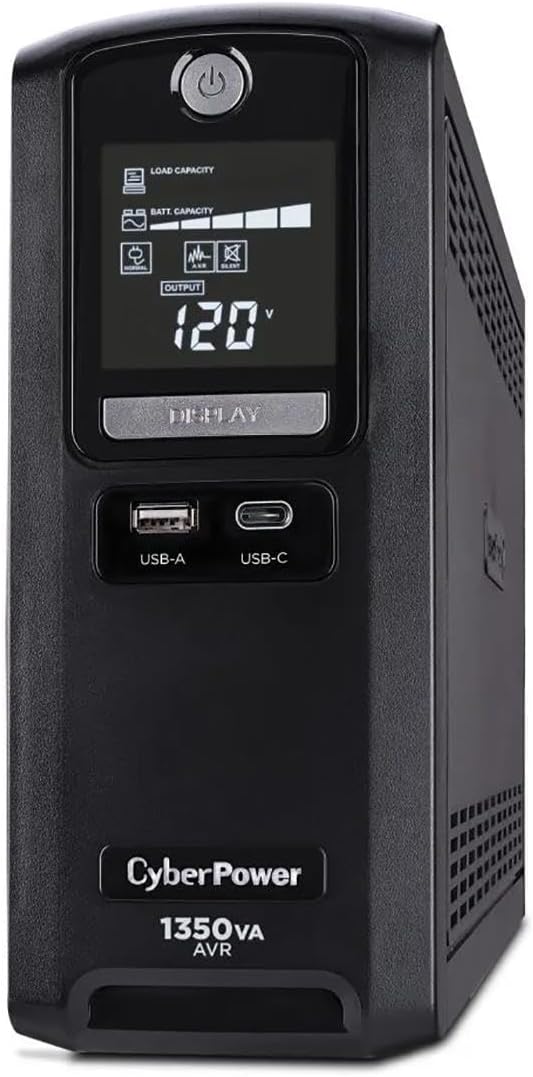
The CyberPower CST135UC stands out for its strong data line protection which is vital for modern connected homes. It safeguards both your computer and your network cables from voltage spikes and surges.
We may earn a commission when you buy through this link, at no additional cost to you.
It includes a USB-C port which is a modern touch for charging tablets or phones during a blackout. The 1500 Joules of surge suppression offers high level protection for your valuable electronics.
With Energy Star certification this unit minimizes energy consumption during normal operation. It is a balanced choice for tech savvy users who want modern features and reliable protection.
This model is perfect for home offices with routers and network gear. If you value connectivity and modern charging options this unit fits the bill perfectly.
Network and coax protection ensures that surges entering via internet lines do not damage your equipment.
The Type-C port allows fast charging for new devices without needing extra adapters.
We may earn a commission when you buy through this link, at no additional cost to you.
The CyberPower BRG1500AVRLCD2 offers a five year warranty which is rare and valuable for UPS units. This long term coverage provides added security for your investment and shows confidence in the product's durability.
We may earn a commission when you buy through this link, at no additional cost to you.
It delivers high capacity protection for desktop computers and workstations. The color LCD panel alerts you to potential issues before they affect your equipment helping you avoid unexpected downtime.
While it is pricier than average the extended warranty makes it a sound long term choice. If you plan to keep the unit for many years this model ensures lasting peace of mind.
This unit is ideal for professionals who need reliable backup over a long period. The warranty and robust features make it a top recommendation for long term use.
A five year warranty covers the battery and unit ensuring you are protected for years.
The color display keeps you informed about load and battery conditions for proactive maintenance.
We may earn a commission when you buy through this link, at no additional cost to you.
The CyberPower OR1500LCDRT2U is designed for rackmount environments where saving space is essential. Its compact 2U profile allows it to be installed directly into server racks for efficient power protection.
We may earn a commission when you buy through this link, at no additional cost to you.
It features a high wattage output suitable for servers and network gear. The LCD screen provides detailed runtime info so administrators know exactly how long the system can support operations.
While it is a premium option its form factor makes it indispensable for professional setups. It is a practical choice for data centers and IT rooms needing compact reliability.
Choose this model if you need to mount power protection in a rack. It delivers high performance and professional features for demanding environments.
The 2U design fits standard server racks saving floor space while keeping protection centralized.
The multi-function screen offers real time updates to keep administrators informed of system status.
We may earn a commission when you buy through this link, at no additional cost to you.
Selecting the right UPS involves balancing capacity features and budget. This section outlines the critical factors to consider before purchasing a new system.
The Volt Ampere (VA) and wattage ratings determine how much power the UPS can deliver. To choose correctly add up the wattage of all devices you plan to connect and ensure the UPS rating exceeds that total by at least twenty percent.
Always check the wattage rating rather than just VA to ensure your computer power supply gets enough energy to operate safely during an outage.
UPS units come with simulated or true sine wave outputs. Most desktop computers tolerate simulated sine waves well but Active Power Factor Correction (PFC) power supplies require true sine wave to function correctly.
If you use high end gaming PCs or server grade equipment prioritize a model that offers true sine wave output to avoid hardware shutdowns.
Modern setups require multiple outlets for computers monitors printers and networking gear. Count your current devices and plan for future expansions to ensure the UPS has enough battery backed surge protected outlets.
Look for USB charging ports for mobile devices as these add convenience and reduce the need for extra power adapters during an outage.
AVR technology stabilizes incoming voltage without draining the battery. This feature protects connected devices from under and over voltage conditions while preserving battery health for actual outages.
Prioritize units with AVR to extend the lifespan of your UPS battery and reduce unnecessary switching during minor power fluctuations.
Surge protection is measured in Joules and indicates how much energy the unit can absorb. A higher Joule rating means better defense against spikes from lightning or grid disturbances.
Choose a model with at least 1000 Joules for comprehensive protection of sensitive electronics in your home office setup.
A longer warranty reflects the manufacturer's confidence in the product. Most units offer three years but some premium models offer five years covering the battery and connected equipment.
Check the details of the Connected Equipment Guarantee to understand what financial protections are included with the warranty policy.
Software tools allow you to monitor battery health and perform safe automatic shutdowns. Some high end models require extra management cards for networked control which should be factored into your budget.
Ensure the UPS supports compatible software for your operating system to take full advantage of monitoring and automation features.
Tower models fit on desks while rackmount units fit into server racks. Ensure the dimensions fit your space and that the weight is manageable for placement.
Consider the cord length and outlet direction to ensure you can plug it in easily without cable clutter.
Proper setup ensures your equipment is protected effectively. Plug the UPS into a grounded wall outlet and connect your devices to the battery backed and surge protected outlets not just any outlets.
Calibrate the battery annually to ensure runtime displays are accurate. Most units have a self-test feature or a calibration option in the software that you can run every six to twelve months.
Replace the battery every three to five years depending on usage. Over time batteries degrade and may not provide sufficient runtime during an outage so regular replacement is essential for reliability.
If your computer power supply has Active Power Factor Correction (PFC) you need a true sine wave UPS. Most modern high efficiency power supplies require this to avoid shutdowns during battery mode.
Runtime depends on the load. A unit might last ten minutes with a light load but only two minutes at full capacity. Check the runtime charts in product specs for your specific wattage.
You can plug in printers but be aware that power surges during printing cycles can draw significant power. Use the surge protected outlets for printers to avoid draining battery too fast.
Once the battery reaches critical levels the UPS will shut off connected devices to prevent damage. Ensure you save your work as you will lose power once the reserve is gone.
Yes all sealed lead acid batteries in these units are replaceable. You can buy a replacement battery kit from CyberPower or a third party vendor easily.
Yes the UPS switches to battery power within milliseconds during a blackout. This ensures your devices continue running without interruption giving you time to save data.
The CyberPower CP1500PFCLCD leads the group for its true sine wave output and detailed LCD monitoring. It is the safest choice for modern computers with Active Power Factor Correction supplies.
For budget conscious buyers the ST625U offers solid protection at an affordable price. It is perfect for basic setups where saving money is as important as protecting equipment.
Prices and availability change frequently so check the latest deals before buying. Investing in a quality UPS now can save you money and frustration by preventing hardware damage later.