
ASRock J4125M
3.4Editor score
Quad Core J4125 CPU
DDR4 Memory Support
Compact Micro ATX Design
Discover the top low power motherboard options for energy efficient builds NAS servers and compact PCs with expert comparisons and detailed product reviews.
Finding the right low power motherboard is essential for building energy efficient systems like NAS servers home labs or compact office PCs that run quietly and save electricity over time.
We evaluated ten top models based on power consumption features performance and reliability to help you choose the best platform for your specific needs without compromising on stability or connectivity.
Each pick highlights key strengths and ideal use cases so you can compare options quickly. Please note that pricing and availability may change so check current listings before making your final decision.
3.4Editor score

4.5Editor score

5.0Editor score
This side by side comparison highlights the key specifications and unique features of each low power motherboard to help you quickly identify the best fit for your project.





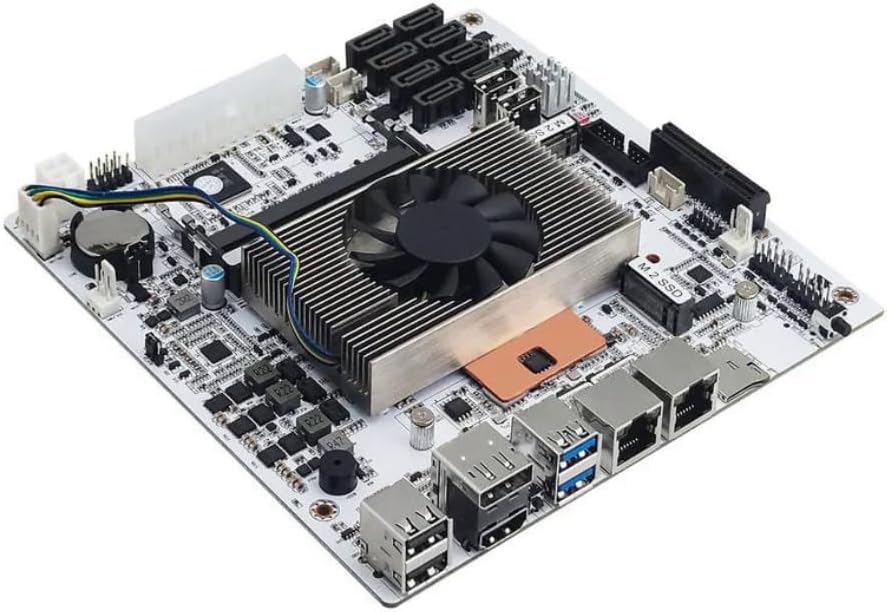
This industrial NAS motherboard stands out for its impressive network capabilities and low power design making it ideal for home labs and enterprise appliances.
We may earn a commission when you buy through this link, at no additional cost to you.
Equipped with four 2.5GbE ports and a capable Celeron N5105 processor it delivers stable performance for virtualization and media streaming without high energy costs.
While the initial boot process can be slow as memory loads the features and thermal design justify the wait for users needing reliable always on systems.
Choose this board if you need extensive LAN ports and efficient processing in a compact package for professional or advanced home server applications.
The four integrated 2.5GbE ports allow for link aggregation and high speed data transfer essential for NAS and firewall setups.
Dual video outputs support 4K at 60Hz enabling flexible display configurations for monitoring or multi screen tasks.
We may earn a commission when you buy through this link, at no additional cost to you.
This budget friendly Micro ATX board is perfect for users who need a basic low power system without the cost of modern DDR4 components.
We may earn a commission when you buy through this link, at no additional cost to you.
The integrated J1800 processor ensures minimal power draw making it suitable for light tasks like browsing or light office work in a compact case.
While it lacks PCIe 4.0 and faster memory support its simplicity and low cost make it a viable option for very specific legacy or entry level builds.
Consider this model if you are working with tight constraints and do not require high speed storage or advanced graphics capabilities.
Pricing significantly lower than newer boards it offers a functional platform for basic computing needs with minimal investment.
Includes PS2 and VGA ports which are still useful for industrial control panels or older peripheral compatibility.
We may earn a commission when you buy through this link, at no additional cost to you.
This Micro ATX board brings modern Ryzen 5000 support to a budget price point allowing users to build efficient systems without sacrificing future upgradability.
We may earn a commission when you buy through this link, at no additional cost to you.
With PCIe 4.0 and dual M.2 slots it provides enough speed for fast storage and graphics cards while maintaining low power consumption when paired with efficient CPUs.
The power delivery is adequate for standard CPUs but may struggle with high end overclocking which aligns with its target market of general users and budget builders.
Choose this motherboard if you need an inexpensive entry into the AM4 ecosystem with reliable features for everyday computing tasks.
PCIe 4.0 compatibility ensures your NVMe drives perform at top speeds for quick boot times and fast application loading.
Supports a wide range of Ryzen processors giving you flexibility to upgrade later without changing the motherboard.
We may earn a commission when you buy through this link, at no additional cost to you.
This Micro ATX board balances performance and efficiency with Core Boost technology and Frozr AI cooling to maintain stability under load while managing power draw.
We may earn a commission when you buy through this link, at no additional cost to you.
It supports high speed DDR4 memory and provides a full Gen4 M.2 slot for storage which is rare at this price level and beneficial for responsive system performance.
While it lacks wireless connectivity and the IO panel is minimal the board delivers a solid foundation for home servers or compact workstations that rely on wired networks.
Pick this option if you want reliable AMD performance and modern storage speeds without paying for unnecessary premium features.
The chipset heatsink and AI cooling features help keep temperatures low ensuring consistent performance during extended usage periods.
Memory boost technology allows for higher DDR4 speeds improving system responsiveness for multitasking and virtualization tasks.
We may earn a commission when you buy through this link, at no additional cost to you.
This small form factor board is designed for extremely efficient computing with a quad core processor that handles light tasks while drawing minimal power from the outlet.
We may earn a commission when you buy through this link, at no additional cost to you.
It supports DDR4 memory which is an upgrade over older generations making it useful for home media centers or lightweight Linux servers requiring some RAM.
The PCIe slots are limited to 2.0 speeds but this does not matter for the intended use cases of this board which focus on efficiency over raw throughput.
Consider this board if you want a simple low cost way to build a system that runs quietly and consumes very little electricity year round.
The J4125 processor ensures that the system remains energy efficient even when running continuously in the background.
Micro ATX size fits in many cases allowing flexibility in placement while keeping the build compact and organized.
We may earn a commission when you buy through this link, at no additional cost to you.
This board offers unique legacy display support with HDMI DVI and VGA outputs which makes it versatile for office systems that need to connect to older monitors.
We may earn a commission when you buy through this link, at no additional cost to you.
It supports Ryzen 5000 processors and high speed DDR4 memory providing a good balance of power efficiency and performance for users who value compatibility.
The power design ensures stable operation under load but the limited RAM slots may constrain future upgrades if you plan to run heavy virtual machines later.
Select this option if you need a flexible video setup and reliable AMD support in a compact budget friendly package for general office use.
Multiple video ports allow you to connect to a wide range of monitors including older VGA screens without needing adapters.
Memory speeds up to 4733MHz offer extra headroom for users who want to squeeze out more performance from their RAM.
We may earn a commission when you buy through this link, at no additional cost to you.
This compact Mini ITX board is perfect for small builds that still need decent power delivery and wireless connectivity without requiring extra cards or adapters.
We may earn a commission when you buy through this link, at no additional cost to you.
The 6 phase digital PWM ensures stable power for Ryzen processors while the Intel WiFi and Bluetooth modules save valuable expansion slots in tight cases.
Storage options are limited to one M.2 slot but the board handles standard PCIe 3.0 speeds well which is sufficient for most users and home server projects.
Choose this board if you need to fit a powerful low power system into a tiny case without sacrificing wireless features or thermal performance.
Built-in Intel WiFi saves you from needing a separate network card keeping the system small and simple to assemble.
Multiple video ports on the rear let you connect two screens easily for multitasking or monitoring in a small footprint.
We may earn a commission when you buy through this link, at no additional cost to you.
This board stands out for its premium feature set including Wi-Fi 6E which provides the fastest wireless speeds available and ample USB ports for all your peripherals.
We may earn a commission when you buy through this link, at no additional cost to you.
It supports up to 128GB of RAM which is rare for Micro ATX boards and makes it ideal for heavy virtualization or workstation tasks while maintaining low idle power.
The 8-phase power design ensures stability even with high end Ryzen chips but the higher cost reflects the advanced features you are getting in this package.
Invest in this motherboard if you need top tier connectivity and memory capacity for a professional or enthusiast build that runs efficiently.
Wi-Fi 6E support ensures you get the fastest possible wireless connection for gaming or streaming without lag.
Four DIMM slots allow for massive RAM upgrades so your system can handle dozens of virtual machines at once.
We may earn a commission when you buy through this link, at no additional cost to you.
This industrial grade board packs an impressive eight SATA ports and dual 2.5GbE LAN into a Mini ITX form factor which is a rare combination for low power systems.
We may earn a commission when you buy through this link, at no additional cost to you.
The 8th Gen U-series processor provides good single thread performance while keeping power usage low making it suitable for home labs that need lots of drive connectivity.
There are some known quirks like sleep mode issues and complex power requirements but the storage and networking capabilities make it a strong choice for advanced users.
Consider this board if you need maximum storage and network capacity in a tiny case and are comfortable with some technical setup challenges.
Eight SATA ports allow you to connect many drives without needing expensive expansion cards for your NAS build.
Dual 2.5GbE ports support link aggregation or separate management and traffic networks for professional setups.
We may earn a commission when you buy through this link, at no additional cost to you.
This board is a powerhouse for low power builds featuring a Core i5 CPU that delivers significantly more performance than standard Celeron options for heavy virtualization work.
We may earn a commission when you buy through this link, at no additional cost to you.
It supports eight drives and two NVMe SSDs offering incredible flexibility for storage while maintaining a compact Mini ITX profile suitable for small server rooms.
The lack of sleep mode and the ES version CPU mean it is designed for 24/7 operation rather than portable use which fits its intended role perfectly.
Choose this motherboard if you need a robust platform for a high performance NAS or virtualization host that runs continuously without waking up issues.
The Core i5 processor handles complex tasks like Docker containers and transcoding much better than entry level chips.
Eight SATA ports plus two M.2 slots give you enough room for all your data needs without expansion cards.
We may earn a commission when you buy through this link, at no additional cost to you.
Selecting the right low power motherboard requires balancing efficiency performance and connectivity to ensure your system runs smoothly without draining your budget or energy bills.
The Total Design Power (TDP) of the CPU and motherboard determines how much electricity your system uses. Look for boards with low wattage CPUs like Intel Celeron or AMD APU options to minimize energy costs over time.
Prioritize models with efficient power delivery systems like digital VRMs to ensure stable operation without excessive heat or energy waste.
Check if the motherboard supports DDR4 or DDR5 as these offer better performance and lower power than older generations. Ensure the board has enough DIMM slots for your storage needs.
Aim for at least two slots to allow for future upgrades without replacing the entire motherboard later.
Modern low power motherboards should include M.2 NVMe slots for fast boot times alongside multiple SATA ports for mass storage. Verify the number of ports based on your drive requirements.
More SATA ports are crucial for NAS builds while a single M.2 slot may suffice for standard office PCs.
If you are building a home server or NAS prioritize boards with multiple Gigabit or 2.5GbE LAN ports for better data throughput. Some industrial boards include four or more network interfaces.
For general use a single Gigabit port is often enough but check if Wi-Fi is included to avoid buying extra cards.
Choose between Mini ITX and Micro ATX based on your case size. Mini ITX boards are smaller and consume less power but often have fewer expansion slots.
Micro ATX boards offer more flexibility for expansion while still fitting in compact cases for low power builds.
Ensure the board has the video ports you need such as HDMI DP or VGA for your monitors. Some industrial boards offer legacy support for older displays.
Multiple video outputs are useful for multi-monitor setups in server management or digital signage applications.
For users running virtual machines look for CPUs that support VT-x and VT-d. This allows you to pass through devices like network cards directly to VMs.
This feature is critical for professional environments where isolation and performance are key for your applications.
High quality capacitors and heatsinks help maintain stability during long runtimes. Industrial grade boards often offer better durability for 24/7 operation.
Select a board with good passive cooling or fan headers to manage heat effectively without extra noise.
Install the motherboard in a compatible case ensuring all standoffs are in place to prevent short circuits. Connect the power supply carefully ensuring all required connectors are secure.
Set up your BIOS to enable power saving features like C-states and speed step to maximize efficiency. Configure network settings and storage drives according to your OS needs.
Keep the system clean from dust regularly using compressed air to prevent overheating. Monitor temperatures and fan speeds through software tools to ensure long term reliability.
A low power motherboard is designed for systems that need to run continuously with minimal energy use. Common uses include home servers, NAS storage, media centers, and small office PCs where quiet operation and cost savings are priorities.
Yes many modern low power boards support latest generation CPUs from Intel and AMD. Look for AM4 or recent Intel socket boards to ensure you can use efficient newer processors with better performance.
Most low power motherboards currently support DDR4 due to cost and efficiency reasons. DDR5 is available on high end platforms but may increase power consumption slightly which goes against the low power goal.
These boards typically draw between 10 to 30 watts at idle depending on the CPU and workload. With efficient designs you can build a system that runs under 50 watts even under moderate usage.
Industrial boards often include extra LAN ports and better durability for 24/7 operation. If you need multiple network interfaces or long term reliability they are worth the investment over standard consumer boards.
Yes standard ATX power supplies work fine with these boards. Just ensure you have the correct connectors such as 24-pin and 4-pin CPU power which some industrial boards require for stability.
Look for boards with multiple SATA ports and at least two network interfaces. Models like the Celeron N5105 Industrial or Core i5 NAS boards are excellent choices for robust storage systems.
Some do especially those with integrated processors like the J4125 or N5105. Others require you to buy a CPU separately. Always check the product description to confirm if the processor is included before purchasing.
We have reviewed ten top low power motherboards ranging from budget friendly options to premium industrial models. Whether you need a compact ITX board or a NAS solution with multiple drives there is a choice here for every need.
Focus on power efficiency and connectivity features that match your specific project. Balancing performance with low energy consumption is the key to building a reliable and cost effective system that runs day and night.
Remember to check current availability and compatibility before buying as specifications can change. Selecting the right motherboard ensures your project starts on the right foot with stable and efficient performance.