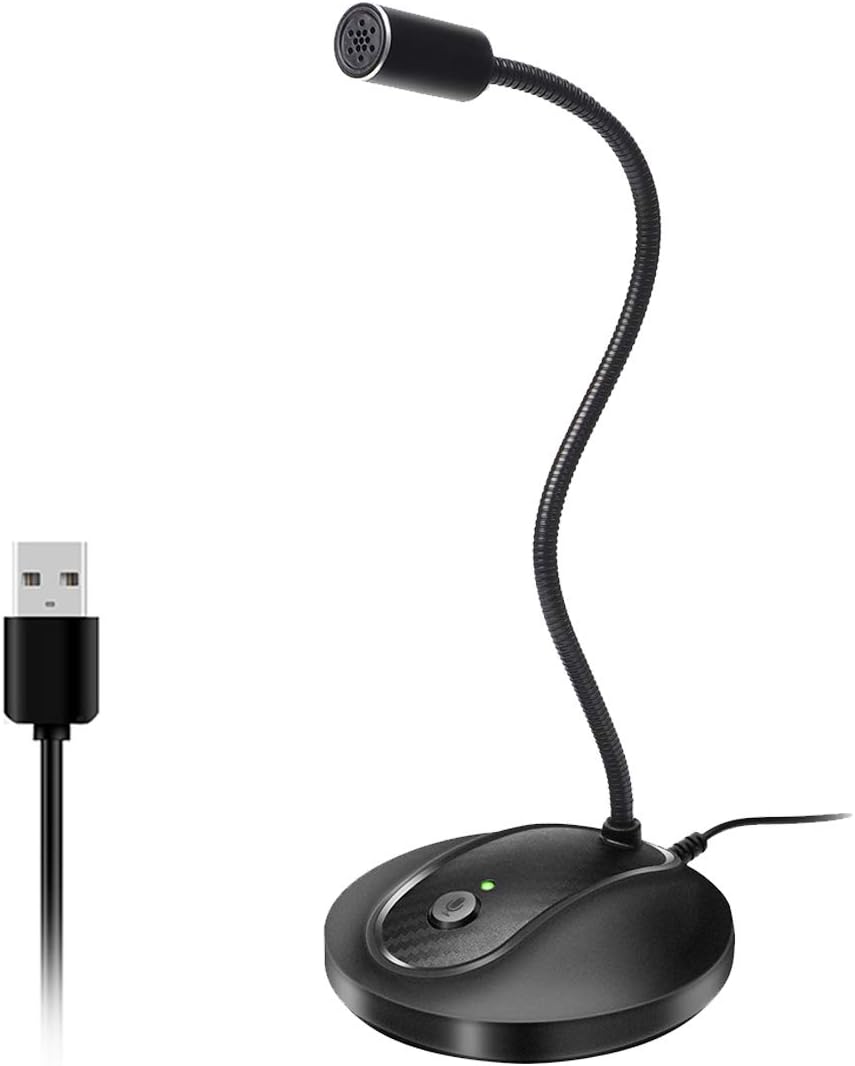
USB Microphone with Gooseneck
4.4Editor score
360 degree adjustable neck
Built-in mute button
Noise-canceling technology
Discover the top-rated dictation microphone for computer to enhance your workflow. We compare features, audio quality, and compatibility for seamless voice
Choosing the right dictation microphone for computer use is essential for professionals who rely on voice-to-text software. A high-quality mic ensures accurate transcription and reduces fatigue during long sessions.
We evaluated ten top models based on audio clarity, build quality, ease of setup, and compatibility with major speech recognition platforms. Our analysis focuses on real-world performance for daily tasks.
Each pick highlights key strengths and ideal use cases to help you find the perfect fit for your needs. Please note that product availability and pricing may change over time.
4.4Editor score

4.6Editor score

4.2Editor score
This side-by-side comparison highlights the core specifications and strengths of each model to help you make an informed decision quickly.




The USB Microphone with Gooseneck offers an affordable entry point for users seeking a dedicated dictation microphone for computer systems. With a rating of 4.4 stars, it is praised for its simplicity and effectiveness in capturing clear audio for speech recognition software like Dragon.
We may earn a commission when you buy through this link, at no additional cost to you.
Its standout feature is the 360-degree adjustable gooseneck, which allows you to position the mic precisely for optimal sound capture. The built-in noise-canceling technology helps reduce background distractions, ensuring your voice is prioritized during transcription sessions.
While it lacks advanced software features, the hardware is reliable. The one-click mute button and LED indicator provide essential control without cluttering your workspace. Users appreciate the solid construction that keeps the mic stable on desks.
This mic is ideal for students or professionals on a budget who need a reliable tool for voice-to-text tasks. It is a practical choice for those who value ease of use and do not require complex audio customization.
The adjustable gooseneck allows you to fine-tune the microphone's location for the clearest possible voice input.
Intelligent noise-canceling technology filters out ambient sounds to maintain transcription accuracy.
We may earn a commission when you buy through this link, at no additional cost to you.
The Philips LFH3500 SpeechMike stands out as a premium option for professionals who require precision in their dictation work. Rated at 4.2 stars, it is designed to integrate seamlessly with high-end speech recognition environments.
We may earn a commission when you buy through this link, at no additional cost to you.
Its free-floating microphone design and built-in pop filter ensure that recordings are free from handling noise and plosives. The motion sensor and configurable function keys allow for a highly customized workflow, reducing the need for keyboard shortcuts.
While the price is higher than budget models, the investment pays off in accuracy and durability. The device is built for heavy daily use and provides crystal-clear sound that improves transcription efficiency significantly.
This microphone is best suited for legal or medical professionals who dictate extensively. If you need a tool that supports complex workflows and offers superior audio quality, the SpeechMike is a strong contender.
Configurable function keys allow you to map frequently used commands directly to the microphone for faster access.
The floating microphone element reduces mechanical noise transmission from the desk to your recordings.
We may earn a commission when you buy through this link, at no additional cost to you.
The FIFINE Mini Gooseneck USB is a versatile tool designed for portability without sacrificing audio performance for dictation tasks. With a 4.3-star rating, it is favored by users who need a reliable microphone that can move with them.
We may earn a commission when you buy through this link, at no additional cost to you.
Its tiny design takes up minimal desk space, making it perfect for compact setups. The flexible gooseneck allows for easy positioning, while the included windscreen helps reduce background noise for clearer recordings.
Although it is built with lightweight materials, it holds its ground well during use. The long cable provides flexibility in positioning, ensuring you can reach the optimal spot for voice capture regardless of your desk layout.
This mic is a great choice for travelers or those with limited desk space. It offers a solid balance of functionality and convenience, making it a reliable companion for dictation and general recording needs.
The mini footprint ensures that your workspace remains clutter-free even when the microphone is in use.
The included windscreen helps minimize plosive sounds and improves overall audio clarity during dictation.
We may earn a commission when you buy through this link, at no additional cost to you.
The Blue Yeti USB Microphone is a legendary device that excels in providing broadcast-quality audio for dictation and more. With a 4.6-star rating, it is celebrated for its flexibility and premium sound output that exceeds standard dictation needs.
We may earn a commission when you buy through this link, at no additional cost to you.
Its custom three-capsule array allows for four different pickup patterns, giving you precise control over how sound is captured. This flexibility ensures that your voice is recorded clearly even in less-than-ideal acoustic environments.
The onboard controls for gain and mute make it easy to adjust levels on the fly. The Blue VOICE software further enhances vocal clarity, making it a top choice for professionals who want premium audio quality.
While it is larger than standard dictation mics, its performance justifies the space. If you need a single microphone that can handle both professional dictation and other audio tasks, the Blue Yeti is the definitive choice.
Switch between cardioid and omnidirectional patterns to suit different recording scenarios and room acoustics.
Blue VOICE effects provide additional tools to refine your voice for clearer and more professional dictation.
We may earn a commission when you buy through this link, at no additional cost to you.
The TONOR Conference Microphone is designed to capture sound from all directions, making it excellent for scenarios where multiple people might contribute to dictation. It holds a 4.3-star rating for its reliable performance in office settings.
We may earn a commission when you buy through this link, at no additional cost to you.
With a pickup range of 11.5 feet, it ensures that voices are captured clearly without needing to lean in. The omnidirectional pattern allows for natural speech capture, which is essential for accurate transcription in collaborative environments.
The metal construction and anti-slip base ensure the mic stays stable during use. The mute button offers quick access to control recording status, which is convenient during meetings or shared workspace usage.
This microphone is ideal for offices where dictation needs are shared among team members. It offers a wide capture zone and professional build quality, making it a robust solution for collaborative voice recording.
The 11.5 foot pickup distance ensures that voices across the table are captured clearly without moving.
The heavy base with anti-slip mat prevents the microphone from sliding during active use or adjustments.
We may earn a commission when you buy through this link, at no additional cost to you.
The ZealSound Podcast Microphone brings professional audio features to the dictation market with its intelligent noise reduction capabilities. Rated at 4.4 stars, it is designed to deliver clean recordings even in noisy environments.
We may earn a commission when you buy through this link, at no additional cost to you.
Its noise reduction mode actively filters out background noises like fans or chatter, ensuring your voice stands out. The cardioid pickup pattern focuses on your voice while ignoring ambient sounds from the sides.
Real-time zero-latency monitoring lets you hear your voice exactly as it is recorded, allowing for immediate adjustments. The echo control and gain knobs provide hands-on control over your audio profile without software delays.
This mic is perfect for users who work in less-controlled environments and need extra noise protection. With its robust set of controls and clear audio output, it is a powerful tool for high-quality voice input.
The intelligent noise reduction mode helps eliminate ambient sounds to maintain transcription accuracy.
Zero-latency monitoring allows you to hear exactly what is being recorded without any delay or lag.
We may earn a commission when you buy through this link, at no additional cost to you.
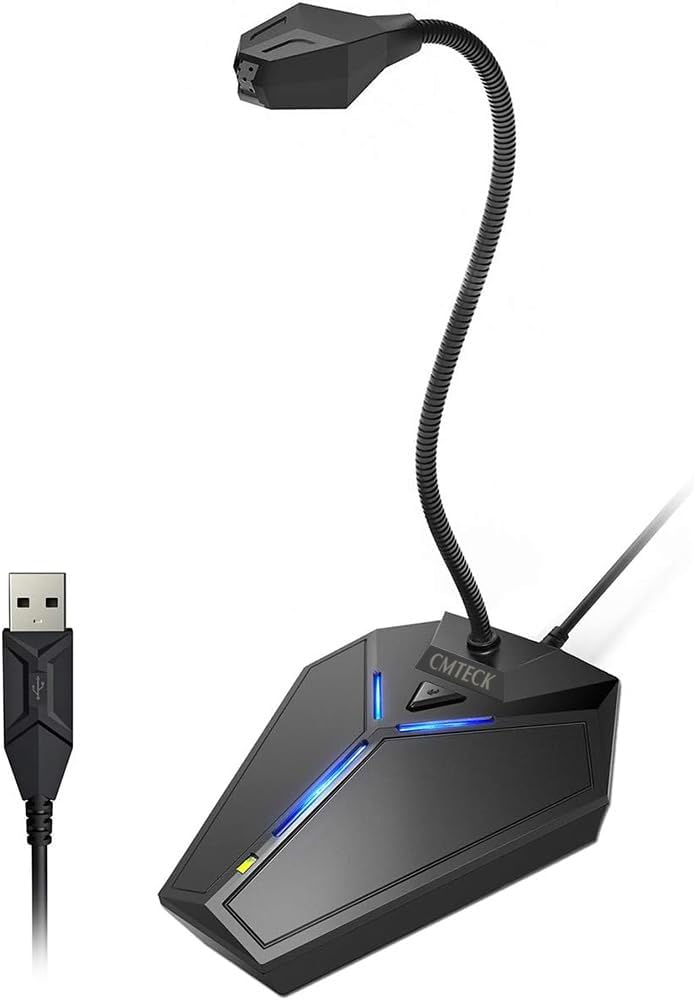
The CMTECK USB Computer Microphone is a straightforward tool designed for users who value simplicity and quick setup. With a 4.4-star rating, it delivers reliable audio performance that meets the needs of basic dictation tasks effectively.
We may earn a commission when you buy through this link, at no additional cost to you.
It features a high-performance smart chip that suppresses background noise to keep your voice clear. The flexible gooseneck allows you to adjust the angle easily, ensuring optimal positioning without any complicated tools.
Visual indicators like the unique blue LED light provide clear status updates during use. The built-in mute button makes it easy to control when you are transmitting audio, preventing accidental recordings during silence.
This microphone is a great fit for home office users who want a hassle-free experience. It provides the essential features needed for dictation without unnecessary complexity or expensive add-ons.
True plug and play compatibility ensures you can start dictating immediately after connecting the USB cable.
The blue LED indicator light helps you quickly check the microphone's status at a glance.
We may earn a commission when you buy through this link, at no additional cost to you.
The Nuance PowerMic III combines a microphone with mouse capabilities to streamline your dictation workflow. Rated at 4.2 stars, it is designed to help professionals switch between speaking and controlling the PC seamlessly.
We may earn a commission when you buy through this link, at no additional cost to you.
Its ergonomic design allows for thumb control operation, making it easy to execute commands without using your hands. The unidirectional microphone focuses on your voice, ensuring high accuracy even in noisy office settings.
This device is tightly integrated with Dragon software, offering features that are specific to high-volume dictation users. The long cord provides flexibility in movement while maintaining a stable connection for uninterrupted recording.
It is best suited for users who spend most of their day dictating and want to minimize physical interruptions. The ability to control the mouse with the microphone significantly boosts productivity for heavy users.
Combining mouse and microphone functions allows you to navigate the computer while continuing to dictate.
The unidirectional pickup ensures your voice is captured clearly while filtering out surrounding noise.
We may earn a commission when you buy through this link, at no additional cost to you.
The PHILIPS LFH3200 SpeechMike III Pro is a professional device known for its accuracy in delivering speech recognition results. With a 4.3-star rating, it is trusted by professionals who need reliable tools for daily dictation.
We may earn a commission when you buy through this link, at no additional cost to you.
Its noise-canceling technology ensures that your voice is transcribed accurately even in busy environments. The push button operation provides a tactile control method that many professionals find intuitive and efficient to use.
Designed for Dragon Naturally Speaking, it integrates well with existing workflows in legal or medical fields. The crystal-clear playback feature helps you review your dictated notes with confidence and clarity.
This microphone is ideal for professionals who require consistency and high-quality results. Its energy-efficient design and professional build make it a dependable choice for long-term daily use.
Energy Star compliance means you can use the device continuously without worrying about high power consumption.
Push button operation allows for precise control over recording sessions without navigating menus.
We may earn a commission when you buy through this link, at no additional cost to you.
The OLYMPUS RecMic II is a specialized device featuring a trackball and push buttons for precise control during dictation sessions. It has a 4.0-star rating and is valued for its mechanical precision and tactile feedback.
We may earn a commission when you buy through this link, at no additional cost to you.
The improved trackball functionality allows you to navigate documents while dictating, offering a unique workflow advantage. Silent keys and UV coating minimize annoying contact noise, keeping your focus on the content rather than the device.
It supports Dragon preset button assignments on Windows, making it a convenient tool for those already invested in the ecosystem. The two microphone systems ensure that you have reliable recording options in different environments.
This device is suitable for users who appreciate mechanical controls and tactile feedback. It provides a stable and quiet interface for dictation, particularly for those who prefer physical buttons over software controls.
Silent keys and UV coating ensure that the device itself does not add noise to your recording session.
The trackball allows for easy scrolling and navigation while keeping your hands on the device.
We may earn a commission when you buy through this link, at no additional cost to you.
Selecting the right dictation microphone involves evaluating several technical and practical factors to ensure optimal performance for your specific needs.
Look for microphones with high sensitivity and clear frequency response to ensure that your voice is captured accurately. This is crucial for speech recognition software to transcribe your words correctly without errors.
Prioritize models known for high sensitivity to capture nuanced speech patterns effectively.
Background noise can disrupt transcription accuracy, so choosing a microphone with active noise cancellation is beneficial. These systems filter out ambient sounds like fans or traffic to focus on your voice.
Ensure the microphone actively filters ambient sounds to keep your recordings clean.
Verify that the microphone is compatible with your operating system and speech recognition software. USB plug and play models are often the most convenient as they require no additional drivers or complex setup.
Choose models compatible with your system to ensure easy installation and reliable connection.
Since you will be using the microphone frequently, it should be durable and comfortable to use. A solid metal base or adjustable stand can help keep the microphone stable during long sessions.
Prioritize durable materials and ergonomic design for comfortable daily use.
Consider the pickup pattern of the microphone to determine how it captures sound. Cardioid mics focus on the front for your voice while omnidirectional ones capture sound from all directions for group use.
Select a pickup pattern that aligns with your specific recording environment.
Access to basic controls like mute buttons and gain adjustments makes a significant difference in daily workflow. These features allow you to manage your recording without interrupting your flow or software.
Ensure the microphone has essential controls for quick access during use.
While professional models can be expensive, they often offer features that justify the cost for heavy users. Evaluate whether the added benefits like software integration or advanced noise cancellation are worth the investment.
Balance the features against your budget to find the best value for your needs.
To begin using your microphone, plug it into a USB port and select it as the default input device in your computer settings. Most modern mics are plug and play, so no additional software installation is needed.
Position the microphone close to your mouth but not too close to avoid distortion. Adjust the gooseneck or stand to ensure the mic captures your voice clearly while remaining stable.
Keep your microphone clean and dry to extend its lifespan. Avoid touching the sensitive microphone elements directly and store it in a safe place when not in use to prevent damage.
Most standard USB microphones are compatible with major speech recognition software like Dragon and Windows dictation. However, some specialized microphones may offer additional integration features for better workflow efficiency.
The ideal distance is typically between 4 to 6 inches from your mouth. This ensures that your voice is captured clearly without causing distortion from being too close or being too quiet from being too far.
Generally, no. Most USB microphones are plug and play and will work immediately after connecting. If issues arise, check your sound settings to ensure the correct input device is selected.
Yes, but a dedicated dictation microphone often provides better noise cancellation and clarity. For casual use, a standard mic may suffice, but professionals may benefit from specialized tools.
Noise cancellation filters out background sounds by analyzing and suppressing frequencies that do not match your voice. This technology helps maintain transcription accuracy in noisy environments.
Try connecting the microphone to a different USB port or restarting your computer. If the issue persists, check your system settings to ensure the device is enabled as an input option.
In conclusion, selecting the right dictation microphone for computer use depends on your specific needs and budget. Whether you choose a budget-friendly model or a premium professional tool, ensure it offers the clarity and controls you require.
Prioritize factors like noise cancellation and compatibility to ensure the microphone integrates smoothly into your workflow. A good microphone can significantly improve your productivity and transcription accuracy.
Remember that product availability and features may change over time, so always check the latest details before making a decision. Investing in the right tool will pay off in better audio quality and efficient work sessions.