
Universal for Hisense TV Remote Replacement
4.4Editor score
No setup required
One year full warranty
Quick launch hotkeys
This guide compares the top Hisense TV Replacement Remote options for Google Android Roku and UHD models to help you find the perfect fit quickly.
Losing a remote can halt your entertainment setup instantly. Finding a reliable Hisense TV Replacement Remote ensures seamless control over your smart TV experience without frustration or delay.
We evaluated ten top-rated replacements based on compatibility, build quality, and feature sets. Our analysis covers infrared and voice-enabled options suitable for various Hisense TV series.
Each pick highlights key specs and user feedback to simplify your choice. Remember that prices fluctuate frequently so verify current deals before finalizing your purchase decision today.
4.4Editor score

4.7Editor score

4.2Editor score
This side-by-side comparison highlights the key specifications and compatibility details for each remote to help you match the right model to your specific Hisense TV.


This universal remote offers a straightforward solution for users needing a reliable replacement for standard Hisense models. It maintains a solid rating due to its simplicity and immediate usability.
We may earn a commission when you buy through this link, at no additional cost to you.
The standout quality here is its plug-and-play functionality. You install batteries and start using it without complex programming steps which is ideal for quick replacements.
While it lacks voice commands and does not support Fire or Roku versions the coverage for standard Android and ULED TVs is extensive. This trade-off keeps costs low.
Buy this if you need a basic functional remote for older or standard Hisense sets. It delivers consistent performance for daily navigation tasks effectively.
No programming steps are required so you can start controlling your TV instantly after inserting batteries.
It supports a wide range of legacy and modern Hisense remote models ensuring a good fit for many users.
We may earn a commission when you buy through this link, at no additional cost to you.
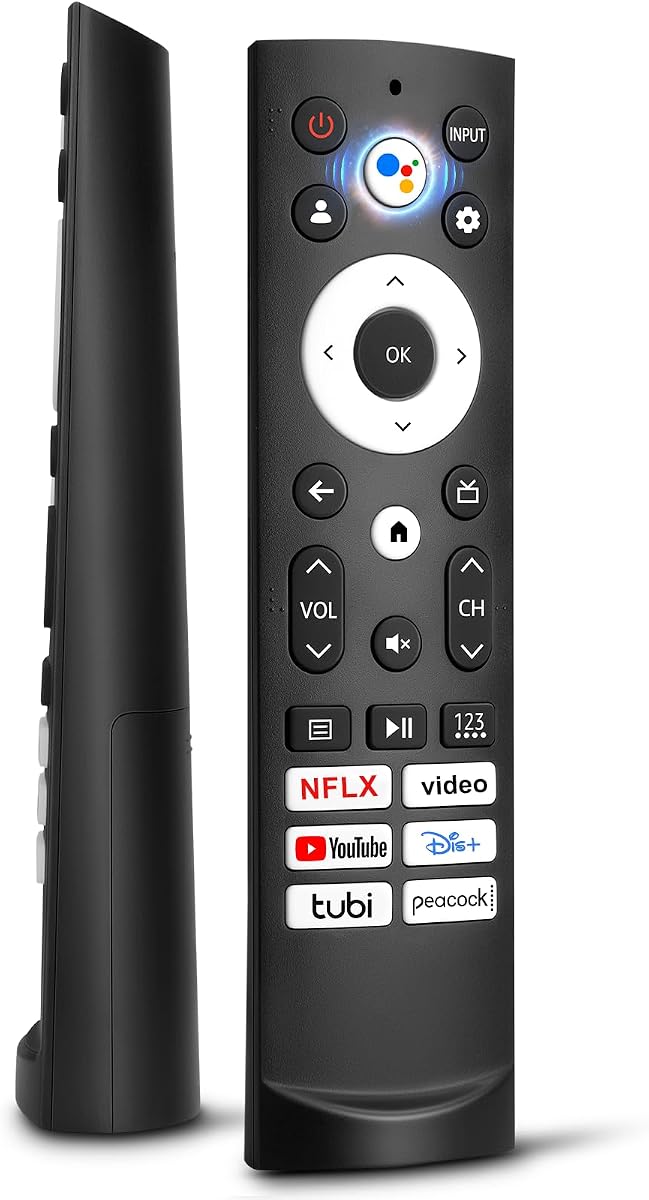
This remote targets Hisense Google TV users with specific hotkeys for popular streaming apps. Its design prioritizes ease of access and physical durability for everyday use.
We may earn a commission when you buy through this link, at no additional cost to you.
The six hotkeys for Netflix YouTube and other services streamline navigation significantly. The narrow top wide bottom design also helps it stand upright on surfaces easily.
It is not compatible with Chromecast or other Google streaming devices which limits versatility. However for dedicated Hisense Google TVs it works reliably without setup.
Choose this option if you own a Hisense Google TV and want quick access to apps. The ergonomic design adds a nice touch of comfort.
Six dedicated keys allow instant access to major platforms like Netflix and YouTube without navigating through menus.
The shape allows the remote to stand on its own making it easier to locate on your coffee table.
We may earn a commission when you buy through this link, at no additional cost to you.
This replacement is highlighted for its cost effectiveness and strong warranty coverage. It provides essential features needed for smart TV navigation without extra bells or whistles.
We may earn a commission when you buy through this link, at no additional cost to you.
Key strengths include immediate functionality and a full year of protection against defects. The hotkeys for major apps ensure you spend less time digging through menus.
It explicitly excludes Roku models which is a critical detail to check. For non-Roku Hisense sets the value proposition is strong given the price point.
Pick this if you want a low-risk budget buy with reliable support. The warranty adds significant peace of mind for the investment.
A full one year warranty covers potential issues ensuring you are protected after your purchase.
Buttons for YouTube and Google Play give you quick access to popular content sources.
We may earn a commission when you buy through this link, at no additional cost to you.
With the highest rating in this list this remote is the top choice for Hisense Roku TV owners. It focuses on core functionality that matches the original device closely.
We may earn a commission when you buy through this link, at no additional cost to you.
It fully supports specific series like H4030F1 and R6ER8F making it a precise fit. Users appreciate that it works as expected without needing complex pairing steps.
It lacks voice control which may be a downside for newer setups. However for basic navigation on Roku systems it delivers consistent and responsive performance.
Select this if you have a Hisense Roku TV and need a direct replacement. Its high satisfaction rate confirms its reliability and fit.
The 4.7 rating reflects strong user confidence in its functionality and build quality for Roku models.
No coding or Bluetooth pairing is needed just insert batteries and start using it immediately.
We may earn a commission when you buy through this link, at no additional cost to you.
This remote stands out for its voice capabilities and extensive model support across the Google TV line. It offers a premium experience with enhanced range and speed.
We may earn a commission when you buy through this link, at no additional cost to you.
The voice control lets you search content hands-free which is ideal for accessibility and convenience. The 50 foot range also covers larger living rooms better than standard remotes.
You must ensure your TV supports the built-in voice assistant for it to work fully. The price is higher but the added features justify the cost for many users.
Choose this if you want modern voice control and maximum range. It is the best option for high-end Hisense Google TV setups.
Use the microphone button to search for shows or check schedules without typing on the screen.
Operate your TV from up to 50 feet away ensuring control even from across a large room.
We may earn a commission when you buy through this link, at no additional cost to you.
This two pack offers exceptional value by providing two remotes at the price of one. It supports a wide variety of brands including Hisense TCL and Sharp Roku models.
We may earn a commission when you buy through this link, at no additional cost to you.
You get one remote for the TV and another as a spare or for a family member. The performance is tested to handle over 120k clicks ensuring longevity.
It is designed strictly for Roku TVs not for standalone streaming sticks or boxes. This distinction ensures you pick the right tool for your hardware setup.
Opt for this if you need backups or want to equip multiple rooms. The cross-brand support makes it versatile for various households.
Two remotes are included in one purchase saving money and providing a handy spare unit.
It works with brands beyond just Hisense including TCL Sharp and Insignia Roku TVs.
We may earn a commission when you buy through this link, at no additional cost to you.
This remote covers a broad range of Android and Google TV models with a focus on usability. It is a reliable choice for users needing a quick functional replacement.
We may earn a commission when you buy through this link, at no additional cost to you.
Shortcuts for major streaming services are integrated directly into the layout. The remote works right out of the box without any pairing or programming steps.
The transmission range is shorter than some premium options which might limit use in large rooms. However it remains effective for standard viewing distances.
Select this if you need a simple reliable remote for Android Hisense TVs. It balances cost and functionality well for everyday needs.
Dedicated buttons allow you to launch apps like Netflix and YouTube quickly.
Just insert batteries and the remote is ready to use without any additional configuration.
We may earn a commission when you buy through this link, at no additional cost to you.
This two pack provides a convenient solution for multiple rooms or backups. It is compatible with a wide array of Google UHD and QLED Hisense series.
We may earn a commission when you buy through this link, at no additional cost to you.
It boasts a 40 foot transmission distance which is stronger than many competitors. The six function keys offer streamlined access to popular streaming platforms.
The buttons are designed with soft silicone for better tactile feedback. While it lacks voice commands it delivers a robust user experience for standard tasks.
Buy this if you need a durable pack for your Google TV set. The extra range and extra unit add significant value.
Control your TV from up to 40 feet away making it suitable for large living spaces.
Six dedicated keys provide quick access to Netflix Prime Video and other top apps.
We may earn a commission when you buy through this link, at no additional cost to you.
This remote serves as a solid alternative for Hisense smart TVs without needing voice features. It covers many common models and provides essential navigation tools.
We may earn a commission when you buy through this link, at no additional cost to you.
Six hotkeys for popular channels are built in for quick access. It works immediately after battery insertion which simplifies the setup process significantly.
It explicitly states it does not work with Fire or Roku TVs which is important to note. For standard smart models it performs reliably without issues.
Choose this if you need a straightforward remote for a supported model. The direct functionality makes it a safe choice.
Buttons for Netflix and YouTube allow you to jump to content instantly without browsing.
There is no coding required just insert the batteries and start controlling your TV.
We may earn a commission when you buy through this link, at no additional cost to you.
This remote offers advanced voice tech for Hisense Google TVs. It includes pairing steps to ensure secure connection but delivers powerful speech recognition features.
We may earn a commission when you buy through this link, at no additional cost to you.
You can search and control the TV using your voice which is great for hands-free operation. It supports a wide range of models including mini-LED and laser sets.
The initial setup involves holding buttons to pair which takes a few seconds. This ensures better performance but is slightly less immediate than non-voice remotes.
Pick this if you want modern voice control for your Google TV. It is ideal for users who value convenience and advanced features.
Use voice commands to search content or check schedules without using your hands.
The remote is tested to withstand over 100,000 clicks ensuring long-term reliability.
We may earn a commission when you buy through this link, at no additional cost to you.
Choosing the right remote depends on your specific TV model and desired features. This guide outlines key factors to help you select the perfect replacement.
Verify that the remote supports your specific TV series such as Google Roku or Android. Using a mismatched remote can lead to connection failures or limited functionality.
Always check the product details for exact model numbers before purchasing to ensure a perfect fit.
Most remotes use infrared technology which requires a direct line of sight to the TV. Bluetooth options offer more flexibility but are rare and often require pairing.
If you want a simple setup choose infrared remotes that work right out of the box without pairing steps.
Voice remotes allow you to control the TV with spoken commands which is great for accessibility. Ensure your TV has built-in voice support to utilize this feature effectively.
Consider if voice control is essential for your usage before paying the premium price for these advanced remotes.
Look for remotes that include shortcut buttons for your most used apps like Netflix or YouTube. A well-designed layout saves time by reducing the need to navigate through menus.
Ensure the buttons are comfortable to press and clearly labeled to avoid accidental inputs during use.
Durable materials like ABS plastic ensure the remote withstands drops and daily wear. Quality construction prevents damage and extends the lifespan of the device significantly.
Invest in a remote with a sturdy build to avoid frequent replacements and extra costs.
Most remotes use standard AAA batteries which are easy to replace when they run out. Check if the device is energy efficient to prolong the time between battery changes.
Choose a remote that has low power consumption to ensure consistent performance without frequent maintenance.
A good warranty protects your purchase against defects or manufacturing issues. Sellers offering at least a one year guarantee provide peace of mind and reliable customer service.
Verify the warranty terms before buying to ensure you have support if the remote fails unexpectedly.
Prices vary widely depending on features like voice control and compatibility range. Set a budget that balances cost with the necessary features you need for your TV setup.
Often simple remotes offer the best value for basic navigation without sacrificing essential performance.
Insert two AAA batteries into the battery compartment ensuring correct polarity matches the symbols inside. Close the cover securely to prevent batteries from falling out during use.
Point the remote directly at the TV sensor for infrared models to ensure commands are received properly. Avoid blocking the sensor with objects or furniture for consistent control.
Store the remote in a cool dry place away from direct sunlight to prevent damage to the casing. Wipe the surface with a soft dry cloth to remove dust and maintain hygiene.
Most infrared remotes do not require pairing and work out of the box. Some voice-enabled models need a simple pairing step by holding specific buttons for a few seconds.
Universal remotes often work but compatibility varies by series. Check the product description carefully to confirm it supports your specific TV model and operating system.
Check if the batteries are fresh and inserted correctly. Ensure there is a clear line of sight between the remote sensor and the TV receiver.
No only remotes with built-in microphones support voice commands. Your TV must also have voice assistant capabilities enabled for this feature to work.
Most replacements do not include batteries so you will need to purchase AAA batteries separately. Always check the product specs before ordering.
Use a soft dry cloth to wipe down the surface. Avoid using harsh chemicals or wet wipes that could damage the buttons or internal components.
Replace the batteries first as old batteries are a common cause. If it still fails contact the seller for warranty support or replacement options.
Yes most are made with ABS plastic and tested for hundreds of thousands of button presses. Proper care ensures they last for years of regular use.
The Hisense Roku TV IR Remote leads as our top pick for its reliability and strong ratings. It offers essential functionality for users needing a straightforward replacement.
Prioritize compatibility and feature needs when selecting your new remote. Voice options are best for modern setups while budget models suit basic navigation tasks well.
Always check current prices and warranty terms before buying to get the best value for your specific TV model and household needs.