
NZXT H5 Flow
4.7Editor score
Compact mid-tower design
Perforated PSU shroud
Supports 360mm front radiator
Discover the top high airflow PC cases for 2026. We compare cooling performance, build quality, and features to help you choose the best chassis for your build.
Choosing a case with high airflow is essential for keeping your system cool during intense gaming or rendering sessions. A well-designed chassis ensures heat is expelled efficiently, preventing thermal throttling and extending component life.
We analyzed ten top-rated models based on fan configuration, vent design, and internal layout. Our goal is to highlight cases that maximize air movement while maintaining structural integrity and ease of assembly for any builder.
Each pick showcases unique strengths, from modular designs to pre-installed fan arrays. Note that availability and pricing can shift quickly, so always verify current details before making your final purchase decision online.
4.7Editor score

4.8Editor score

4.8Editor score
This side-by-side comparison highlights the key specifications and design philosophies of each model to help you identify the right fit for your specific hardware requirements.





This mid-tower case delivers massive airflow potential right out of the box with four pre-installed fans. Its E-ATX support and generous internal dimensions make it ideal for high-performance builds needing serious cooling.
We may earn a commission when you buy through this link, at no additional cost to you.
The ventilated mesh front panel ensures unrestricted air intake for your CPU and GPU. Combined with the ability to mount large radiators at the front and top, thermal management is effectively handled without modification.
While the unit is physically large, this size is necessary to accommodate the massive airflow and component clearance. The lack of a side glass panel is a minor trade-off for the raw cooling efficiency it provides.
Buy this if you prioritize cooling performance over flashy glass aesthetics. It is a fantastic choice for gamers and creators who want a reliable chassis that handles heat efficiently without extra expense.
Supports large radiators and high-end components without thermal constraints.
Pre-installed fans provide immediate cooling without additional purchases.
We may earn a commission when you buy through this link, at no additional cost to you.
The 4000D RS introduces a revolutionary FRAME system that allows you to swap components like motherboard trays and I/O panels easily. It stands out as a future-proof chassis for enthusiasts who love customization.
We may earn a commission when you buy through this link, at no additional cost to you.
Its front panel uses a 3D Y-Pattern to maximize airflow while keeping dust out. The pre-installed RS fans support Zero RPM mode for silence during light tasks while maintaining high cooling when needed.
The modular nature adds complexity but offers unmatched flexibility. You can choose to focus on pure cooling or swap parts for a different look. This adaptability ensures the case evolves with your needs over time.
This is perfect for users who want a case that can grow and change. If you value long-term flexibility and high airflow in equal measure, this model offers a compelling and versatile package.
Swap panels and trays to change look or function without buying a new case.
Zero RPM fan mode keeps noise low during idle or light usage.
We may earn a commission when you buy through this link, at no additional cost to you.
The NZXT H5 Flow is an excellent choice for builders seeking high airflow without a high price tag. Its compact footprint saves desk space while still supporting powerful liquid cooling configurations.
We may earn a commission when you buy through this link, at no additional cost to you.
Perforations on the PSU shroud allow air to flow directly to the intake fans, improving overall thermal efficiency. This design choice ensures your power supply and GPU stay cool during demanding sessions.
While compact, it still fits large components like 360mm radiators. The only trade-offs are limited drive bays and missing USB Type-C, which are acceptable for the value and space savings it provides.
Ideal for small-to-medium builds, this case balances cost and performance well. If you need a reliable, efficient chassis on a budget, the H5 Flow delivers impressive airflow capabilities.
Perforated shroud directs air efficiently to critical components.
Compact size leaves room for your desk without sacrificing cooling.
We may earn a commission when you buy through this link, at no additional cost to you.
This case focuses heavily on cooling efficiency with two massive 160mm front fans that push a lot of air. Its steel frame and ample internal space make it ideal for high-performance component builds.
We may earn a commission when you buy through this link, at no additional cost to you.
The fine mesh panels on the front and top ensure unrestricted airflow while keeping dust at bay. Modular brackets and removable sections make installing radiators and managing cables straightforward for any skill level.
The weight and size of the glass panels are a trade-off for the premium look and protection. However, the dual chamber design helps keep cable runs neat and the overall system organized.
Buy this if you prioritize raw airflow and build quality. It is a fantastic fit for those wanting a robust case that handles heat effectively while looking professional on a desk.
Large 160mm fans move more air with less noise than smaller units.
Separates cables and components for better airflow and cleaner look.
We may earn a commission when you buy through this link, at no additional cost to you.
The Antec Flux Pro combines a distinctive aesthetic using metal, glass, and wood with serious cooling performance. It is built to support dual high-performance radiators simultaneously for ultimate temperature control.
We may earn a commission when you buy through this link, at no additional cost to you.
With six pre-installed PWM fans including reverse blades on the shroud, the airflow is optimized for both intake and exhaust. The multi-directional vent design ensures air moves exactly where it is needed.
The premium materials give it a unique look that stands out from standard plastic or metal cases. However, the large physical footprint and higher price point mean it is best suited for spacious setups.
Ideal for those wanting a statement piece with top-tier cooling, this case delivers on both fronts. If you have the space and want maximum cooling potential, this is a strong candidate.
Wood and metal combo creates a sophisticated and premium desktop look.
Supports dual large radiators for extreme overclocking and cooling needs.
We may earn a commission when you buy through this link, at no additional cost to you.
The 3500X offers a wraparound glass aesthetic that lets you see every detail of your build without sacrificing cooling. It supports a wide range of motherboard sizes and up to ten fans total.
We may earn a commission when you buy through this link, at no additional cost to you.
Despite the glass front, airflow is maintained through efficient mounting points on the roof and sides. The RS fans included provide strong performance and vibrant lighting controlled easily via your motherboard.
The removable glass panels make maintenance and building much simpler than fixed designs. While glass shows dust easily, the visual appeal and cooling capability make it a worthwhile trade-off for many.
Choose this if you want a stunning look with solid thermal performance. It is perfect for builders who want their components to be the center of attention without overheating issues.
Wraparound glass gives a full view of your custom PC build.
Many fan options ensure you can tailor airflow to your needs.
We may earn a commission when you buy through this link, at no additional cost to you.
This model provides exceptional value with four pre-installed ARGB fans and an integrated LED strip. Its support for back-connect motherboards makes it a forward-thinking choice for clean cable management.
We may earn a commission when you buy through this link, at no additional cost to you.
The tool-less side panels allow for rapid access to internal components whenever needed. With room for large GPUs and high-end coolers, it handles modern hardware without any spatial constraints.
The basic lighting and storage limits are minor trade-offs given the price and features. The daisy-chain fan setup simplifies cable clutter and helps maintain a tidy interior environment effectively.
Buy this for a budget-friendly yet feature-rich experience. It suits those who want a clean build with modern connectivity and strong cooling support without a high cost.
Back-connect support helps you hide cables for a clean look.
Tool-less panels let you open the case instantly without tools.
We may earn a commission when you buy through this link, at no additional cost to you.
This high-end chassis features oversized 220mm intake fans that push more air than standard units. The low resistance design ensures smooth airflow through the case to cool components efficiently.
We may earn a commission when you buy through this link, at no additional cost to you.
Split-level cable management optimizes routing space for a cleaner build and better thermal performance. The MasterRail mounting system provides flexibility for fans and radiators at the front and top.
The price is higher than average but justified by the premium build and unique cooling features. The dual GPU holder adds stability for heavy cards, ensuring they stay secure during use.
Choose this if you want premium performance and unique cooling tech. It is an investment for enthusiasts who demand the best airflow and build stability for their high-end system.
220mm fans move more air volume for superior cooling potential.
MasterRail allows custom fan placement to optimize cooling paths.
We may earn a commission when you buy through this link, at no additional cost to you.
The H9 Flow separates components from the PSU to improve thermal performance and aesthetics. Its panoramic glass view lets you showcase your build while maintaining high cooling efficiency.
We may earn a commission when you buy through this link, at no additional cost to you.
Pre-installed fans and a ten-fan capacity allow for extensive customization of airflow. The back-connect compatibility ensures your motherboard looks clean with zero visible power cables.
While the price is high and glass adds weight, the dual-chamber design is excellent for heat separation. This helps keep the CPU area cool while isolating the hot PSU air effectively.
Ideal for those prioritizing clean aesthetics and airflow separation. If you want a modern case that looks great and performs well, this is a top contender in its class.
Dual chambers prevent hot air mixing for cooler and more stable temps.
Back-connect and glass combo hides clutter for a sleek build.
We may earn a commission when you buy through this link, at no additional cost to you.
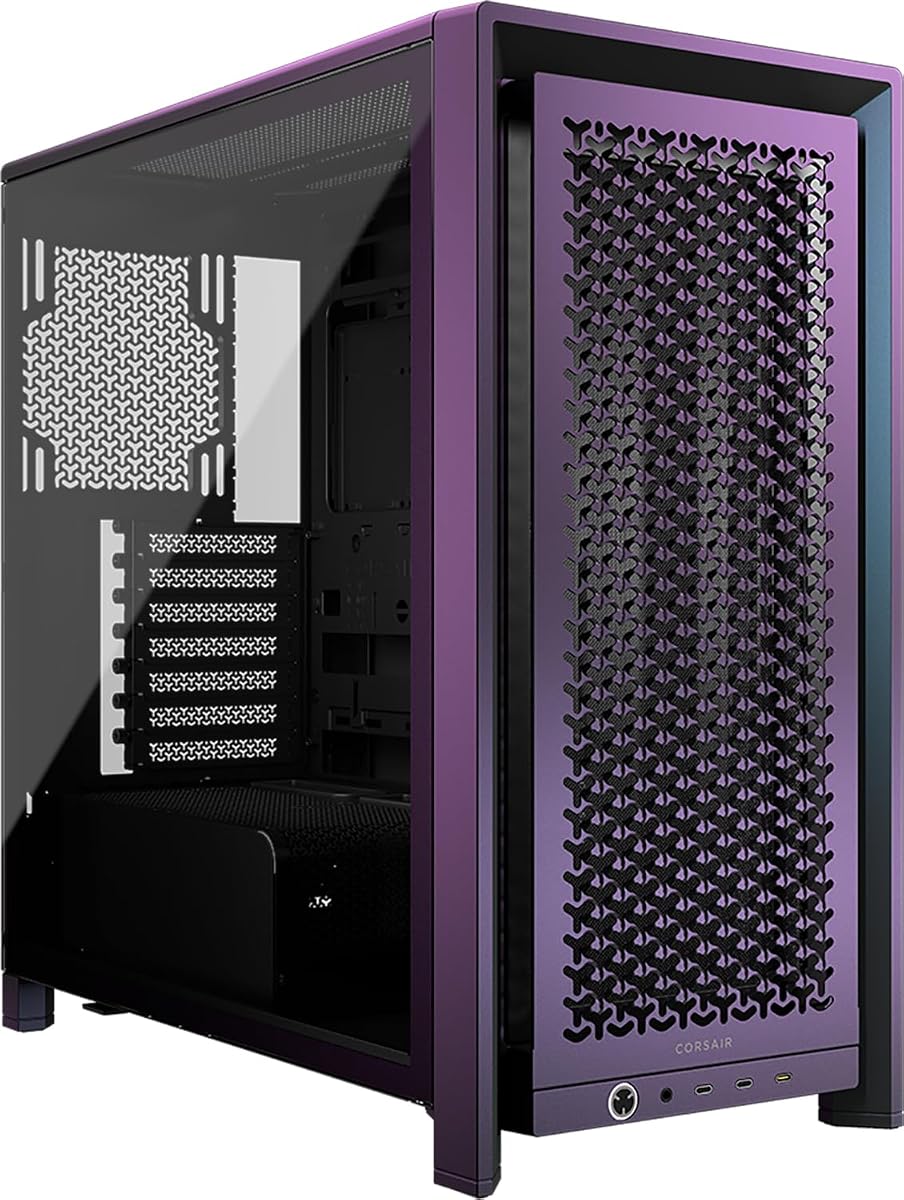
This limited edition Vault Series case offers a unique Galaxy finish that is highly collectible. It uses the same powerful FRAME system as the standard model for modular flexibility.
We may earn a commission when you buy through this link, at no additional cost to you.
The dual 360mm radiator support ensures high-end cooling options remain open for your build. The 3D Y-Pattern panel maximizes airflow while keeping the front panel stylish and durable.
Because it is a limited run, availability is scarce and value is high. The premium finish and collector status make it special, but standard models work just as well for cooling.
Choose this if you want a unique collector's item with high cooling. It is for enthusiasts who value exclusivity and custom options in a high-performance chassis.
Limited edition finish makes your build stand out from others.
FRAME system allows easy upgrades without replacing the whole case.
We may earn a commission when you buy through this link, at no additional cost to you.
Selecting the right case requires balancing airflow, size, and features. We break down key factors to help you choose a chassis that keeps your system cool and looks great.
Look for perforated panels on the front and top to allow air to enter freely. Solid glass fronts block intake and force heat to recirculate inside the case. High airflow cases prioritize mesh or perforated steel over solid panels to ensure cooling efficiency.
Always check if the front and top panels are open or have mesh to maximize intake air volume.
Pre-installed fans save money and ensure immediate cooling. Check the maximum fan capacity supported by the case to allow for future upgrades. More mounting points allow you to tailor airflow for your specific hardware configuration and cooling needs.
Choose a case that fits your current needs but supports extra fans if you plan to upgrade later.
Ensure the case supports your motherboard form factor like ATX or E-ATX to avoid assembly issues. GPU clearance should match the length and height of your graphics card to prevent fitment problems. A spacious interior ensures heat is not trapped in tight areas.
Verify dimensions before buying to guarantee your components fit without forcing or bending.
Proper cable routing keeps airflow paths clear and improves aesthetics. Look for grommets, straps, and wide channels to hide wires behind the motherboard tray. Good management prevents cables from blocking air moving across critical components.
Adequate space behind the tray is essential for neat builds and optimal airflow.
If you use liquid cooling, check the max radiator size the case can mount at the front or top. High airflow cases often support larger radiators which provide better cooling than stock solutions. Ensure fans are included or available to match the radiator size.
Select a case that supports your preferred cooling size and offers enough fan mounting for it.
Dust filters keep debris out of the chassis while maintaining airflow. Look for fine mesh filters that are easy to remove for cleaning. Regular cleaning ensures fans and radiators stay clear and function efficiently over time.
Choose models with removable filters to make maintenance simple and effective.
Steel and aluminum frames provide stability and better vibration dampening than plastic. Quality construction ensures panels fit well to seal airflow paths properly. Durability also affects how well the case protects your expensive internal components.
Invest in sturdy materials to ensure longevity and a secure enclosure for your parts.
Compare what is included like fans and tool-less features against the price. Higher cost cases often include better materials or accessories that save you money later. Determine your priorities to find the best value for your specific requirements.
Balance the cost with included features to avoid hidden expenses for necessary accessories.
Ensure all panels are securely closed to prevent dust from entering the intake paths. A properly sealed case helps maintain consistent airflow and keeps internal components clean for longer periods.
Regularly clean dust filters every few months to prevent clogging that restricts air movement. Use a soft brush or vacuum to remove particles from mesh panels and fan blades efficiently.
Monitor your system temperatures using software tools to confirm cooling performance. If temps rise unexpectedly, check if fans are working correctly and air paths are clear of obstructions.
Not necessarily. Many high airflow cases use larger fans that move more air at lower RPMs, resulting in quieter operation. The design prioritizes airflow efficiency over raw fan speed which helps maintain a quiet environment.
Yes, most high airflow cases support large radiators and fans required for liquid cooling. The open design often improves liquid cooling performance by exhausting hot air more quickly from the system.
Mesh is better for airflow while glass is better for aesthetics. If cooling is your priority, mesh panels allow more air through which prevents thermal throttling and extends component life significantly.
Install intake fans at the front and exhaust fans at the rear or top. Keep cable management neat so wires do not block the air path from entering the case and reaching your components.
Yes, pre-installed fans save time and money. They ensure you start with a working cooling system and avoid needing to buy separate fans just to get the case functional immediately.
Place the case on a flat surface away from walls to allow rear exhaust to clear freely. Avoid placing it in enclosed spaces where hot air can get trapped and recirculate into the front intake.
We reviewed ten cases balancing performance, design, and value for modern builds. From the MONTECH AIR 903 MAX to the Cooler Master HAF II 500, each offers unique strengths for different priorities.
Focus on what matters most for your build whether it is cooling capacity or aesthetics. High airflow cases are a worthwhile investment to ensure your system runs efficiently and lasts longer.
Prices and availability can change so always verify current details before buying. This guide helps you choose wisely based on the latest models and expert insights available today.