
Canon PIXMA TR4720
3.9Editor score
Affordable entry-level pricing
Compact design for small spaces
Built-in fax functionality included
This guide compares the best all in one printer with fax models for home and office use, featuring top picks for quality, speed, and value.
Finding the right all in one printer with fax can streamline your workflow and keep you connected. These devices combine printing, scanning, copying, and faxing into one convenient machine, saving space and reducing clutter in your office or home setup.
We evaluated ten top-rated models based on print quality, speed, connectivity options, and ease of use. Our comparison considers features like automatic document feeders, wireless capabilities, and ink efficiency to help you make an informed decision for your specific needs.
Each pick includes detailed pros, cons, and specifications to highlight key strengths and trade-offs. Keep in mind that prices and availability can change frequently, so check the latest offers before making your purchase to ensure you get the best value today.
3.9Editor score

4.0Editor score

4.3Editor score
This side-by-side comparison highlights the key specifications and capabilities of ten leading all in one printers with fax capabilities. Use this table to quickly identify which model aligns best with your printing volume, budget, and feature requirements.






The HP OfficeJet Pro 9125 stands out as a top contender for small offices needing reliable fax capabilities. With a rating near 4 stars, it delivers professional color output and fast speeds suitable for daily business documents and presentations.
We may earn a commission when you buy through this link, at no additional cost to you.
Its standout qualities include a robust 250-sheet input tray and dual-band Wi-Fi that minimizes connection drops. The inclusion of HP Wolf Pro Security adds a layer of protection for sensitive networked printing tasks.
While the print speeds are impressive, the proprietary cartridge system may limit cost-saving options for users preferring third-party inks. Additionally, the instant ink trial expires after three months, potentially affecting long-term ink budgets.
This printer is ideal for offices that prioritize speed, security, and ease of use. It balances performance with modern connectivity, making it a strong recommendation for users seeking a versatile all-in-one solution with fax support.
HP Wolf Pro Security helps safeguard your network against cyber threats during printing operations.
HP AI optimizes print layouts to reduce waste and ensure professional document appearance.
We may earn a commission when you buy through this link, at no additional cost to you.
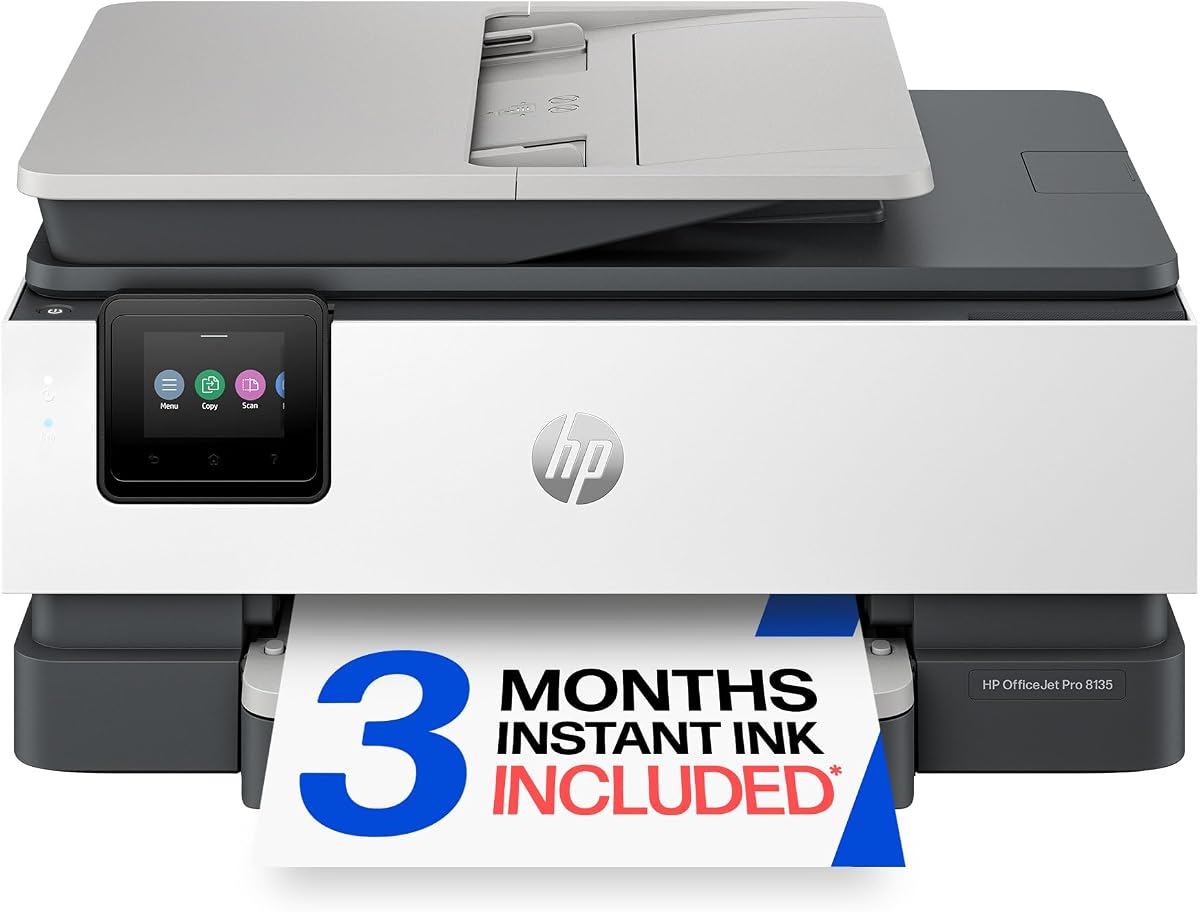
The HP OfficeJet Pro 8135 offers excellent value for home offices needing a multifunctional device. It balances cost and performance effectively, providing professional-quality output without a high upfront investment.
We may earn a commission when you buy through this link, at no additional cost to you.
Key strengths include a reliable dual-band Wi-Fi connection and a user-friendly 2.7-inch touchscreen. The automatic document feeder simplifies multi-page faxing and scanning tasks for remote workers.
Users should note that color printing is slower than black-and-white, which may affect heavy graphic work. The instant ink subscription trial provides initial savings but requires monitoring after three months.
This model is best for home professionals who need occasional faxing and consistent color prints. It delivers reliable performance for reports, presentations, and flyers at a competitive price.
Designed specifically for home office tasks like business documents and presentations.
Constructed with over 45% recycled plastic to reduce environmental impact.
We may earn a commission when you buy through this link, at no additional cost to you.
The Epson EcoTank ET-4800 redefines printing costs with its Supertank system that eliminates traditional cartridges. This model is ideal for users who print frequently and want to avoid frequent ink replacements.
We may earn a commission when you buy through this link, at no additional cost to you.
Its Micro Piezo technology ensures sharp text and vibrant photos without heat, preserving paper integrity. The included flatbed scanner handles detailed scanning needs alongside its robust printing capabilities.
The initial investment is higher than cartridge printers, but the long-term savings on ink are substantial. Users should consider print speed needs as it may be slower than laser alternatives for bulk jobs.
This printer suits households or offices with high-volume printing requirements. It offers a sustainable and economical solution for those prioritizing ink efficiency over sheer speed.
Exclusive EcoFit ink bottles make filling easy and worry-free for all users.
Using EcoTank reduces cartridge waste ending up in landfills significantly.
We may earn a commission when you buy through this link, at no additional cost to you.
The HP OfficeJet Pro 8125 is a solid choice for home offices needing reliable document handling. It offers a balance of speed and efficiency for daily business documents and reports.
We may earn a commission when you buy through this link, at no additional cost to you.
Key strengths include a user-friendly touchscreen and robust HP security features that protect your network. The automatic document feeder streamlines scanning and copying tasks efficiently.
While faxing is standard, it may not be emphasized as strongly as in other models. Users should monitor ink usage to maximize value before the trial period ends.
This model is best for home professionals needing steady performance. It delivers professional-quality color and black printing with convenient wireless access.
HP AI optimizes print formatting for web pages and emails to reduce waste.
Constructed with sustainable materials to minimize environmental footprint.
We may earn a commission when you buy through this link, at no additional cost to you.
The HP Smart Tank 7603 offers exceptional value by including up to three years of ink with the purchase. This makes it ideal for households or offices that want to avoid running out of ink frequently.
We may earn a commission when you buy through this link, at no additional cost to you.
Key features include a mess-free refill system that simplifies the process for all users. It supports faxing, scanning, and printing with borderless capabilities for photos.
Users should consider the higher upfront cost against the long-term savings. The magic touch control panel provides intuitive navigation for everyday tasks.
This printer suits users seeking convenience and economy. It delivers reliable color printing and fax support with minimal maintenance.
Set it up once and print with confidence without complicated maintenance needs.
Delivers sharper text and richer colors compared to standard cartridge printers.
We may earn a commission when you buy through this link, at no additional cost to you.
The HP OfficeJet Pro 9135 stands out for its rapid print speeds and advanced scanning capabilities. It is designed for busy offices that need high efficiency and reliability every day.
We may earn a commission when you buy through this link, at no additional cost to you.
Key strengths include single-pass duplex scanning which saves time on multi-page documents. The large touchscreen and dual trays reduce user interaction and paper reloading.
Users should consider the cost against the productivity gains. The security features add value for networked environments handling sensitive data.
This model is best for offices prioritizing speed and capacity. It offers a premium experience with professional-quality output and fax support.
Print speeds up to 25 ppm black help you stay ahead of deadlines.
Single-pass duplex scanning reduces paper usage and saves time.
We may earn a commission when you buy through this link, at no additional cost to you.
The Canon PIXMA TR4720 is an ideal choice for home users needing a compact all-in-one printer with fax. It fits easily into small spaces while delivering reliable daily functionality.
We may earn a commission when you buy through this link, at no additional cost to you.
Key strengths include Alexa voice alerts for low ink warnings and mobile printing convenience. The auto document feeder simplifies scanning and copying multiple pages.
Users should note the lower paper capacity requires frequent reloading. It is optimized for light to medium workloads rather than heavy office use.
This model suits students or home offices with limited space. It delivers essential faxing and printing without taking over your desk.
Connect to Alexa to receive smart reorder notifications when ink is low.
Produce quality photos and borderless prints up to 8.5 by 11 inches.
We may earn a commission when you buy through this link, at no additional cost to you.
The Canon PIXMA TR8620a brings versatile media support to home offices with its Micro SD card slot. This allows direct printing without needing a computer connection.
We may earn a commission when you buy through this link, at no additional cost to you.
Key strengths include voice printing via Alexa and a 200-sheet capacity for reduced refills. It delivers reliable faxing and scanning for home business needs.
Users should consider the smart reorder plan requirements. It offers a balance of features suitable for light to medium workloads.
This model is best for users who need easy media access. It supports a variety of tasks from documents to photos with ease.
Micro SD slot enables printing directly from cards without a PC.
Use voice commands to print quickly without opening apps.
We may earn a commission when you buy through this link, at no additional cost to you.
The HP OfficeJet Pro 8139 offers an extended one-year instant ink trial making it attractive for home offices. It delivers consistent performance for reports and presentations with fax capabilities.
We may earn a commission when you buy through this link, at no additional cost to you.
Key strengths include a reliable dual-band Wi-Fi connection and a user-friendly touchscreen. The automatic document feeder supports efficient multi-page scanning tasks.
Users should note the monthly fee after the trial period. This model provides a good balance of cost and functionality for regular home use.
This printer is best for those seeking extended ink support. It maintains reliable print quality and connectivity for professional documents.
Enjoy a full year of Instant Ink included before subscription fees apply.
HP Wolf Essential Security helps protect your network from cyber threats.
We may earn a commission when you buy through this link, at no additional cost to you.
The Brother MFC-L2820DW is the top choice for users prioritizing laser speed and fax reliability. It offers monochrome efficiency ideal for offices focused on text documents.
We may earn a commission when you buy through this link, at no additional cost to you.
Key strengths include 36 ppm print speed and secure dual-band wireless. It includes a Refresh subscription trial to help manage toner costs.
Users should consider that it is strictly black and white. It excels at speed and efficiency for business workflows without color needs.
This model suits offices needing robust faxing and scanning. It delivers professional quality with a durable and efficient design.
Produces black and white documents quickly to keep work moving.
Securely connect via dual-band wireless or Ethernet for reliability.
We may earn a commission when you buy through this link, at no additional cost to you.
Choosing the right printer involves considering speed, ink costs, and connectivity. This guide breaks down essential factors to help you find a model that meets your daily needs.
Print speed measured in pages per minute (ppm) affects how quickly you can finish tasks. High-volume offices benefit from faster models to reduce wait times during busy periods.
Evaluate the cost of replacements and subscription options like Instant Ink. Tank systems may have higher upfront costs but save money long-term for heavy users.
Wireless and dual-band Wi-Fi ensure stable connections across multiple devices. Ethernet options are useful for secure office networks where physical connections are preferred.
Check if the fax feature supports both sending and receiving efficiently. Look for digital fax options if you need to integrate with email systems seamlessly.
A larger automatic document feeder reduces the need to reload paper for multi-page scanning. Consider models with 50 or more sheets for efficient batch processing.
Touchscreens simplify navigation and menu selection. Larger displays make it easier to preview documents before printing or scanning.
Built-in security protects sensitive data during networked printing. Look for encryption and secure access controls if you handle confidential documents.
Measure your available space to ensure the printer fits comfortably. Compact models save room while larger ones may offer higher capacity trays.
To maintain consistent print quality, clean the printheads regularly using the built-in maintenance tools. This prevents clogs and ensures your text remains sharp.
Not all models support VoIP lines due to digital signal issues. Check compatibility with your provider before purchasing.
Some models block non-brand cartridges to protect quality. Review manufacturer policies before buying alternatives.
Digital fax sends documents over internet networks. Analog uses traditional phone lines.
Clean every three months for light use. Heavy users may need monthly maintenance.
Many modern models offer mobile app fax sending. Confirm features before buying.
Inkjet printers generally offer better color quality. Laser models excel at black text.
Our top picks include the HP OfficeJet Pro 9135 for speed and the Canon PIXMA TR4720 for budget needs. Each model offers unique strengths for home and office environments.