
G32P 32 Inch UHD
4.6Editor score
6K IPS Panel 99% P3
100W Power Delivery
Ergonomic Stand with Pivot
Finding the right display is crucial for modern workflows requiring high fidelity and precision. A 6K monitor offers exceptional pixel density that enhances detail and reduces eye strain during extended sessions.
We evaluated ten leading models based on panel technology color gamut coverage connectivity options and ergonomic design. Our analysis focuses on real-world performance for creative professionals and power users.
Each pick highlights specific strengths to help you match a display to your needs. Remember that prices and availability change frequently so check current listings before purchasing your new screen.
4.6Editor score

3.9Editor score

4.1Editor score
As an Amazon Associate we earn from qualifying purchases.
The following table provides a side by side comparison of all ten models analyzed in this guide highlighting their key specifications to help you decide.



The ASUS ProArt PA32QCV stands out as a premier choice for creatives needing reliable color fidelity. It holds a solid rating and delivers a 6K display with LuxPixel technology that ensures sharp text and images.
We may earn a commission when you buy through this link, at no additional cost to you.
Its factory calibration guarantees Delta E less than two for accurate color reproduction across 98 percent DCI-P3. The dual Thunderbolt 4 ports allow high speed data transfer and power delivery for laptops.
Some users may find the price high compared to generic 4K monitors. However the included Adobe Creative Cloud subscription and extended warranty add significant value for professional users.
If you need a precise tool for design or video editing this model is highly recommended. It bridges the gap between macOS color performance and professional grade hardware.
Calman Verified factory calibration ensures that colors match print and digital outputs accurately without needing extra tools.
The M Model-P3 Color Preset Mode aligns perfectly with MacBook displays for a unified visual workflow.
We may earn a commission when you buy through this link, at no additional cost to you.
This Dell monitor offers an expansive 52 inch curved experience designed for multitasking and deep focus. With a 120Hz refresh rate it provides smooth motion for both work and entertainment.
We may earn a commission when you buy through this link, at no additional cost to you.
The IPS Black panel improves contrast to 2000 to one for deeper blacks and vivid colors. It supports Thunderbolt 4 charging up to 140 watts making it a true hub for your setup.
Its size might be overwhelming for smaller desks or rooms. Additionally the price reflects its high-end specs which may not suit budget conscious buyers.
Ideal for power users who need room for multiple windows and high fidelity visuals this screen delivers. It is a top choice for those prioritizing workspace volume and quality.
The 21:9 aspect ratio and curve wrap around your vision to reduce head movement and increase focus.
Picture by Picture and KVM support let you control two computers with one keyboard and mouse efficiently.
We may earn a commission when you buy through this link, at no additional cost to you.
The G32P offers a compelling balance of performance and price for those seeking 6K clarity. It boasts 223 pixels per inch for crisp text and detailed image rendering.
We may earn a commission when you buy through this link, at no additional cost to you.
With 99 percent DCI-P3 and sRGB coverage it handles color critical tasks well. The 100W power delivery allows you to charge a laptop while using the display for video.
The glossy screen may show reflections in bright environments. Also the 60Hz refresh rate limits its use for fast action gaming.
For writers editors and designers on a budget this model is an excellent option. It provides premium specs without the premium price tag.
The 6K resolution on 32 inches ensures text is sharp and images are detailed without scaling issues.
Height adjustable stand and tilt options help maintain a healthy posture during long work sessions.
We may earn a commission when you buy through this link, at no additional cost to you.
Samsung brings 6K to the gaming arena with this Fast IPS model. It features a dual mode option allowing 6K at 165Hz or 3K at 330Hz for different gaming needs.
We may earn a commission when you buy through this link, at no additional cost to you.
NVIDIA G Sync and AMD FreeSync support ensure smooth gameplay without tearing. HDR10+ gaming optimizes brightness and contrast for a more immersive experience.
Some users report inconsistencies in firmware or panel quality. The high resolution demands powerful GPUs which may require upgrades.
If you want next level visuals in games this monitor is a standout. It pushes boundaries for high fidelity gaming experiences.
Switch between high resolution visuals and high refresh rate action depending on the game requirements.
A 1ms response time reduces motion blur ensuring clear images during fast-paced gameplay.
We may earn a commission when you buy through this link, at no additional cost to you.
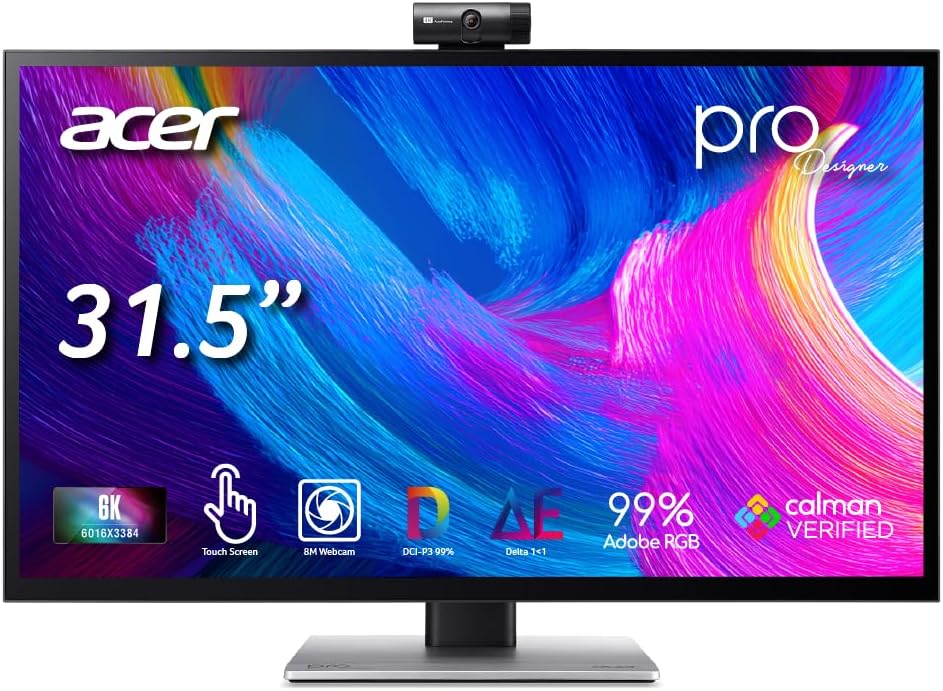
The Acer ProDesigner combines a 6K display with touch and stylus input for direct creative work. It is designed for artists and designers who want to draw directly on screen.
We may earn a commission when you buy through this link, at no additional cost to you.
With a Delta E of less than one it offers top-tier color accuracy. The built-in 8MP webcam and mic array reduce the need for extra peripherals during calls.
Touchscreens can be harder to clean and may cause glare. Also the price includes features you may not need if you use a separate tablet.
For digital artists and content creators this all-in-one solution is powerful. It simplifies your desk setup significantly.
Supports active styluses with 4096 pressure levels for natural sketching and retouching.
Integrated webcam and microphones mean you can start a call without plugging in extra devices.
We may earn a commission when you buy through this link, at no additional cost to you.
The G32X focuses on delivering core performance with a clean design. It achieves high praise for its crisp 6K display and reliable color reproduction.
We may earn a commission when you buy through this link, at no additional cost to you.
The anti-reflective coating helps in various lighting conditions. With 100W power delivery it can charge most laptops through a single cable.
Users note the menu system is basic compared to higher-end models. Availability can sometimes be limited based on region.
If you prefer a clean desk with minimal bezels this is a strong choice. It balances function and form well for general productivity.
Height tilt swivel and pivot adjustments ensure the screen fits your physical setup perfectly.
CNC machined aluminum body provides a premium feel and protects internal components.
We may earn a commission when you buy through this link, at no additional cost to you.
This Dell monitor acts as a central hub for your peripherals with dual Thunderbolt 4 ports. It supports up to 140W power delivery for high-end laptops.
We may earn a commission when you buy through this link, at no additional cost to you.
The inclusion of remote control and Dell color management software adds convenience for pros. The screen offers 6K resolution with 120Hz refresh rate.
User feedback suggests potential issues with firmware or specific port configurations. Setup can be complex for non-technical users.
For those needing a powerful docking station with a display it is useful. It is best for IT managed environments.
Connect and charge high wattage laptops while sending video data over a single cable.
Remote control allows easy adjustments to settings without reaching for physical buttons.
We may earn a commission when you buy through this link, at no additional cost to you.
LG delivers a forward looking display with Thunderbolt 5 support for future high speed needs. It features Nano IPS Black technology for improved contrast and color.
We may earn a commission when you buy through this link, at no additional cost to you.
The DisplayHDR 600 certification ensures bright highlights and deep blacks in content. It includes a bundle with cleaning kit and cable ties.
The 60Hz limit means it is not ideal for gaming. The bundle price reflects the high-end specs and accessories.
For creatives needing future proof connections and accurate colors this is a solid pick. It prepares you for upcoming hardware standards.
Delivers up to 80Gbps data transfer for fast file handling and video streaming.
99.5 percent Adobe RGB ensures colors match print outputs for professional work.
We may earn a commission when you buy through this link, at no additional cost to you.
This Dell bundle provides peace of mind with an extended protection plan included. It features 6K resolution mode on a 31.5 inch screen for clarity.
We may earn a commission when you buy through this link, at no additional cost to you.
The 450 nit brightness helps in well lit rooms. A 5ms response time makes it acceptable for casual gaming and action movies.
User reviews indicate some variability in color consistency. The bundle is priced higher due to the insurance inclusion.
For corporate fleets or shared use where durability matters this is a smart choice. It ensures long term usability.
The 2 year premium plan covers accidental damage and hardware failures.
High brightness ensures content remains visible in offices with strong ambient lighting.
We may earn a commission when you buy through this link, at no additional cost to you.
This renewed model offers a way to own a large 52 inch display at a reduced cost. It provides a 6K resolution with 120Hz refresh rate for smooth visuals.
We may earn a commission when you buy through this link, at no additional cost to you.
The lack of a stand requires a VESA mount which adds complexity but saves desk space. It retains the Thunderbolt 4 hub features of the original.
Buying renewed items carries a risk of wear or minor defects. No stand means you must buy one separately.
For buyers comfortable with mounting hardware this can be a great deal. It offers large screen utility for less.
Designed to be mounted on arms or walls for flexible ergonomic setups.
Renewed options allow access to high-end features without the full retail cost.
We may earn a commission when you buy through this link, at no additional cost to you.
Selecting a 6K monitor involves balancing resolution panel type connectivity and ergonomics to suit your specific work needs.
6K resolution offers roughly 20 million pixels which ensures text and images appear incredibly sharp. This density reduces the need to zoom in on details and helps reduce eye strain during long sessions.
Look for pixel density around 220 PPI for a comfortable viewing experience without scaling issues.
IPS panels remain the standard for color accuracy. models with 99% DCI-P3 or Adobe RGB ensure your work looks consistent across devices.
Check for Delta E values under 2 to guarantee colors are true to life for creative tasks.
Thunderbolt 4 or 5 ports are essential for single cable solutions. They transmit video data and charge your laptop simultaneously.
Ensure the monitor supports at least 90W power delivery if you plan to use it as your primary hub.
Most 6K monitors run at 60Hz which is sufficient for productivity and video editing. However gamers may need 120Hz or higher for smooth motion.
Consider your use case; high refresh rates are optional for non-gaming workflows.
An adjustable stand that supports height tilt pivot and swivel is vital for neck health. Good ergonomics prevent fatigue during long work days.
Check VESA compatibility if you prefer to mount the monitor on an arm.
Professional monitors often come with multi-year warranties. Look for options that cover dead pixels and color uniformity.
Extended protection plans can add value for expensive displays in corporate environments.
To get the best image quality calibrate your monitor using built-in tools or software if possible. Set your operating system scaling to 200% for 6K to ensure text is readable.
Clean the screen regularly with a soft microfiber cloth to avoid scratches. Avoid using harsh chemicals or aerosols on the panel.
Adjust brightness and color temperature based on ambient light to reduce eye strain. Take short breaks during long sessions to maintain comfort.
A 6K monitor provides significantly more screen real estate and pixel density than 4K. This allows for sharper text and larger windows without scaling, which improves productivity and reduces eye strain.
Yes rendering 6K output requires a powerful GPU and CPU. Ensure your system meets the minimum requirements for smooth performance especially if you use multiple applications.
Yes some models like the Samsung Odyssey G8 support high refresh rates and G Sync. However most 6K monitors are optimized for creative work rather than fast-paced gaming.
Use certified Thunderbolt 4 or DisplayPort 2.1 cables to support 6K resolution and data speeds. Standard HDMI cables may not handle the bandwidth required for full 6K.
For professionals like video editors and graphic designers the clarity is worth the investment. For casual users standard 4K might offer better value for money.
Use a soft dry microfiber cloth to wipe the surface gently. If stains persist lightly dampen the cloth with water but avoid spraying liquid directly on the monitor.
We have explored ten distinct models ranging from budget friendly to premium options. Each offers unique strengths in resolution connectivity and ergonomics for different needs.
Prioritize panel quality and connectivity features that match your workflow. A high quality display can significantly enhance your daily productivity and creativity.
Prices and stock vary by retailer so always check current listings before finalizing your purchase. Ensure you select the right model for your setup and budget.