
HDMI KVM Switch 3 Monitors 2 Computers 4K@60Hz KVM Switches with 4 USB 3.0 Ports
4.0Editor score
Affordable HDMI solution for triple displays
Includes wired controller for easy switching
Supports 4K@60Hz resolution output
This expert guide compares the top 10 KVM switches for triple monitors to help you find the perfect solution for your multi display workstation setup needs.
Managing multiple computers with a triple monitor setup requires a reliable KVM switch to avoid constant cable swapping. These devices streamline workflows by allowing one set of peripherals to control several systems efficiently.
We evaluated leading models based on video resolution support, USB connectivity speed, and ease of switching. Our list covers diverse needs from basic office tasks to demanding creative and gaming workflows.
Each pick highlights key strengths and potential limitations to help you choose wisely. Please note that product availability and pricing may change over time, so check current listings before purchasing your device.
4.0Editor score

4.9Editor score

4.2Editor score
The following table provides a side-by-side overview of the top KVM switches for triple monitors. Compare their video support, port counts, and key features to find the ideal match for your specific workstation requirements.





The AV Access KVM Switch 3 Monitors 2 Computers KVM Docking 8K@60Hz stands out as the top pick for users needing a complete dual PC setup. It earns a near perfect rating for its ability to function as a full docking station while switching displays.
We may earn a commission when you buy through this link, at no additional cost to you.
Its standout feature is the ability to keep network connectivity active for both computers simultaneously. This ensures downloads and cloud sync continue even while you switch control. The USB C port supports up to 100W power delivery which eliminates the need for a separate laptop charger.
While expensive, this device replaces multiple peripherals including USB hubs and card readers. The only notable limitation is macOS support which only mirrors displays rather than extending them. For Windows users, this is the most robust solution available.
If you need a seamless transition between a desktop and a laptop without reconnecting cables, this is the ideal choice. Its high specs ensure future proofing for high resolution and high refresh rate displays.
This unit integrates SD card readers and audio jacks reducing the need for extra dongles on your desk.
Background tasks continue uninterrupted on the inactive PC thanks to the shared Ethernet port keeping connections alive.
We may earn a commission when you buy through this link, at no additional cost to you.
The HDMI KVM Switch 3 Monitors 2 Computers is an excellent entry level choice for users prioritizing value. It allows two computers to share three monitors and USB devices efficiently. Despite its lower cost, it maintains solid performance for standard office tasks.
We may earn a commission when you buy through this link, at no additional cost to you.
This model supports 4K@60Hz resolution which is sufficient for most productivity workflows. It includes USB 3.0 ports for fast data transfer with peripherals like mice and keyboards. The package includes a wired controller to keep your desk clutter free.
The limitation is that it only supports HDMI inputs meaning you cannot use DisplayPort monitors. Additionally, it requires each computer to natively support three screens. For HDMI based setups, this remains the most cost effective reliable option.
Buy this if you have HDMI monitors and want to switch between two systems without buying expensive gear. It delivers essential KVM functionality without unnecessary premium features that drive up the cost.
Ideal for users with existing HDMI monitors who do not need DisplayPort high refresh rate capabilities.
Offers the core ability to share one mouse and keyboard across three screens at a fraction of the price.
We may earn a commission when you buy through this link, at no additional cost to you.
The AV Access 8K KVM Switch 3 Monitors 2 Computers is a top tier solution for high performance needs. It supports refresh rates up to 480Hz making it perfect for competitive gaming on the desktop side. It also functions as a full docking station.
We may earn a commission when you buy through this link, at no additional cost to you.
This model allows the laptop side to receive up to 100W power which charges most laptops fully. The Ethernet port ensures network tasks continue even when the desktop is inactive. This prevents interruption to downloads or updates while you use the laptop.
While it offers similar features to the model above, this version emphasizes higher refresh rates. The price is higher but justified for users who need both productivity and high speed gaming capabilities. It handles mixed workload environments very well.
If you need to switch between a gaming desktop and a work laptop seamlessly, this is the best choice. It ensures both systems stay connected and powered without needing separate dongles.
Supports up to 480Hz for desktop gaming ensuring smooth motion without screen tearing.
Delivers up to 100W power to the laptop ensuring it stays charged during use.
We may earn a commission when you buy through this link, at no additional cost to you.
This model is unique because it supports up to four computers instead of the usual two. It uses two DisplayPort and one HDMI port per computer to connect three monitors. This makes it ideal for environments where multiple users need to share a set of screens.
We may earn a commission when you buy through this link, at no additional cost to you.
It supports resolutions up to 8K@60Hz and 4K@144Hz depending on the port used. The package includes four USB 3.0 cables which simplifies setup. You get a wired remote for easy switching between the four inputs.
However, setting it up can be complex because it requires specific graphics card configurations. Each computer needs to support three displays independently. If your setup fits this criteria, it offers unmatched flexibility for shared workspaces.
Choose this if you need to switch between four different systems on one triple monitor setup. It is versatile but requires careful planning to ensure all video signals are supported.
Rare capability to share three monitors across four computers instead of just two.
Combines HDMI 2.1 and DP 1.4 to support high refresh rates and high resolutions.
We may earn a commission when you buy through this link, at no additional cost to you.
This switch allows you to share three monitors and USB devices between two computers easily. It uses two DisplayPort and one HDMI connection per system. The HDMI port supports up to 8K@60Hz while DisplayPort supports up to 8K@30Hz.
We may earn a commission when you buy through this link, at no additional cost to you.
It includes a separate power switch which makes it easy to restart without unplugging. The wired controller keeps your desktop clean by allowing remote switching. It works with Windows Mac and Linux systems out of the box.
The main trade off is that 8K is limited to 30Hz on DisplayPort. If you need high refresh rates at 4K you should use HDMI or lower resolutions. For general productivity, this is a very capable device.
Pick this if you want a balanced mix of HDMI and DisplayPort with 8K capabilities. It offers good value for users who need flexibility in their video connections.
Supports 8K output to ensure your setup is ready for next generation monitors.
Includes a wired controller and power switch for easier access and management.
We may earn a commission when you buy through this link, at no additional cost to you.
This KVM switch is designed specifically for users with HDMI 2.1 compatible monitors. It supports resolutions up to 8K@60Hz and 4K@120Hz. This makes it suitable for gaming and high definition video editing without needing DisplayPort.
We may earn a commission when you buy through this link, at no additional cost to you.
It includes four USB 3.0 ports to share your peripherals like keyboards and printers. The device comes with a wired controller to toggle between your two PCs effortlessly. It supports both extended and duplicate display modes.
Because it is HDMI only, you cannot use DisplayPort monitors. You must ensure you have high quality HDMI cables to achieve the maximum resolution. It is a straightforward solution for HDMI centric setups.
Select this if you prefer HDMI over DisplayPort for your monitors. It delivers excellent clarity and speed for standard triple monitor configurations.
Utilizes HDMI 2.1 standards for higher bandwidth and better gaming performance.
Focuses on HDMI simplicity to avoid adapter issues with DisplayPort to HDMI conversions.
We may earn a commission when you buy through this link, at no additional cost to you.
This switch allows three computers to share a single set of three monitors and peripherals. It uses a mix of two DisplayPort and one HDMI input per computer. This setup provides flexibility for users with different graphics card ports.
We may earn a commission when you buy through this link, at no additional cost to you.
It supports 8K@60Hz on HDMI and 4K@144Hz on DisplayPort. The package includes a wired remote to switch between systems quickly. It supports both extended and copy modes so you can clone or split screens.
You must ensure all three computers support triple output independently. If one machine only has two outputs, it will not utilize all monitors. This is a great option for small teams sharing a workstation.
Choose this if you need to switch between three different systems on the same screens. It offers more versatility than standard two computer switches.
Allows three computers to access one set of displays which is rare for this type of switch.
Supports both HDMI and DisplayPort to reduce the need for converters.
We may earn a commission when you buy through this link, at no additional cost to you.
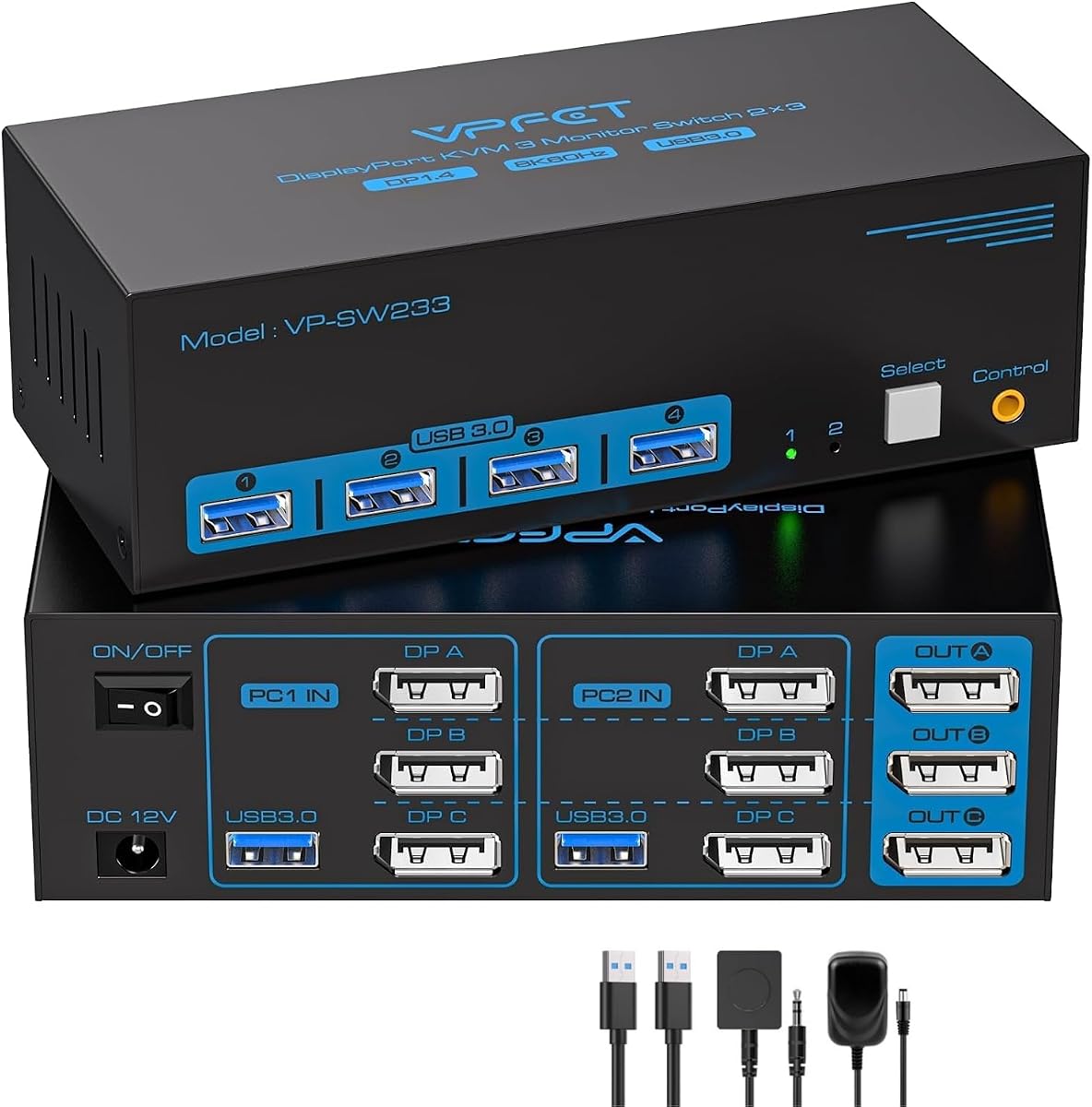
This model focuses solely on DisplayPort connections which is ideal for high refresh rate gaming. It supports up to 4K@144Hz which ensures smooth motion on compatible monitors. It allows two computers to share three screens seamlessly.
We may earn a commission when you buy through this link, at no additional cost to you.
The design is clean and simple without extra HDMI ports to complicate things. It comes with a wired controller for easy switching. The USB 3.0 sharing ensures your peripherals connect without delay.
It is not suitable if you have HDMI monitors. You must use native DisplayPort outputs. This makes it perfect for dedicated gaming rigs that use DP cables for maximum speed.
Pick this if your monitors all have DisplayPort inputs. It delivers the best performance for high refresh rate triple monitor setups.
Prioritizes 144Hz on 4K to deliver fluid gaming visuals across three screens.
Dedicated DP inputs avoid conversion issues for high speed gaming.
We may earn a commission when you buy through this link, at no additional cost to you.
This is a well rounded option that supports both HDMI and DisplayPort inputs. It allows two computers to share three monitors and four USB devices. The package includes the necessary HDMI DP and USB cables to get started quickly.
We may earn a commission when you buy through this link, at no additional cost to you.
It supports high resolutions including 8K@60Hz on HDMI and 4K@144Hz on DP. The LED indicators help you track which system is currently active. It offers both panel button and remote controller switching.
You need to verify that your PCs can output to three screens at once. This switch does not force a third screen if the PC does not support it. It is a reliable choice for general professional use.
Choose this if you want a balanced switch that includes cables in the box. It saves you the effort of buying extra cables separately.
Includes all necessary cables so you do not need to buy extra ones.
Provides a one year warranty to ensure peace of mind for your purchase.
We may earn a commission when you buy through this link, at no additional cost to you.
This model is a robust choice for high performance triple monitor setups. It supports 8K@60Hz on HDMI and 4K@144Hz on DisplayPort. This ensures you get both sharp details and smooth motion regardless of the task.
We may earn a commission when you buy through this link, at no additional cost to you.
It allows four computers to share the three monitors which is a unique feature. The remote controller is included so you can switch without leaning over. It uses USB 3.0 for all peripheral sharing.
Because it requires a discrete graphics card to drive three screens, it is best for PCs with dedicated GPUs. This ensures stable video output. For workstations, this level of performance is ideal.
Select this if you need high refresh rates and the option to switch four computers. It delivers top tier speed and reliability.
Supports 144Hz at 4K for a smooth experience during gaming and design.
The ability to connect four computers provides flexibility for shared workspaces.
We may earn a commission when you buy through this link, at no additional cost to you.
Selecting the right KVM switch for triple monitors requires careful evaluation of your hardware and workflow needs.
Ensure the switch supports the maximum resolution and refresh rate your monitors can handle. High end models support 8K@60Hz or 4K@144Hz while budget models often cap at 4K@30Hz. Matching your monitor capabilities prevents signal loss or blurry images.
Check if your computers use HDMI DisplayPort or USB C. Most switches support a mix of HDMI and DP. If you have a laptop, look for USB C docking options to simplify connections. Using mismatched ports may require adapters which can degrade signal quality.
Your computers must support three independent displays to use a triple monitor switch. Some laptops only support two screens externally. Verify your graphics card capabilities before buying. If one computer cannot drive three screens, the KVM will not activate all monitors.
Look for USB 3.0 ports to ensure fast data transfer for external drives and peripherals. Most switches offer four USB ports which is enough for a keyboard mouse and two other devices. USB 2.0 ports are slower but adequate for basic keyboards.
Decide between panel buttons or a wired remote controller. Panel buttons are easy to reach but might clutter your desk. A remote controller can be placed anywhere to keep your workspace tidy. Both options work effectively for quick system toggling.
Triple monitor switches require an external power adapter to provide stable video signals. Do not rely solely on USB bus power. A 12V DC adapter ensures your devices like hard drives remain stable. Missing power can cause flickering screens.
Ensure the switch works with your operating system such as Windows macOS or Linux. Most devices are plug and play but macOS has limitations with extended displays. Check reviews for your specific OS to avoid software conflicts or display issues.
Consider the length of cables included in the package. Short cables may be insufficient for larger desks. Buying additional high speed cables is often necessary. Look for models that include HDMI DP and USB cables to save extra costs.
Connect your computers to the KVM switch using the provided HDMI and DisplayPort cables. Then plug the monitors into the KVM output ports. Ensure all cables are securely connected to prevent signal loss.
Yes, your computers must support three independent display outputs. Most laptops support only two. You may need a desktop with a multi GPU setup or a high end card. Check your specs before purchasing.
Yes but macOS limits extended displays to mirrors on USB C docks. You may only get one screen active on the laptop side. Check specific docking models for better support if you use a MacBook.
Ensure the power adapter is connected. Unplugged power often causes signal issues. Also check if your computers support three screens. If one PC only supports two, the third monitor will stay blank.
HDMI is common for general use while DisplayPort supports higher refresh rates. Choose HDMI for standard 60Hz setups. Use DisplayPort for gaming 144Hz. Most switches support both.
Quality loss is rare with HDMI 2.1 or DP 1.4 cables. If quality drops, check cable lengths. Keep cables under two meters to avoid signal degradation. Good cables ensure a clear display.
Press the button on the KVM unit or use the wired remote. The switch toggles control between computers instantly. You may need to press Windows P to adjust display modes on your new computer.
Yes, USB sharing is a core feature of KVMs. Connect the printer to the KVM USB port. Both computers can access it by switching control. It avoids needing two separate printers.
We reviewed ten top KVM switches to help you find the right match for your needs. The AV Access KVM Switch 3 Monitors 2 Computers KVM Docking 8K@60Hz stands out as the top pick for power users needing a docking station. For budget conscious shoppers, the HDMI KVM Switch 3 Monitors 2 Computers 4K@60Hz offers excellent value.
Prioritize your specific needs like resolution refresh rate and docking features. High refresh rate gamers should look for DisplayPort support while dock users benefit from USB C ports. Ensure your computers support triple displays to avoid frustration during setup.