
Womier SK80 75% Keyboard
4.7Editor score
Color multimedia display screen
Gasket mounted design
Pro software customization
This guide compares the top 75 Percent Percent Mechanical Keyboard options for 2026. Find the perfect compact layout, premium build quality, and hot-swappable
The 75 Percent Percent Mechanical Keyboard has become a favorite among enthusiasts who want compact efficiency without losing essential keys. These keyboards balance space savings with full functionality, offering arrow keys and a media row in a streamlined design that fits any desk.
We evaluated ten leading models based on build quality, switch performance, connectivity options, and customization features. Our analysis covers wired and wireless variants, highlighting gasket mounts, RGB lighting, and hot-swap capabilities to help you choose the right fit.
Each pick below showcases specific strengths and potential trade-offs so you can match a keyboard to your workflow. Note that availability and pricing can shift frequently, so verify details on the product pages before making your final decision.
4.7Editor score

4.6Editor score

4.4Editor score
The following table compares the core specifications and key features of each model to help you quickly identify which design best fits your typing needs, connectivity preferences, and budget constraints.



The AULA F75 Pro ranks as our top pick for its versatile connectivity and impressive build quality. With a 4.6 rating from users, it balances premium features like a multi-function knob and tri-mode connection in a compact 75 percent layout.
We may earn a commission when you buy through this link, at no additional cost to you.
Its standout quality is the five-layer sound-absorbing filling that creates a solid, quiet typing experience. The pre-lubricated stabilizers and switches deliver a smooth and consistent keystroke while the 4000mAh battery ensures days of wireless use on a single charge.
Trade-offs include the need for a driver to unlock macro programming and some users may find the side-printed keycaps less intuitive initially. These issues are minor compared to the overall value and customization potential offered by this model.
Gamers and remote workers who need to switch between devices frequently will appreciate the rapid connection options. If you want a keyboard that performs well for typing and gaming without breaking the bank, this is a strong recommendation.
You can pair up to five devices via Bluetooth or 2.4GHz wireless and switch quickly using shortcuts or a side button.
The advanced internal structure includes an extended integrated silicone pad and single key slotting for a softer hand feel.
We may earn a commission when you buy through this link, at no additional cost to you.
The Womier SK80 stands out with its vibrant color multimedia display, allowing you to visualize custom gifs or system stats directly on the keyboard. This premium model received a 4.7 rating for its exceptional build quality and immersive user interface.
We may earn a commission when you buy through this link, at no additional cost to you.
Its gasket mount design with EVA positioning plate provides a soft and responsive feel that reduces typing noise significantly. The south-facing transparent light diffusers ensure the RGB lighting looks crisp, and the hot-swappable PCB accepts both 3-pin and 5-pin switches.
While the screen adds a cool factor, it may not appeal to minimalist setups, and the software customization is steep for beginners. However, these trade-offs are acceptable for users seeking a high-end, personalized desk centerpiece.
If you enjoy tweaking every aspect of your setup and want a keyboard that doubles as a status display, this is the ideal choice. The combination of sound performance and visual flair makes it a top-tier option for enthusiasts.
The screen sits at an 11-degree angle to match natural viewing habits and supports custom images and system indicators.
Full control over backlight modes and macros is available through the dedicated driver, including music syncing capabilities.
We may earn a commission when you buy through this link, at no additional cost to you.
The Newmen GM326 offers excellent value for those seeking a 75 percent keyboard without a high cost. Rated 4.4 by users, it includes features like a detachable USB-C cable and a multi-function knob typically found on more expensive models.
We may earn a commission when you buy through this link, at no additional cost to you.
Its hot-swappable design lets you experiment with different 3-pin linear switches easily. The ergonomic stepped keycaps and adjustable tilt legs provide a comfortable typing experience, while the rainbow LED backlighting adds a personalized touch to your desk.
The main trade-offs are the lack of wireless connectivity and ABS keycaps which may develop shine over heavy use. These are minor compromises given the low entry price and functional layout.
This keyboard is perfect for students or first-time buyers who want a compact, functional mechanical keyboard. If budget is a priority but you still want customization options, the GM326 is a smart starting point.
The compact 75 percent layout saves desk space while keeping essential arrow keys and function rows fully accessible.
The hotswap function supports smooth and faster linear switches that allow for fast tapping without resistance.
We may earn a commission when you buy through this link, at no additional cost to you.
The RK ROYAL KLUDGE R75 delivers a robust wireless experience with a focus on typing comfort. Users rate it 4.4 for its smooth pre-lubed cream switches and premium metal knob that can be hot-swapped like a standard key.
We may earn a commission when you buy through this link, at no additional cost to you.
Its triple mode connection supports Bluetooth and 2.4GHz wireless along with USB-C for stable wired use. The gasket mount design includes sound-absorbing poron cotton to reduce vibration and improve sound quality for a quieter environment.
Some users may find the battery life depends heavily on RGB usage and initial software pairing can be tricky. These issues are manageable and do not detract from the overall solid build and typing feel.
If you prefer PBT keycaps and a quieter typing sound for an office setting, this model is a great fit. The combination of wireless freedom and high-quality switches makes it a reliable daily driver.
The CNC metal knob allows precise volume control and can be replaced with a cream switch for extra customization.
The 4000mAh battery provides at least 7 days of use though turning off lights can extend this time significantly.
We may earn a commission when you buy through this link, at no additional cost to you.
This wired version of the R75 focuses on tactile feedback and consistent performance. With a 4.6 rating, it appeals to typists who prefer brown switches and a dedicated volume knob for quick adjustments during work.
We may earn a commission when you buy through this link, at no additional cost to you.
The build includes triple absorption layers with poron cotton and IXPE foam to reduce noise and enhance rebound speed. South-facing transparent RGB backlit ensures vibrant lighting effects while the detachable USB-C cable aids portability.
The lack of wireless connectivity limits mobility and the cable may need management to keep a clean desk setup. However, these trade-offs ensure zero latency and stable input for focused sessions.
If you value tactile feedback and want a reliable, cost-effective wired solution, this keyboard is an excellent choice. It offers a premium typing feel suitable for both gaming and long typing tasks.
The tactile brown switches provide a satisfying bump with low noise making them ideal for shared workspaces.
A scientific stair-up design ensures your hands stay in a natural state to minimize fatigue over time.
We may earn a commission when you buy through this link, at no additional cost to you.
The EPOMAKER x Aula F75 is engineered for acoustic mastery with its sophisticated five-layer padding design. Rated 4.6 by users, it delivers a tranquil typing environment with minimal noise and resonance for better focus.
We may earn a commission when you buy through this link, at no additional cost to you.
Its precision-engineered 1.2mm PCB ensures each keystroke is registered accurately while the factory-lubricated mechanical switches offer a seamless actuation. The three-way connectivity adapts to any scenario whether you prefer wireless or a stable wired link.
Some users may find the initial driver setup complex and battery life shortens significantly with RGB effects active. These minor drawbacks do not overshadow the excellent sound quality and build precision.
If sound control is a priority for your workspace, this model stands out with its refined acoustic tuning. The combination of wireless freedom and a hushed typing experience makes it ideal for professional settings.
The internal design includes Poron foam and PET sound enhancement pads to significantly reduce typing noise and resonance.
Ultra-responsive low-latency connection ensures every keystroke is delivered with swift precision for gaming or typing.
We may earn a commission when you buy through this link, at no additional cost to you.
The DIERYA DK81E offers a unique approach to customization with its browser-based key control system. Rated 4.5 by users, it eliminates the need for traditional desktop software making it easier to manage macros and key remapping.
We may earn a commission when you buy through this link, at no additional cost to you.
Its cushioned gasket structure with six layers of sound-dampening material pairs with factory-lubed linear switches for smoother keystrokes. The dedicated volume knob allows quick media adjustments without interrupting your workflow.
Some users might prefer wireless options and rely on a stable browser for driver access. These factors are minor considering the solid typing feel and convenient software approach.
If you want a keyboard that is easy to configure across different operating systems, this model is a great choice. The creamy sound and quiet operation make it well suited for daily work tasks.
Remap keys and record macros through the web driver on Windows or macOS without installing desktop software.
Factory-lubed switches are rated for 50 million keystrokes while double-shot keycaps keep legends clear over time.
We may earn a commission when you buy through this link, at no additional cost to you.
The MageGee 75% provides an accessible entry point into mechanical keyboards with its simple plug-and-play design. Rated 4.1 by users, it offers fast red switches and a blue LED backlight that create an immersive atmosphere for gaming.
We may earn a commission when you buy through this link, at no additional cost to you.
Its compact layout maximizes desk space for mouse movement while retaining essential arrow keys and multimedia functions. The ergonomic ABS keycaps and two-step kickstands add to the comfort during extended typing sessions.
Users should note that the switches are not hot-swappable and the build quality is more basic than premium models. These trade-offs are acceptable given the low price and straightforward functionality.
If you are looking for a simple and affordable keyboard to replace your standard membrane one, this is a solid option. It delivers fast and accurate input for basic gaming and typing tasks.
The design features a tenkeyless layout but retains separate arrow keys and F1-F12 keys for full functionality.
Customize multiple illuminated LED light effects with about 16 modes to create a unique gaming atmosphere.
We may earn a commission when you buy through this link, at no additional cost to you.
This 75% Retro Mechanical Keyboard brings premium gasket mounting to a compact design that saves desk space. Rated 4.6 by users, it features a five-layer padding design that provides exceptional stability and tactile comfort during use.
We may earn a commission when you buy through this link, at no additional cost to you.
The smooth linear switches produce minimal noise making it perfect for office environments while the hot-swap PCB allows free replacement of 3-pin or 5-pin switches. Full-key macro programmability enhances your gaming performance and work efficiency.
Trade-offs include the wired connection which limits mobility and the requirement for a driver to customize macros. These are minor given the excellent build quality and typing feel.
If you want a high-quality gasket mount keyboard without a high price tag, this model is a great choice. Its clean design and quiet operation make it suitable for professional and home setups.
The gasketed mount ensures a tight fit between internal components for smooth and quiet typing pleasure.
Vibrant colors and music rhythm lighting effects add a touch of personality to your setup for a dynamic experience.
We may earn a commission when you buy through this link, at no additional cost to you.
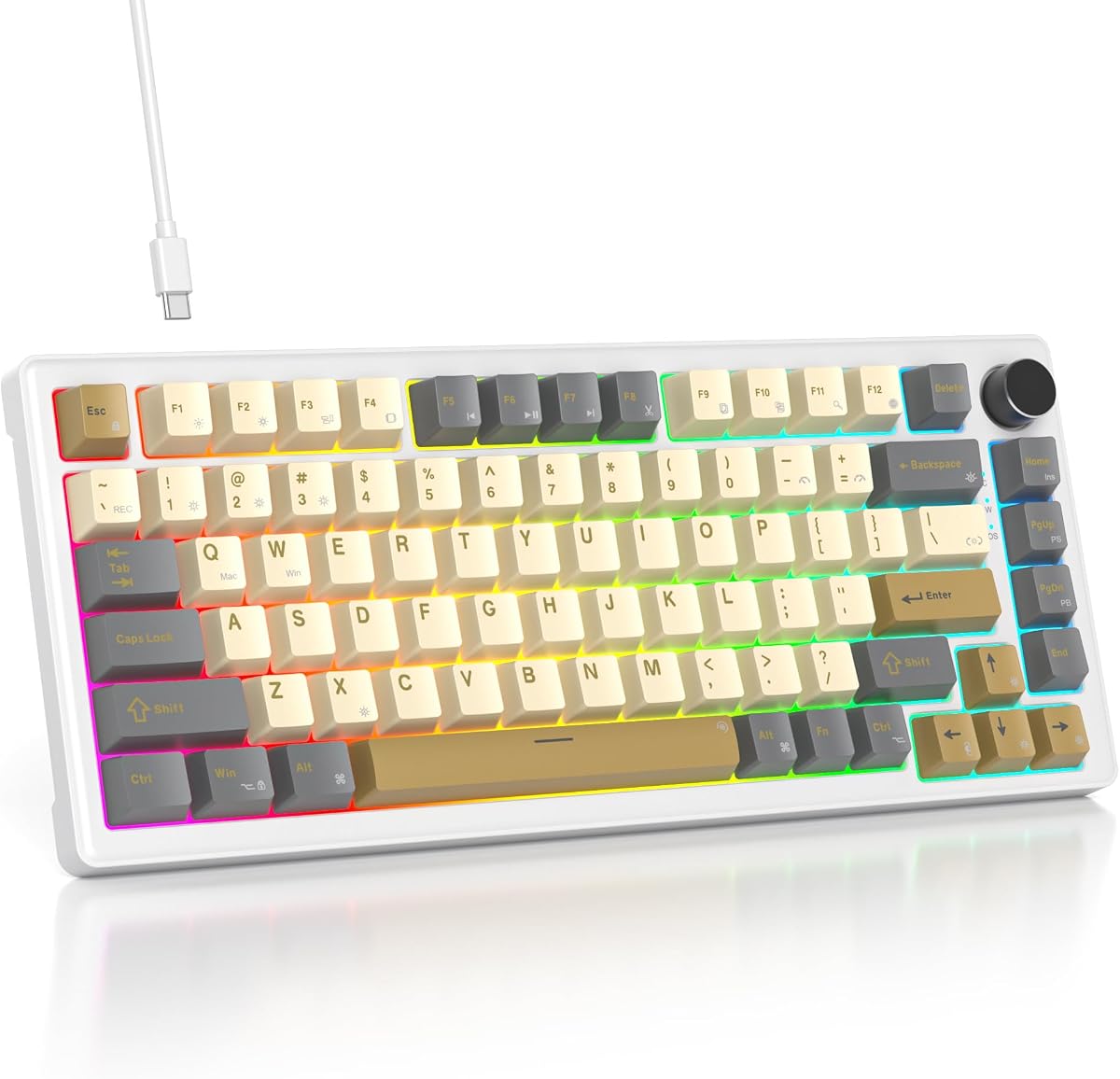
The 75 Percent Keyboard focuses on delivering a softer and quieter typing experience through its sound-absorbing pads. Rated 4.6 by users, it features a gasket-mounted structure that cushions each keystroke for enhanced comfort during extended use.
We may earn a commission when you buy through this link, at no additional cost to you.
Equipped with high-quality PBT keycaps it resists oil and wear to maintain its texture over time. The hot-swappable sockets allow you to switch out mechanical switches effortlessly providing a tailored typing and cool gaming experience.
The lack of wireless capability limits portability and the software setup may require time to perfect. These trade-offs are acceptable for users prioritizing sound quality and durability.
If you want a durable keyboard with excellent sound dampening and customization, this is a strong option. It performs flawlessly in intense gaming sessions ensuring every key press is registered accurately.
High-quality PBT keycaps resist oil and wear ensuring a clean and durable surface that maintains its texture over time.
Intuitive software allows for macro programming and key remapping giving you full control over your keyboard.
We may earn a commission when you buy through this link, at no additional cost to you.
Choosing the right mechanical keyboard depends on several key factors that affect your typing experience and workflow efficiency.
The 75 percent layout offers a balance between compactness and functionality. It removes the numpad and some function keys but keeps arrow keys and essential shortcuts making it ideal for saving desk space without losing usability.
Look for a layout that retains the keys you use daily. If you frequently need a numpad, a larger size might be necessary but for most users, the 75 percent layout provides the best compromise.
Mechanical switches come in various types including linear tactile and clicky. Linear switches offer smooth keystrokes suitable for gaming while tactile switches provide a bump for feedback during typing. Choose based on your preference for sound and feel.
Consider pre-lubed switches for a smoother experience right out of the box. If you prefer a specific sound or feedback, check if the keyboard supports hot-swappable switches to customize later without soldering.
Decide between wired and wireless connectivity based on your needs. Wired connections offer zero latency and stability while wireless options provide flexibility and cleaner desk setups. Some models offer multiple modes like Bluetooth and 2.4GHz for switching between devices.
If you work across multiple devices, a keyboard with dual or triple mode connectivity is beneficial. Ensure the battery life supports your usage if you choose a wireless option.
A durable frame and high-quality keycaps like PBT ensure longevity and a premium feel. Metal plates or gasket mounts improve typing comfort and reduce noise. Avoid keyboards with hollow sounds or cheap plastic builds that may wear quickly.
Check for features like sound dampening layers or gasket mounting which enhance the acoustic experience. A sturdy build also protects internal components from accidental drops or daily wear.
Features like RGB lighting, programmable keys, and multi-function knobs add versatility to your setup. Software support allows macro recording and key remapping which can improve workflow efficiency for specific tasks.
Ensure the software is compatible with your operating system and easy to use. Hardware-level customization via hot-swap PCBs allows you to change switches without tools which is great for enthusiasts.
Ergonomic designs like adjustable kickstands and wrist support help maintain a natural hand position. Stepped keycaps also improve comfort during long typing sessions. A keyboard that reduces fatigue is essential for daily use.
Look for keyboards that offer tilt adjustments or ergonomic layouts. If you spend many hours typing, consider adding a separate wrist rest for additional support.
Ensure the keyboard works with your operating system and any accessories you use. Most keyboards support Windows and Mac but some may have specific software requirements. Check for driver availability and community support.
Also consider the warranty and customer support offered by the manufacturer. Reliable support ensures you can resolve issues quickly and enjoy a smooth user experience.
Set a realistic budget that balances cost with features. Entry-level models offer basic functionality while higher-end ones provide advanced features like hot-swap and wireless. Determine which features are essential for you before deciding.
Avoid overpaying for unnecessary features but do not compromise on essential build quality. A well-built keyboard at a mid-range price often offers better value than a cheap model that requires frequent replacement.
Start by connecting your keyboard via USB or Bluetooth depending on your preference. Pair Bluetooth devices through system settings and ensure the battery is charged if it is a wireless model. Test basic input to confirm functionality.
Customize your keys and lighting using the provided software or onboard controls. Adjust brightness levels to match your environment and set macros for frequent actions. Use hot-swap tools to change switches safely without damaging the PCB.
Clean your keyboard regularly using a soft brush or compressed air to remove dust and debris. Wipe keycaps with a damp cloth and avoid liquid near the electronic components. Store the keyboard in a dry place when not in use to maintain its condition.
A 75 percent layout is a compact design that removes the numpad and some function keys while keeping essential arrow keys and a full row of F keys. It saves desk space without sacrificing critical functionality making it popular for gaming and typing.
Yes most models support both Windows and Mac operating systems. However you should verify specific software compatibility if you plan to use advanced customization features. Many keyboards also include dedicated Mac mode switchers for easier transitions.
Many models support hot-swappable switches allowing you to replace them without soldering. Check the product specifications for 3-pin or 5-pin switch compatibility. This feature lets you customize the sound and feel of your keyboard over time.
Wireless connectivity has improved significantly with many models offering 2.4GHz low-latency connections that rival wired performance. For competitive gaming a wired option is still preferred but for casual use wireless provides sufficient speed and convenience.
Use a soft brush or compressed air to remove dust from under the keycaps. Wipe the surface with a slightly damp cloth avoiding direct contact with the electronics. For deep cleaning you can remove keycaps but reassemble carefully to ensure proper placement.
A gasket mount design isolates the PCB from the case using soft padding which reduces noise and vibration. It provides a softer and more cushioned typing feel which can reduce fatigue during long typing sessions. This design is also popular for its premium acoustic quality.
The top picks in this guide offer excellent choices whether you want the versatility of the AULA F75 Pro or the premium features of the Womier SK80. Each model balances performance and value to suit different needs and preferences.
Prioritize connectivity and build quality when making your decision. If you value sound dampening and customization look for gasket mounts and hot-swap options. For simplicity a budget-friendly wired model like the Newmen GM326 provides great entry-level performance.
Always check current prices and availability before purchasing as these can change frequently. Taking the time to choose the right keyboard ensures a satisfying typing experience and long-term satisfaction with your setup.