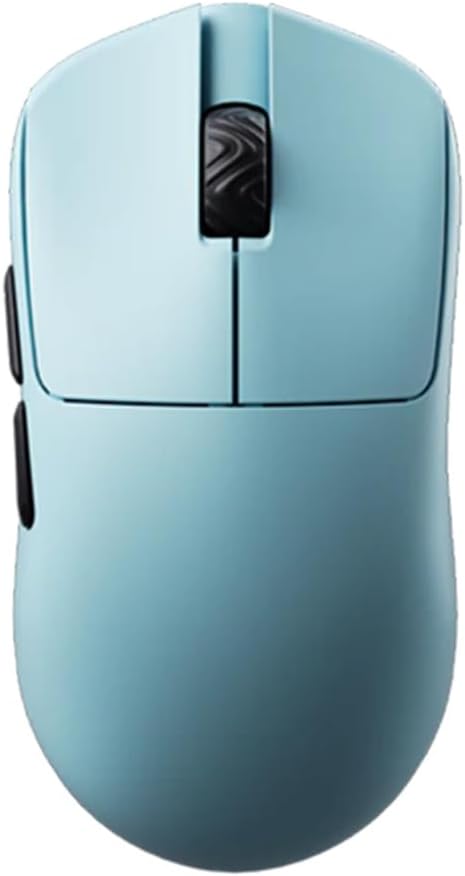
V6 Gaming Mouse
4.6Editor score
40 gram ultra lightweight build
Symmetrical shape for versatile grip
PAW3950 chip included
This guide compares the top 10 claw grip gaming mice for small hands, evaluating sensor performance, weight, ergonomics, and features to help you choose.
Finding the perfect claw grip gaming mouse for small hands is crucial for precision and comfort during intense gaming sessions. A well-designed mouse ensures your fingers rest naturally, reducing strain while maximizing control over fast-paced movements in competitive titles.
We have carefully evaluated ten leading models based on sensor accuracy, build quality, weight distribution, and ergonomic design specifically tailored for smaller hand shapes. Each product was analyzed to determine how well it supports claw grip techniques without compromising on performance or durability.
Each pick in this list highlights unique strengths such as lightweight construction, high DPI sensors, or wireless connectivity options. Please note that prices and availability can change frequently, so checking the latest details on the product pages is recommended before making a final decision.
4.6Editor score

4.6Editor score

4.1Editor score
This side-by-side comparison reviews all ten products to highlight their key specifications, strengths, and ideal use cases for gamers with smaller hands seeking optimal claw grip performance.


The Lamzu Atlantis Mini Champion Edition stands out as a top-tier option for gamers with small hands seeking a claw grip experience. It boasts a 4.6 rating from users who appreciate its ultra-light weight and precision tracking capabilities.
We may earn a commission when you buy through this link, at no additional cost to you.
Its PAW3950 sensor delivers up to 30000 DPI with low latency wireless performance powered by the Nordic 52840 MCU. The optical switches ensure a long lifespan and quick tactile feedback which is vital for competitive play.
While the design offers a broad back and curved top to prevent finger cramps some users might find the symmetrical shape less intuitive if they prefer ergonomic contours. The price reflects its high-end component choices.
This mouse is ideal for competitive FPS players who need speed and accuracy without adding strain to their wrists. It represents a solid investment for those prioritizing performance and build quality over cost.
The PAW3950 sensor ensures smooth tracking on various surfaces with high resolution and speed capabilities.
The hourglass symmetry and curved top provide a natural resting position for claw grip users.
We may earn a commission when you buy through this link, at no additional cost to you.
The V6 Gaming Mouse offers an exceptional value proposition for gamers looking to optimize their setup without breaking the bank. It carries a 4.6 rating due to its impressive performance relative to its lower price point.
We may earn a commission when you buy through this link, at no additional cost to you.
Weighing only around 40 grams it significantly reduces hand fatigue during long sessions. The symmetrical shell design supports both claw and fingertip grips while providing a stable platform for rapid movements.
Some users might note the simplicity of the web-based driver compared to full software suites but this ensures easy setup across different systems. The concave buttons enhance click positioning which aids accuracy.
This mouse is perfect for budget-conscious gamers who still demand high-end sensor performance and lightweight design. It serves as an excellent entry point into competitive gaming peripherals.
Reducing weight to 40 grams allows for faster flicks and less physical effort during intense play.
Ergonomic concave main buttons fit the fingers naturally for consistent and accurate clicking.
We may earn a commission when you buy through this link, at no additional cost to you.
The Pulsar X2H mini Wireless delivers advanced features tailored for aggressive claw grips with a focus on stability and endurance. It is rated 4.1 stars reflecting user satisfaction with its structural improvements over previous models.
We may earn a commission when you buy through this link, at no additional cost to you.
Its higher hump and narrower waist offer better support for the palm while maintaining agility. The PixArt PAW3395 sensor with Motion Sync ensures smooth and jitter-free tracking at high speeds.
While the renewed status may concern some buyers the upgraded internal structure ensures consistent clicks and reduced rattling. The 100-hour battery life supports extended use without frequent recharging.
This model is recommended for gamers who need a reliable wireless mouse with specific ergonomic contours for small hands. It balances premium performance with practical features for daily use.
The elevated rear hump provides a solid anchor point for the palm during intense gaming moments.
With up to 100 hours of usage players can game for days on a single charge.
We may earn a commission when you buy through this link, at no additional cost to you.
The Gwolves Skoll Mini SK-S Black is designed specifically with small hands in mind offering a compact ergonomic profile. It holds a 4.4 rating for its lightweight build and responsive performance in competitive settings.
We may earn a commission when you buy through this link, at no additional cost to you.
The 3389 sensor supports up to 16000 DPI allowing for precise cursor control. Its honeycomb design reduces weight to 50 grams making it easy to lift and move quickly across the mousepad.
While the detachable cable adds portability some users might prefer wireless options for a completely untethered experience. The PTFE skates ensure smooth gliding on various surfaces which enhances comfort.
This mouse is a great choice for entry-level competitive gamers looking for a lightweight tool without high costs. It fits well in the budget category while maintaining solid functionality.
The small form factor ensures fingers can reach all buttons comfortably without stretching.
High quality PTFE skates reduce friction for effortless and accurate mouse movements.
We may earn a commission when you buy through this link, at no additional cost to you.
The Pulsar X3 LHD Crazylight redefines lightweight gaming with an unbelievable 43 gram weight that feels almost weightless in the hand. It is rated 4.3 stars by users who value speed and durability in their gear.
We may earn a commission when you buy through this link, at no additional cost to you.
Featuring the XS-1 sensor it supports high tracking speeds and acceleration which are essential for fast-paced games. The hybrid ergonomic design blends palm and claw grip benefits for a comfortable and controlled experience.
Although it is built for durability the minimalist design might not appeal to gamers who prefer extra features or lighting. The cost reflects the high-end components and specialized engineering involved.
This mouse is ideal for players who prioritize absolute speed and precision above all else. It stands out as a unique option for those willing to invest in premium performance.
At 43 grams the mouse offers a sensation of zero weight allowing for effortless flicks.
Optical switches provide reliable and fast response times without the risk of double clicking.
We may earn a commission when you buy through this link, at no additional cost to you.
The V8 Gaming Mouse offers an incredibly lightweight experience at around 36 grams making it one of the lightest options available for competitive gaming. It earns a 4.5 rating for its balance of speed and stability.
We may earn a commission when you buy through this link, at no additional cost to you.
Powered by the PAW3950 chip and Nordic 52840 MCU it ensures low latency wireless performance. The symmetrical shape supports versatile grip styles including claw and fingertip techniques for different play preferences.
Some users might find the lack of advanced software a limitation if they wish to deeply customize settings. The web-based driver offers a simple alternative for quick adjustments without installation.
This mouse is a great fit for esports enthusiasts who need a fast and reliable tool for high-speed action. It delivers professional-level features at a competitive price point.
The combination of optical switches and high polling rates ensures near-instantaneous input delivery.
A stable 2.4GHz connection provides a lag-free experience comparable to wired alternatives.
We may earn a commission when you buy through this link, at no additional cost to you.
The Corsair IRONCLAW Wireless SE is known for its massive battery life and robust feature set making it a strong contender for long gaming sessions. It has a 3.9 rating reflecting mixed feedback on its ergonomic suitability for smaller hands.
We may earn a commission when you buy through this link, at no additional cost to you.
With up to 285 hours on 2.4GHz and 532 hours via Bluetooth the mouse ensures minimal downtime for charging. The 26K DPI sensor provides surface calibration to adapt to various mousepad textures effectively.
However its ergonomic asymmetric shape is designed primarily for larger hands which might limit its appeal for users seeking a small fit. The weight is also higher than typical lightweight claw mice.
This model is best for gamers who prioritize battery endurance and extensive customization over lightweight agility. It serves well for those who spend hours at the PC without needing frequent breaks.
Battery life that spans weeks ensures uninterrupted gameplay for marathon gaming sessions.
10 programmable buttons allow users to map macros and functions for enhanced productivity.
We may earn a commission when you buy through this link, at no additional cost to you.
The Pulsar X2H Wireless White offers a refined version of the popular X2H design with enhanced stability for claw grip users. It maintains a 4.2 rating due to its improved internal structure and responsive performance.
We may earn a commission when you buy through this link, at no additional cost to you.
Its higher hump and narrow waist provide better palm support which reduces strain during long sessions. The PixArt PAW3395 sensor delivers precise tracking with Motion Sync technology for smoother movement.
While the price is higher than some competitors the build quality and durability justify the investment for serious gamers. The white finish adds a stylish touch but requires regular cleaning to stay pristine.
This mouse is recommended for users who need a reliable wireless option with specific ergonomic contours. It balances performance and comfort well for daily use and competitive play.
The narrow waist allows for better control and precision during rapid aiming movements.
Upgraded internal structure ensures satisfying clicks without rattling or unintended double clicks.
We may earn a commission when you buy through this link, at no additional cost to you.
The Bloody V7 is a functional option for users who need extensive programmability alongside ergonomic comfort. It holds a 4.4 rating for its utility in both gaming and productivity tasks.
We may earn a commission when you buy through this link, at no additional cost to you.
With 8 programmable buttons it supports complex macros and automation scripts which can be a significant advantage for specific game types. The rubberized black coating provides a secure grip during intense usage.
While the sensor is older at 3200 DPI it remains sufficient for casual gaming and general use. The adjustable report rate allows users to balance performance with system resource usage effectively.
This mouse is a practical choice for those who need customization without breaking the budget. It serves well for casual gamers or users who need extra control features.
Bloody 6 software allows deep customization for scripting and automated workflows.
The rubberized coating ensures a secure hold even during long and sweaty gaming sessions.
We may earn a commission when you buy through this link, at no additional cost to you.
The BenQ Zowie S2-C is built for professional esports performance with a focus on simplicity and reliability. It carries a 4.3 rating among competitive players who value consistent hardware over software features.
We may earn a commission when you buy through this link, at no additional cost to you.
Its symmetrical shortened design is ideal for small hands allowing precise control without unnecessary bulk. The 3360 sensor provides steady tracking with adjustable DPI levels to suit various game styles.
While it lacks RGB lighting and software customization this driverless approach ensures zero bloat and maximum focus on gameplay. The paracord cable minimizes drag which enhances free movement.
This mouse is highly recommended for purists who prefer a clean and straightforward experience. It is a reliable choice for serious gamers who need tools that work without distraction.
No software required means plug and play functionality with immediate DPI adjustments.
The design and sensor are tuned specifically for competitive shooter games for better accuracy.
We may earn a commission when you buy through this link, at no additional cost to you.
Selecting the right mouse requires considering several key factors to ensure comfort and performance. This guide outlines the most important elements to evaluate when purchasing a claw grip mouse for small hands.
The size and weight of a mouse are paramount for small hands. A mouse that is too large can force fingers to stretch leading to strain. Ideally look for mice under 50 grams to ensure swift movements without fatigue.
Prioritize models with a compact form factor and light construction to enhance speed and reduce physical effort during long sessions.
A high-quality sensor ensures precise tracking without acceleration or spin outs. Look for sensors with high DPI and IPS ratings to handle fast flicks reliably. Optical sensors generally provide better consistency than older technologies.
Choose a sensor with a high DPI range and tracking speed to guarantee accurate cursor control across various surfaces.
The shape must support a claw grip by providing a high back and narrow waist. This allows fingers to arch over the top while the palm rests on the hump. Symmetrical shapes often work well for claw users.
Select a mouse with a design that naturally fits your hand contours to prevent cramping and improve control.
Wireless mice offer greater freedom of movement but wired models can provide more stability and no battery concerns. Modern wireless technology has largely closed the latency gap making it a viable option for competitive gaming.
Decide between wireless and wired based on your preference for cable management versus maximum stability and charging convenience.
Optical switches are preferred for their durability and faster response times compared to mechanical switches. They reduce the risk of double clicking and offer a satisfying tactile feel. The lifespan of optical switches is typically much longer.
Opt for optical switches if you prioritize long-term reliability and quick click response in your gaming sessions.
For wireless mice battery life determines how often you must recharge. Models with over 50 hours of usage are standard but some offer hundreds of hours. Consider your gaming frequency when evaluating battery capacity.
Choose a mouse with sufficient battery life to avoid interruptions during extended gaming sessions or tournaments.
Some games benefit from extra buttons that can be programmed for macros or specific actions. However too many buttons can clutter the design and make the mouse too heavy. Look for essential buttons that fit your play style.
Balance the need for programmable buttons with a clean design that does not compromise ergonomics or weight.
Prices for gaming mice range from budget-friendly options to high-end models with premium features. A higher price does not always guarantee better performance so compare specs carefully. Many affordable mice now offer flagship features.
Assess the value by comparing the features offered against the cost to find the best fit for your budget.
To maximize the benefits of a claw grip mouse position your hand so that your palm rests lightly on the back hump while your fingers arch over the main buttons. This posture provides stability and allows for quick micro-adjustments.
Regularly clean your mouse to prevent dust buildup especially if it has a honeycomb design. Use compressed air or a soft brush to remove debris from the surface and crevices to ensure smooth sensor tracking.
Update your mouse firmware and drivers through the official software to access new features and performance improvements. This ensures your device operates at its best and maintains compatibility with your system.
A good claw grip mouse typically features a high back and narrow waist to support finger arching. It should have a sensor that tracks fast movements accurately and a weight that minimizes strain on small hands.
Yes lighter mice reduce wrist and finger strain allowing for faster movements. Mice under 60 grams are generally recommended for small hands to facilitate better control and endurance during play.
Many high-end mice offer customization through software but some driverless models allow basic adjustments via hardware buttons. Check if your preferred mouse requires software for DPI changes or button mapping.
Measure your hand from wrist to tip of middle finger and check the mouse dimensions. A mouse designed for small hands should allow your fingers to reach all buttons comfortably without stretching.
Modern wireless mice have low latency comparable to wired ones offering freedom of movement. However wired mice are always ready and require no charging making them suitable for competitive setups.
Most competitive players prefer a DPI between 400 and 1600 for pixel-perfect aim. Higher DPI is available but often unnecessary for gaming as it can lead to overshooting targets.
The top picks in this guide offer a range of options from budget friendly to premium wireless models. Each caters to small hands while maintaining the ergonomic features essential for a comfortable claw grip.
When selecting your mouse prioritize weight sensor accuracy and shape over flashy features like RGB lighting. These core elements have the most significant impact on your gameplay experience and comfort.
Always check the latest prices and reviews on the product pages before purchasing to ensure you are getting the best value. The market evolves quickly so staying updated helps you find the most current deals.