
Learning Resources Code & Go Robot Mouse
4.5Editor score
Ideal for ages four and up
Includes twenty-two maze walls
Teaches sequencing without screens
Explore our expert guide comparing the top 10 coding toys for kids in October 2026, featuring screen-free and app-based STEM robotics kits for all ages.
Coding toys have revolutionized how children learn technology by turning abstract programming concepts into tangible, interactive play experiences that foster creativity and logical thinking.
We evaluated ten top-rated robotic kits based on educational value, ease of use, durability, and age appropriateness to help you find the perfect introduction to coding for your child.
Each selection below highlights unique features and learning outcomes to guide your decision, but remember that retail prices and availability can fluctuate so verify current details before purchasing.
4.5Editor score

4.1Editor score

4.6Editor score
This side-by-side comparison breaks down the core specifications and unique capabilities of each robotic toy to help you quickly identify which kit matches your child's skill level and interests.





The Thames & Kosmos My Robotic Pet stands out as a top choice for children aged eight and older who want to learn coding without staring at a screen. With a solid 4.1 rating from verified buyers, this kit combines hands-on building with interactive programming that feels more like playing with a real pet than solving a puzzle. Its standout quality lies in the unique combination of physical action cards and robotic movement that teaches sequencing and logic naturally.
We may earn a commission when you buy through this link, at no additional cost to you.
This robotic chameleon is engineered to respond to color sensors and infrared inputs, allowing kids to program it to move, change colors, and even retract its tongue using physical cards instead of digital interfaces. The kit includes a comprehensive 48-page manual that guides users through assembly and explains how nature inspires engineering design, providing deep educational value beyond simple play. Three distinct modes including Coding, Wild, and Pet modes ensure that the experience evolves as the child learns new concepts.
While the assembly process can take some time and requires adult assistance for younger builders, this is a minor trade-off for the durable and detailed nature of the final product. The need to purchase batteries separately is also a consideration for families budgeting for holiday gifts or classroom supplies. However, these requirements are standard for complex STEM kits and ensure the robot operates with the precision needed for realistic movement and sensor feedback.
Parents looking for a gift that balances entertainment with rigorous learning will find this kit exceptional for children ready for independent play at age twelve or guided play at age eight. The award-winning status and focus on physical interaction make it a safe and engaging option for reducing screen time while still teaching core programming principles. We recommend this highly for any home or classroom aiming to foster engineering curiosity.
The physical nature of the coding cards helps children visualize abstract programming concepts through tangible objects they can touch and arrange. This approach reinforces memory retention and makes the learning process feel like a creative adventure rather than a structured lesson.
The inclusion of multiple play modes allows the toy to grow with the child, offering new challenges and different ways to interact with the robot as their skills improve over time.
Using physical colored action cards means children learn sequencing logic without needing tablets or computers which reduces eye strain and promotes social interaction during play sessions.
The building process teaches mechanical principles and attention to detail while the manual explains how biological systems inspire efficient robotic design and problem solving.
We may earn a commission when you buy through this link, at no additional cost to you.
The Makeblock mBot is a highly rated entry-level coding robot designed specifically for children between the ages of eight and twelve who are ready to explore electronics and robotics. With a strong 4.6 rating, this kit offers a robust learning path that starts with simple drag-and-drop programming and progresses to more advanced concepts like Arduino coding. Its standout feature is the seamless integration with multiple free software applications that allow for remote control and game creation.
We may earn a commission when you buy through this link, at no additional cost to you.
Kids can assemble the robot in about fifteen minutes thanks to clear instructions, making it a quick start to STEM learning without long setup frustration. The robot supports various functions such as line-following and obstacle avoidance which can be customized through coding cards or digital interfaces. The open-source nature of the platform means it is compatible with over one hundred electronic modules and five hundred parts, including LEGO bricks, allowing for endless creativity and expansion.
The requirement for separate battery purchases for both the controller and the robot is a small inconvenience that parents should account for when buying. Additionally, while the learning curve is gentle, children may need some initial guidance to fully grasp the connection between code inputs and physical robot actions. These factors do not diminish the educational value but suggest that a collaborative approach between parent and child yields the best results.
Families who want a robot that can grow in complexity as their child advances will appreciate the mBot's ability to transition from a basic toy to a serious coding platform. The rich tutorials and community support ensure that there is always something new to learn or create. We highly recommend this for households with older elementary or middle school children interested in tech and engineering.
The ability to use Scratch and then transition to Arduino provides a clear pathway for learning real-world programming languages rather than just toy-specific commands. This progression helps bridge the gap between playful learning and professional development skills.
The compatibility with existing building blocks like LEGO allows children to customize their robot's design and function using parts they already own and are familiar with.
Starting with simple block coding and moving to text-based languages ensures children build confidence gradually without feeling overwhelmed by complex syntax too early.
The open-source design and compatibility with popular building systems mean the robot can be upgraded with sensors and motors as the user's interest grows.
We may earn a commission when you buy through this link, at no additional cost to you.
The Sphero Mini packs a surprising amount of functionality into a tiny robotic ball that is roughly the size of a ping pong ball making it ideal for play in smaller spaces. Rated 4.6 by users, this educational robot offers a great entry point for beginners who want to experience robotics without the bulk of larger kits. Its standout quality is the versatility of control modes allowing users to drive via joystick, slingshot, or device tilt for a dynamic play experience.
We may earn a commission when you buy through this link, at no additional cost to you.
Powered by the free Sphero Edu app, children can create and customize games or learn to code by drawing paths, using drag-and-drop blocks, or writing JavaScript. The kit includes three traffic cones and six bowling pins to encourage obstacle course fun and physical play even when not connected to a device. With a play time of about one hour on a charge, it offers substantial entertainment for a single session.
The compact size makes it easy to lose or damage, and the small components might not be suitable for very young children who might put them in their mouths. The relatively short battery life means frequent recharging is necessary for long play sessions which could interrupt the flow of activity. Despite these minor drawbacks, the durability and robustness of the ball itself are generally well-received.
This toy is perfect for families with limited floor space or for children who are just starting to explore coding concepts and want something fun and interactive. The ability to use the robot as a controller for arcade-style games adds an extra layer of engagement that keeps interest high. We recommend it for ages eight and up who can handle small parts responsibly.
The combination of physical play with digital coding encourages children to see the connection between programming logic and real-world movement in a very direct and immediate way. This helps demystify technology and makes the learning process feel like a game.
The colorful LED lights and responsiveness to different control inputs provide instant feedback that reinforces learning and keeps the child motivated to try new codes and commands.
Offering joystick, slingshot, and tilt controls gives children different ways to interact with the robot which helps keep play fresh and engaging over time.
The small size means it can be used indoors or outdoors without requiring much room making it a versatile option for various play environments and settings.
We may earn a commission when you buy through this link, at no additional cost to you.
The Learning Resources Code & Go Robot Mouse is an excellent budget-friendly option for introducing very young children to the basics of coding and logic. With a rating of 4.5, this toy is specifically designed for ages four and up, making it one of the most accessible entry points in the coding toy market. Its standout quality is the simplicity of the interface which uses large physical buttons to program the mouse without needing any screens or complicated software.
We may earn a commission when you buy through this link, at no additional cost to you.
This kit includes a comprehensive set of maze grids, walls, tunnels, and coding cards that allow children to build their own challenges and see immediate results from their programming choices. The mouse moves based on the sequence of buttons pressed teaching foundational concepts like sequencing and directional understanding through playful trial and error. It is a strong choice for classrooms or homes looking for a reliable and educational tool.
While the simplicity is a strength for young learners it also means there are no advanced features or connectivity options that older children might find engaging as they grow. The reliance on physical cards and buttons limits the complexity of codes that can be written compared to app-based systems. However for this age group the focus on basic logic is exactly what is needed to build confidence.
Parents and teachers seeking an affordable and durable introduction to STEM will find this robot mouse to be a perfect fit for early learners. The set is robust enough to withstand classroom use and the included materials provide plenty of variety for extended play. We recommend it highly for families with preschoolers who are curious about how robots work.
The tangible nature of the coding cards helps young children understand that computers follow specific instructions in a specific order which is a fundamental concept in programming. This concrete approach makes abstract ideas more manageable for developing minds.
The included maze grid allows for the creation of repeatable challenges which means children can test their logic and see different outcomes by rearranging the physical path elements.
Using physical buttons and cards ensures that even the youngest children can engage with coding concepts without the distraction or health concerns associated with screen time.
The durable construction and organized set of pieces make it easy for teachers to set up multiple activity stations for small group rotations and structured lessons.
We may earn a commission when you buy through this link, at no additional cost to you.
The TEACH TECH Mech-5 is a specialized coding robot designed for older children who have a strong interest in mechanical engineering and complex assembly. With a 4.5 rating, this kit challenges kids to build a robot that can throw, lift, kick, and draw using mechanical coding buttons. Its standout quality is the mission-based approach that focuses on the principles of engineering rather than just software programming making it a unique choice in this category.
We may earn a commission when you buy through this link, at no additional cost to you.
This is an in-depth STEM project that requires multiple hours of build time and attention to detail which fosters patience and problem-solving skills alongside technical knowledge. The robot moves through mechanical systems controlled by coding buttons that children snap onto a coding wheel allowing for a hands-on understanding of how hardware and software interact. The instructions are detailed to ensure proper assembly and successful operation.
The main trade-off is the time commitment required for assembly which might be daunting for younger children or those who prefer immediate play over construction. The complexity also means it may not be suitable for beginners with no prior experience in building kits or mechanics. However for those who enjoy building and engineering this is a rewarding experience that offers deep satisfaction.
Families with children aged ten and up who dream of becoming engineers will find this kit to be an inspiring and educational tool that goes beyond typical toy play. The focus on mechanical functions helps explain the physical side of robotics which is often overlooked in app-only coding toys. We recommend it for kids who enjoy hands-on building projects.
The mechanical coding buttons provide a tactile way to input commands which helps children understand the connection between physical controls and robotic movement. This hands-on approach makes the coding concepts more concrete and easier to grasp.
The mission-based design encourages children to think about how to solve specific challenges using the robot's capabilities fostering critical thinking and strategic planning skills.
Learning how gears and motors work together gives children a broader understanding of robotics that includes physical mechanics as well as digital logic and programming.
Completing specific missions provides clear goals for the robot which keeps the child motivated and helps them see the practical application of their programming and building skills.
We may earn a commission when you buy through this link, at no additional cost to you.
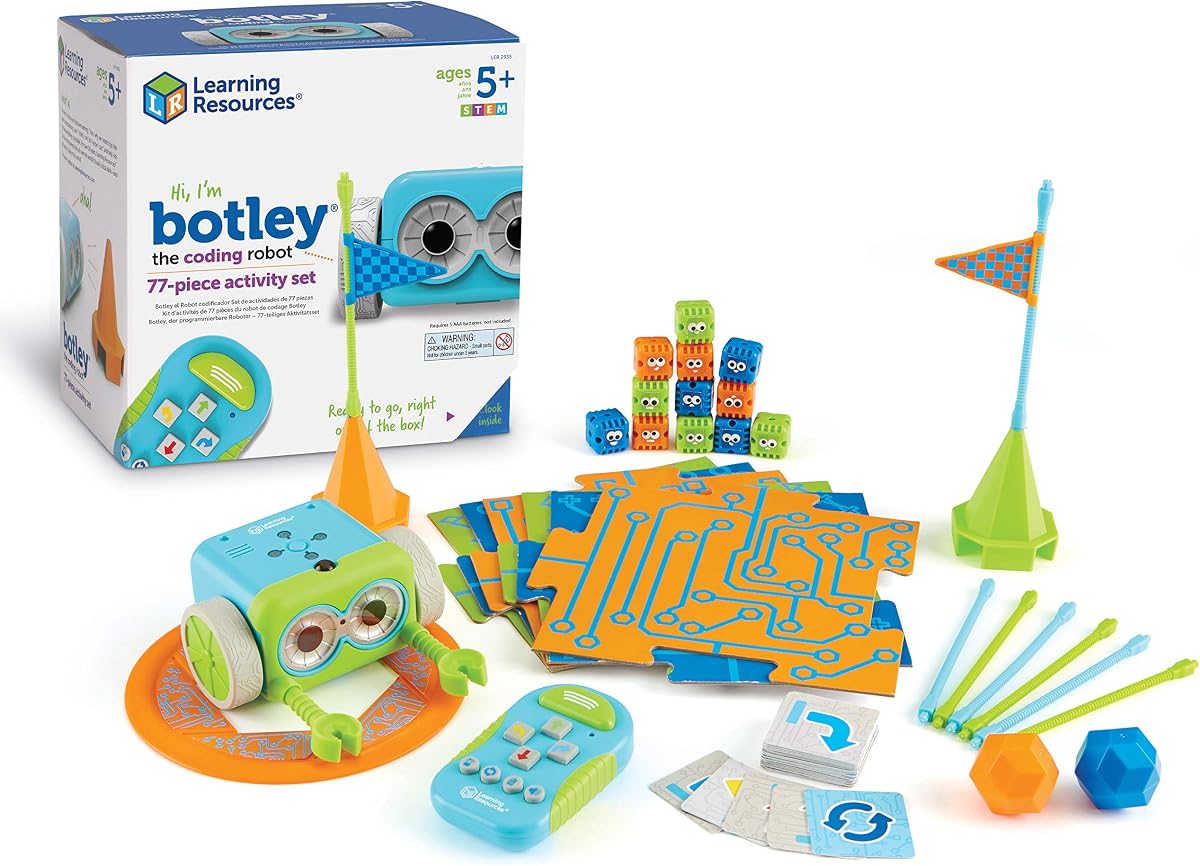
Learning Resources Botley is a robust and engaging robot designed for children aged five and up who want to create complex coding challenges without using a screen. With a strong 4.6 rating, this activity set includes seventy-seven pieces that provide endless opportunities for building obstacle courses and testing programming logic. Its standout quality is the object detection capability that allows Botley to avoid obstacles autonomously adding a layer of sophistication to the coding play.
We may earn a commission when you buy through this link, at no additional cost to you.
This kit comes ready to use out of the box with a remote programmer that sends commands easily making it accessible for young coders to start immediately. The robot supports looping commands which teaches kids how to create efficient sequences and solve multi-step problems. The included cards and tiles allow for creative storytelling and path building that keeps play fresh and challenging over time.
While the set is extensive it requires multiple AAA batteries for both the robot and the remote which adds to the ongoing cost of ownership. The assembly of the maze pieces and the robot itself takes a bit of time but the result is a durable and interactive playset. The complexity of loop commands might require some guidance for the youngest users to fully grasp.
Parents looking for a toy that encourages critical thinking and problem solving will appreciate Botley's ability to grow in complexity as the child's skills improve. The screen-free nature makes it a great alternative for kids who spend too much time on tablets and phones. We recommend it for classrooms or homes with children who enjoy building and navigating mazes.
The looping command feature is a valuable introduction to efficient coding practices teaching children how to save steps and simplify their programs. This concept is fundamental to computer science and gives them an early advantage.
The hidden features and unlockable challenges provide an extra layer of discovery that keeps children interested and motivated to explore the robot further capabilities fully.
Supporting loops and object detection introduces more advanced programming ideas to young children which helps them develop stronger logical thinking and problem-solving abilities early.
The large number of pieces and cards ensures that there are always new ways to build and play so the toy does not lose its appeal quickly over time.
We may earn a commission when you buy through this link, at no additional cost to you.
The Ozobot Evo Coding Robot Kit is a comprehensive educational tool designed to introduce children in grades K-12 to coding in a fun and interactive way. With a 4.6 rating, this kit stands out for its extensive resources and ability to adapt to a wide range of skill levels through five distinct learning stages. Its standout quality is the combination of screen-free color code learning and digital block coding which caters to diverse learning styles and environments.
We may earn a commission when you buy through this link, at no additional cost to you.
The kit includes an Evo robot and five dual-tip color code markers allowing students to draw paths and commands for the robot to follow using its optical sensors. Access to over seven hundred free lessons covering STEAM and core subjects provides teachers with a ready-made curriculum that integrates coding into daily learning seamlessly. The robot is durable and comes in a zip case making it practical for busy educational settings.
While the price is higher than some other options the included educational resources and longevity of the kit make it a valuable investment for schools and serious learners. The markers need occasional replacement and the robot requires charging which are standard maintenance tasks for such technology. However the depth of content available justifies these small ongoing requirements.
Educators and parents seeking a long-term coding solution that evolves with a child's abilities will find this kit to be an excellent choice. The adaptability ensures that the toy remains relevant and challenging from kindergarten through middle school. We recommend it for classrooms or households that prioritize structured educational content.
The dual learning modes allow students to start with simple color drawing and transition to complex block coding which creates a smooth learning curve and reduces frustration during the process. This approach builds confidence and interest in coding over time.
The wide range of available lessons ensures that teachers have a rich resource bank to draw from which supports diverse subjects and keeps the curriculum fresh and engaging.
Offering both color codes and block coding means children can choose the method that suits their learning style or switch between them for a comprehensive understanding of coding.
Access to hundreds of lessons provides continuous learning opportunities which helps students develop skills consistently and apply coding concepts to a variety of subjects.
We may earn a commission when you buy through this link, at no additional cost to you.
The Botley 2.0 is an updated version of the popular coding robot that adds new layers of complexity and interactivity for children aged five and up. With a 4.5 rating, this kit enhances the original experience with improved object-sensing capabilities and multi-step coding paths that challenge kids to refine their strategies. Its standout quality is the multisensory feedback that includes lights and music making the coding experience more engaging and fun.
We may earn a commission when you buy through this link, at no additional cost to you.
This kit opens the box with ready-to-use coding cards and a remote programmer allowing children to jump right into designing command sequences for their robot. The ability to program forty-five degree turns and object-sensing reactions adds depth to the play and encourages critical thinking and problem solving. The set includes seventy-eight pieces which allow for building custom mazes and imaginative stories.
While the features are improved, the need for battery setup remains a minor hurdle before play can begin. The small parts included in the kit mean that parental supervision is recommended for younger children to ensure safety. Despite this, the durability and robust design of the robot itself are well-suited for regular use in homes and classrooms.
Families looking to upgrade from a simpler coding toy to one with more capabilities will find the Botley 2.0 to be a worthy investment. The added complexity ensures that children will not outgrow the toy as quickly. We recommend it for kids who have mastered basic sequencing and are ready for more complex challenges.
The secret code combinations offer open-ended play which encourages children to experiment with different commands and see unique responses from the robot. This creativity keeps the experience fresh and engaging over many sessions.
The stacking obstacle pieces allow for three-dimensional maze building which adds a new dimension to play and helps children understand spatial relationships better than two-dimensional mazes.
Lights and sounds provide immediate feedback that helps children understand if their code worked and adds a fun element to the learning process keeping them engaged.
The ability to react to objects introduces conditional programming concepts which helps children understand how robots can make decisions based on their environment around them.
We may earn a commission when you buy through this link, at no additional cost to you.
The Wonder Workshop Dash Robot is a premium choice for children aged six and older who want a sophisticated coding experience that feels like playing with a real friend. With a 4.6 rating, this robot is ready to use out of the box without any assembly which is a major plus for busy parents. Its standout quality is the ability to respond to voice commands and sing or dance which creates a highly interactive and engaging play environment.
We may earn a commission when you buy through this link, at no additional cost to you.
Dash can be controlled through five different apps compatible with iOS, Android, and Fire OS providing a variety of coding styles from simple blocks to more advanced concepts. The robot includes building brick connectors and offers up to five hours of active play which is excellent for long play sessions or classroom activities. The design is durable and has been adopted in thousands of schools globally.
While the price is higher than other options the lack of assembly and the advanced features justify the cost for families seeking a top-tier educational toy. The requirement for a smartphone or tablet is necessary to access the full capabilities of the robot but this is standard for many modern learning tools. The battery life is impressive and supports extended use without interruption.
Parents who want a robot that offers maximum interaction and advanced programming features without the frustration of assembly will find Dash to be the perfect choice. It serves as a bridge between simple toys and professional robotics education. We recommend it for children ready for more complex coding concepts.
The ability to respond to voice commands introduces children to voice recognition technology which is an emerging and exciting field of computer science that is growing rapidly every year.
The long battery life ensures that children can enjoy extended play sessions without needing to stop for charging which is crucial for maintaining engagement during learning and play.
Since no assembly is required children can start coding and playing immediately which reduces frustration and ensures the focus remains on learning rather than building.
Five dedicated apps provide different ways to code which means children can explore multiple styles and deepen their understanding of programming through varied and fun activities.
We may earn a commission when you buy through this link, at no additional cost to you.
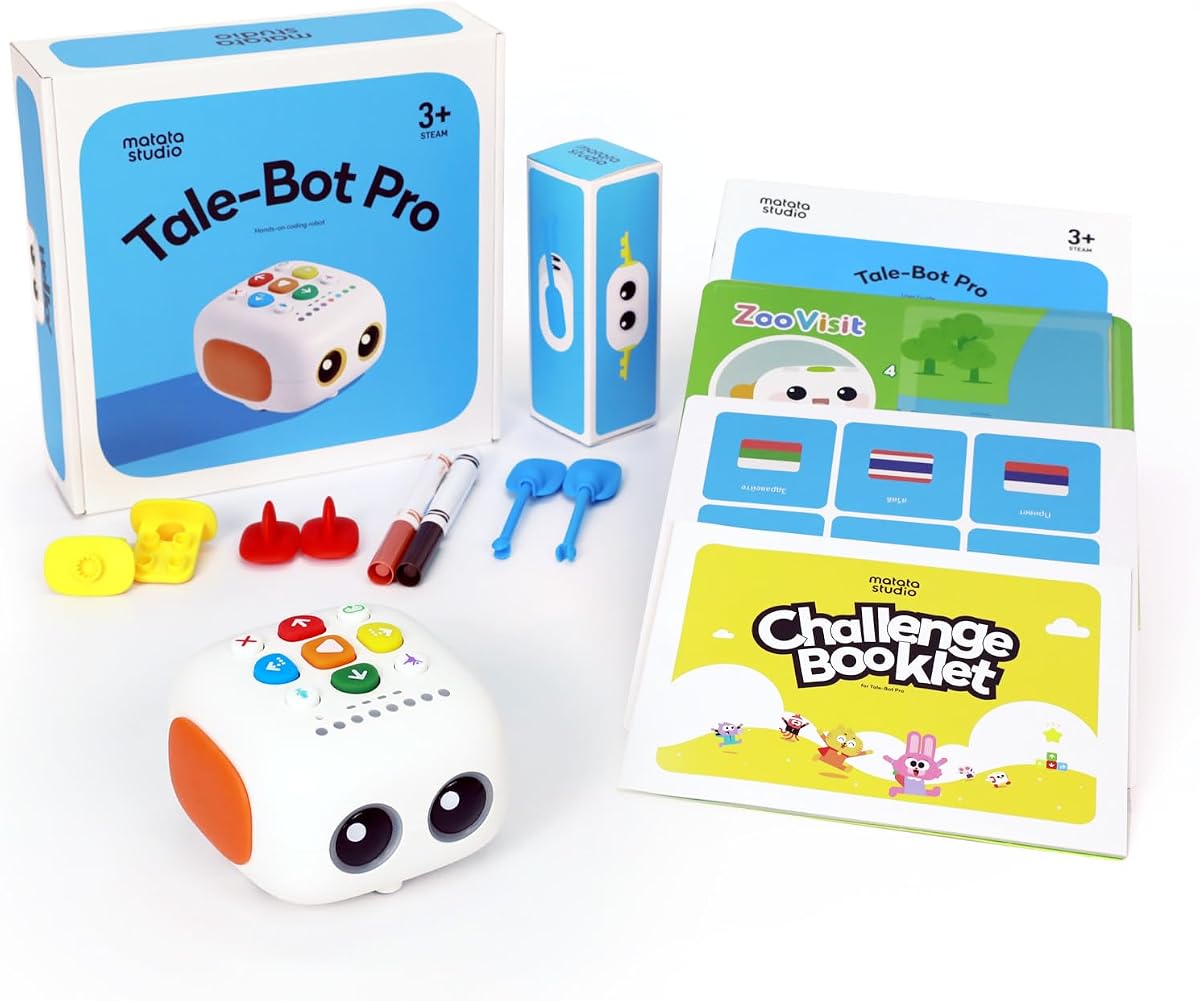
The TaleBot Pro is a specially designed coding robot for toddlers aged three to five that combines early programming concepts with language and storytelling skills. With a high 4.7 rating, this screen-free toy provides an interactive map and voice feedback that makes learning fun and engaging for very young children. Its standout quality is the storytelling feature that allows kids to record their own voices and bring them to life through the robot's interactive map.
We may earn a commission when you buy through this link, at no additional cost to you.
This robot supports up to two hundred fifty-six commands which includes basic concepts like sequences and loops taught through simple button presses. The interactive map helps children learn spatial concepts and follow directions while developing critical thinking and problem-solving skills. It is compatible with Lego blocks which adds another dimension of creative building and play to the experience.
While the coding concepts are basic this is perfectly aligned with the developmental stage of toddlers who need simple and intuitive interfaces to learn effectively. The limited advanced features mean it may not grow with the child as they get older but it serves its purpose well as an introduction. The high quality of the materials ensures it can withstand active play.
Parents looking for a gentle introduction to technology that also supports language development will find TaleBot Pro to be an excellent choice for preschoolers. The inclusion of ten languages makes it a versatile option for multicultural homes or for children learning multiple languages. We recommend it for early childhood education at home.
The voice feedback and recording features help children develop their speaking and listening skills which are foundational for learning and communication. This combination of tech and language is unique and valuable for toddlers.
The challenge booklet with missions provides a structured way to play that helps children stay focused and learn specific skills through guided activities that are appropriate for their age.
Combining coding with storytelling and recording helps children develop speaking and listening skills alongside logic and sequencing which supports overall cognitive growth and development.
Simple buttons and no screen make this toy safe and easy for toddlers to use which ensures they can enjoy the experience without getting frustrated or overwhelmed.
We may earn a commission when you buy through this link, at no additional cost to you.
Selecting the right coding toy involves considering age appropriateness, screen time preferences, and educational goals to ensure the toy matches your child's learning needs and interests.
Coding toys are designed for specific developmental stages ranging from toddlers who need simple buttons to older children who can handle complex apps and assembly. Choosing a toy that matches your child's current abilities ensures they remain engaged and do not become frustrated by tasks that are too difficult or too simple for their skill level.
Always check the recommended age range on the packaging to find a product that aligns with your child's motor skills and cognitive abilities.
Some parents prefer screen-free options that use physical cards or buttons to teach coding logic without increasing screen time while others prefer app-based toys that offer more interactive and visual feedback. Consider your household's technology rules and your child's interest in digital interfaces when deciding which style suits them best.
Choose screen-free toys for younger children to reduce distractions and app-based toys for older kids who are ready to explore more visual programming environments.
Look for toys that teach fundamental concepts like sequencing, loops, and problem-solving through hands-on play rather than just offering simple entertainment. The best coding toys provide structured learning paths that grow with the child and encourage critical thinking and engineering skills through challenging and interactive activities.
Select toys with detailed manuals or lesson plans to ensure the learning experience is structured and educational over a long period of use.
Robotic toys often contain small moving parts that can break if not handled with care so checking reviews for durability and material quality is essential. A well-built robot will withstand the rigors of active play and last longer even with regular use in a busy home or classroom environment.
Prioritize products made with high-quality materials that can handle frequent assembly and play without breaking down quickly.
Prices vary widely across coding toys so set a budget that allows for ongoing costs like batteries or charging accessories to avoid unexpected expenses. Some toys require multiple batteries while others are rechargeable which impacts long-term convenience and overall cost of ownership for your family.
Consider rechargeable models to reduce ongoing costs and check if batteries are included in the purchase price before you buy.
Toys that offer add-on packs or compatibility with other building systems provide more longevity and value as the child can expand their play experience as they grow. Features like remote control, object detection, or voice recognition can add depth to the learning process and keep the toy interesting for longer.
Choose robots with expandable options to ensure the toy can grow with your child's increasing skills and interests over time.
Resources like lesson plans, user guides, and community support can make a significant difference in how easily a toy can be integrated into learning routines. Products with strong support materials help parents and teachers facilitate the learning process and ensure children get the most out of the coding experience.
Select toys that include comprehensive guides or online resources to assist adults in helping children learn and progress.
Some toys focus heavily on physical building and movement while others are more focused on software and simulation which affects how tangible the coding experience feels. Physical interaction often helps children understand mechanical principles better while virtual interaction can teach more advanced software concepts.
Balance the need for physical play with software learning based on what your child enjoys most and learns best.
Start by fully assembling the robot according to the manufacturer's instructions to ensure all parts function correctly and safely during play.
Introduce coding concepts one at a time such as sequencing or loops so the child can master each idea before moving on to more complex challenges.
Store all accessories and cards in a labeled container to prevent loss and keep the play area organized for easy future access and use.
Yes, many coding toys are designed to be intuitive and include detailed manuals that guide both parents and children through the basics of programming. Even if you are not tech-savvy, you can facilitate learning by following the step-by-step instructions and exploring the features together with your child.
Most screen-free coding toys do not require internet access at all. However, app-based robots usually need a connection to download updates or access online lessons which should be considered based on your internet availability preferences.
Coding toys help develop critical thinking, problem-solving, and logical reasoning skills which are essential for academic success and future careers. They also foster creativity and patience as children experiment with different code sequences to achieve specific outcomes.
Yes, there are several screen-free coding toys designed for toddlers as young as three years old that focus on basic sequencing and spatial awareness. These toys use simple buttons and physical maps to introduce concepts without overwhelming young minds.
Many of the robots listed are designed with durability and educational resources in mind making them suitable for classroom use. Teachers can use them to teach STEM concepts through structured lessons and collaborative group activities.
App-based robots usually come with their own free software or apps that are easy to download and use without extra fees. Screen-free models do not require any software at all as they use physical cards or buttons to control the robot.
The ten coding toys reviewed offer a wide range of options for every age group and budget from the budget-friendly Code & Go Mouse to the premium Dash Robot.
Prioritize toys that match your child's current interests and skill level to ensure the learning experience remains enjoyable and engaging over time.
Remember to check current prices and availability before making a final purchase as details may change slightly over time.