
Switch 2 Pro Controller Charging Station
3.5Editor score
Dual charging for Pro controllers
LED indicator shows charging status clearly
Compact space-saving desktop design
This guide compares the top controller charging dock for Switch 2 options to help you find the best station for your gaming setup and battery needs.
Finding the right controller charging dock for Switch 2 is essential for any serious gamer who wants to keep their sessions going without interruption. A good dock ensures your controllers are always powered up and ready to play when you need them most.
We have compared ten top-rated charging stations based on compatibility, charging speed, safety features, and overall design to help you make an informed decision for your console setup.
Each pick below shows key features and real user ratings so you can choose the best match for your needs but remember that prices and availability can change over time.
3.5Editor score

4.7Editor score
4.6Editor score
The following table provides a side-by-side comparison of all ten products so you can quickly see which features and capabilities match your specific gaming requirements and budget.


This FASTSNAIL dock is a top choice for Switch 2 owners who want reliable magnetic charging and stylish RGB lighting for their gaming desk setup.
We may earn a commission when you buy through this link, at no additional cost to you.
It charges up to four Joycons simultaneously using magnetic alignment so you do not need to distinguish between plus and minus controllers during setup.
The only trade-offs are that it does not work with older Switch Joycons and the included cable might be shorter than some users prefer.
If you own the new Switch 2 Joycons and value both speed and aesthetics this dock is a highly recommended choice for your gaming station.
The magnetic design ensures easy alignment and secure placement which reduces wear and tear on the Joycons charging ports over time.
Nine vivid lighting modes including static and dynamic effects allow you to personalize your gaming space according to your mood.
We may earn a commission when you buy through this link, at no additional cost to you.
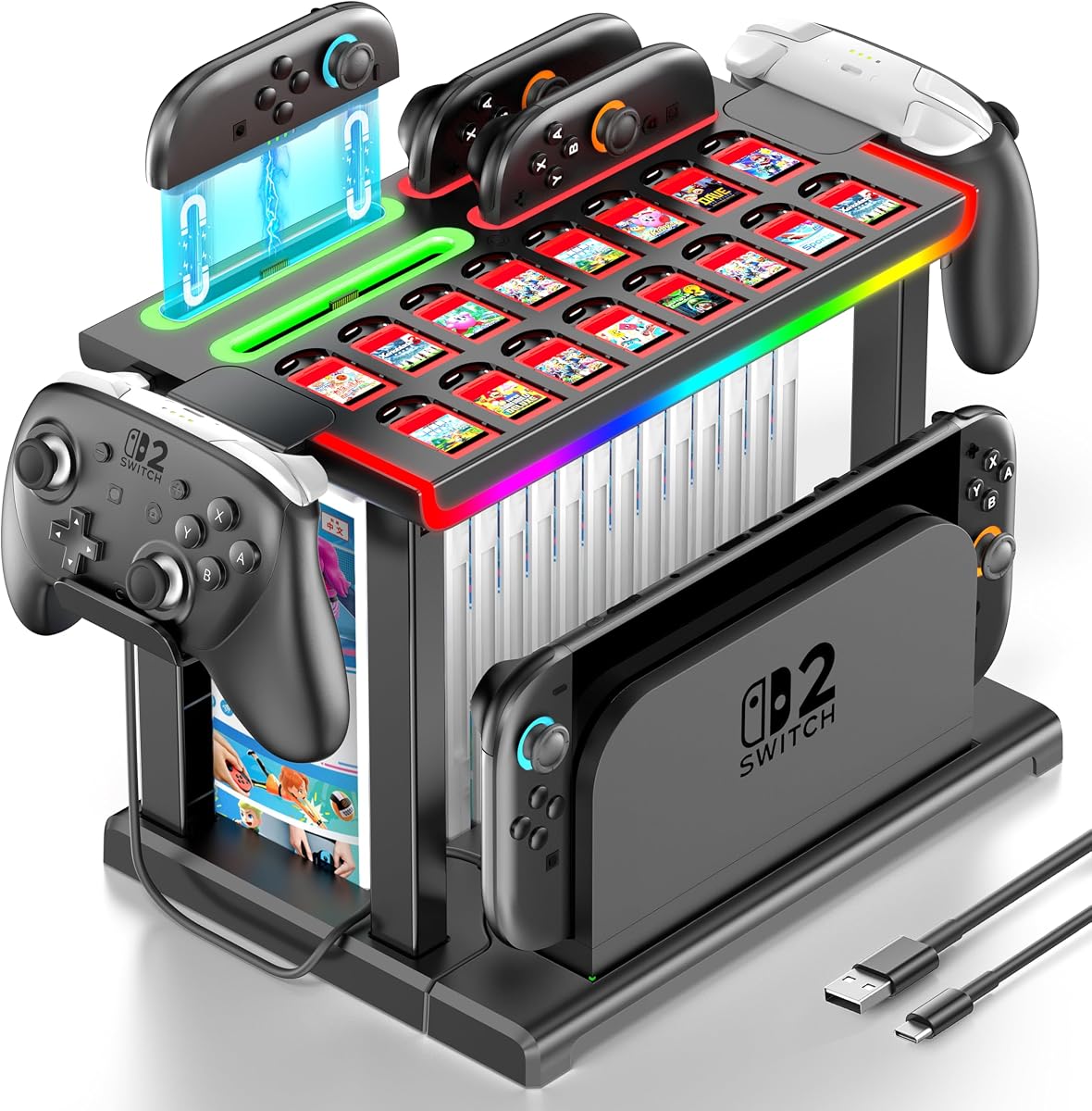
This organizer station is perfect for gamers who need a lot of storage space while keeping their controllers charged and their gaming area neat and tidy.
We may earn a commission when you buy through this link, at no additional cost to you.
It can hold your Switch 2 TV dock plus sixteen game cases and cards and it charges four Joycons in just two hours with clear LED status lights.
The RGB lighting modes add a stylish touch but the large size might not suit smaller desks and you must supply the Switch 2 dock separately.
If you want one solution that organizes everything and charges fast this station is an excellent premium choice for serious Switch 2 enthusiasts.
Holds your TV dock four Joycons sixteen game cards and sixteen game cases to keep your gaming area neat and organized.
Charges four Switch 2 Joycons at once in about two hours with red and green lights showing charging and full status clearly.
We may earn a commission when you buy through this link, at no additional cost to you.
This dual charging station is a budget-friendly way to keep two Switch 2 Pro Controllers powered up without spending much money on accessories.
We may earn a commission when you buy through this link, at no additional cost to you.
It features a simple design with red and green LED lights to show when your controllers are charging or fully charged and ready to use.
The main limitation is that it only works with Pro Controllers and not Joycons which may not suit everyone who uses Joycons primarily for gaming.
For players who mainly use Pro Controllers and want a basic affordable charging solution this station is a solid choice for your gaming desk.
Charge two Switch 2 Pro Controllers simultaneously with this convenient dual controller charging stand to keep them ready for gaming.
Built-in LED indicators show charging status at a glance with red light for charging and green for fully charged controllers.
We may earn a commission when you buy through this link, at no additional cost to you.
This versatile charging dock works with Switch Pro PS5 and Xbox controllers making it a great option if you own gaming consoles from different brands.
We may earn a commission when you buy through this link, at no additional cost to you.
It includes removable Type-C adapters for easy drop-in charging and the front LED indicators show red for charging and green when the battery is full.
Keep in mind that it does not support third-party Pro controllers like PowerA or Luna so you should check your controller model before buying this dock.
If you need a universal station that fits multiple controller types this dock offers excellent value and convenience for your multi-console gaming setup.
Dual controller charger dock supports Switch Pro PS5 Xbox Series X and Xbox Elite Series 2 controllers for versatile charging options.
Removable Type-C adapters allow for easy drop-in charging and help reduce wear on the controller charging port.
We may earn a commission when you buy through this link, at no additional cost to you.
This PowerA charging base offers a reliable way to charge both Joycons and wireless controllers including Pro controllers with a bold design that complements gaming setups.
We may earn a commission when you buy through this link, at no additional cost to you.
The LED lights indicate when your controllers are charged so you can easily monitor power levels without needing to check the screen or devices.
Some users may find the design style too bold for minimal setups but the brand reliability and dual charging capability make it a strong contender.
If you want a trusted brand that supports both Joycons and wireless Pro controllers this base is a practical and stylish addition to your desk.
Charges Joy-Con and wireless controllers simultaneously and is fully compatible with Nintendo Switch Pro Controllers.
LED lights indicate when controllers are charged so you know exactly when your devices are ready to use.
We may earn a commission when you buy through this link, at no additional cost to you.
This six-in-one charger is an affordable option that can handle four Joycons two Pro controllers or PS5 controllers all at once on your gaming desk.
We may earn a commission when you buy through this link, at no additional cost to you.
It uses a USB type-C port for flexible power sources and the fireproof panel design adds an extra layer of safety during the charging process.
The package does not include controllers and the design is basic but the high rating and quality promise make it a reliable choice for many users.
If you need a versatile charger for multiple controller types at a budget price this station delivers solid performance and safety for your devices.
The charging station could charge four joycons and two nintendo pro controller or two ps5 controller at same time.
Usb-type c charging port design that easy to power from game console charging hub or wall charger.
We may earn a commission when you buy through this link, at no additional cost to you.
This HEATFUN dock is designed for official USB-C controllers including Switch Pro and PS5 and it lets you charge two controllers together to reduce downtime.
We may earn a commission when you buy through this link, at no additional cost to you.
It comes with USB-C adapters for convenient drop-in charging and the built-in LED indicators show charging status at a glance for easy monitoring.
Lower power USB ports may charge slower so you need a five volt two amp adapter for best performance but the compact size fits most desks.
If you own official USB-C controllers and want a compact dual charging solution this dock offers good compatibility and practical features for daily use.
Designed for Switch Pro and Switch 2 Pro controllers and also compatible with PS5 Xbox Series X and Xbox Elite Series 2 controllers.
Comes with USB-C adapters for convenient dock-and-charge use while helping reduce wear on the controller charging port.
We may earn a commission when you buy through this link, at no additional cost to you.
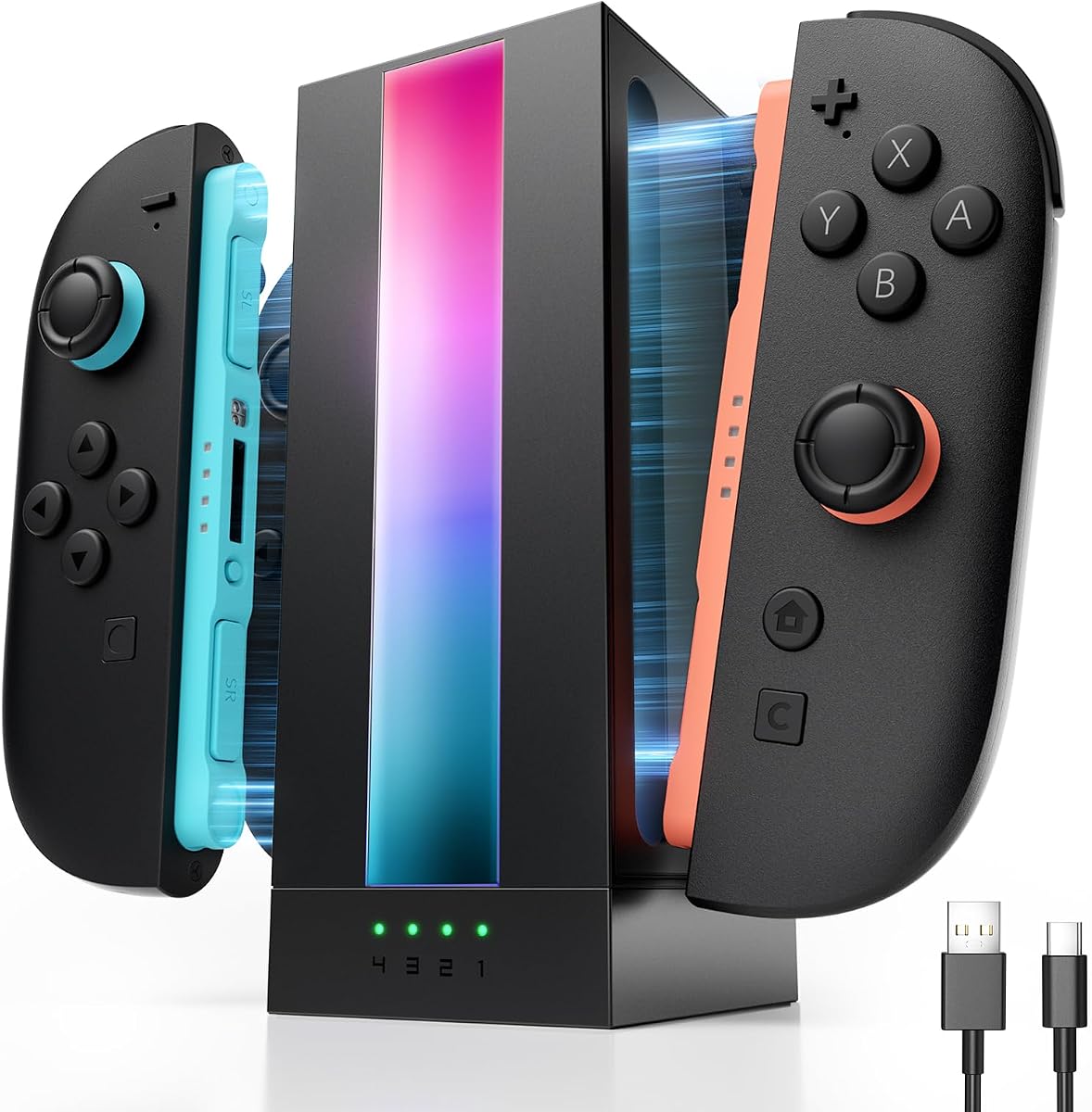
This SUPCASE dock is designed specifically for Switch 2 Joycons and it uses a magnetic design to make charging easy while preventing wear on the ports.
We may earn a commission when you buy through this link, at no additional cost to you.
It can charge up to four Joycons at the same time with dual-side support so you do not need to match plus and minus labels for placement.
The nine RGB lighting modes let you customize your gaming atmosphere and the smart chip stops charging when the battery is full to prevent overheating.
If you want a high-quality magnetic charger that supports four Joycons and looks stylish this dock is a top pick for Switch 2 players.
This multi-functional charging dock supports Dual-Side charging ensuring stable charging no matter how the Joy Cons are placed.
The magnetic design makes Joy Con charging more convenient allowing for easy alignment and secure placement of the controllers.
We may earn a commission when you buy through this link, at no additional cost to you.
This versatile FASTSNAIL charger supports Joycon 2 and Joycon 1 plus Pro controllers and you can charge up to ten devices at once on the dock.
We may earn a commission when you buy through this link, at no additional cost to you.
It includes two USB 2.0 ports for data transfer or charging other devices and the eleven RGB modes let you create a unique visual gaming environment.
The dock is not compatible with third-party controllers and it works best when connected to the NS2 official dock as the power source.
If you need a single charger for multiple Switch generations and devices this dock provides maximum flexibility with high capacity and RGB customization.
Our switch 2 controller charging dock is specially designed for Nintendo Switch 2 and1/OLED model for Joycon 2/Joycon 1 and for Pro controllers.
Our switch 2 charger for joycon enhance your gaming ambiance with 11 vivid lighting modes including static and dynamic effects.
We may earn a commission when you buy through this link, at no additional cost to you.
This JSAUX dock is designed exclusively for the 2025 Switch 2 Joycons and it charges all four units at once in just about two five hours for fast gameplay.
We may earn a commission when you buy through this link, at no additional cost to you.
The built-in dynamic RGB light bar enhances your gaming environment and the independent LED indicators show charging status clearly so you know when controllers are ready.
It does not work with older Switch Joycons and the power adapter is not included but the efficiency and safety features make it a strong modern option.
If you own Switch 2 Joycons and want the fastest charge for multiplayer sessions this dock delivers speed and style with smart safety protections.
The JSAUX EnergyFlow Charging Dock is fully compatible with the 2025 Switch 2 JoyCon controllers and can simultaneously charge 2 pairs at high speed.
Charge all 4 JoyCons at once in just about 2.5 hours reducing waiting time during multiplayer sessions.
We may earn a commission when you buy through this link, at no additional cost to you.
Choosing the right charging dock depends on which controllers you use and how much storage you need for your gaming accessories and game cards.
First verify that the dock supports your exact controller type because some only charge Pro Controllers while others work with Joycons or both. Check product descriptions carefully to avoid buying a dock that does not fit your specific Switch 2 or older controllers.
Always confirm the dock is compatible with your controller models before you make a purchase decision.
Look for docks that support fast charging speeds like five volt two amp input and multiple ports so you can charge all your controllers at once. Some docks charge four Joycons in under three hours which reduces downtime during multiplayer sessions.
Choose a dock with enough ports to charge your entire collection of controllers in one go.
Safety is critical when charging lithium ion batteries so choose docks with built-in protection chips that prevent overcharging overheating and short circuits. These features extend the lifespan of your controllers and protect your devices from electrical damage.
Prioritize docks with overcharge and overcurrent protection for safe long term use.
Consider the physical size and design of the dock to ensure it fits on your desk or TV stand without cluttering your gaming area. Some docks also act as organizers with slots for game cards and the TV dock which saves valuable space.
Select a design that matches your setup and fits the available space comfortably.
Many modern docks include RGB lighting that can enhance your gaming atmosphere with customizable colors and effects. Clear LED indicators also help you see at a glance whether your controllers are charging or fully charged.
Choose lighting features based on whether you prefer visual customization or simple status indicators.
Some docks include extra USB ports or adapters that can be useful for data transfer or charging other devices like headsets. Check if the dock includes removable adapters to reduce wear on your controller charging ports.
Look for extra ports and adapters that add versatility to your charging setup.
Stick with well known brands or highly rated sellers to ensure product quality and reliable customer support if you encounter any issues. Reviews and ratings can give you insight into how durable and effective a dock is in real use.
Check user reviews and brand reputation before making your final purchase.
Verify whether the dock comes with a power adapter or if you need to supply your own. Some docks require specific adapters to charge fast so missing this detail can result in slow or intermittent charging.
Confirm if a power adapter is included and what specifications you need for optimal charging.
Place the dock on a flat stable surface near your gaming area and connect it to a USB power source such as a wall adapter or console USB port for power supply.
Insert your controllers into the dock ensuring they align properly with the charging slots or magnetic guides so that the connectors make firm contact for efficient charging.
Monitor the LED indicators to know when your controllers are fully charged then unplug them if the dock does not have auto stop features to extend battery life.
Most docks are not cross compatible because the physical connectors may differ between generations. Always check the product description to confirm the dock supports your specific controller model before you buy it.
Charging times vary by model but most docks fully charge a set of Joycons in two to three hours. Faster docks with five volt two amp inputs can reduce this time significantly for quicker gaming sessions.
Some docks support multiple controller types like Joycons Pro Controllers and even PS5 controllers. Verify the product compatibility list to ensure all your controllers can be charged on the same dock simultaneously.
Many docks do not include a power adapter so you may need to supply your own USB wall adapter. Check the package description carefully to see if an adapter is included before purchasing.
RGB lights are generally safe but bright colors might cause eye strain during night gaming. Some docks let you turn off the lights or adjust brightness to reduce potential strain while you play.
Most modern docks have smart chips that stop charging when the battery is full to prevent overcharging. However it is good practice to unplug controllers after they are fully charged to maintain long term battery health.
We have reviewed ten top charging docks ranging from budget Pro stations to premium organizers with RGB lighting and multi-console support to suit every gaming setup and budget.
Prioritize docks with safety protection and correct compatibility for your controllers to avoid slow charging or damage to your valuable gaming devices over time.
Prices and availability can change so please check the current prices on Amazon before you make your final purchase decision for your preferred charging dock.