
Switch Dock for Nintendo Switch/Switch OLED, Portable TV Docking Station
4.2Editor score
3-in-1 docking station
100W PD pass-through
Compact and sleek build
Discover the best dock for Nintendo Switch portable play. We compare top travel docks with 4K HDMI, USB ports, and fast charging for seamless gaming anywhere.
Finding the right dock for Nintendo Switch portable play is essential for gamers who want to take their experience beyond the handheld screen. A quality travel dock transforms your console into a full home theater setup instantly. Look for compact designs that support high resolution and offer reliable charging while you play.
We evaluated ten top-rated docking stations based on port selection, build quality, and compatibility with various models. Our comparison focuses on performance during travel and at home. Each option brings unique features like 4K output or ultra-lightweight frames for your backpack.
Every pick highlights key strengths and potential trade-offs to help you decide quickly. Read through the detailed reviews to see how each model performs. Remember that product availability and pricing can change frequently, so check current listings before purchasing your next accessory.
4.2Editor score

4.4Editor score

4.2Editor score
This side-by-side comparison covers all ten selected docking stations. We detail their specs and features to help you choose the perfect fit for your gaming needs and travel habits.
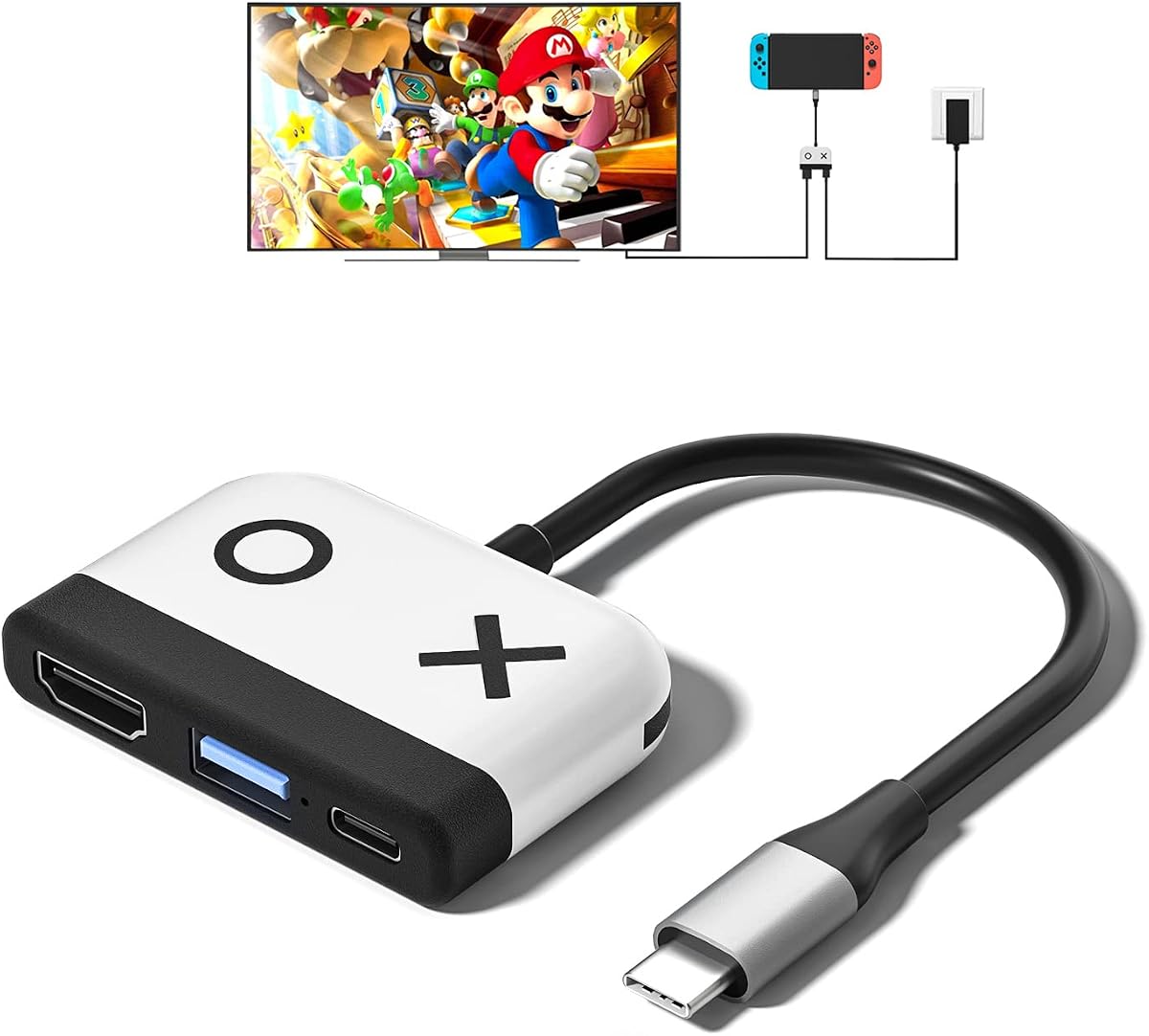


The pdobq Switch Dock stands out as a top choice for gamers needing a versatile adapter. With a 4.2 rating, it balances performance and portability well. Users appreciate its ability to handle both Switch and Steam Deck connections effortlessly.
We may earn a commission when you buy through this link, at no additional cost to you.
This adapter supports 4K/60Hz output for a crisp viewing experience on large screens. The included USB 3.0 port allows you to connect peripherals like controllers or drives while playing. It also features robust voltage protection to keep your console safe during charging.
While it lacks support for the Switch Lite, this is a common limitation in TV adapters. The unit requires an external charger to function, which is standard for this class of product. Most users find the slight inconvenience worth the added flexibility and performance.
If you own a Switch OLED or a Steam Deck and want a compact travel solution, this dock is ideal. It fits easily in a backpack and offers reliable connectivity. We recommend it for anyone who values broad compatibility and high-resolution output.
This dock is designed to work with Switch 1, 2, OLED, and Steam Deck. This broad compatibility means you only need one adapter for multiple devices.
The USB 3.0 port enables fast data transfer and accessory connection without sacrificing charging power during gameplay.
We may earn a commission when you buy through this link, at no additional cost to you.
The RREAKA TV Dock is a top contender for those seeking maximum power in a tiny package. Its 4.4 rating reflects high user satisfaction. Weighing just 1.5oz, it is one of the lightest options available for portable gaming.
We may earn a commission when you buy through this link, at no additional cost to you.
This dock delivers 4K@60Hz output for stunning visuals on modern TVs. The 100W PD charging port ensures your console charges quickly even during intense gaming sessions. It also includes both USB 3.0 and 2.0 ports for connecting various peripherals.
Users note that cables are not included, so you will need your own HDMI and power adapters. The aluminum alloy build feels durable despite its small size. This is a solid choice for travelers who prioritize weight without sacrificing performance.
If you want a dock that is easy to carry and supports fast charging, this is an excellent pick. It replaces the bulky original dock effectively. We recommend checking your charger compatibility before purchase for best results.
Made from lightweight aluminum, this dock weighs only 1.5oz, making it perfect for slipping into any backpack or pocket.
The PD 100W port allows rapid charging of your device while you play, preventing battery drain during long sessions.
We may earn a commission when you buy through this link, at no additional cost to you.
The Kstkry Switch Dock offers excellent value for gamers on a budget. With a 4.4 rating, users love its durability and portability. The silicone construction protects your device from scratches and dents during transit.
We may earn a commission when you buy through this link, at no additional cost to you.
It supports 1080P video output, which is the standard limit for most Switch consoles. The USB 3.0 port provides fast data speeds for file transfers. Its compact design lets you slip it into a jacket pocket or small bag easily.
While it does not include cables, this keeps the price low. The material is less rigid than aluminum but provides good shock absorption. This dock is ideal for casual users who need a reliable backup at a low cost.
For anyone looking for a budget-friendly option that still performs well, this is a smart buy. It covers all basic needs for TV mode. We recommend it for students or travelers who want simplicity.
The wear-resistant silicone material ensures your dock and console stay protected from minor bumps and scratches.
Enjoy high-speed data transmission of 5Gbps, making it easy to move files or connect external drives.
We may earn a commission when you buy through this link, at no additional cost to you.
The iPLYGAM Switch Dock is designed for users who need multiple connection types at once. With a 4.0 rating, it offers a 6-in-1 port layout. This includes HDMI, USB 2.0 ports, and Type-C options for various devices.
We may earn a commission when you buy through this link, at no additional cost to you.
Its built-in smart chip protects against overheat and short circuits. The LED indicator light helps you confirm when the dock is active. While it weighs 2.6oz, it remains portable enough for travel use.
The lack of included cables is a downside for some buyers. The multiple ports mean you can connect more accessories than standard docks. This is suitable for power users who need extra connectivity while on the go.
If you need to connect multiple USB devices simultaneously, this dock is a strong choice. It offers more versatility than many others. We recommend it for those who prioritize features over minimal weight.
With six ports including HDMI and USB, you can connect multiple peripherals without needing extra hubs.
Integrated protection against overheat and overcharge ensures safe operation during extended gaming sessions.
We may earn a commission when you buy through this link, at no additional cost to you.
The Travel Portable Switch 2 Dock is designed with the latest console models in mind. It supports the Nintendo Switch 2 alongside the OLED and standard versions. This makes it a future-proof option for tech enthusiasts.
We may earn a commission when you buy through this link, at no additional cost to you.
It features a cable-style design that is incredibly easy to pack. The 100W PD charging ensures your device stays powered up. Video output supports up to 4K@60Hz on compatible displays for sharp images.
The dock does not include a power adapter, so you must use your own. It is lightweight and fits well in any travel bag. Users value the ability to use the same dock for current and future hardware.
If you plan to upgrade to the Switch 2 soon, this dock is an ideal investment. It offers high performance and easy storage. We recommend it for early adopters and serious travelers.
This dock works with Switch 2 (2025) as well as older models, ensuring you get years of use.
Instead of a bulky box, this dock is a thin adapter that saves significant space in your luggage.
We may earn a commission when you buy through this link, at no additional cost to you.
This Switch Dock offers a perfect balance of features and price for casual gamers. It supports a wide range of USB-C devices beyond the Switch. The simple 3-in-1 design makes it easy to use without any setup.
We may earn a commission when you buy through this link, at no additional cost to you.
It includes a 100W PD input for fast charging during play. The 4K HDMI port allows for high-quality video output on larger screens. The sleek design fits easily into any bag for daily commute use.
The plastic casing feels sturdy but not premium. It lacks advanced features like extra USB ports for data. However, for the price, it delivers reliable performance for TV mode gaming.
If you need a straightforward dock that works everywhere, this is a great choice. It is highly versatile and budget-friendly. We recommend it for users seeking essential functionality without extra cost.
Beyond the Switch, this dock works with Steam Deck, ROG Ally, and many other USB-C devices.
The 100W PD input ensures your device charges fully even during long gaming sessions.
We may earn a commission when you buy through this link, at no additional cost to you.
The BIYTC Switch Dock is a straightforward adapter for users who want simple functionality. It is compact and weighs very little. This makes it easy to slip into a pocket or small case for daily travel.
We may earn a commission when you buy through this link, at no additional cost to you.
It supports 1080P output, which is sufficient for most portable gaming needs. The USB 3.0 port allows you to connect essential peripherals like a mouse or keyboard. It works with Switch 1 and 2 models.
Users note that the build is basic but functional. It does not support higher resolutions like 4K. However, for a low-cost solution, it performs reliably for standard HD displays.
If you need a no-fuss dock at a low price, this is worth considering. It covers the essentials for TV mode. We recommend it for budget-conscious users who do not need advanced features.
This dock is designed to be small enough to fit in a pocket, making it ideal for impromptu TV play.
Connect the power and HDMI cable to start using it immediately with no drivers required.
We may earn a commission when you buy through this link, at no additional cost to you.
The AHGEIIY Switch 2 Dock is incredibly light at only 1.4oz. It is designed to be a compact replacement for bulky official docks. Users value its ability to support Switch, MacBooks, and Samsung Dex devices.
We may earn a commission when you buy through this link, at no additional cost to you.
This dock supports 4K@60Hz video output for high-resolution displays. The 100W PD port keeps your device powered up quickly. It also includes a USB 3.0 port for data needs.
It does not include power or HDMI cables in the box. You must ensure your charger meets the power requirements for proper TV mode activation. The build quality is high for such a small device.
If you need a tiny dock that handles multiple devices well, this is a great choice. It is perfect for tech professionals. We recommend it for users who value portability and multi-platform support.
At only 39 grams, this dock is barely noticeable in your bag compared to standard docking stations.
This dock doubles as a Samsung Dex station, allowing you to use your phone or tablet as a PC.
We may earn a commission when you buy through this link, at no additional cost to you.
This Switch 2 Dock features a classic black and white design that looks premium. It weighs only 45 grams making it very easy to carry. Users appreciate its simple yet effective layout for travel gaming.
We may earn a commission when you buy through this link, at no additional cost to you.
It supports HDMI 2.0 with 4K@60Hz output for clear visuals. The USB 3.0 port allows for fast data transfers. PD charging support ensures your console stays powered during long sessions.
It does not include HDMI or power adapters in the box. The design is streamlined to save space. It is a reliable choice for those who prefer a minimalist approach.
If you want a dock that looks good and performs well without bulk, this is ideal. It offers all the essentials in a small package. We recommend it for modern gamers on the go.
The classic color scheme and slim profile make this dock look great in any setting.
Transfer files quickly or connect external storage without slowing down your console.
We may earn a commission when you buy through this link, at no additional cost to you.
This Portable Dock Station is unique for its top placement design and built-in cooling. It sits higher than standard docks, allowing for easier connection and removal. Users note the extra ventilation helps with heat dissipation.
We may earn a commission when you buy through this link, at no additional cost to you.
It supports 4K HDMI output and includes multiple USB ports for peripherals. The anti-slip pads keep the dock stable on any surface. This design is convenient for frequent switching between modes.
The rating is lower than average, likely due to bulk. It is not as portable as the cable adapters. However, the cooling features make it a good choice for home use or stationary travel setups.
If you need a dock that keeps your device cool during long sessions, this is a strong option. It prioritizes function over extreme portability. We recommend it for home office setups.
Multiple ventilation openings help prevent overheating during extended gaming sessions.
Anti-slip pads keep the dock in place, preventing accidents while your console is connected.
We may earn a commission when you buy through this link, at no additional cost to you.
Choosing the right dock requires considering your travel habits and specific device models. This guide breaks down the essential factors to help you pick a reliable adapter.
Ensure the dock supports your specific console model and any other USB-C devices you use. Most docks support Switch 1 and OLED but may exclude the Lite. Check for USB 3.0 ports if you need to connect peripherals.
Always verify device compatibility before buying to avoid connectivity issues during play.
Look for docks that support at least 1080P for standard gaming. Some models offer 4K@60Hz which is great if you have a modern TV. Keep in mind the console itself may limit output resolution.
Select a dock with video output that matches your display capabilities for the best visuals.
A good dock should support fast charging to keep you playing longer. Models with 100W PD charging ensure your device stays powered up. Verify the charger compatibility to avoid slow charging issues.
Prioritize docks with high-power pass-through charging for uninterrupted gameplay sessions.
Docks made from aluminum or silicone offer different benefits. Aluminum is durable and light, while silicone absorbs impact better. Consider where you will use the dock most often.
Choose materials that fit your travel needs and handling preferences for longevity.
Portability is key for travelers. Docks under 2 ounces are ideal for backpacks. Compare dimensions to ensure they fit your carry-on bag or pocket.
Lighter docks reduce travel burden and fit more easily into compact luggage.
Most portable docks do not include cables. This keeps costs down but means you must bring your own HDMI and power adapter. Check product descriptions carefully.
Account for the lack of included cables when budgeting for the total setup.
Look for built-in safety features like overheat and overcharge protection. Smart chips help prevent damage to your console during extended use.
Safety chips are essential for protecting expensive hardware during long play sessions.
Read user feedback to see how the dock performs in real-world scenarios. High ratings often indicate reliability and ease of use. Look for common complaints about heat or connectivity.
Use community insights to validate claims before making your final purchase decision.
Connect your official charger to the dock's power input first. Then plug the HDMI cable into the dock and your TV. This order helps prevent connection errors.
Place your console securely into the dock or on top depending on the model. Wait for the indicator light to turn on if available. Ensure the USB-C port aligns correctly.
Store your dock in a padded case when not in use. Avoid bending the cables or putting heavy items on it to extend its lifespan.
Most TV docks do not support the Nintendo Switch Lite because it lacks a TV output mode. The console itself is designed for handheld use only. Always check product specifications for Lite compatibility.
No, most portable docks are sold as standalone units without cables. You will need to use your own HDMI and power adapters. This helps reduce cost and bulk for travelers.
Yes, almost all docks support play and charging simultaneously. Ensure you use a power adapter that meets the voltage requirements. This keeps your battery from draining during long sessions.
Yes, a 4K dock will work with a standard 1080P TV. The output will adjust to the TV's maximum resolution. You will still get a crisp image suitable for gaming.
Yes, quality docks include built-in protection against overheating and overcharging. However, ensure proper ventilation around the dock during use. This helps maintain safe operating temperatures.
Simply disconnect the console from the dock. The screen should return to handheld mode immediately. If not, check your system settings to confirm the connection status.
The dock will output the highest resolution your TV supports automatically. You will not see 4K images on a 1080P screen. The image will still look clear and sharp.
You can use third-party chargers if they meet the power specifications. Always check the wattage and voltage requirements. Using a compatible charger ensures stable performance.
We highlighted ten excellent options for portable gaming docks ranging from ultra-light adapters to multi-port stations. The RREAKA and pdobq models stand out for their high performance and compatibility. The Kstkry and Switch Dock Portable Station offer great value for budget buyers.
When selecting your dock, prioritize weight and charging power for true portability. If you have a Switch 2 in the future, choose a model that supports newer hardware. Ensure you have the right cables ready for setup.
Prices and stock can change quickly, so verify details before buying. Check the latest reviews to confirm current performance. With the right dock, you can enjoy your games anywhere with ease.