
Stylus Pen for Touchscreen iPad
4.5Editor score
High precision disc tip
Works on all screens
Replaceable tips easy
This guide compares the top fine point stylus options for touchscreens, evaluating precision, compatibility, durability, and value to help you choose the right
Finding the right fine point stylus can transform how you interact with touchscreens. Whether you need precision for drawing, accurate note-taking, or simple navigation, a good stylus offers control that fingers cannot match.
We compared ten highly-rated stylus pens based on tip precision, build quality, compatibility across devices, and user feedback. Our analysis focuses on capacitive models that deliver reliable performance without needing batteries or Bluetooth connections.
Each pick highlights key strengths and potential trade-offs to help you decide quickly. Prices and availability change frequently, so check the linked pages for current deals before making your final selection for work or play.
4.5Editor score

4.6Editor score

4.2Editor score
Here is a side-by-side look at every stylus in our roundup. We highlight the main design features, tip types, and compatibility notes so you can scan quickly and find the model that fits your needs.




The MEKO stylus leads our list with its versatile 3-in-1 design. It offers a transparent disc tip for precision plus dual rubber tips for general use. Users report smooth performance across tablets and phones without needing power.
We may earn a commission when you buy through this link, at no additional cost to you.
The disc tip provides exceptional accuracy for writing and drawing tasks. It allows you to see exactly where the contact point is on screen. The rubber tips work well for browsing and games where precision matters less.
Trade-offs include no palm rejection, so rest your hand carefully on screen. Tips are replaceable which extends lifespan but extra purchases may be needed over time. The cap protects the disc tip when not in use.
Buy this if you want one stylus that handles most tasks well. It suits students and casual users who need reliability without complex features. Its value and versatility make it a top pick for most buyers.
The transparent disc tip lets you see the contact point clearly for better accuracy during writing or drawing tasks.
All three tips are replaceable allowing you to maintain performance over time without buying a whole new stylus.
We may earn a commission when you buy through this link, at no additional cost to you.
This stylus offers exceptional value with its 3-in-1 tip system at a low price. The disc tip delivers fine point accuracy for notes while rubber tips handle general navigation. It works universally across capacitive screens.
We may earn a commission when you buy through this link, at no additional cost to you.
The 0.18 inch and 0.27 inch rubber tips cover different needs like scrolling or selecting icons. The transparent disc allows you to see where you are writing which improves accuracy. Replacement tips are easy to swap.
Build quality is basic with plastic materials that feel less premium. There is no palm rejection so accidental touches may occur if you rest your hand. For the price this is a minor trade-off for most users.
Choose this if you need an affordable stylus for everyday tasks. It fits budget shoppers or families needing multiple pens. The wide compatibility ensures it works with any device you own today.
This stylus works with any capacitive touchscreen including phones tablets and laptops making it a versatile tool for all devices.
It is a passive stylus that needs no charging or pairing so it is ready to use straight out of the package.
We may earn a commission when you buy through this link, at no additional cost to you.
This active stylus provides a more pen-like experience with its 1.5mm ultra fine tip. The rechargeable battery allows for hours of continuous use. It offers better precision than passive capacitive stylus for digital tasks.
We may earn a commission when you buy through this link, at no additional cost to you.
The buffer unit at the tip provides control and accuracy similar to real pens. It charges via Micro USB and lasts about eight hours per charge. The lightweight design reduces hand fatigue during long drawing sessions.
It does not have Bluetooth so it cannot offer full pressure sensitivity like premium branded pencils. Charging is required which adds maintenance compared to passive models. Still it delivers excellent value for active pen features.
Buy this if you need finer control for art or detailed notes. It suits users who want an active pen without paying premium brand prices. The battery life supports daily use without frequent charging.
Active stylus technology offers better accuracy and control on screens making it ideal for writing and drawing tasks.
Built-in battery provides hours of use per charge ensuring you can work without interruption on your projects.
We may earn a commission when you buy through this link, at no additional cost to you.
This stylus stands out with a magnetic design that attaches to specific iPad Pro models. It charges quickly and offers nearly ten hours of use. A one-touch switch makes it easy to turn on and off.
We may earn a commission when you buy through this link, at no additional cost to you.
The magnetic adsorption keeps the stylus secure and within reach preventing loss. Battery life supports full days of use. The quick charge feature ensures you get back to work fast if it runs low.
It only supports select iPad Pro models limiting its universal appeal. There is no palm rejection so hand positioning matters. If you own a compatible iPad the magnetic feature adds real convenience daily.
Choose this if you have a supported iPad Pro and want magnetic attachment. It suits users who value convenience and battery life. For other devices look at universal options instead.
Securely attaches to select iPad Pro models ensuring the stylus stays with your device and does not get lost.
Full charge in just forty minutes supports continuous use throughout the day without long waits.
We may earn a commission when you buy through this link, at no additional cost to you.
This active stylus features a 1.5mm diameter tip for realistic drawing feel. It powers on quickly and offers about ten to twelve hours of use. The design suits artists seeking precision without brand pricing.
We may earn a commission when you buy through this link, at no additional cost to you.
The tip provides consistent line thickness good for general drawing and painting. Battery life supports extended creative sessions. Automatic power off after thirty minutes of inactivity helps conserve charge.
Lines do not vary in thickness since there is no pressure sensitivity. Battery life can be shorter compared to some models. For casual art and notes it still offers solid performance and value.
Buy this if you want an active pen for digital art on a budget. It fits artists who do not need advanced pressure features. The quick power on adds convenience during creative work.
The 1.5mm tip offers a natural pen feel for creation suitable for drawing and painting tasks on tablets.
Saves battery by turning off after thirty minutes of inactivity ensuring longer life for future use.
We may earn a commission when you buy through this link, at no additional cost to you.
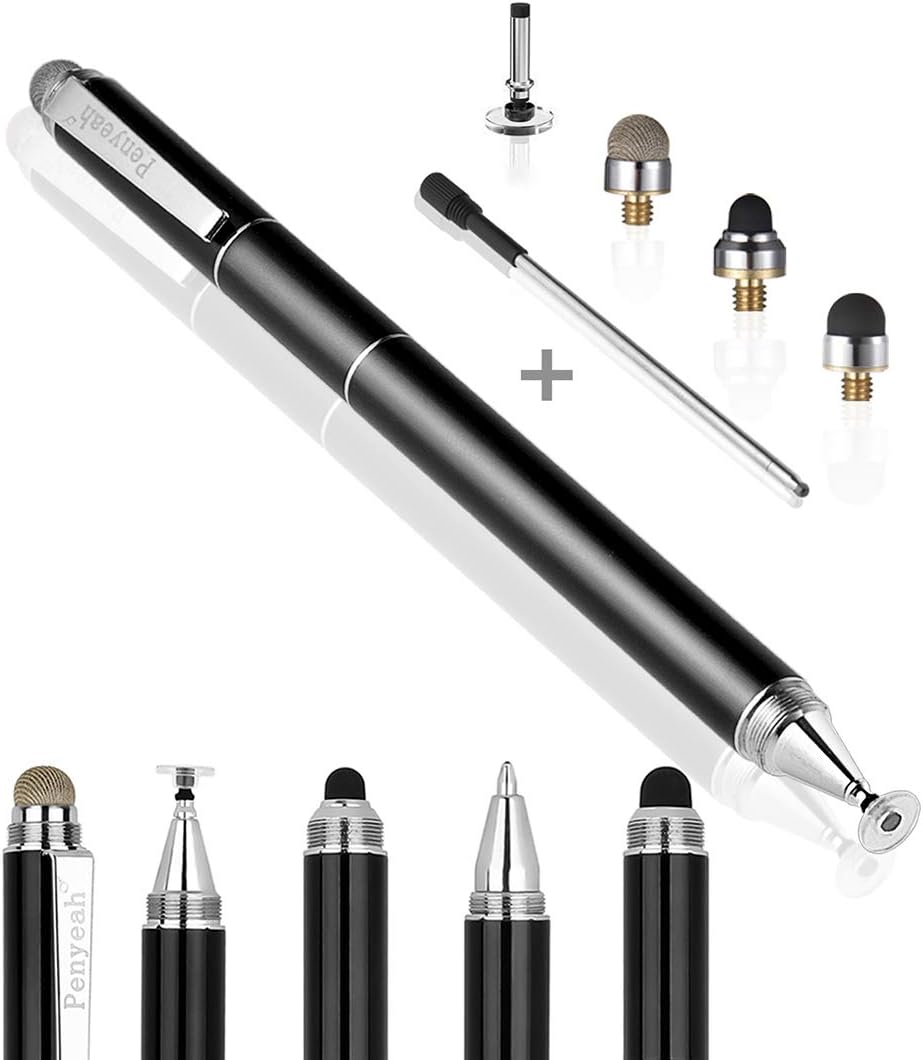
This stylus includes a ballpoint pen along with four screen tips. The metal body feels sturdy and premium. It works universally on capacitive devices offering versatility for many tasks from digital to paper writing.
We may earn a commission when you buy through this link, at no additional cost to you.
The clear disc tip offers fine precision while mesh and rubber tips cover different needs. The ballpoint pen adds a real writing option when screens are not needed. A pocket clip makes it easy to carry.
The metal build adds weight which some users may find heavy. There is no palm rejection so screen handling requires care. Still the dual purpose as pen and stylus adds unique value.
Choose this if you want one tool for screen and paper. It fits professionals carrying one pen for all needs. The metal build and clip suit pocket or notebook carrying daily.
Includes multiple tips plus a ballpoint pen offering multiple writing and touch options in one device.
High grade metal construction provides a durable and comfortable grip for extended daily use.
We may earn a commission when you buy through this link, at no additional cost to you.
This active stylus offers lightweight design ideal for students writing notes daily. The 1.5mm tip provides precise control for digital writing. It works on iPads without Bluetooth making setup simple and fast.
We may earn a commission when you buy through this link, at no additional cost to you.
Users find it comfortable for long sessions thanks to balanced weight. Accuracy improves note taking and drawing on tablets. The passive connection to devices ensures reliability without complex pairing steps.
Charging is needed which adds maintenance compared to passive stylus. Micro USB charging feels older than USB-C options available now. Still performance and price make it a solid student choice.
Buy this if you want an active pen for school notes. It suits students needing precision without brand prices. The lightweight design supports comfortable use through long study days.
Lightweight and accurate design makes it perfect for daily note taking and digital writing tasks in class.
No Bluetooth required means instant use on compatible devices without pairing or app setup steps.
We may earn a commission when you buy through this link, at no additional cost to you.
This bundle includes six vibrant stylus pens ideal for families or teams. Each pen features a responsive rubber tip and a built-in clip. They work on all capacitive devices making sharing easy among users.
We may earn a commission when you buy through this link, at no additional cost to you.
Having multiple pens means one for each device or person. The clip keeps them attached to bags or notebooks preventing loss. Colors help distinguish who owns which pen in shared settings.
Rubber tips are standard and may wear faster than disc tips. No palm rejection limits advanced tasks. For everyday use though value and convenience of a multi-pack stand out strongly.
Choose this if you need multiple stylus pens for a group. It suits families classrooms or offices sharing devices. The clip and color options add practical value to the pack.
Six pens in one bundle offer great value for families or teams needing multiple stylus for different users or devices.
Clip attachment to pockets bags or notebooks keeps pens safe and within reach at all times.
We may earn a commission when you buy through this link, at no additional cost to you.
This MEKO pack includes four stylus pens with disc and rubber tips. It also provides twelve replacement tips for long-term use. The aluminum barrel offers a premium feel at a budget-friendly pack price.
We may earn a commission when you buy through this link, at no additional cost to you.
The two tip options cover precision writing and general navigation. Extra tips ensure you never run out of replacements. Aluminum barrels feel better than plastic and improve grip comfort.
Tips can loosen over time requiring adjustment. No palm rejection limits some writing scenarios. Overall value and tip supply make it a strong pick for households or classrooms.
Buy this if you need multiple stylus pens with spare tips. It suits classrooms or families sharing devices. The aluminum build and tip count offer long-term value.
Twelve replacement tips included ensure you have extras for extended use without buying replacements later.
Aluminum barrel adds durability and a premium feel compared to plastic stylus options.
We may earn a commission when you buy through this link, at no additional cost to you.
This bulk set offers ten stylus pens with dual rubber tips. Alloy bodies provide durability while mixed colors help identify owners. It is ideal for offices schools or large families sharing touch devices.
We may earn a commission when you buy through this link, at no additional cost to you.
Each pen has a fine and a wider tip for different tasks. The alloy body feels solid and resists damage better than plastic. Replacement nibs extend the lifespan of every pen in the pack.
Rubber tips are standard and may not suit precision writing as well as disc tips. No palm rejection is typical for passive stylus. Value and quantity stand out for bulk buyers.
Choose this if you need many stylus pens at once. It fits offices classrooms or large households. The alloy build and extra nibs add lasting value to the bundle.
Ten pens plus extra nibs provide outstanding value for group use or bulk procurement needs.
Solid alloy construction ensures durability and a balanced grip for comfortable daily use.
We may earn a commission when you buy through this link, at no additional cost to you.
Choosing the right stylus depends on your device needs, preferred tip type, and usage habits. Here are key factors to evaluate before buying.
Tip type determines precision and use case. Disc tips offer high accuracy by letting you see the contact point making them ideal for writing and drawing. Rubber tips are better for browsing and gaming with lower cost. Mesh tips provide a paper-like feel.
Choose disc tips for precision tasks and rubber or mesh for general use.
Passive stylus need no power and work instantly on any capacitive screen. Active stylus contain batteries and offer better accuracy often supporting pressure or tilt features. Passive models are cheaper and simpler while active ones suit artists.
Pick passive for simplicity and active for advanced digital art needs.
Active stylus require charging and battery life ranges from eight to twelve hours. Look for long-lasting batteries and convenient charging ports. If you prefer no maintenance passive stylus avoid battery concerns entirely.
Ensure battery life fits your usage or choose passive for zero charging.
Most stylus work on all capacitive touchscreens but check device specifics. Some active pens work only with certain iPad or Android models. Confirm compatibility before buying to avoid limitations.
Always verify your device is supported by the stylus.
Tips wear out over time so replaceable tips extend lifespan. Look for packages with extra tips included. Easy-to-swap tips save money compared to buying new stylus frequently.
Prefer models with replaceable tips and included spares for longevity.
Aluminum or alloy bodies feel premium and resist damage better than plastic. Weight affects comfort during long sessions. A lightweight balanced design reduces hand fatigue.
Choose durable materials for daily use and comfort.
Palm rejection prevents accidental touches when resting your hand. Active stylus often offer this feature. For passive stylus avoid palm rejection and keep hands clear of the screen.
Look for palm rejection if hand resting is common in your workflow.
Prices vary from cheap passive models to premium active stylus. Multi-packs offer value for families or teams. Consider tip cost and lifespan when comparing total cost of ownership.
Balance upfront cost with durability and included accessories.
For passive stylus just touch the screen to begin writing or drawing. No pairing or charging is needed. Make sure the tip is clean and not worn to avoid lag or scratch marks.
Active stylus may require powering on before use. Charge via provided port before first use and enable auto power off to save battery. Store away from heat to protect internal components.
Replace tips when they show wear or feel rough. Wipe the stylus body with a soft cloth to remove smudges. Keep spare tips accessible for quick changes during daily use.
A fine point stylus is a pen-like tool designed for touchscreens with a narrow tip offering precision. It lets you write draw or navigate with accuracy similar to paper pens without damaging screens.
Most capacitive stylus work on phones tablets and laptops with touchscreens. Active stylus may require specific device support so check compatibility before buying to ensure proper function.
Passive stylus are simple and need no power while active stylus offer better precision and features. Choose passive for casual use and active for professional drawing or detailed tasks.
Unscrew or pull out the old tip and screw in the new one. Check manual for specific steps. Keep spares handy to replace worn tips quickly.
Check if the tip is damaged or dirty. For active stylus ensure it is charged. Restart your device if needed. Compatibility issues may also prevent proper function.
Yes most stylus work with screen protectors. Use a clean screen and soft tips to avoid scratches. Disc tips may offer better visibility through protectors.
Tips vary by usage and type. Rubber tips wear faster than disc tips. Replace when performance drops or surface feels rough.
Palm rejection is mostly found in active stylus or branded pens. Passive stylus require you to keep hands clear of the screen to avoid accidental inputs.
Our top picks highlight versatility and value with options like the MEKO stylus for everyday precision and the Active Stylus for digital art. Each model brings unique strengths to suit different needs.
Prioritize tip type, compatibility, and battery needs based on your devices. Multi-packs offer great value for families while single stylus suit focused users looking for specific features.
Prices and stock change regularly so check current listings before buying. With the right stylus you can enhance productivity and creativity across all your touch devices.