
Thrustmaster TFRP Precision Flight Sim Rudder Pedals
4.4Editor score
S.M.A.R.T rail system
Compatible with PS5 Xbox PC
Self-centering rudder axis
This guide compares the top 10 flight sim rudder pedals for realistic control, precision, and comfort to help you choose the best setup for your simulator
Flight simulation enthusiasts know that realistic control is essential for an immersive experience. Quality rudder pedals allow you to manage yaw and braking with precision, mimicking real aircraft systems effectively.
We evaluated ten top-rated models based on build quality, sensor accuracy, and ergonomic design. Our analysis covers everything from entry-level options to professional-grade setups suitable for serious pilots and gamers alike.
Each selection highlights key strengths and potential limitations to guide your decision. Note that product availability and pricing may fluctuate over time, so verify current details before purchasing your preferred model.
4.4Editor score

4.5Editor score

4.7Editor score
The following table provides a side-by-side comparison of all ten models reviewed in this guide. It highlights key specifications and features to help you quickly identify the right fit for your simulation needs.



The Thrustmaster TFRP pedals deliver a strong balance of performance and price for flight simulators. Rated 4.4 stars, they feature a robust aluminum rail system that ensures smooth movement during complex maneuvers.
We may earn a commission when you buy through this link, at no additional cost to you.
Their S.M.A.R.T sliding system reduces friction significantly compared to older models. The self-centering rudder axis provides consistent feedback, allowing pilots to maintain precise yaw control without constant manual correction.
While generally reliable, some users note occasional creaking sounds during heavy use. Additionally, the lack of adjustable brake tension limits customization for those seeking highly nuanced ground control inputs.
These pedals are ideal for intermediate simmers seeking reliable hardware without breaking the bank. They offer enough realism to enhance Microsoft Flight Simulator experiences while remaining accessible for casual gamers.
The S.M.A.R.T rail system uses four aluminum tracks to minimize friction during rudder input.
These pedals work seamlessly with PC, Xbox Series X, and PS5 consoles for broad compatibility.
We may earn a commission when you buy through this link, at no additional cost to you.
The Logitech G Pro pedals stand out as a budget-friendly option that does not compromise on essential features. With a 4.5-star rating, they offer adjustable tension dials to match different aircraft weights effectively.
We may earn a commission when you buy through this link, at no additional cost to you.
Their differential toe brake system allows for precise runway control, essential for landing scenarios. The 9-bit resolution ensures smooth input recognition, preventing jitter during subtle adjustments.
Constructed mostly from plastic, they may feel less premium than metal alternatives. However, the adjustable resistance and durable design make them a practical choice for those prioritizing function over form.
This model suits beginners or those on a tight budget who still want professional-grade control. The ability to tweak tension means you can simulate everything from light Cessnas to heavy jets.
A simple twist dial lets you change the resistance feel to match your flying style.
Separate toe brake pedals allow for precise turning control while taxiing on runways.
We may earn a commission when you buy through this link, at no additional cost to you.
The Honeycomb Charlie pedals bring a touch of aviation professionalism to any home cockpit. Rated 4.3 stars, their aluminum build and belt drive system ensure smooth, quiet operation during extended flights.
We may earn a commission when you buy through this link, at no additional cost to you.
Hall Effect sensors provide accurate input without mechanical wear, ensuring longevity. The adjustable foot angles allow for ergonomic customization, reducing fatigue during long-haul simulation sessions.
At a higher price point, they are an investment for serious simmers. The need for an extra hub on Xbox platforms adds complexity, but the precision justifies the cost for PC users.
Choose these if you demand high-quality materials and precise control. They are best suited for those building a dedicated simulation rig where realism and durability are paramount.
An innovative belt drive reduces mechanical noise and improves pedal movement smoothness.
Hall Effect sensors offer reliable, frictionless input detection for precise control.
We may earn a commission when you buy through this link, at no additional cost to you.
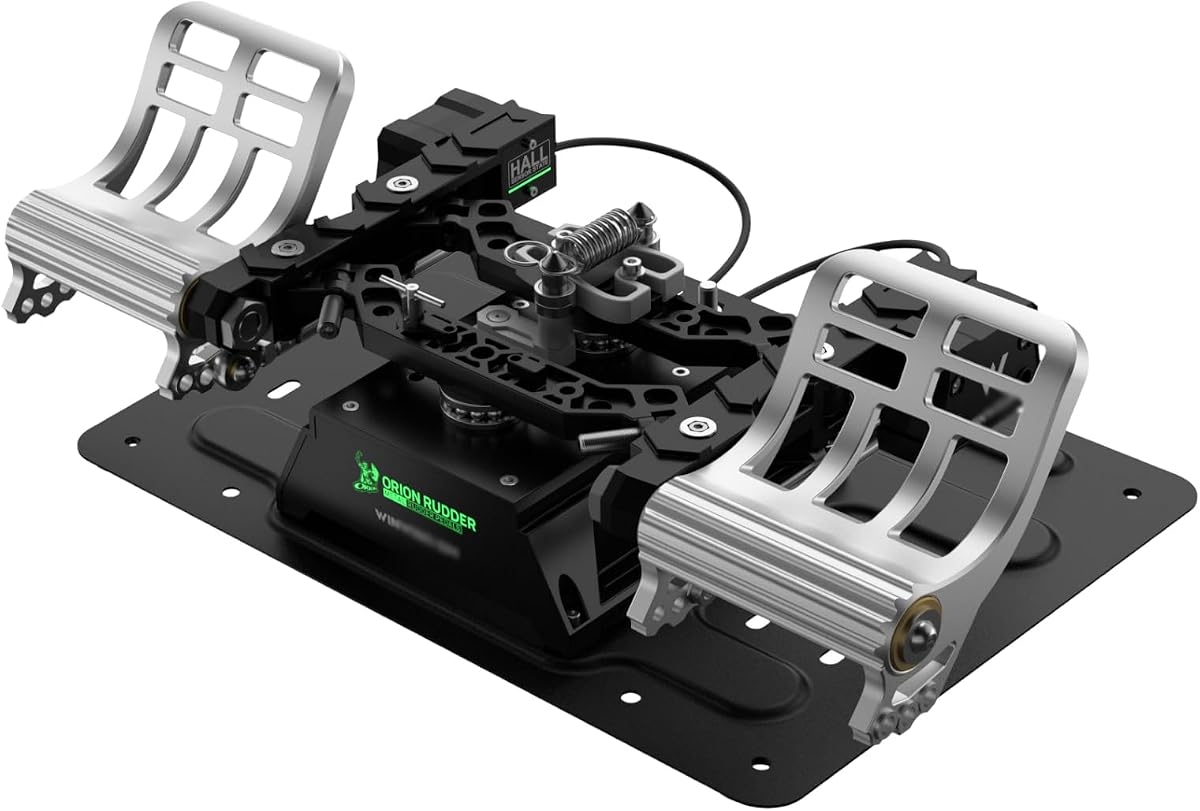
The WINCTRL Orion Standard pedals emphasize durability with an all-metal frame design. They feature quick-swap springs to change control modes easily, offering flexibility for different flight simulations.
We may earn a commission when you buy through this link, at no additional cost to you.
Hall sensors ensure accurate tracking of your movements. The parallelogram structure reduces installation space, making them suitable for smaller cockpits or limited floor areas.
Without user ratings yet, their real-world performance is still being validated. The mechanical complexity might challenge less technical users during initial setup and configuration.
These are ideal for enthusiasts who prioritize build quality and modularity. If you enjoy tinkering with hardware to achieve specific flight feel characteristics, this model offers significant potential.
Swap springs in seconds to switch between rotor, fixed-wing, and vehicle modes easily.
Aviation-grade aluminum and stainless steel parts ensure long-lasting performance.
We may earn a commission when you buy through this link, at no additional cost to you.
WINCTRL Orion Damper pedals add unique grinding dampers for personalized resistance. With a perfect 5.0 rating, users appreciate the realistic feel and durability of the all-metal construction.
We may earn a commission when you buy through this link, at no additional cost to you.
The nonlinear rocker rebound structure mimics real aircraft behavior better than simple springs. This design provides a nuanced stepping experience, enhancing immersion during taxi and flight.
While expensive, the customization options justify the cost for serious enthusiasts. The three control modes allow switching between helicopters, fixed-wing aircraft, and ground vehicles seamlessly.
Buy these if you want the highest level of control customization. They are best for users who demand realistic feedback and have the budget for premium hardware features.
Included dampers let you tailor the resistance to match specific aircraft requirements.
High-precision die casting ensures a solid, rigid structure without flex or wobble.
We may earn a commission when you buy through this link, at no additional cost to you.
The Thrustmaster TPR pedals represent the pinnacle of consumer flight hardware. Rated 4.7 stars, they use Pendulum technology to replicate the fluid motion of real aircraft rudder systems.
We may earn a commission when you buy through this link, at no additional cost to you.
H.E.A.R.T Hall Effect sensors ensure perfect precision over time without mechanical wear. Users note that these pedals handle subtle yaw corrections better than any other model tested.
The price and footprint are significant commitments. They are designed for dedicated simulator rooms where space and budget allow for top-tier equipment installation.
Choose these if you want the most authentic experience possible. They are ideal for professional pilots or hardcore enthusiasts who demand zero compromise on realism and durability.
A suspended mechanism delivers natural, fluid motion that mimics real cockpit pedals.
Magnetic sensors provide consistent, high-resolution input tracking without friction.
We may earn a commission when you buy through this link, at no additional cost to you.
This variant of the Honeycomb Charlie pedals continues to impress with its build quality. With a 4.5 rating, they maintain the brand's reputation for durable aluminum construction and precision sensors.
We may earn a commission when you buy through this link, at no additional cost to you.
The high-friction strips and deployable spikes prevent foot slippage during intense maneuvers. The belt drive system keeps noise levels low, ensuring a focused and immersive environment.
While effective, the software compatibility requires checking before purchase on consoles. The lack of an included hub adds cost for those trying to use them with Xbox systems.
They are a strong choice for PC-based simmers seeking reliability. The combination of durability and realistic feedback makes them a solid long-term investment.
High-friction strips ensure your feet stay in place even during high-pressure taxiing.
Works with Microsoft Flight Simulator, X-Plane, and Prepar3D seamlessly.
We may earn a commission when you buy through this link, at no additional cost to you.
This bundle provides a complete hands-on-throttle-and-stick system with rudder pedals. It delivers a seamless integration with Xbox consoles, offering dedicated guide buttons for easy menu navigation.
We may earn a commission when you buy through this link, at no additional cost to you.
The included TFRP pedals provide smooth S.M.A.R.T sliding, ensuring coordinated turns. Removable heel rests add comfort for long sessions, reducing foot fatigue significantly.
Advanced users may find the lack of deep customization limiting. However, the all-in-one nature simplifies setup, making it perfect for beginners starting their sim journey.
Pick this if you want a ready-to-play cockpit solution. It offers everything needed for combat and civil aviation simulations right out of the box.
Direct Xbox support means no extra controllers are needed to navigate system dashboards.
Removable heel rests let you adjust foot position for reduced fatigue.
We may earn a commission when you buy through this link, at no additional cost to you.
This combo pairs the TFRP pedals with the popular T16000M FCS joystick. The 4.6 rating reflects the high precision of both components working together effectively for various flight sims.
We may earn a commission when you buy through this link, at no additional cost to you.
The pedals support differential braking, crucial for ground maneuvering. The S.M.A.R.T rail system ensures smooth steering inputs, preventing jerky movements during taxiing.
While the bundle offers great value, users must configure the software carefully. Without dedicated brake tension knobs, you rely on software mapping for nuanced control.
It is an excellent entry point for serious PC users. The combination of quality pedals and joystick provides a near-complete cockpit experience for the price.
Get both stick and pedals together to save money and ensure compatibility.
Differential pedals let you apply brakes independently for better taxi control.
We may earn a commission when you buy through this link, at no additional cost to you.
These racing pedals can be adapted for flight sim use with proper configuration. A 4.8 rating highlights their solid build quality and durable Hall Effect sensors that resist wear.
We may earn a commission when you buy through this link, at no additional cost to you.
The load cell brake offers precise resistance feedback, similar to real aircraft braking systems. The adjustable positions allow you to tailor the pedal angle for foot comfort.
They are not designed specifically for aviation axes, which limits direct usability. However, for users who mix racing and flight sims, they provide a robust, versatile hardware option.
Consider these if you need a single setup for multiple genres. Their durability and adjustability make them a flexible choice for multi-simulation hobbyists.
A 75 kg load cell provides consistent, realistic braking force feedback.
Hall Effect sensors ensure long-term precision without mechanical contact wear.
We may earn a commission when you buy through this link, at no additional cost to you.
Choosing the right rudder pedals involves balancing budget, build quality, and feature set. Use this guide to identify the specific needs for your cockpit setup.
Hall Effect magnetic sensors are the industry standard for high-end pedals. They offer frictionless operation and high accuracy without mechanical wear over time.
Look for models using Hall Effect sensors to ensure long-term reliability and precise inputs.
Metal frames provide stability and durability but come at a higher price. Plastic constructions are lighter and cheaper but may wobble during intense use.
Invest in metal or reinforced plastic for serious simming sessions.
Differential toe brakes are essential for realistic taxiing and landing. Some models offer adjustable tension for different aircraft types.
Prioritize pedals with independent brake control for better ground maneuverability.
Check if the pedals support your specific console or PC operating system. Some require hubs or adapters for full functionality on Xbox or PS5.
Confirm platform support before purchasing to avoid compatibility issues.
Pedals vary significantly in size. Measure your available floor space to ensure they fit comfortably without obstructing other equipment.
Choose compact models if space is limited in your cockpit.
Comfortable pedal surfaces and adjustable angles reduce fatigue. Heel rests can help maintain a steady position during long flights.
Look for ergonomic designs to prevent discomfort during extended sessions.
Budget models offer basic functionality while premium ones include advanced customization. Decide which features are non-negotiable for your simulation style.
Balance cost against the features you will actually use.
Some pedals require specific drivers or software to unlock all features. Ensure the software is compatible with your main sim applications.
Verify software availability to maximize hardware potential.
Always install the manufacturer's drivers before connecting the pedals to ensure proper calibration. Check all connections for stability before launching your simulation software.
Clean the pedal surfaces regularly with a damp cloth to prevent dust buildup. Avoid spraying liquids directly on the mechanical joints to protect internal components.
Periodically check for any loose screws or wobbling in the pedal arms. Tighten fasteners as needed to maintain a secure feel during active use.
While they can function independently for yaw control, a joystick is usually needed for pitch and roll. Most flight sims require both inputs for full aircraft control.
Yes, racing pedals can be mapped to rudder axes with software adjustments. However, they lack specific aviation features like differential toe braking.
TFRP uses S.M.A.R.T rails while TPR uses Pendulum technology. TPR is more advanced and offers smoother, more realistic movement than TFRP.
No, any standard PC with a USB port will work. However, ensure your operating system is compatible with the drivers provided by the manufacturer.
Not strictly necessary but highly recommended for realism. They improve control during takeoff and landing significantly compared to keyboard or mouse inputs.
Check USB connections and reinstall drivers. Try connecting to a different USB port or restarting the simulator software to resolve detection issues.
The Thrustmaster TFRP remains a top recommendation for those seeking value and performance. For premium experiences, the Thrustmaster TPR offers unmatched realism.
Prioritize build quality and sensor accuracy to ensure longevity. A reliable set of pedals can enhance years of immersive simulation without needing replacement.
Always verify current pricing and compatibility before purchasing. Prices fluctuate and features may change with newer model releases.