
Light Gaming Laptop AMD Ryzen 7 5700U
4.6Editor score
Affordable price point
Solid Ryzen 7 processor
Long battery life
Choosing the right gaming laptop for college requires balancing power portability and price. Students need machines that handle demanding coursework while delivering smooth gaming sessions during downtime. The ideal device should offer reliable performance without breaking the bank or weighing down your backpack.
We evaluated ten current models based on processor speed graphics capability display quality and overall value. Our analysis considers real-world usage scenarios including multitasking between study apps and games. Each entry was selected to represent a distinct budget tier or performance level available now.
Every pick highlights specific strengths like battery life thermal management or upgradeability. Remember that prices fluctuate frequently so check current listings before purchasing. We aim to provide transparent insights so you can invest confidently in a machine that supports your goals.
4.6Editor score
4.5Editor score

4.4Editor score
As an Amazon Associate we earn from qualifying purchases.
The following table presents a side-by-side comparison of all ten selected models. It highlights key specifications like processor type memory and display features to help you quickly identify which device matches your specific requirements and budget constraints.




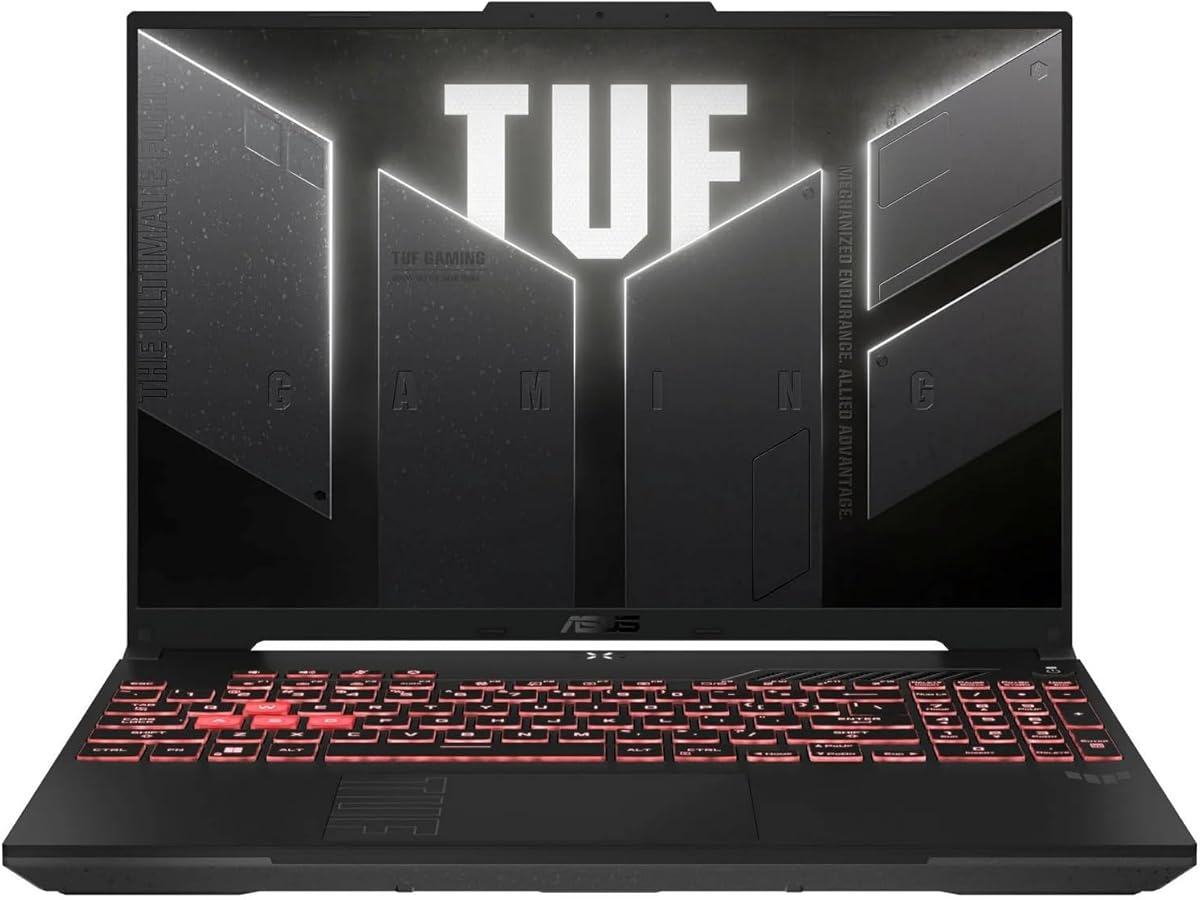
The ASUS TUF Gaming A16 stands out as a top choice for students needing reliability and performance. With a solid 4.5 rating it delivers robust gaming capabilities without compromising on build quality or daily usability in dorm settings.
We may earn a commission when you buy through this link, at no additional cost to you.
Its AMD Ryzen 7 processor paired with an RTX 4050 handles modern titles smoothly. The 144Hz screen ensures fluid visuals for both gaming and scrolling through lecture notes. The military-grade durability means it can survive the bumps of campus life.
While battery life is average for a gaming device the performance justifies the trade-off. Fans can get loud during intensive sessions but the cooling system prevents thermal throttling effectively. This makes it suitable for long study and play marathons.
If you want a machine that balances power and toughness this laptop is an excellent investment. It fits well into budgets requiring strong specs without paying for unnecessary premium features. Ideal for engineering or design majors who game on the side.
The military-grade tested chassis ensures this laptop can withstand drops and spills common in student environments.
The 144Hz display reduces motion blur allowing for sharper visuals during fast-paced competitive gaming sessions.
We may earn a commission when you buy through this link, at no additional cost to you.
The Acer Nitro V offers incredible value for students on a tight budget. It pairs a capable Intel Core i5 processor with an RTX 4050 card making it a powerful contender in its price range.
We may earn a commission when you buy through this link, at no additional cost to you.
The 165Hz display is a standout feature that delivers crisp motion for gaming and video playback. Its AI-powered graphics enhance visual fidelity without requiring high-end specs. Wi-Fi 6 ensures stable connections for online classes and multiplayer games.
Starting with 8GB RAM might feel limiting but the system allows upgrades to 32GB. The Gen 4 SSD provides fast boot times and app loading. While the chassis feels light on the build is functional and durable enough for regular use.
This model is perfect for gamers who prioritize performance per dollar over luxury materials. It handles heavy multitasking like streaming and editing well. Choose this if you need maximum horsepower for minimum cost without sacrificing screen quality.
DLSS 3.5 technology leverages AI to boost frame rates and visual clarity in supported modern game titles.
Two DDR5 RAM slots allow users to expand memory later as their gaming or study needs grow.
We may earn a commission when you buy through this link, at no additional cost to you.
The ASUS ROG Strix G16 represents the pinnacle of mobile gaming technology for 2026. With a powerful Core i7 processor and RTX 5060 it excels at rendering complex 3D graphics and running intensive simulations.
We may earn a commission when you buy through this link, at no additional cost to you.
Its ROG Intelligent Cooling system uses a vapor chamber and liquid metal to keep temperatures low under stress. The 165Hz display offers smooth motion and better contrast with its ACR film. Wi-Fi 7 ensures ultra-low latency for competitive online play.
Users will appreciate the 1TB Gen 4 SSD which eliminates storage anxiety during large game downloads. The RGB lighting includes a Stealth Mode for quiet focus in libraries or shared dorms. It is heavier than budget options but the performance justifies the weight.
For students with demanding majors or who play the latest AAA titles this is a top-tier choice. It provides longevity and raw power that outlasts typical three year college cycles. Invest here if budget allows for future-proofing your academic and gaming setup.
Advanced vapor chamber cooling keeps the CPU and GPU running cool even during extended stress tests.
The Anti-Cross Contamination film reduces glare and improves contrast for clearer visuals in bright rooms.
We may earn a commission when you buy through this link, at no additional cost to you.
The HP Victus 15.6 brings a balanced mix of style and utility to the gaming market. It features a clean design that blends well in professional or academic settings without looking overly aggressive.
We may earn a commission when you buy through this link, at no additional cost to you.
Equipped with 16GB RAM and an RTX 3050 it handles casual gaming and moderate rendering tasks well. The 144Hz display ensures smooth navigation and gameplay. Windows 11 Pro offers enterprise-grade features beneficial for students in business or tech fields.
While the GPU is older it remains capable for 1080p gaming. The chassis stays cool and quiet thanks to efficient airflow. It may lack the flash of premium models but delivers consistent performance for daily coursework and entertainment needs.
Choose this if you want a reliable machine that looks good in class. It supports multitasking between heavy apps and games comfortably. Ideal for students who need a professional look with enough power for standard gaming experiences.
Windows 11 Pro provides advanced security and management tools suitable for corporate internships.
Enhanced vents keep the system running cool without distracting fan noise during lectures.
We may earn a commission when you buy through this link, at no additional cost to you.
The Light Gaming Laptop with Ryzen 7 offers a low barrier to entry for students needing portable power. It is lightweight and compact making it easy to carry between classrooms and library sessions throughout the day.
We may earn a commission when you buy through this link, at no additional cost to you.
While it uses integrated graphics it still manages light gaming tasks like indie titles or esports games. The 16GB RAM ensures smooth multitasking for research and streaming. Connectivity includes HDMI and USB-C for easy projector hookups.
This machine sacrifices raw power for price and portability. It is not built for high-end AAA gaming but serves well for coursework and casual play. The SSD ensures quick boot times so you can focus on work immediately.
Select this option if budget is your primary constraint and portability is key. It handles daily tasks effortlessly and can run older games smoothly. Perfect for students prioritizing weight and cost over intense graphical performance.
The slim profile fits easily into small backpacks reducing strain during long commutes.
HDMI and USB-C ports allow seamless connection to external displays for presentations.
We may earn a commission when you buy through this link, at no additional cost to you.
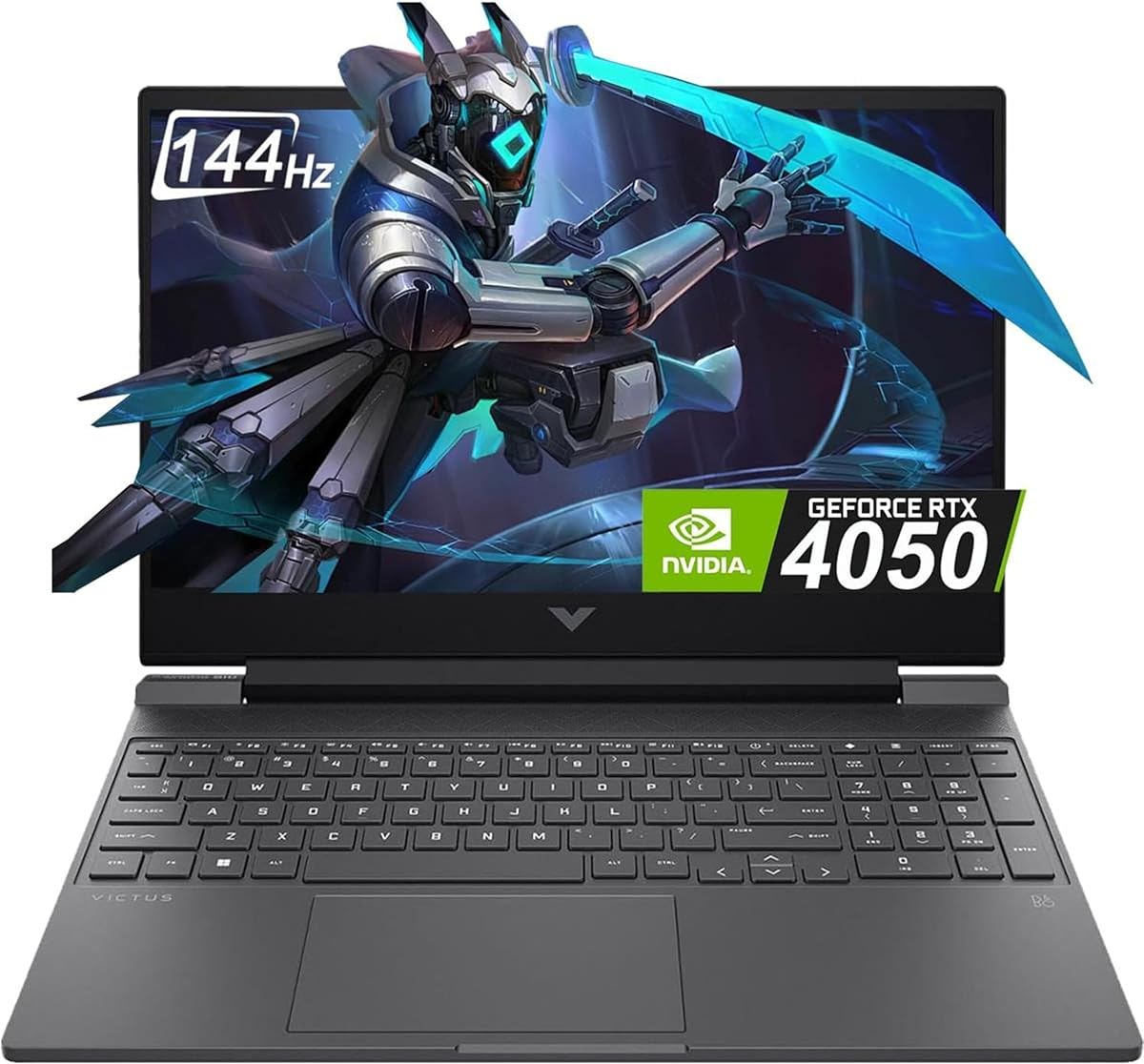
The HP Victus 15.6 2024 model updates the lineup with newer hardware while maintaining a sleek look. It features a modern Core i5 processor and RTX 4050 GPU offering a balance between efficiency and gaming capability.
We may earn a commission when you buy through this link, at no additional cost to you.
The RTX 4050 supports DLSS and ray tracing for better visuals in supported titles. The display offers 144Hz refresh rates for fluid motion. The Mica Silver finish looks professional and resists fingerprints better than darker alternatives.
While it uses DDR4 memory the system remains responsive for most student workloads. The cooling system handles heat well during extended sessions. This model is a solid choice for those wanting updated hardware without breaking the bank.
Ideal for students needing a fresh design and good performance for daily tasks. It supports light editing and gaming effectively. Choose this if you value a clean aesthetic and reliable performance over cutting-edge specs.
RTX 4050 hardware accelerates ray tracing for more realistic lighting in supported games.
The silver finish blends well in academic settings looking more like a work machine.
We may earn a commission when you buy through this link, at no additional cost to you.
This model focuses heavily on portability and everyday utility for mobile students. With a Ryzen 7 5700U processor it handles multitasking effortlessly despite lacking a dedicated graphics card. It is designed for on-the-go productivity.
We may earn a commission when you buy through this link, at no additional cost to you.
The Zen 3 architecture ensures responsive performance for study apps and web browsing. The battery lasts longer than typical gaming laptops allowing all-day use on campus. Connectivity includes WiFi 6 for fast internet speeds in crowded areas.
While not a powerhouse for gaming it supports lighter titles via integrated graphics. The build is sturdy enough for travel but simple in design. It serves well as a primary machine for students prioritizing weight and efficiency.
Choose this if you need a light machine that travels well. It is perfect for coding writing or design work where graphics power is less critical. Ideal for students who value battery life and portability above raw gaming performance.
Efficient power management allows full day usage without needing to find a power outlet.
WiFi 6 ensures stable connections in crowded campus networks for seamless streaming.
We may earn a commission when you buy through this link, at no additional cost to you.
The KAIGERR 18.5 inch laptop offers a massive screen experience rarely found at this price. It is perfect for students who need extra space for split-screen multitasking or large spreadsheets during study sessions.
We may earn a commission when you buy through this link, at no additional cost to you.
With a 4.8 rating it is highly trusted by users for its reliability. The thin bezels maximize screen real estate making content consumption immersive. It balances cost and utility well for those needing visual space over portability.
While it is heavier it provides a desktop-like experience on the go. The keyboard is spacious enough for comfortable long typing sessions. It handles standard gaming tasks well but shines in productivity and media consumption scenarios.
Select this if you prefer a large canvas for work and play. It is ideal for dorm setups where the laptop stays mostly stationary. A great choice for maximizing screen real estate without buying an external monitor.
The wide 18.5 inch panel offers ample space for viewing multiple windows side by side.
A full-sized keyboard layout ensures comfortable typing for long essays or reports.
We may earn a commission when you buy through this link, at no additional cost to you.
The 2022 HP Victus 15 remains a solid choice for budget-conscious students seeking reliability. It features a capable Core i5 processor and RTX 3050 graphics that still handle most modern titles at reasonable settings.
We may earn a commission when you buy through this link, at no additional cost to you.
Enhanced thermals ensure the system stays cool and quiet during heavy use. The backlit keyboard aids productivity in dimly lit dorms. While it started with 8GB RAM many users find it sufficient for general tasks if not maxed out.
Its design prioritizes function over flashy aesthetics. It is a practical machine that gets the job done without extra cost. Performance is steady and consistent for study and entertainment alike. This model offers great value for those who prefer proven hardware.
Pick this if you want a tested machine with fewer risks. It balances price and performance well for standard student needs. Choose for long you need a reliable workhorse without paying for the latest new features.
Improved thermal vents keep internal temperatures low even during extended play sessions.
Illuminated keys allow comfortable typing in dark environments like libraries or late nights.
We may earn a commission when you buy through this link, at no additional cost to you.
The NIMO 15.6 blends business features with gaming capability for a versatile option. It includes a fingerprint sensor for secure logins and DDR5 RAM for speed. This makes it well suited for students who need to switch between work and play.
We may earn a commission when you buy through this link, at no additional cost to you.
Its Ryzen 5 processor handles multitasking well and the 100W Type-C charger supports quick powerups. The warranty offers peace of mind for long term use. It is a functional device that supports both academic and light gaming tasks effectively.
While graphics performance is moderate it ensures battery efficiency and stability. The laptop is ready for modern connectivity with fast data transfer. Security features like hidden webcams add privacy for remote classes. It is a practical tool for daily academic life.
Choose this if you want a secure portable device with modern memory. It balances utility and performance well for general student needs. Ideal for those needing business-grade security features without high-end gaming costs.
Fingerprint login and hidden webcam protect sensitive data during online classes.
USB-C charging and display support simplify desk setups with fewer cables.
We may earn a commission when you buy through this link, at no additional cost to you.
Selecting the right laptop requires weighing several technical factors against your lifestyle. Below are the key elements to consider before making a purchase.
The processor is the brain of your laptop. Look for at least an Intel Core i5 or AMD Ryzen 5 to ensure smooth performance during multitasking. Higher end models with i7 or Ryzen 7 chips are better for rendering or heavy simulations.
Prioritize recent generations like 12th Gen or newer for better efficiency and longevity in academic environments.
Dedicated graphics cards like NVIDIA RTX provide better frame rates for modern games. Integrated graphics are sufficient for casual play but limit performance in heavy titles. Consider your favorite games to decide how much power you really need.
Opt for at least an RTX 3050 or 4050 if gaming is a primary use case alongside your studies.
Minimum 16GB of RAM is recommended to handle browsers open with multiple apps running. SSDs are essential for fast boot times and application launches. Aim for 512GB or more to store large files without cluttering your drive.
Ensure the RAM is upgradeable if you buy a system with 8GB so you can expand later.
High refresh rates above 144Hz offer smoother motion for gaming and video. Color accuracy matters if you work with graphics or design content. Look for IPS panels to ensure good viewing angles in lecture halls.
Choose a screen that balances resolution and refresh rate to suit your specific academic and gaming interests.
Students often carry laptops between classes so weight is a major consideration. Aim for under five pounds to reduce backpack strain. Thin bezels can help increase screen size without adding bulk to the chassis.
Consider the laptop weight alongside your carry habits to ensure it fits your daily commuting routine.
Gaming laptops often sacrifice battery for performance but aim for at least six hours of mixed use. Check wattage requirements since high performance models need larger chargers. Battery life impacts how long you can study without hunting for outlets.
Look for power-saving modes that extend runtime during non-gaming study sessions.
Ports like USB-C and HDMI are essential for connecting to projectors and external monitors. Wi-Fi 6 support ensures stable internet in crowded campus networks. Ensure there are enough USB ports for peripherals like mice and drives.
Verify the port selection matches your existing accessories to avoid needing extra adapters.
A sturdy chassis protects your investment from accidental drops or spills on campus. Look for reinforced hinges and military grade testing for long term reliability. Plastic builds can be light but might feel less robust over years of use.
Choose a model that feels solid when opened to prevent wear and tear over time.
Keep your laptop clean by wiping the screen and keyboard regularly with a microfiber cloth. Dust can clog vents so use compressed air occasionally to clear cooling fans. Maintaining a dust-free environment helps prevent overheating during gaming or processing tasks.
Always use the provided charger or a compatible adapter to avoid damaging the battery. Avoid letting the system sit at zero percent charge for long periods to preserve battery health. Proper charging habits extend the overall life of the power cell.
Update your drivers and operating system regularly to ensure smooth performance. Install security software to protect your data during online classes and gaming. Regular maintenance keeps your machine running fast and secure for years of school use.
Yes they are excellent because they offer the power needed for engineering software and multitasking. Their high performance ensures smooth operation during heavy study loads. The only downside is battery life but they handle complex tasks easily.
Sixteen gigabytes is the sweet spot for multitasking between apps and games. Eight gigabytes can work for basic tasks but may slow down when streaming. More RAM future proofs your device for demanding software updates later.
If you play modern titles yes a dedicated card is necessary. For casual use integrated graphics might suffice but dedicated options offer better performance. Most students benefit from a card like the RTX 4050 for future proofing.
Use power saving modes and lower screen brightness when away from outlets. Close background apps like streaming services to reduce load. Proper habits help maximize the time you can study unplugged.
Many models allow RAM and storage upgrades after purchase. Check if the chassis has accessible panels before buying. Upgrading extends the device life and keeps it relevant for future coursework.
Fifteen to sixteen inches offers a balance between portability and workspace. Larger screens provide more real estate but add weight to your bag. Choose based on your priority between comfort and carrying convenience.
We have reviewed ten top models ranging from budget picks to premium powerhouses. Each option offers distinct benefits depending on your budget and academic requirements. The ASUS TUF A16 and Acer Nitro V stand out for their overall value.
Prioritize what matters most to your routine like battery life or raw power. Balancing performance with portability will ensure you stay productive during long days on campus. Your choice should reflect both your gaming habits and study needs.
Prices change frequently so always check current listings before buying. We hope this guide helps you find a machine that lasts throughout your degree. Invest wisely to support your academic and personal goals.