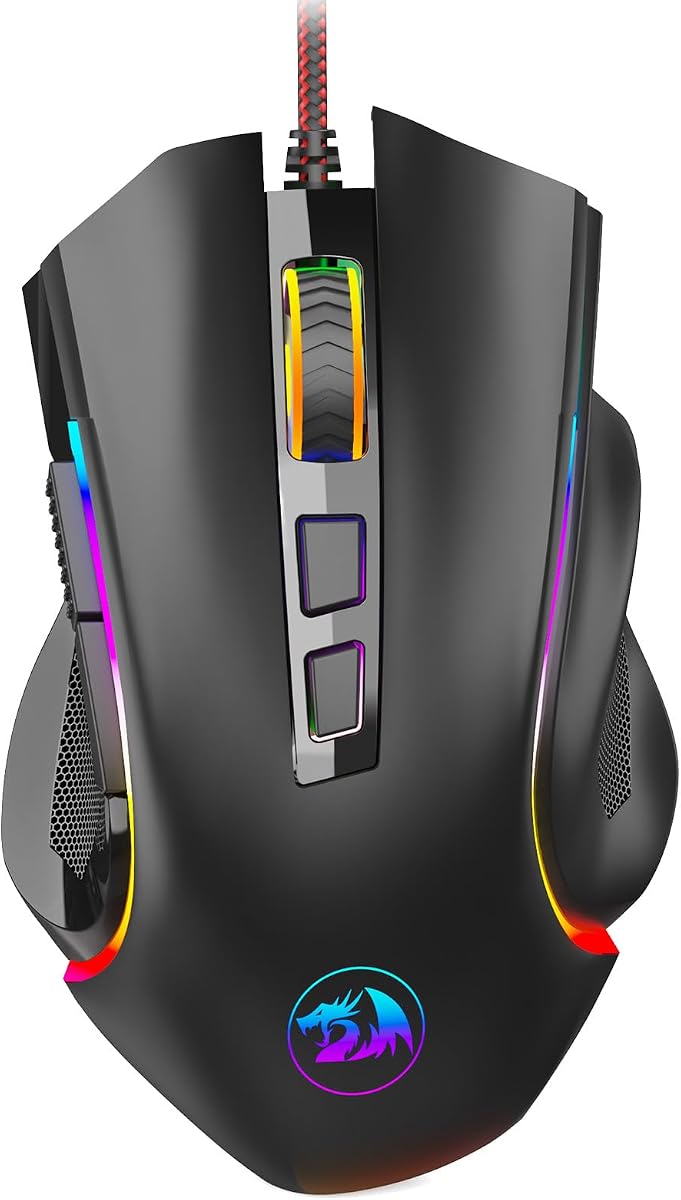
Redragon M602 Gaming Mouse
4.6Editor score
7200 Adjustable DPI
9 Programmable Buttons
Ergonomic RGB Design
Discover the best gaming mouse for Diablo 4 in October 2026. We compare top wired and wireless mice with high DPI, programmable buttons, and ergonomic designs
Choosing the right gaming mouse for Diablo 4 is crucial for success in Netherworld. A quality mouse offers precise tracking, ergonomic comfort for long sessions, and programmable buttons for skills.
We evaluated ten top-rated mice based on sensor accuracy, button layout, build quality, and user feedback. This list covers wired and wireless options suitable for various play styles and budgets.
Each pick highlights key features and pros to help you decide. Prices fluctuate frequently so check current listings before purchasing. Our goal is to guide you to the perfect tool for your adventure.
4.6Editor score

4.6Editor score

4.2Editor score
This side-by-side comparison outlines the core specifications and unique strengths of each selected mouse. Use this table to quickly identify which model aligns with your specific gaming needs and preferences.






The Logitech G502 Hero stands out as a top contender for Diablo 4 players seeking precision and customization. With a HERO sensor delivering up to 25600 DPI, it ensures flawless tracking during intense combat.
We may earn a commission when you buy through this link, at no additional cost to you.
Its 11 programmable buttons allow you to map skills and potions efficiently. The dual mode scroll wheel enables quick inventory navigation, while adjustable weights let you tailor the feel to your grip.
While it lacks wireless freedom, the sturdy build and reliable cable make it a durable choice for long gaming sessions. Some may find the weight slightly high, but it adds stability.
This mouse is ideal for gamers who prioritize button count and sensor accuracy over wireless convenience. It offers exceptional value for both competitive and casual Diablo 4 experiences.
The HERO sensor eliminates smoothing and acceleration, ensuring every movement translates accurately. This consistency is vital for landing precise clicks on high priority targets.
With 11 buttons you can assign macros and frequently used skills to the mouse. This reduces keyboard reliance and streamlines your workflow during chaotic raids.
We may earn a commission when you buy through this link, at no additional cost to you.
The Razer Naga V3 Pro offers unmatched versatility with swappable side plates for different game genres. Its Focus Pro 50K sensor delivers top tier tracking accuracy for precise actions.
We may earn a commission when you buy through this link, at no additional cost to you.
Featuring up to 155 hours of battery life on HyperSpeed Wireless, it minimizes interruptions. The HyperScroll Tilt Wheel Gen 2 provides smooth navigation through inventories and large maps.
While expensive, the build quality and flexibility justify the cost for serious players. The multi-mode connectivity allows seamless switching between gaming and productivity tasks.
This mouse suits those who want the ultimate in customization and wireless freedom. It is a premium investment that adapts to changing gaming needs over time.
The magnetic side plates allow you to switch between 2 6 or 12 buttons instantly. This makes the mouse versatile across different game types without buying multiple devices.
With up to 280 hours on Bluetooth and 155 on HyperSpeed, you can game for days on one charge. Charging is easy via USB-C when needed.
We may earn a commission when you buy through this link, at no additional cost to you.
The Redragon M602 proves you do not need to spend a fortune to get a capable gaming mouse. It offers solid performance with 7200 DPI and ergonomic comfort for long sessions.
We may earn a commission when you buy through this link, at no additional cost to you.
Nine programmable buttons allow essential key bindings and macro setup. The RGB lighting adds style without impacting performance significantly. It has a proven track record with high user satisfaction.
While it lacks the advanced features of premium models, it meets all core needs for Diablo 4. The software is straightforward and easy to use for quick customization tasks.
For budget conscious gamers this mouse delivers excellent value. It is an ideal entry point for those new to PC gaming or seeking a reliable secondary mouse.
At a low price, the M602 offers more features than many similarly priced options. It balances cost and functionality effectively for most users.
The shape fits the natural curve of your hand reducing strain during extended play. Dedicated finger positions enhance control and comfort.
We may earn a commission when you buy through this link, at no additional cost to you.
The Razer DeathAdder Essential is a simple yet effective mouse for basic gaming needs. Its ergonomic design and reliable sensor make it a comfortable choice for daily use.
We may earn a commission when you buy through this link, at no additional cost to you.
Featuring 6400 DPI and mechanical switches rated for 10 million clicks, it ensures durability. The ridged scroll wheel offers precise scrolling which is useful for menu navigation.
With only five buttons it may limit complex macro setups but covers essentials well. The lack of RGB lighting keeps costs down and reduces distractions.
This mouse is best for players who prefer simplicity and reliability. It is a great option for those who value comfort and basic performance over extra features.
Designed for right handed users the shape supports natural hand positioning. This reduces fatigue during extended gaming or work sessions.
The mechanical switches are built to withstand millions of clicks. This longevity makes it a trustworthy choice for frequent use.
We may earn a commission when you buy through this link, at no additional cost to you.
The Corsair NIGHTSWORD offers a unique approach to customization with its Smart Tunable Weight System. You can adjust the balance to perfectly fit your grip and play style.
We may earn a commission when you buy through this link, at no additional cost to you.
Its custom Pixart PMW3391 sensor ensures ultra-accurate tracking with 18000 DPI. The rubber grips provide a secure hold which is essential for intense gaming scenarios.
While the weight system adds complexity it allows for highly personalized setup. The ten programmable buttons support detailed macro functions for advanced gameplay.
Ideal for players who want to fine tune their mouse feel this model stands out. It combines precision tracking with ergonomic comfort for a refined experience.
By adjusting weights and balance configurations you can tailor the mouse to your exact preferences. This level of customization is rare at this price point.
High performance rubber grips inspired by sports equipment enhance control. They prevent slipping during fast movements and improve precision.
We may earn a commission when you buy through this link, at no additional cost to you.
The Razer Basilisk V3 combines high performance with stunning visual customization. Its Focus Plus 26K sensor tracks movement flawlessly for precise in game actions.
We may earn a commission when you buy through this link, at no additional cost to you.
The HyperScroll Tilt Wheel offers both free spin and tactile modes. This versatility is perfect for browsing inventories or navigating menus quickly.
With 11 RGB zones you can create unique lighting effects using Chroma software. The optical switches provide crisp actuation for rapid response times.
This mouse is perfect for gamers who appreciate aesthetics and performance equally. It delivers a high end experience with solid build quality and responsive controls.
Optical switches actuate in 0.2ms reducing the risk of misclicks. This speed is crucial for competitive gameplay and precise inputs.
Over 16.8 million colors and dynamic lighting effects react to games. This creates an immersive atmosphere tailored to your gaming setup.
We may earn a commission when you buy through this link, at no additional cost to you.
The Logitech G305 Lightspeed delivers wireless freedom without compromising performance. Its HERO sensor provides 12000 DPI and 10x better power efficiency.
We may earn a commission when you buy through this link, at no additional cost to you.
Weighing only 3.4 ounces it ensures high maneuverability and reduced strain. The LIGHTSPEED technology offers a 1ms report rate for lag free gameplay.
Battery life reaches up to 250 hours on one AA cell. Switching to Endurance mode can extend this to nine months for convenience.
This mouse is ideal for gamers seeking portability and reliable wireless connection. It is great for travel or for those who prefer wireless setups.
LIGHTSPEED ensures a consistent connection that rivals wired mice. This stability is essential for competitive play and responsiveness.
Efficient power use allows months of use on a single battery. This minimizes maintenance and interruptions to your gaming routine.
We may earn a commission when you buy through this link, at no additional cost to you.
The Corsair Scimitar RGB Elite is built for MMO players needing extensive button access. With 17 programmable buttons it supports complex macro chains.
We may earn a commission when you buy through this link, at no additional cost to you.
Its Key Slider System lets you reposition side buttons to fit your thumb position comfortably. The contoured shape supports extended use without hand fatigue.
The custom PixArt PMW3391 sensor delivers accurate tracking up to 18000 DPI. Braided cables and durable switches ensure longevity during heavy use.
For MMO and MOBA fans this mouse provides superior control. It is a specialized tool designed for players who need maximum key accessibility.
Moving the side panel adjusts button placement for better ergonomics. This ensures a natural thumb position regardless of hand size.
Designed specifically for MMOs it offers more buttons than standard mice. This simplifies executing complex abilities during raids.
We may earn a commission when you buy through this link, at no additional cost to you.
The UtechSmart Venus Pro Wireless offers robust MMO features with wireless convenience. It features 16 programmable buttons designed for comfortable thumb placement.
We may earn a commission when you buy through this link, at no additional cost to you.
Its dual mode wireless technology ensures stable connections via 2.4 GHz or wire. The 16000 DPI sensor delivers precise tracking for accurate gameplay.
Battery life reaches 70 hours per charge supporting long gaming sessions. The ergonomic coating reduces fatigue and enhances grip during use.
This mouse is well suited for MMO players wanting wireless flexibility. It provides a balance of button count and portability for versatile use.
Switching between wireless and wired modes offers flexibility for different environments. This adaptability extends the mouse to both gaming and work tasks.
The grinding coating increases friction and reduces wrist fatigue. It provides a skin friendly surface for extended play.
We may earn a commission when you buy through this link, at no additional cost to you.
The Redragon M901K is a feature packed mouse designed for macro heavy games. With 19 programmable buttons you can map extensive skill chains easily.
We may earn a commission when you buy through this link, at no additional cost to you.
Its 12400 DPI sensor supports adjustable polling rates for smooth tracking. Eight removable weights allow you to fine tune balance for your grip.
RGB lighting with 16.8 million colors adds style to your setup. The ergonomic shape helps prevent fatigue during long gaming sessions.
Ideal for MMO players this mouse maximizes command accessibility. It offers high customization at an affordable price for budget gamers.
The 19 buttons support complex macro editing for automated actions. This reduces keyboard reliance and improves in game efficiency.
Adjustable weights let you tailor the mouse feel to your preference. This enhances comfort and control across different gaming scenarios.
We may earn a commission when you buy through this link, at no additional cost to you.
Selecting the right mouse requires evaluating sensor accuracy, button layout, and comfort. These factors ensure you can react quickly and maintain performance over time.
A high DPI optical sensor ensures your cursor follows movements precisely without lag or jitter. Look for sensors with adjustable DPI to match your sensitivity needs.
Prioritize sensors that offer smooth tracking with minimal smoothing or acceleration for consistent performance.
Diablo 4 benefits from extra buttons for skills and potions. Mice with side buttons or macro support enhance your control options.
Ensure buttons are accessible and easy to press without accidental clicks during gameplay.
An ergonomic shape reduces wrist strain during long sessions. Look for models with thumb rests or contoured designs that fit your hand.
Comfort should be a priority to avoid fatigue and maintain focus during extended play.
Wired mice offer consistent connections with no latency but limit mobility. Wireless models provide freedom but depend on battery life and connection stability.
Choose wireless if you value a clean setup; wired if you want maximum reliability.
Adjustable weights let you balance the mouse to your preference. This helps reduce strain and improves control based on grip style.
Consider models with weight systems if you have specific feel requirements.
Durable materials and mechanical switches ensure longevity. Look for mice rated for high click counts and robust construction.
Investing in quality reduces the need for frequent replacements.
Software enables macro customization and button mapping. Reliable software with an intuitive interface is essential for optimizing performance.
Check compatibility with your OS before purchasing to ensure full functionality.
RGB lighting allows personalization of your gaming setup. Some models offer sync with other devices for immersive effects.
While not essential, RGB can enhance aesthetics and help identify your gear quickly.
Start by installing the manufacturer's software to enable customization features. Use this tool to map buttons and adjust DPI settings to suit your preferences.
Clean the mouse regularly with a soft, dry cloth to prevent dust buildup. For sticky residues, use a slightly damp cloth to wipe the surface carefully.
Store the mouse in a safe place when not in use to avoid physical damage. Avoid exposing it to extreme temperatures or moisture to maintain longevity.
For Diablo 4, a DPI range of 800 to 2000 typically works well. This allows precise aiming without being too sensitive. Adjust based on screen resolution and personal preference.
Wireless is optional. Many players prefer wired mice for zero latency. Choose wireless if you prioritize a clean desk setup and battery life is sufficient.
At least five to seven buttons are useful for basic skills. More buttons help with complex macro chains and potion usage. Match button count to your play style.
Yes, software is usually required to remap buttons and set DPI profiles. Some mice have onboard memory to save settings without constant software access.
Most gaming mice last several years with regular use. Mechanical switches rated for 20 million clicks ensure longevity. Proper care extends the lifespan significantly.
Yes, most mice work on Mac but software support may be limited. Check manufacturer compatibility for full feature access like macros and RGB control.
The Logitech G502 Hero, Razer Naga V3 Pro, and Redragon M602 lead the list for different reasons. Each offers unique strengths tailored to budget and play style needs.
Prioritize sensor accuracy and comfort to enhance your performance. Ensure the button layout matches your skill requirements for efficient gameplay.
Prices fluctuate so always check current listings before purchasing. This guide helps you make an informed choice for your next Diablo 4 adventure.