
NOYAFA NF-488 POE Cable Tester
4.5Editor score
RJ45 continuity checking
Backlit LCD display
Loop-back detection feature
This comprehensive guide compares the top ten inline POE testers for network engineers. We evaluate accuracy, display quality, and compatibility with IEEE
Selecting the right inline POE tester is crucial for network professionals who need to verify power delivery without disrupting services. These tools ensure cameras and access points receive stable voltage and current while maintaining data throughput efficiency during critical operations.
Our evaluation process focuses on real-world performance across diverse networking environments. We examined voltage ranges, display clarity, and battery-free operation capabilities to determine which models offer the most reliable diagnostics for modern Power over Ethernet installations.
Each product entry highlights specific strengths and weaknesses based on technical specifications. Prices fluctuate frequently due to market demand so always verify current costs before purchasing to ensure you get the best value for your specific networking infrastructure requirements.
4.5Editor score
4.3Editor score

4.1Editor score
The following table provides a side-by-side technical comparison of all ten selected models. Review the specifications to identify which device aligns best with your specific testing requirements and operational environment needs.



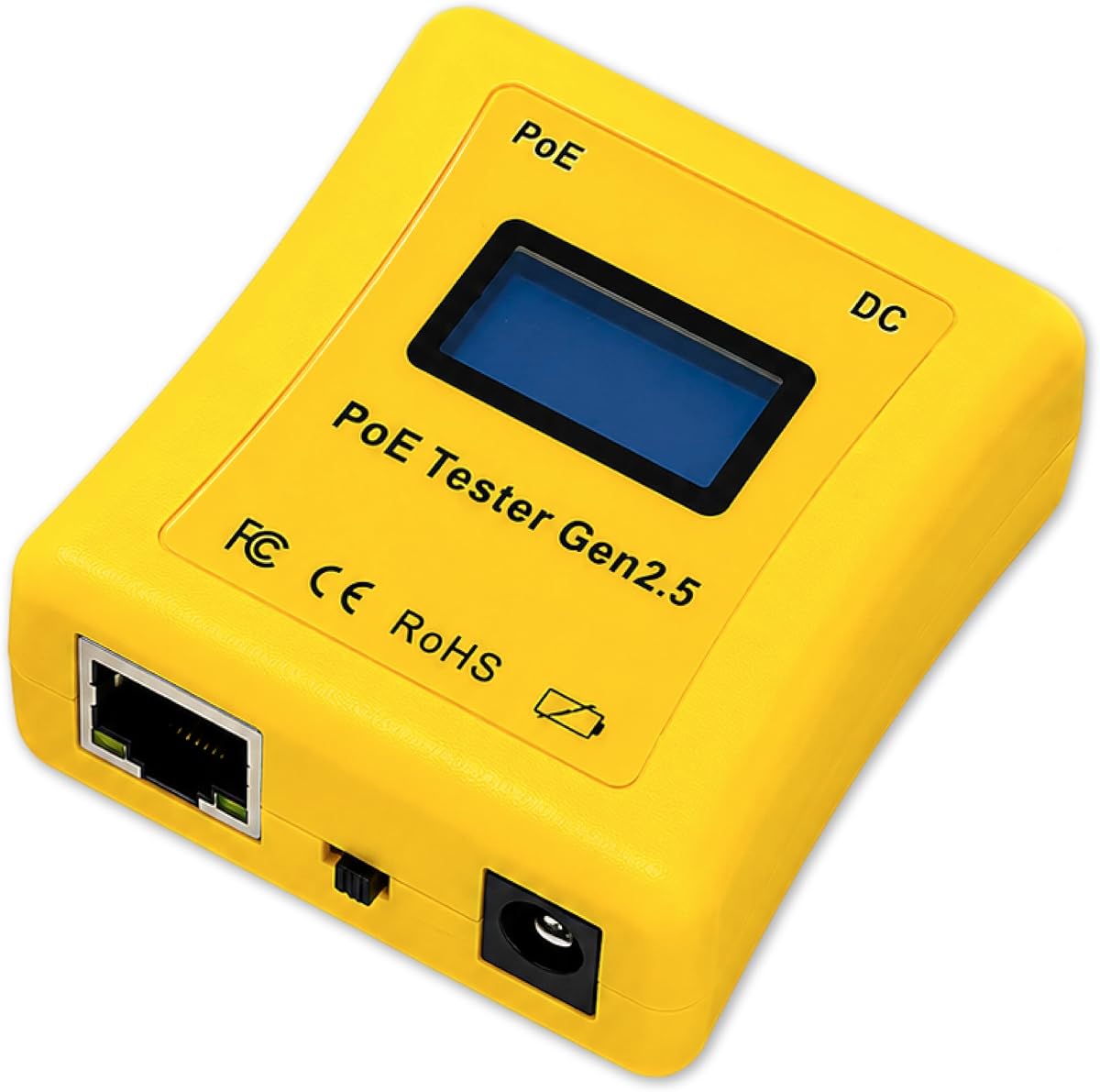
The PoE Texas Power Over Ethernet Voltage and Current Tester stands out as a top choice for network technicians due to its reliable performance and innovative design. With a strong rating reflecting user satisfaction it delivers accurate readings for both standard and passive PoE configurations without requiring external power sources.
We may earn a commission when you buy through this link, at no additional cost to you.
Its key strength lies in the professional diagnostic capabilities allowing you to eliminate guesswork when installing VoIP phones or cameras. The device activates ports on switches and measures power consumption efficiently. The curved body makes it pocket-sized and easy to carry during field deployments.
While the LCD screen is functional it may lack the brightness of OLED displays in direct sunlight. Additionally it focuses on core measurements without advanced cable length testing features found in some premium models. These trade-offs are acceptable given its targeted focus on power verification.
Network professionals who prioritize battery-free operation and quick diagnostics will find this tool indispensable for daily maintenance tasks. We recommend it for technicians who need a durable straightforward tester to ensure connected devices receive adequate power consistently.
The device draws power directly from the PoE line ensuring you never run out of energy during critical field testing jobs.
Its new curved body design is 25% smaller making it easier to hold and use in tight network rack environments.
We may earn a commission when you buy through this link, at no additional cost to you.
The NOYAFA NF-488 offers exceptional value for users seeking a versatile tool that combines PoE verification with cable continuity checks. It is a top contender for budget-conscious buyers because it covers essential installation needs without compromising on core accuracy or usability standards.
We may earn a commission when you buy through this link, at no additional cost to you.
Its primary strength includes the ability to detect open circuits short circuits and crossover issues in addition to identifying standard PoE voltages. The remote wiring function simplifies tasks for technicians working in large facilities. The clear display ensures results are visible even in dimly lit server rooms.
However the power testing function is less comprehensive than dedicated models like the PoE Texas unit. It does not provide detailed power consumption graphs or advanced negotiation data. These limitations are minor for basic installation verification but might limit advanced troubleshooting scenarios.
We recommend this device for IT installers who need a reliable all-in-one solution for network cabling and basic power checks. Its cost-effectiveness makes it an ideal choice for small businesses or contractors managing multiple low-voltage systems efficiently.
This Ethernet tester detects PoE network cables and Ethernet reducing troubleshooting time for low-voltage system installations.
The casing features anti-slip effects and independent backlighting timers to ensure visibility and comfort during extended use.
We may earn a commission when you buy through this link, at no additional cost to you.
The PoE-T100 distinguishes itself through its bright OLED display and comprehensive support for various PoE standards. It is a premium choice for engineers who demand precise real-time data visualization and the ability to test both DC supplies and standard PoE networks reliably.
We may earn a commission when you buy through this link, at no additional cost to you.
Its standout features include self-powered operation which draws power from the line and accurate power readings for voltage current and polarity. The bright OLED screen ensures data is legible in various lighting conditions. Support for 802.3af/at/bt standards makes it future-proof for evolving network demands.
The higher price point may not be justified for simple home installations. Additionally the multiple modes require some familiarity to use effectively. However for professionals these features offer significant value by reducing downtime and misconfigurations during complex network deployments.
We suggest this tool for experienced network engineers and installers who work on diverse and sophisticated PoE systems. Its robust capabilities and clear display justify the investment for teams where accuracy and efficiency are paramount priorities.
The clear easy-to-read OLED screen shows real-time power voltage and current measurements on a single page instantly.
It accelerates installation and troubleshooting by providing critical power data in real time to reduce misconfigurations.
We may earn a commission when you buy through this link, at no additional cost to you.
The TRENDnet TC-NTP1 is engineered for government and enterprise environments requiring compliance with strict procurement regulations. It is a trusted option for public sector projects because it meets NDAA standards while providing reliable inline testing for complex power setups.
We may earn a commission when you buy through this link, at no additional cost to you.
Its Gigabit ports ensure high-speed data compatibility which is crucial for modern network switches. The three testing modes cover PSE PD and non-standard passive PoE devices effectively. Users appreciate the reliable tech support and two-year manufacturer protection backing the product.
The interface relies on a step button which can feel less intuitive than a touch screen. It also lacks the advanced cable length measurement found in other models. These minor inconveniences are outweighed by the compliance and support features important for institutional buyers.
We recommend this device for network managers working on government or corporate projects where compliance is mandatory. Its robust build and support make it a safe choice for ensuring long-term operational stability.
This tester helps plan and install networking solutions that government customers demand today in the U.S. and Canada.
It provides battery-free operation and is ready for use right out of the box with just a simple plug-in.
We may earn a commission when you buy through this link, at no additional cost to you.
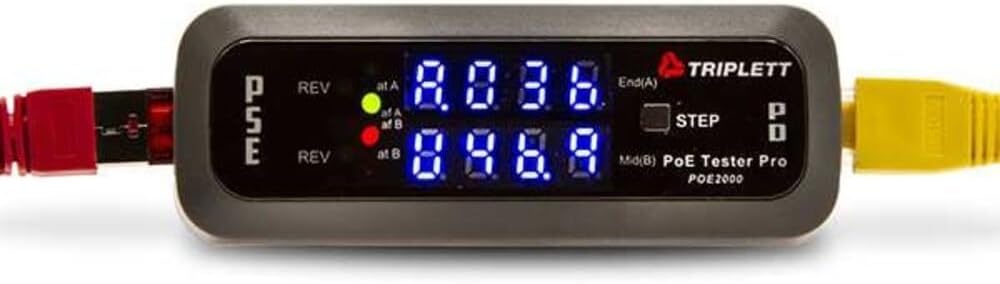
The Triplett POE2000 offers a straightforward approach to inline testing using visual LED indicators for power source identification. It remains a viable option for those who prefer simple visual cues over complex digital readouts for basic power delivery verification tasks.
We may earn a commission when you buy through this link, at no additional cost to you.
Its dual 7-digit LEDs quickly show whether the power source is end span or mid span. This visual feedback helps technicians identify wiring configurations without needing to interpret numerical data. The step button allows selection of specific data points for focused checks.
The device relies on older LED technology which may lack the precision of modern digital displays. Some users find the interface less intuitive than newer models with screens. These factors contribute to its lower rating compared to contemporary alternatives in the market.
We suggest this tester for users who need a budget-friendly tool for basic PoE presence checks. It is best suited for simple environments where advanced data visualization is not a primary requirement for daily maintenance.
These indicators show power source either End Span or Mid Span or across all four pairs for quick identification.
Two yellow LEDs indicate reversed polarity for power type helping prevent potential installation errors quickly.
We may earn a commission when you buy through this link, at no additional cost to you.
The Triplett POE3000 builds on the classic design with visual indicators for IEEE standards and polarity status. It serves as a reliable tool for technicians who appreciate a direct visual representation of power status without relying on complex screen navigation.
We may earn a commission when you buy through this link, at no additional cost to you.
Its 4 LEDs clearly indicate IEEE802.3af or 802.3at/bt standards. This feature simplifies the identification of compatible power sources. The inline power level monitoring function helps ensure devices receive adequate wattage during operation without interrupting network traffic.
However the absence of recent user ratings makes it harder to gauge current satisfaction levels. The interface remains similar to older models which might not appeal to users seeking modern touch controls. These limitations are minor for those familiar with traditional testers.
We recommend this tester for professionals working in environments where visual feedback is preferred over digital readouts. It offers a practical balance between cost and functionality for standard PoE verification needs.
4 LEDs indicate IEEE802.3af or 802.3at/bt standard while 2 Yellow LEDs indicate reversed polarity for power type.
It detects PSE-type/class power source polarity voltage current power and whether it is End Span or Midspan.
We may earn a commission when you buy through this link, at no additional cost to you.
The Jonard Tools POE-1 provides a comprehensive approach to testing by combining PoE verification with cable continuity checks. It is designed for technicians who need to verify resistance and power presence simultaneously during network troubleshooting and setup phases.
We may earn a commission when you buy through this link, at no additional cost to you.
Its ability to measure resistance for Cat5e and Cat6a cables adds value for physical layer diagnostics. The belt clip ensures easy portability in the field. The package includes accessories like an RJ45 adapter and batteries which simplifies initial deployment.
While powerful it requires AA batteries for unpowered cable tests which can be inconvenient in the field. The absence of a digital rating makes it less transparent for new buyers. These factors are minor for those familiar with Jonard Tools products.
We recommend this tester for technicians who prioritize physical layer verification alongside power checks. Its complete kit makes it a convenient choice for comprehensive field service tasks.
Ensure flawless data transmission by measuring resistance and verifying continuity for Cat5e Cat6 and Cat6a cables.
The package includes PoE Tester Cable Remote Female-Female RJ45 Adapter Instruction Manual and 2 AA batteries.
We may earn a commission when you buy through this link, at no additional cost to you.
This PoE Cable Tester stands out for its ability to measure cable length alongside standard power checks. It is a highly-rated option for installers who need to verify cable runs without separate tools for distance measurement in complex environments.
We may earn a commission when you buy through this link, at no additional cost to you.
Its key feature includes measuring lengths up to 300 meters which is essential for ensuring data compliance. The 1500mAh rechargeable battery supports extended testing sessions without frequent interruptions. The port flash detection helps locate active ports in dense wiring closets.
The cost is higher than basic models which may not suit every budget. Additionally the settings for length measurement may require more setup time than simple testers. These trade-offs are acceptable for users needing multifunctional capabilities.
We recommend this device for network installers who frequently manage large installations with many cable runs. Its comprehensive features ensure both power and physical compliance are met efficiently.
Measures Ethernet cable lengths for CAT5 and CAT6 from 5 to 300 meters for essential verification.
Equipped with a 1500mAh rechargeable battery customizable auto-shutoff and a clear low-battery indicator.
We may earn a commission when you buy through this link, at no additional cost to you.
This device offers a specialized approach with a DVM power panel for detailed voltage and current analysis. It is designed for professionals who require precise digital measurements alongside network connectivity checks during complex installation phases.
We may earn a commission when you buy through this link, at no additional cost to you.
The inclusion of CAT5 CAT6 support ensures compatibility with a wide range of cabling standards. Its power panel provides detailed readings that help identify subtle voltage drops or inconsistencies. This level of detail is valuable for troubleshooting unstable power issues.
The higher price point may be a barrier for general contractors. The absence of current ratings suggests it may be an older model with limited community feedback. These factors should be weighed against the need for detailed data.
We recommend this tester for specialists who prioritize detailed voltage and current data over standard PoE checks. It serves well in environments where precision is critical for network stability.
This panel supports CAT5 CAT6 DVM and Network POE testing for versatile installation verification needs.
The DVM power panel ensures detailed voltage and current analysis for precise troubleshooting tasks.
We may earn a commission when you buy through this link, at no additional cost to you.
The NF-488 combines network cable testing with PoE verification in a compact form factor. It is a solid choice for users needing basic checks for connectivity and power status without the need for advanced digital data screens.
We may earn a commission when you buy through this link, at no additional cost to you.
Its LED lamp helps illuminate dark areas during maintenance which is a practical feature for rack work. The loop-back test helps diagnose network issues by checking switch connectivity. Current detection up to 3A supports many standard PoE+ devices.
The interface is simple and may lack the customization found in premium models. Power detection ranges are limited compared to advanced units. These limitations are acceptable for those needing a quick and reliable handheld solution.
We recommend this device for field technicians who need a quick reference tool for basic connectivity and power checks. Its LED lamp adds practical value for work in dimly lit environments.
The Network Tester tests current voltage and power consumption of DC appliances for intuitive data.
It includes an LED lamp to illuminate in low-light environments and lifetime friendly customer service.
We may earn a commission when you buy through this link, at no additional cost to you.
Selecting the right inline POE tester requires understanding your specific testing needs and the standards you must support. This guide outlines key factors to consider before making a purchase.
Ensure the tester supports the voltage and current range of your network devices. Many modern PoE+ and PoE++ devices require up to 56V or higher. Checking the maximum wattage capacity is also essential for verifying high-power devices like PTZ cameras.
Choose a tester that exceeds your device requirements to ensure accurate readings.
A clear display is vital for reading voltage current and power levels quickly. OLED screens offer better contrast and readability in various lighting conditions. Backlit LCDs are also effective for dim environments. Some models use LED indicators for simple pass or fail tests.
Prioritize display readability to reduce errors during field testing.
Look for testers offering multiple modes such as PSE PD and inline testing. Advanced models may simulate a PoE device to test switch ports. Continuity checking and loop-back tests add value for verifying cable integrity.
Select a tester with modes that match your testing workflow.
Verify that the device supports IEEE 802.3af/at/bt standards. Some users also need support for passive PoE or specific vendor standards like 4PPoE. Compliance is often required for government projects. This ensures the tester works with your current infrastructure.
Confirm standard support to ensure compatibility with your network.
Many testers are self-powered drawing power from the PoE line. This eliminates the need for batteries during use. However some models require batteries for continuity testing on unpowered cables. Check the battery life or support for external power.
Choose a power source that ensures uninterrupted testing sessions.
Since testers are used in the field they should be durable and compact. Ergonomic designs reduce hand fatigue during long sessions. Features like belt clips or rugged casings protect the device. Check for manufacturer protection or warranty support.
Select a durable unit that is easy to carry on a job site.
Extra features like cable length measurement or port flash detection can save time. Resistance testing helps verify cable integrity for data transmission. Some models offer step buttons to lock specific readings for monitoring.
Consider additional features that align with your diagnostic needs.
Price varies significantly between basic LED testers and advanced digital units. Ensure the budget matches your required features. Check for manufacturer warranty to protect your investment. Higher quality support often correlates with better product reliability.
Balance the price with the warranty provided for peace of mind.
To use a tester connect it inline between the power source and the powered device. Ensure the cable is firmly seated in both ports to avoid loose connections. Wait for the display to stabilize before reading the voltage and power values.
Regularly calibrate the device if it offers calibration options to maintain accuracy. Store it in a protective case to prevent damage to the connectors. Avoid exposing the unit to extreme temperatures or excessive moisture during storage.
Clean the connectors with a dry cloth to remove dust or debris. Replace batteries immediately if required to ensure reliable operation. Check for firmware updates if the model supports software upgrades for improved functionality.
Most modern inline POE testers are self-powered and draw electricity from the PoE line to function. However some models require batteries for continuity testing or when used on unpowered cables. Always check the specific power requirements before purchasing.
Standard PoE follows IEEE 802.3af/at/bt specifications which include power negotiation. Passive PoE supplies power without negotiation and can be unsafe for non-passive devices. Ensure your tester supports the specific PoE type you need to verify.
While most inline testers focus on power not some models offer cable length measurement. It is a valuable feature for verifying cable compliance. Check the specifications to see if the model supports distance testing.
Most testers are rated for high-power PoE++ devices but you must verify the voltage and wattage limits. Exceeding these limits can damage the tester or cause unsafe conditions. Always stay within the manufacturer's stated specifications.
Many testers display polarity indicators to show if the positive and negative wires are correct. Incorrect polarity can prevent devices from receiving power. Look for a tester that clearly indicates polarity status for troubleshooting.
Yes many models include continuity testing to verify open circuits and short circuits. This is essential for diagnosing network issues alongside power problems. Look for specific continuity modes to ensure full cable verification.
The PoE Texas Power Over Ethernet Voltage and Current Tester and NOYAFA NF-488 offer excellent value for most professionals. Their features balance power verification with practical usability for field work.
Prioritize testers with clear displays and support for the specific standards you use. Features like battery-free operation and warranty support should also guide your final selection.
Remember that prices fluctuate regularly so check the current cost before ordering. Verify compatibility with your network equipment to ensure seamless integration.