Keyboard for Procreate Wireless
4.5Editor score
22 shortcut keys
84 hour battery life
Optimized for Procreate
This guide compares the top iPad drawing Bluetooth controllers for artists. We analyze features, compatibility, and performance to help you choose the right
Digital artists often struggle with complex workflows on touch devices. A dedicated Bluetooth controller can streamline your process by providing physical shortcuts for common commands.
We evaluated ten distinct devices focusing on connectivity, customization options, and ergonomic design. Our analysis highlights how each unit integrates with popular creative software on iOS and Android.
Each selection details specific strengths and potential limitations for different user needs. Please note that availability and specific model configurations may change over time.
4.5Editor score

4.4Editor score

5.0Editor score
The following table provides a quick overview of the technical specifications and core capabilities for each device in this comprehensive comparison.


The TourBox Lite Bluetooth Creative Controller stands out as a top choice for digital artists seeking streamlined workflows. With a 4.4 rating it offers a unique blend of style and functionality designed to enhance creative tasks.
We may earn a commission when you buy through this link, at no additional cost to you.
This device features a refined layout that replaces memorized keyboard shortcuts with a more intuitive path. The knob and wheel provide clear tactile feedback allowing for precise adjustments without looking away from your canvas.
While the price point is higher than basic remote options the ergonomic design supports long drawing sessions comfortably. Some users may find the key count limited compared to full keypad solutions.
Artists focused on illustration and light creative work will appreciate the unified control approach. It is highly recommended for those wanting a stylish and efficient addition to their digital setup.
The refined layout allows you to complete frequent actions in fewer steps without memorizing complex key combinations.
Shaped from ergonomic data the design supports long drawing and editing sessions with a natural grip.
We may earn a commission when you buy through this link, at no additional cost to you.
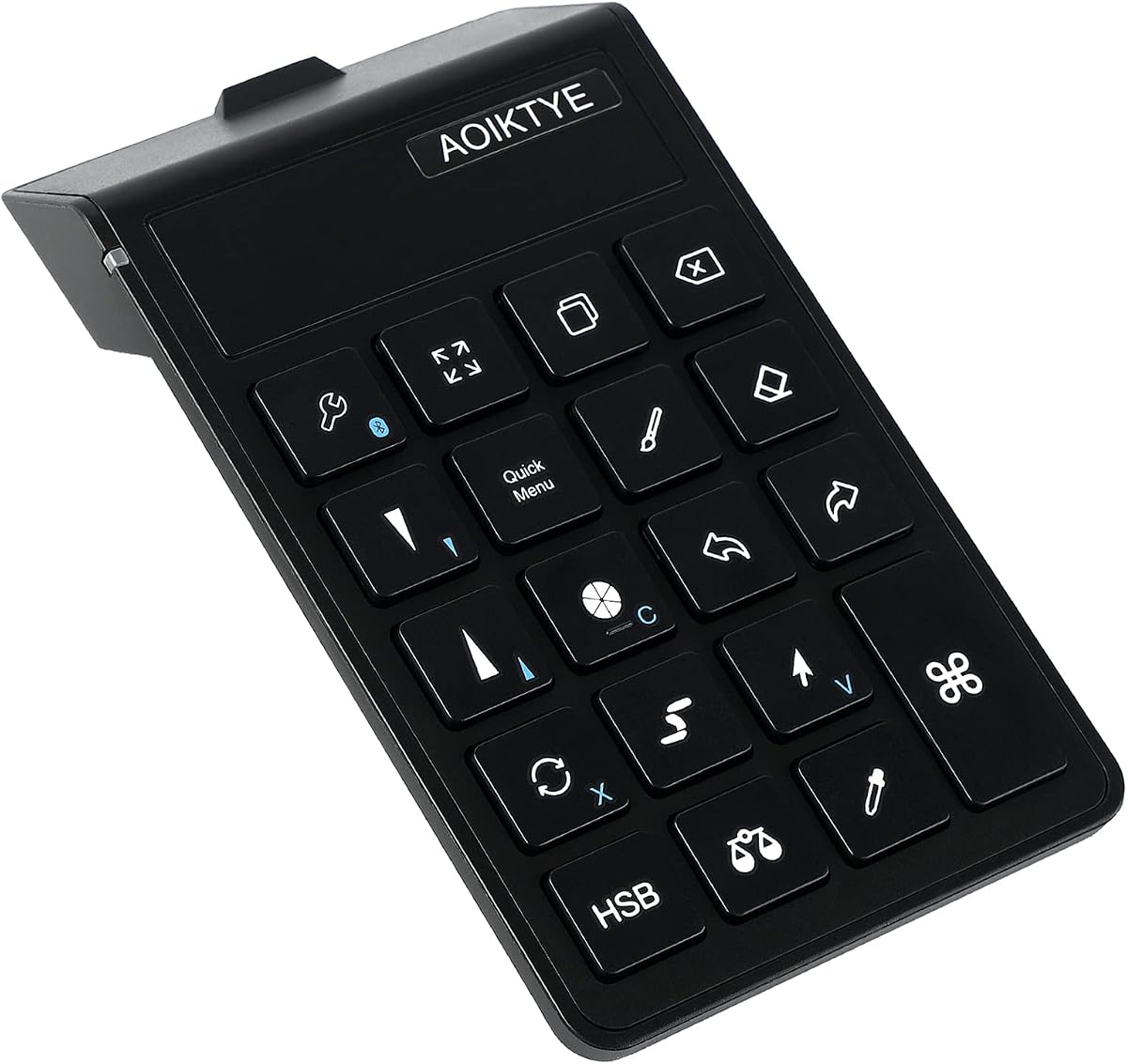
This wireless keyboard is specifically designed to make working in Procreate easier for iPad users. With a 4.5 rating it delivers reliable performance for digital artists who prioritize efficiency and battery life.
We may earn a commission when you buy through this link, at no additional cost to you.
The device includes over twenty shortcut functions that cover essential tasks like color adjustment and brush size control. Recent upgrades have placed frequently used keys in the most accessible positions for better workflow.
Users may need to download specific software to access the full range of features on other platforms. The high battery life ensures uninterrupted creative sessions without frequent recharging.
Artists primarily using Procreate on iPad will find this a no-brainer essential tool. It is an excellent choice for those seeking a budget-friendly way to enhance their digital drawing process.
The keyboard allows you to use your right hand to draw and left hand to operate shortcuts making painting more efficient.
A built-in rechargeable lithium-ion battery provides up to 84 hours of continuous use and six months of standby.
We may earn a commission when you buy through this link, at no additional cost to you.
The DIGIDRAW K30 achieves a perfect rating by offering premium features tailored for professional creative workflows. Its dual dial system paired with custom keys provides instant access to vital functions without reaching for a keyboard.
We may earn a commission when you buy through this link, at no additional cost to you.
The ultra-light design allows for one-handed control that remains comfortable during extended use. Raised tactile markers enable blind operation so you can keep your eyes locked on the canvas while making adjustments.
While the price is higher than standard remotes the build quality and functionality justify the investment. Users must download the latest driver version to fully adjust settings to their specific needs.
Artists who require precise control and minimal distraction will find this device invaluable. It is highly recommended for those seeking a high-end remote controller for Photoshop and similar applications.
Two precision dials paired with custom keys give you instant access to functions like zoom and brush size instantly.
Tactile positioning allows you to locate and press commands by feel alone keeping your focus on the art.
We may earn a commission when you buy through this link, at no additional cost to you.
The HUION Keydial Mini offers a versatile solution for digital painting and media control with its upgraded Bluetooth 5.0 connectivity. It features a unique dial controller that allows for simple navigation of brush sizes and timelines.
We may earn a commission when you buy through this link, at no additional cost to you.
Eighteen programmable keys can be customized to any shortcut making complex commands available in one tap. The anti-ghosting technology ensures reliable multi-key input which is crucial for intricate editing tasks.
While the setting preview function helps with memorizing shortcuts the need for a driver on computers can be a minor hurdle. The portable design makes it suitable for both home and mobile workstations.
This device is well-suited for artists who need a cost-effective programmable keyboard for various creative software. It provides reliable convenience for tasks requiring frequent shortcut usage without cables.
Upgraded to support Bluetooth connection this device brings cable-free convenience with a reliable 10m range.
The dial controller can be set up to three different functions allowing you to switch between them easily.
We may earn a commission when you buy through this link, at no additional cost to you.
This wireless shortcut keyboard offers three connection options including Bluetooth for a flexible workspace. It supports up to forty shortcuts which can be set through four customizable sets for different applications.
We may earn a commission when you buy through this link, at no additional cost to you.
The device features a compact profile that weighs only 75 grams making it easy to hold with one hand. A dot protruding on the middle key allows for easy identification without even a glance.
Setting up the device on iPad requires downloading a specific app for proper configuration. However the anti-ghosting performance allows for reliable multi-key control which is useful for complex editing.
Artists who need to switch between multiple applications frequently will appreciate the versatile shortcut capabilities. It is an excellent productivity tool for creation work study and gaming across various platforms.
The built-in 1000 mAh battery ensures continuous working for about 300 hours allowing you to grab it anytime.
Rotating the dial provides a clear click sound feedback allowing you to adjust brush size and zoom easily.
We may earn a commission when you buy through this link, at no additional cost to you.
This controller is designed to work across multiple platforms making it a versatile choice for various setups. It offers responsive analog sticks and triggers for accurate performance which can be utilized for drawing control as well.
We may earn a commission when you buy through this link, at no additional cost to you.
The ergonomic design ensures a comfortable grip during extended sessions without fatigue. Built-in rechargeable battery provides long-lasting power allowing you to game or draw without frequent interruptions.
While it supports drawing control the interface is primarily oriented towards gaming experiences. Users may find the customization options less intuitive compared to dedicated creative peripherals.
Artists who also engage in gaming or need a universal controller for multiple devices will find this useful. It offers a cable-free experience that is responsive and reliable for general input needs.
The wireless connectivity offers a responsive and cable-free experience allowing you to move freely without restrictions.
The ergonomic design allows for extended sessions without fatigue ensuring you can work or game longer.
We may earn a commission when you buy through this link, at no additional cost to you.
This remote control features a trackpad that allows you to move the mouse cursor on your iPad screen. It also supports the iOS Home button which is useful for switching between apps and activating Siri.
We may earn a commission when you buy through this link, at no additional cost to you.
The device includes multimedia controls for your favorite music and videos allowing for convenience while working. It is compatible with a wide range of devices including iPhone and Macbook Pro.
While it offers a trackpad it is not specifically designed for drawing tasks or creative software shortcuts. The primary focus is on media control and presentation flow rather than artistic creation.
Users needing a versatile remote for presentations or media management will find this highly functional. It serves as a convenient tool for controlling apps and content on your tablet or phone.
Swipe on the trackpad to move the mouse cursor on your iPad screen just as you would with a desktop computer.
The remote supports the iOS Home button allowing you to switch between apps and activate Siri easily.
We may earn a commission when you buy through this link, at no additional cost to you.
This controller is compatible with a wide variety of tablets including iPad and Galaxy Tab models. It features Hall Effect sticks and triggers which provide smooth and durable control for long-term use.
We may earn a commission when you buy through this link, at no additional cost to you.
The extendable design supports many phones and tablets allowing for a universal fit across different devices. It includes a 6-axis gyroscope for precise motion controls which can be utilized for specific interactive tasks.
The price point is significantly higher than standard controllers which may be a consideration for budget-conscious buyers. Setup might require specific holders for certain devices to ensure a secure fit.
Users looking for a high-quality universal controller with durable components will appreciate this device. It offers robust features for those who value precision and compatibility across multiple hardware platforms.
Hall Effect sticks and triggers ensure smooth accurate and long-lasting control without wear over time.
The controller is compatible with a wide variety of tablets including iPad and Galaxy Tab models and more.
We may earn a commission when you buy through this link, at no additional cost to you.
This handheld shortcut device is designed specifically to support Clip Studio Paint on iPadOS and iOS. It allows you to assign frequently used operations to each button to greatly enhance your production speed.
We may earn a commission when you buy through this link, at no additional cost to you.
The device includes a single device 12-month license for Clip Studio Paint Debut which adds value to the purchase. It communicates via Bluetooth Low Energy ensuring efficient power usage during operation.
Users must provide their own AA batteries which is a minor inconvenience compared to rechargeable options. The device is not compatible with older versions of the software which limits its usability for some.
Artists primarily working in Clip Studio Paint will find this a valuable accessory for workflow optimization. It provides a dedicated way to access commands quickly without interrupting the creative process.
Assign frequently used operations to each button to greatly enhance your production speed while enjoying the drawing experience.
The device comes with a 12-month license for Clip Studio Paint Debut adding value to your purchase.
We may earn a commission when you buy through this link, at no additional cost to you.
The Wacom Intuos Small offers industry leading tablet performance with a battery-free pen that feels like pen on paper. It connects wirelessly via Bluetooth which enables you to work and create whether at a desk or outside.
We may earn a commission when you buy through this link, at no additional cost to you.
Each purchase includes access to some of the best creative software and Wacom's online training which helps users get started quickly. The device is compatible with any software program to explore new facets of digital creativity.
While it is a powerful solution it requires a learning curve for new users and physical space on the desk. The wireless connectivity adds convenience but may have occasional latency issues depending on your setup.
Artists looking for a trusted brand and a complete package including software will find this highly rewarding. It is an excellent choice for those entering digital art or seeking a reliable portable solution.
Enjoy industry leading tablet performance in superior control and precision with Wacom's EMR battery free technology.
Only Wacom gives you software with every purchase helping you start creating immediately with trusted tools.
We may earn a commission when you buy through this link, at no additional cost to you.
Selecting the right controller depends on your specific workflow and software needs. We break down the key factors to consider for an informed decision.
Bluetooth 5.0 or newer ensures a stable connection with reduced latency which is vital for drawing tasks. Look for devices that offer both wireless and wired options to avoid drop-offs during critical work.
Prioritize models with proven Bluetooth 5.0 support for reliable and consistent performance on your tablet.
Ensure the controller supports your primary drawing software such as Procreate Photoshop or Clip Studio Paint. Some devices offer deep integration with specific apps while others provide general shortcuts.
Choose a device that aligns with your preferred software ecosystem to maximize workflow efficiency.
Highly customizable devices allow you to map specific shortcuts to buttons that match your workflow. Look for drivers that enable multi-set profiles for different applications.
Select a controller with flexible mapping options to handle complex tasks with a single tap.
Long battery life is essential for uninterrupted creative sessions. Devices offering 40 hours or more reduce the need for frequent recharging during work.
Prioritize models with high capacity batteries to ensure you can work for extended periods without power worries.
Comfort is key when holding a device for long periods. Look for lightweight designs that fit naturally in your hand to reduce fatigue.
Choose a device with a lightweight and ergonomic form factor to maintain comfort during long drawing sessions.
Durable materials and reliable components ensure the device lasts over time. Hall Effect switches are preferred for long-lasting performance without wear.
Opt for controllers with durable materials and robust components to ensure long-term reliability.
Consider the balance between cost and features to ensure you get value for your investment. Budget-friendly options may have fewer features but can be sufficient for basic needs.
Evaluate the cost against the features offered to find a device that fits your budget and needs.
Clear tactile feedback allows you to operate keys without looking away from your canvas. This feature is crucial for maintaining creative flow.
Select devices with tactile markers to keep your focus on the canvas while using shortcuts.
Begin by pairing the device with your tablet via the Bluetooth settings menu. Ensure both devices are fully charged before the initial connection for a stable setup.
Download the necessary software or app to configure shortcuts and customize keys to your workflow. This step is crucial for unlocking the full potential of the device.
Clean the device regularly with a soft dry cloth to prevent dust buildup on the buttons. Store it in a cool dry place when not in use to extend battery life.
Most advanced controllers require drivers or specific apps to customize keys and access full features. Basic remotes often work immediately but may lack deep integration options.
Several controllers in this list are specifically optimized for Procreate. However check the compatibility list to ensure your specific version of the app is supported.
Yes many Bluetooth controllers offer dual functionality for gaming and creative work. Check if the device supports gaming profiles for a versatile experience.
Refer to the user manual for a hardware reset button or process. Disconnecting the Bluetooth and re-pairing often resolves common connectivity issues.
Most devices offer a reliable range of up to 10 meters or 30 feet. This allows for comfortable use without being tethered to the tablet.
Many models support Windows along with macOS and Android. Verify the specific compatibility list for your operating system before purchasing.
We have explored ten distinct devices ranging from simple remotes to professional creative controllers. Each option offers unique benefits tailored to different artistic needs and budgets.
Prioritize devices that offer the connectivity stability and software compatibility you need for daily work. A well-matched controller can significantly streamline your creative process.
Remember to check current availability and configurations as models may update frequently. Choosing the right tool today will enhance your digital art experience for years to come.