
AULA WIN68 HE Mechanical Gaming Keyboard 60%
4.5Editor score
Magnetic switch fast trigger
8000Hz polling rate
Compact 60% design
Discover the top keyboard for Valorant picks for October 2026. We compare magnetic switches, polling rates, and layouts to help you choose the perfect gaming
Finding the right keyboard for Valorant means prioritizing speed and precision above all else. Competitive players need hardware that registers inputs instantly to support quick counter-strafing and precise aim adjustments during intense matches.
We evaluated ten top-rated keyboards based on switch technology, polling rates, and layout efficiency. Our analysis focuses on models that offer rapid trigger capabilities and low latency to ensure your actions translate to screen movement without delay.
Each pick below highlights unique strengths like magnetic switches or compact designs. Note that availability and pricing can shift frequently, so verify current stock before making your final decision to secure the best deal available today.
4.5Editor score

4.1Editor score

4.6Editor score
This table provides a side-by-side comparison of the top ten keyboards selected for competitive play. Each entry includes key specifications like switch type and polling rate to help you differentiate based on your specific gaming requirements.
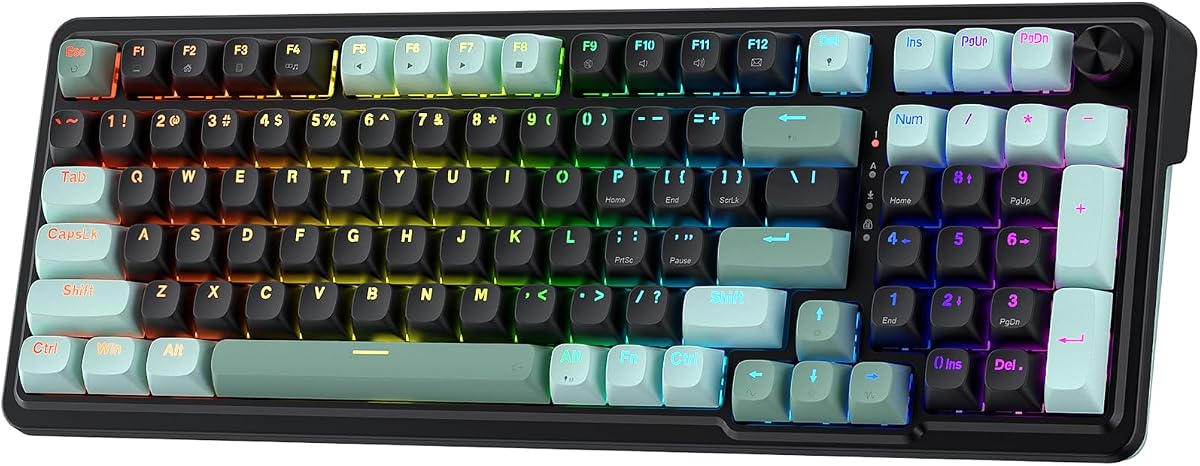
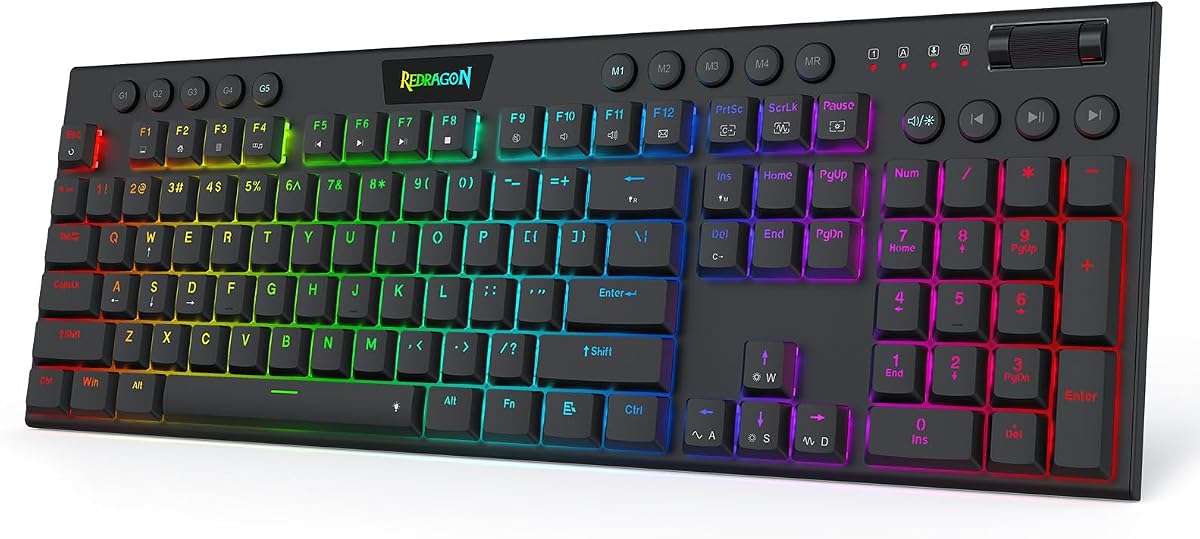




This keyboard stands out as a top contender for competitive Valorant players seeking precision. With a strong rating from users who prioritize speed, it delivers on the promise of rapid trigger functionality that helps you stop and shoot instantly.
We may earn a commission when you buy through this link, at no additional cost to you.
The core advantage lies in its UltraMag POM magnetic switches which detect keypresses without physical contact. This design allows for an 8000Hz polling rate ensuring that every movement you make is transmitted to the game engine with near-zero latency.
While the keyboard is robust, the reliance on a wired connection means you must have desk space for the cable. Additionally, customization happens through a web-based driver which some users might find less convenient than a standalone desktop app.
If you need a high-performance board that balances cost with cutting-edge magnetic technology, this model is an ideal choice. It provides the responsiveness required for high-level play without breaking the bank on excessive features you might not use.
The magnetic switches eliminate debounce delay allowing for faster counter-strafing movements that are critical in tactical shooters.
A single knob simplifies media and lighting adjustments so you can focus entirely on your game without digging through menus.
We may earn a commission when you buy through this link, at no additional cost to you.
Similar to its sibling model this keyboard offers the same high-speed magnetic benefits with a slightly higher user rating. It is designed to ensure that your peek-and-fire timing lands exactly when you intend during intense matches.
We may earn a commission when you buy through this link, at no additional cost to you.
The dual-module floating structure helps dampen noise while maintaining a solid feel under the keys. This build quality contributes to a more pleasant experience over long gaming sessions without the harsh clack typical of standard mechanical switches.
The main limitation remains the need for a stable internet connection to access the tuning software. Some users may prefer offline tools for adjusting actuation points though the web interface is generally straightforward to navigate.
For players seeking a proven magnetic keyboard with strong feedback this is a dependable option. It delivers the necessary speed for Valorant while keeping the physical design sturdy and comfortable for extended use.
The noise dampening layers ensure that your typing does not distract teammates during voice chat or recording sessions.
Software-powered precision tuning lets you save multiple profiles so your setup stays consistent across different games.
We may earn a commission when you buy through this link, at no additional cost to you.
This model achieves a perfect score from early users who appreciate its streamlined design and responsive performance. The low-profile switches reduce travel distance making keystrokes register quicker than on standard keyboards.
We may earn a commission when you buy through this link, at no additional cost to you.
A standout feature is the ability to record macros on the fly without needing to install any driver software. This allows you to adjust volume or set up simple commands instantly which is vital during fast-paced scenarios.
The compact form factor might feel different if you are used to full-sized boards. However the lighter touch and reduced height often lead to less wrist strain over time making it a comfortable choice for long sessions.
If you want a board that combines speed with ergonomic benefits this keyboard is a top pick. It balances advanced magnetic technology with user-friendly features that simplify your setup process significantly.
The 30% slimmer design shortens travel distance so your keystrokes register quicker and typing feels lighter on your wrists.
Dedicated macro keys let you record combos or adjust volume and tracks instantly without installing anything first.
We may earn a commission when you buy through this link, at no additional cost to you.
Corsair brings a premium magnetic option to the table with a compact 60% design that maximizes mouse space. This layout is ideal for low-sensitivity gamers who need extra room for broad mouse sweeps during aim training.
We may earn a commission when you buy through this link, at no additional cost to you.
The MGX Hyperdrive switches offer adjustable actuation points and zero drift ensuring consistent performance under pressure. Combined with IP57 durability this keyboard is built to handle spills and dust without compromising functionality.
The main trade-off is the lack of dedicated function keys or a number pad which might inconvenience users who switch between gaming and productivity. You will need to rely on function layer combinations for certain commands.
For pure FPS focus where desk space is limited this keyboard excels. It delivers the speed and durability expected from a top-tier brand while keeping the footprint small enough for any setup.
Built to handle intense gameplay with water and dust resistance plus durable PBT double-shot keycaps that resist wear.
FlashTap SOCD enables cleaner directional inputs and sharper counter-strafing ensuring every movement lands exactly when needed.
We may earn a commission when you buy through this link, at no additional cost to you.
Razer offers a high-speed alternative using optical switches instead of magnetic ones to register key presses at the speed of light. This technology reduces actuation distance significantly providing a snappy feel that rivals magnetic performance.
We may earn a commission when you buy through this link, at no additional cost to you.
The keyboard features a sturdy aluminum top frame and oil-resistant PBT keycaps that resist shine over time. These quality materials ensure the board remains looking new even after thousands of hours of intense gaming sessions.
Snap Tap functionality allows for prioritized inputs which can streamline movement in tactical shooters. However accessing advanced features requires the Synapse software which adds a layer of dependency for full customization.
If you prefer optical technology over magnetic and want a durable compact board this is a strong choice. It balances premium build quality with fast response times that suit competitive play well.
Optical beam-based actuation registers key presses at the speed of light with shorter actuation distance than linear switches.
Razer Chroma RGB lighting supports over 30 partners and 16.8 million colors for deep personalization of your setup.
We may earn a commission when you buy through this link, at no additional cost to you.
This keyboard offers advanced magnetic technology at a price point that appeals to budget-conscious gamers. It features self-developed magnetic switches that eliminate physical contact ensuring precise actuation without wear and tear over time.
We may earn a commission when you buy through this link, at no additional cost to you.
Hot swap compatibility means you can change switches without soldering which adds flexibility to your setup. This feature is rare at this price range and allows you to experiment with different switch feels easily.
The web driver is convenient but requires an internet connection to function fully. Some users might prefer a locally installed application for faster access though the online tool is generally stable and feature-rich.
For those starting their competitive journey or looking for an affordable upgrade this board is an excellent choice. It delivers high performance without demanding a premium investment in hardware.
The hot-swappable base allows you to replace switches and customize the typing feel without any soldering issues.
Access powerful settings from any device with an internet connection and customize RGB without needing software downloads.
We may earn a commission when you buy through this link, at no additional cost to you.
Designed specifically for titles like Valorant this keyboard emphasizes speed with an industry-leading polling rate. The ultra-low latency ensures that your commands take effect instantly giving you a distinct edge in fast-paced games.
We may earn a commission when you buy through this link, at no additional cost to you.
Individual key personalization allows you to set reset sensitivity to match your habits which enhances consistency during play. The magnetic switches support precise actuation that helps reduce finger fatigue over long gaming sessions.
The software is exclusively compatible with Windows systems which may limit Mac users. While the web driver is efficient it does not offer cross-platform support making it less versatile for mixed environments.
If you need raw speed and precise control for competitive play this model delivers well. It combines responsive hardware with detailed customization options that cater to serious gamers.
Press reset sensitivity can be individually set via software to match the habits of different people in different games.
South-facing LEDs provide a better visual experience with brighter colors and 14 preset lighting effects for ambiance.
We may earn a commission when you buy through this link, at no additional cost to you.
This wireless keyboard offers great flexibility with Bluetooth 2.4GHz and wired connections allowing you to switch between devices easily. The hot-swap base supports 3-pin or 5-pin switches enabling you to customize the sound and feel.
We may earn a commission when you buy through this link, at no additional cost to you.
Side printed PBT keycaps give a unique look and feel that resists fading and wear over time. The multi-function knob lets you adjust brightness or volume quickly adding a tactile convenience to your workflow.
While wireless is convenient it may introduce slight latency compared to a direct wired link. For competitive Valorant play this might be a consideration but the stability of 2.4GHz wireless is generally quite good.
If you need a board that works across multiple devices and offers great customization this is a strong choice. It balances modern convenience with the tactile feedback that mechanical enthusiasts appreciate.
Connect up to five devices at the same time and switch easily by shortcut keys or side button for multi-device use.
Double injection molding and heat sublimation process make these keycaps more durable without fading and softer to touch.
We may earn a commission when you buy through this link, at no additional cost to you.
This keyboard focuses on ultra-fast response times with a true 8000Hz polling rate that minimizes latency to an impressive theoretical value. The rapid trigger function allows you to bind multiple functions to a single key based on pressing degrees.
We may earn a commission when you buy through this link, at no additional cost to you.
The top-mounted structure provides a stable feel while reducing noise during use. Combined with double layer PORON material it offers a satisfying keystroke experience that remains smooth even after extensive use over time.
Remapping and macros are handled via a web-based tool which is convenient but requires a browser connection. Users should be comfortable with online drivers to get the most out of the customization options available.
If you prioritize low latency and high precision this board is designed for you. It offers the necessary speed for tactical shooters while maintaining a stable and comfortable typing feel.
Customizable dynamic keystroke and rapid trigger function allow you to bind 4 functions according to 4 different pressing degrees.
Top-mounted structure with PORON enhances gaming efficiency with a quiet stable and smooth typing operation for better focus.
We may earn a commission when you buy through this link, at no additional cost to you.
This premium option offers a 96% layout that retains essential keys while saving space compared to a full board. The tri-mode connectivity ensures you can switch between devices seamlessly using either wired or wireless connections as needed.
We may earn a commission when you buy through this link, at no additional cost to you.
Integrated sound-dampening foam absorbs pinging noises to deliver a cleaner and quieter keystroke sound. The hot swappable switches come pre-lubed for a smooth feel right out of the box which reduces the need for modding.
While it is an investment it provides the versatility of wireless with the stability of wired connections. The ergonomic comfort features including a wrist rest make it suitable for long work or gaming sessions alike.
If you need a full-featured board that supports professional setups and daily work this keyboard is a top choice. It combines premium build quality with the performance needed for competitive gaming.
Enjoy comfortable extended use with three adjustable tilt positions and a detachable wrist rest for maximum comfort.
Seamlessly connect via Bluetooth or 2.4GHz wireless with ROG SpeedNova technology or a reliable USB wired connection.
We may earn a commission when you buy through this link, at no additional cost to you.
Choosing the right keyboard involves understanding several technical factors that impact performance. We break down the essential elements to help you find a board that matches your specific needs.
Magnetic and optical switches provide faster actuation than traditional mechanical ones. Look for models that allow adjustable actuation points to customize sensitivity.
Choose magnetic or optical switches for the fastest response times possible.
A higher polling rate ensures that your inputs are sent to the computer more frequently. Aim for at least 8000Hz for the smoothest input registration.
Higher polling rates like 8000Hz ensure near-instant input registration.
Rapid trigger allows keys to reset as soon as you release them enabling faster counter-strafing. This feature is critical for tactical shooters.
Prioritize models with rapid trigger for better movement control.
Compact layouts like 60% or 75% free up mouse space for low-sensitivity aiming. However full layouts offer convenience with dedicated function keys.
Choose a layout that balances mouse space with necessary function keys.
Wired connections offer the lowest latency but limit portability. Wireless options provide freedom but may introduce slight lag.
Select wired for zero latency or wireless for convenience.
Sturdy frames and quality keycaps ensure longevity. Look for aluminum cases and PBT keycaps to resist wear over time.
Focus on durable materials like PBT keycaps for longevity.
Software or web drivers allow you to remap keys and adjust lighting. Ensure the software is user-friendly and supports your operating system.
Ensure robust software support for advanced customization options.
Magnetic keyboards have become more affordable recently. Set a budget but remember that higher costs often bring better durability.
Balance advanced features with your overall budget constraints.
Set your actuation points to a low sensitivity to maximize speed. Use software to calibrate switches so they register only when you need them.
Regularly clean the keycaps and switches to prevent dust build-up. Use a blower to remove debris from the gaps to maintain smooth key movement.
Keep your drivers updated to ensure optimal performance. Check manufacturer releases for patches that improve latency or add new customization features.
A magnetic switch keyboard uses magnets instead of physical contact to register key presses. This allows for faster actuation and customizable sensitivity which benefits competitive games.
A higher polling rate means your keyboard checks for input more often. For example 8000Hz checks 8000 times per second resulting in smoother and faster input registration.
Optical switches use light to register inputs which reduces latency. They are often faster than traditional mechanical switches but may lack the tactile feedback some users prefer.
Smaller sizes like 60% free up desk space for mouse movement which is crucial for aiming. Choose a size that allows you to move your mouse freely.
Most magnetic keyboards work on Mac but software support is often better on Windows. Check the product specifications to confirm cross-platform compatibility before purchasing.
Use a compressed air blower to remove dust between keys. You can also remove keycaps occasionally to wipe down the switches thoroughly with a damp cloth.
We highlighted the Redragon K673 HE as our top pick for its balance of speed and value. The Aula WIN68 HE offers great budget performance while the ASUS ROG Strix Scope II 96 provides premium features.
Prioritize magnetic or optical switches with rapid trigger capabilities to gain a competitive edge. Ensuring your keyboard supports high polling rates is essential for smooth and accurate gameplay.
Remember to check current pricing and availability before making your final decision. These details can shift quickly so verify stock before completing your purchase to secure the best deal.