
NIMO 15.6 AI Ready Laptop
4.8Editor score
Intel 4 Core Processor
8GB RAM and 256GB SSD
2 Year Warranty Included
Finding the right laptop for karaoke gear means balancing power, portability, and audio quality. Whether you host home parties or run mobile events, your machine must handle mixing software, video playback, and live inputs without lag or crashes during performance.
We compared ten top-rated devices ranging from large-screen business laptops to specialized audio mixers and microphones. Each entry was evaluated on processor speed, memory capacity, connectivity options, and overall value to ensure reliable operation when you need it most.
Every pick in this list highlights specific strengths like battery life, screen size, or audio interface compatibility. Prices and availability can fluctuate quickly online so be sure to check current listings before making your final decision for your next singing session.
4.8Editor score

4.5Editor score

4.5Editor score
As an Amazon Associate we earn from qualifying purchases.
This side-by-side comparison breaks down the ten strongest contenders in the laptop and karaoke gear space. We analyzed processing power, display quality, audio connectivity, and overall build durability to help you find the perfect match for your specific singing needs.






The HP 17 inch Business Laptop Computer stands out as the top choice for karaoke setups that require a large screen and robust processing power. With a solid 4.5 rating from verified buyers it delivers consistent performance for streaming karaoke tracks and running audio mixing software simultaneously without stuttering or lag during live performances.
We may earn a commission when you buy through this link, at no additional cost to you.
This device features an AMD Ryzen 5 CPU paired with 16GB of RAM ensuring that you can open multiple browser tabs for lyric videos while managing audio controls and monitoring system resources in real time. The 17.3 inch Full HD display provides ample workspace to view tracks clearly even in brightly lit rooms which is essential for host interactions.
While it lacks a dedicated graphics card the integrated graphics are sufficient for most 2D karaoke applications and video playback. The trade off is a slightly heavier chassis compared to ultra portable laptops but the benefit of the large screen outweighs the minor weight penalty for stationary or semi portable event setups.
Whether you are a mobile DJ or a home enthusiast this laptop offers the reliability and screen real estate needed to deliver professional quality karaoke nights. We recommend it for users who prioritize visual clarity and processing speed over extreme portability.
The 17.3 inch screen ensures lyrics and video content are easily readable from a distance reducing eye strain during long sessions.
With 16GB RAM you can run karaoke apps browsers and music players concurrently without slowdowns ensuring smooth show flow.
We may earn a commission when you buy through this link, at no additional cost to you.
The Dell Pro 15.6 Laptop offers a modern computing experience with a high refresh rate display that makes scrolling through song lists feel incredibly fluid. Rated 4.5 by users it combines the latest DDR5 memory with a responsive Intel Core 3 processor to handle typical karaoke workflows with ease and efficiency.
We may earn a commission when you buy through this link, at no additional cost to you.
Its 120Hz refresh rate is a standout feature that reduces motion blur when playing video karaoke files which enhances the visual experience for performers and audiences alike. The 16GB of DDR5 memory ensures that background processes do not slow down your main applications allowing you to focus on the performance.
One limitation is the 256GB storage which may fill up quickly if you store large media libraries locally. However the inclusion of an SD card slot provides a convenient way to expand storage for additional songs or backup files without needing external drives.
This laptop is ideal for users who value screen smoothness and memory speed over massive internal storage. It works well for streaming based karaoke systems where the primary load comes from internet connectivity rather than local file access.
The 120Hz refresh rate minimizes motion blur making video content look smoother during playback which is vital for high quality streams.
DDR5 memory offers faster data transfer speeds improving overall system responsiveness when switching between apps during events.
We may earn a commission when you buy through this link, at no additional cost to you.
The HP OmniBook 3 17.3 Laptop PC excels in endurance making it perfect for long events where access to power outlets is limited. With a rating of 4.5 it promises up to 14 hours of battery life ensuring you can host extended karaoke sessions without worrying about plugging in mid show.
We may earn a commission when you buy through this link, at no additional cost to you.
This model includes an AMD Ryzen 3 30 processor and 8GB of RAM which handles light multitasking well for basic streaming and lyric display. The 512GB SSD provides ample space for storing tracks locally reducing reliance on internet connections during performances and improving load times.
The main trade off is the limited RAM capacity which might struggle if you run too many heavy applications simultaneously. For standard karaoke use however the system is stable and responsive. The noise reduction feature also helps clarify voice communication if you use the laptop for conference calls between events.
Buyers seeking reliability and all day battery should consider this option. It balances portability with screen size and offers a dependable platform for both casual and professional users.
The extended battery life allows uninterrupted usage for entire events without needing to carry chargers or hunt for outlets.
HP Fast Charge restores half the battery in about 45 minutes giving you quick power boosts between sets if needed.
We may earn a commission when you buy through this link, at no additional cost to you.
The NIMO 15.6 AI Ready Laptop proves you do not need to spend a fortune to get a reliable karaoke setup. Boasting an impressive 4.8 rating it offers solid everyday performance for streaming music and videos while keeping costs low for budget conscious buyers.
We may earn a commission when you buy through this link, at no additional cost to you.
Its Intel N150 processor handles basic tasks smoothly and the included 8GB of RAM is sufficient for typical karaoke software. The lightweight design makes it easy to transport to different venues and the backlit keyboard ensures you can navigate menus even in dimly lit rooms.
While it lacks the power of higher end machines for heavy video editing it is perfectly suited for playback and mixing tasks. The two year warranty provides peace of mind against defects which is a rare benefit at this price point.
This is the top pick for students or casual users who need a functional machine without breaking the bank. It delivers consistent performance for standard karaoke needs and includes essential ports to reduce dongle clutter.
This laptop delivers reliable daily performance for streaming and playback at a price that makes it accessible for beginners.
Features like the webcam shutter and lightweight build protect your privacy and ensure easy transport to parties.
We may earn a commission when you buy through this link, at no additional cost to you.
The HP Ultrabook 14 Laptop Computer is a versatile workhorse that brings professional features to a compact form factor. With a 4.2 rating it appeals to those who need a secure Windows 11 Pro environment alongside generous storage for media files and documents.
We may earn a commission when you buy through this link, at no additional cost to you.
It comes with 16GB of RAM which supports smooth multitasking allowing you to manage playlists while keeping system monitors open. The bundle includes a 500GB external drive which significantly expands your capacity for storing high quality audio tracks and video clips for events.
The main drawback is the slightly lower user rating compared to premium models suggesting some variability in quality control. However the inclusion of Lifetime MS Office adds significant value for users who want to create flyers or track bookings alongside their karaoke duties.
This model suits organizers who need a laptop for both administrative work and entertainment. Its compact size makes it easy to carry while still providing enough power for typical streaming and playback needs.
Windows 11 Pro and included Office apps let you manage client bookings and print flyers directly from the device.
The combination of internal UFS and external drive ensures you have plenty of room for large media collections.
We may earn a commission when you buy through this link, at no additional cost to you.
The HP 255 G10 Laptop offers a solid balance of modern AMD technology and everyday usability. Its 4.2 rating reflects a dependable performance profile that handles web streaming and media playback efficiently without unnecessary bloat or excessive power consumption.
We may earn a commission when you buy through this link, at no additional cost to you.
Equipped with 16GB of RAM it supports comfortable multitasking across multiple browser tabs which is often necessary for finding lyrics and managing audio. The Radeon Graphics are capable of rendering visuals smoothly making it suitable for watching music videos on the device itself.
Storage is limited to 256GB but this is adequate for an operating system and essential apps if you rely on cloud storage or external drives for large media libraries. The thin design makes it a good choice for travel where weight is a concern.
We recommend this laptop for users who want a reliable AMD powered machine without paying a premium for higher specs. It delivers the essentials needed for a functional karaoke setup effectively and affordably.
The Ryzen 3 7330U offers a good mix of speed and power efficiency suitable for general entertainment and productivity.
Its thin and light profile ensures easy transport between venues without adding bulk to your gear bag.
We may earn a commission when you buy through this link, at no additional cost to you.
The HP OmniBook 3 16 inch Laptop PC brings an interactive element to karaoke through its 2K touchscreen display. Rated 4.5 it offers sharp visuals and direct touch control which can be useful for navigating song lists or adjusting settings quickly without relying on a mouse.
We may earn a commission when you buy through this link, at no additional cost to you.
Its 2K resolution ensures text remains crisp and colors look vibrant making lyric displays easy to read from various angles. The AMD Radeon 610M graphics support smooth video playback and basic multitasking tasks effectively for a home or mobile setup.
While storage is limited the 256GB SSD ensures quick boot times and responsiveness. The inclusion of Advanced AI noise reduction also enhances audio clarity during calls which might be beneficial for coordinating events remotely.
This option is best for those who prefer touch interfaces and high resolution screens. It adds a premium feel to the user experience while maintaining a solid core performance for entertainment purposes.
The touchscreen allows direct control over apps and media players which speeds up navigation during live events.
2K resolution delivers clear text and images ensuring lyrics are easy to read even in bright environments.
We may earn a commission when you buy through this link, at no additional cost to you.
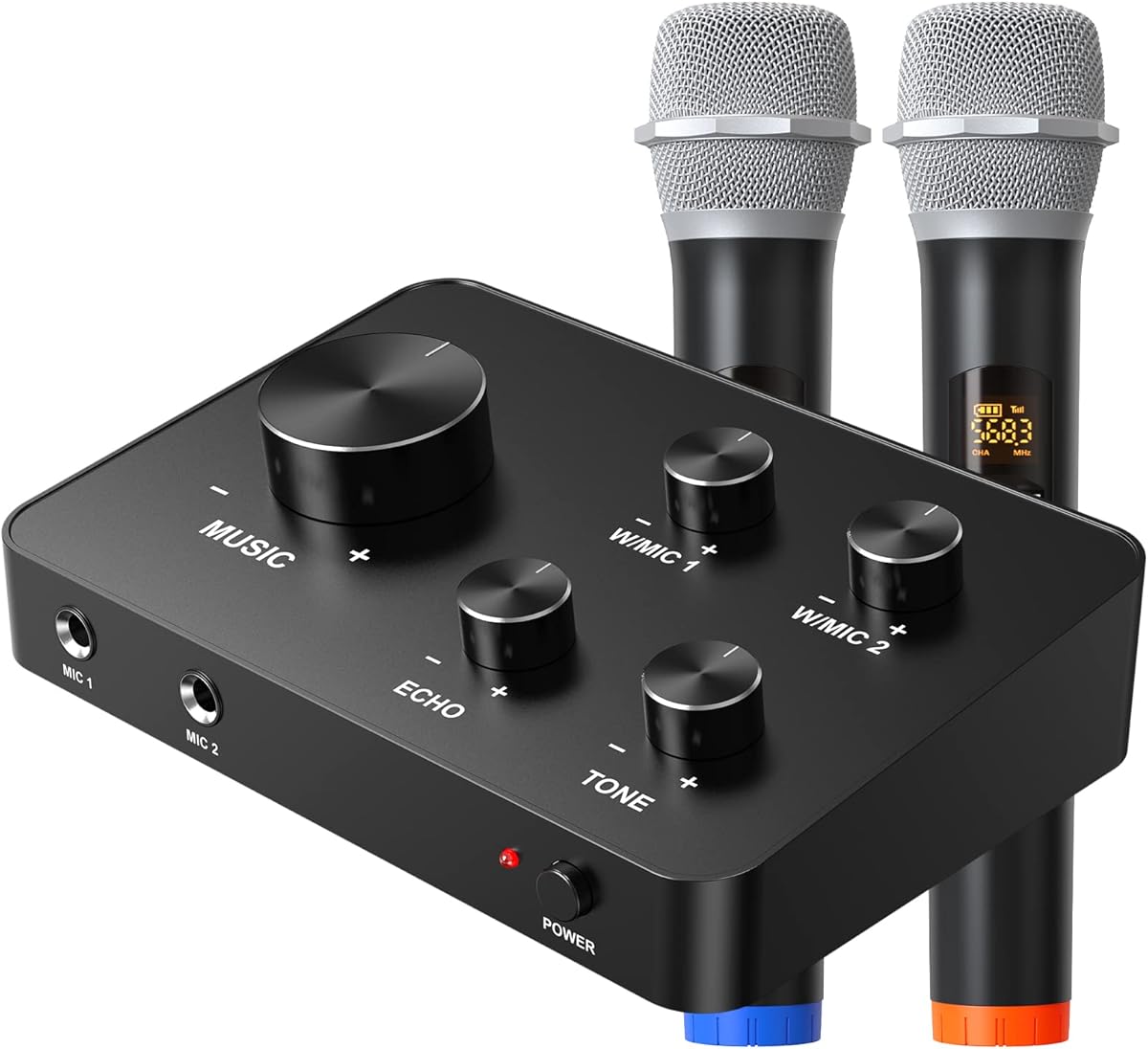
The Rybozen Wireless Microphone Karaoke Mixer System offers an all in one solution for audio input and mixing that complements any laptop setup. With a 3.8 rating it is a functional budget friendly option for those needing wireless flexibility without complex wiring.
We may earn a commission when you buy through this link, at no additional cost to you.
It provides two handheld wireless microphones and separate volume controls allowing performers to manage their own levels independently. The HDMI and AUX outputs make it easy to connect to home theater systems or speakers ensuring sound reaches the audience clearly.
Audio quality is decent for casual use but might lack the clarity needed for professional events. The adjustable echo and tone dials offer some customization to match room acoustics which helps improve overall performance quality.
This mixer is a good starting point for home parties where ease of setup is prioritized. It allows you to add professional style mixing to a laptop system without investing in expensive external interfaces.
The 100ft operating range lets singers move freely around the room without tripping over cables during their performance.
Rotatable dials for volume and echo let you adjust sound in real time without technical expertise.
We may earn a commission when you buy through this link, at no additional cost to you.
The Sound Town SWM15-MAX Mixer is designed for versatility with support for HDMI ARC, Optical, and Bluetooth inputs. It rates 3.7 among users who appreciate the ability to integrate it with various devices including smart TVs and soundbars for a seamless audio experience.
We may earn a commission when you buy through this link, at no additional cost to you.
Its ability to extract audio from a TV and blend it with microphone input makes it ideal for using existing home theater setups for karaoke. The vocal cut mode is particularly useful for practicing songs without the original artist vocals playing in the background.
While the setup can be slightly complex for beginners the wide range of ports ensures compatibility with almost any media source. This makes it a strong choice for users with existing high end audio gear looking to add karaoke capabilities.
We recommend this mixer for home theater enthusiasts who want to utilize their current equipment for singing. It bridges the gap between entertainment systems and professional audio tools effectively.
ARC and Optical inputs allow direct connection to TVs and receivers improving sound quality over standard analog cables.
Vocal cut mode helps singers rehearse by isolating instrumental tracks which is great for skill building.
We may earn a commission when you buy through this link, at no additional cost to you.
The Wireless Bluetooth Karaoke Microphone offers a fun standalone solution for singing without needing a full laptop and mixer setup. With a 4.1 rating it is perfect for spontaneous singalongs at home or parties where simplicity and portability are the main goals.
We may earn a commission when you buy through this link, at no additional cost to you.
Its built-in speaker allows immediate playback of music from a paired phone or tablet. The battery life is excellent providing up to 10 hours of use which ensures it lasts through long gatherings without needing frequent charging breaks.
While the audio quality is not comparable to high-end speakers it is sufficient for casual fun. The dynamic lights and voice effects add entertainment value especially for children or informal parties where the vibe matters more than technical perfection.
This is the ideal accessory for casual users who want to add a karaoke element to their events quickly. It requires zero setup time and can serve as a great gift for families looking for simple entertainment.
The device pairs quickly with smartphones allowing you to start singing within seconds of turning it on.
With ten hours of battery life you can use it all day without worrying about finding a power source.
We may earn a commission when you buy through this link, at no additional cost to you.
Choosing the right laptop for karaoke gear requires balancing several technical factors to ensure smooth operation during live performances.
Processing power and memory are the backbone of any reliable karaoke system. You need a processor capable of handling audio processing alongside video playback without lag. Aim for at least an Intel Core i5 or AMD Ryzen 5 equivalent to ensure smooth multitasking. Memory should be at least 16GB to allow browser tabs and streaming apps to run in the background without slowing down the main performance software.
Display quality impacts how easily you can read lyrics and navigate menus during a show. Larger screens like 15 inches or more help avoid eye strain and allow you to see multiple windows at once. Look for Full HD resolution to ensure text remains sharp and clear even in brighter environments.
Connectivity options determine how easily you can attach microphones and speakers to your laptop. Ensure your device has multiple USB ports for audio interfaces and dongles. HDMI output is essential for projecting visuals to a larger screen if you are performing in a venue.
Battery life is critical for mobile setups where power outlets are scarce. Aim for a laptop that offers at least eight hours of real world use. Fast charging features can also be a lifesaver during short breaks between sets to ensure your gear stays powered up.
Your laptop must be compatible with external audio interfaces for high quality sound. Check driver support for your preferred mixer software. USB audio interfaces work best with modern laptops so ensure you have enough bandwidth to support your desired connection type.
Storage capacity affects how many tracks you can keep on hand without relying on internet connections. Solid state drives offer faster boot times and better durability. A 512GB drive is a good baseline for storing local backups and media libraries.
Build durability ensures your device survives transport between venues. Look for laptops with sturdy chassis and reinforced hinges. A good warranty can also save you money if issues arise during heavy use in active environments.
Software compatibility ensures you can run your preferred karaoke and mixing tools. Check if your OS supports the specific apps you plan to use. Many modern platforms support Windows and macOS but always verify system requirements before purchasing.
Maintain battery health by avoiding extreme heat and unplugging the charger once fully charged. Store the laptop in a protective case when moving it to ensure longevity and consistent performance over time.
While not strictly necessary, a dedicated laptop ensures your system remains stable during performances. Using a separate machine prevents other users from interrupting your show with notifications or downloads.
A 15 inch or larger screen is ideal as it allows easy viewing of lyrics from a distance. This size ensures readability for both the performer and the audience.
Yes, most laptops support standard USB or 3.5mm microphones. Ensure the port is compatible with your device and install necessary drivers for clear audio capture.
A minimum of 8GB RAM is recommended for smooth multitasking, but 16GB is preferable for larger libraries. This ensures your software runs without slowdowns during complex setups.
HDMI output is crucial if you want to project visuals onto a larger screen. It allows you to connect directly to TVs or projectors for better audience engagement.
Use your audio interface or system mixer to balance microphone and music volumes. Adjust settings before the show to prevent feedback or overly quiet vocals.
Always check current prices and availability before buying since market conditions change quickly. Investing in a reliable device now will save time and hassle during your future karaoke performances.