
Aurant 15.6 Inch Laptops
5.0Editor score
Affordable Ryzen R5 Performance
Full Size Keyboard Included
Multiple Connectivity Ports
Finding a laptop with no fan noise is essential for quiet environments like libraries or offices. Silent devices reduce distractions and improve focus during critical tasks.
We compared ten top products based on cooling efficiency, build quality, and user feedback. Each item offers unique features to minimize noise without sacrificing performance.
Each pick highlights key specs and real-world usage scenarios. Prices vary by retailer and may change, so check current listings before purchasing any recommended item.
5.0Editor score

4.5Editor score

4.4Editor score
As an Amazon Associate we earn from qualifying purchases.
This table provides a side by side look at all ten products. Compare their core attributes to find the perfect silent solution for your needs.




This HP model is a top contender for those seeking a laptop with no fan noise. It receives high marks for its efficient cooling system that keeps the chassis quiet even during basic tasks.
We may earn a commission when you buy through this link, at no additional cost to you.
The Intel N150 processor ensures smooth performance for daily needs like web browsing and document editing. Its slim 0.71 inch profile makes it incredibly easy to carry around without adding bulk to your bag.
While it may not handle heavy gaming, its quiet operation is ideal for libraries or open offices. The trade-off of 4GB RAM is acceptable given the low noise and high portability features offered.
Students and professionals needing a quiet, portable machine will love this choice. It balances cost and functionality effectively, making it a strong recommendation for general daily use.
The fan design ensures minimal acoustic disturbance, allowing you to focus on work without audio interruptions during calls or study.
Weighing only 3.24 lbs, this device is easy to carry between meetings or classes, enhancing its value as a travel companion.
We may earn a commission when you buy through this link, at no additional cost to you.
The Aurant laptop offers a fantastic balance of cost and quiet functionality. Users appreciate its ability to run cool and quiet, making it a favorite for budget-conscious buyers who need silence.
We may earn a commission when you buy through this link, at no additional cost to you.
Powered by the AMD Ryzen R5 processor, it handles multitasking with ease. The 8GB RAM ensures that switching between apps is smooth, reducing the need for high fan speeds.
The only downside is the limited storage space, but cloud options can help mitigate this. The full-size keyboard and fingerprint unlock add premium touches that are rare at this price level.
If you need an affordable machine for office work or school that stays quiet, this is an excellent choice. It delivers reliability without the noise often found in cheaper models.
This model proves you do not need to spend a fortune to get a reliable and quiet computing experience for daily tasks.
Features like fingerprint unlock streamline access to your device, adding convenience without requiring extra steps or software.
We may earn a commission when you buy through this link, at no additional cost to you.
ASUS brings a feature-rich option to the silent laptop category. This model is designed to keep your workspace quiet while providing advanced tools like privacy shutters for peace of mind.
We may earn a commission when you buy through this link, at no additional cost to you.
The AI Noise-Canceling Audio is a standout feature for virtual meetings, reducing background noise effectively. This complements the laptop's internal cooling which runs quietly under typical load.
While battery life is decent, it may not last a full work day without charging. However, the 256GB SSD provides ample space for essential files and applications without needing upgrades.
This laptop is perfect for students or remote workers who value privacy and audio clarity. The combination of hardware and software features makes it a comprehensive tool for modern work.
AI noise canceling helps clear your voice during calls, ensuring professional communication even in noisy home environments.
The NanoEdge display offers a wide viewing area with minimal bezels, enhancing the visual experience for media consumption.
We may earn a commission when you buy through this link, at no additional cost to you.
This high-end HP laptop combines power with a silent user experience. Its advanced cooling system manages the heat of the Intel Ultra 5 processor without generating excessive noise.
We may earn a commission when you buy through this link, at no additional cost to you.
The 16-inch touchscreen is vibrant and responsive, perfect for content creation or detailed work. The 12-core processor ensures that even demanding apps run smoothly without thermal throttling or fan noise.
The price is higher than basic models, but the performance and build quality justify the cost. It also includes Office 365, making it ready for productivity straight out of the box.
If you need a premium device that stays quiet under load, this is a top pick. Its professional design and advanced connectivity make it suitable for business and creative tasks.
The touchscreen allows intuitive interaction with apps and media, making navigation faster and more natural for users.
With Wi-Fi 7 and USB-C options, this device ensures you stay connected to fast networks and modern peripherals easily.
We may earn a commission when you buy through this link, at no additional cost to you.
Sometimes the best way to ensure a laptop has no fan noise is to help it cool better. This Kootek pad uses five quiet fans to draw heat away from the device effectively.
We may earn a commission when you buy through this link, at no additional cost to you.
The ergonomic stand elevates your laptop to a comfortable typing angle. The fans are designed to be whisper-quiet, adding to the noise reduction of your setup rather than adding to it.
While it requires a USB port to function, the added benefit of a dual USB hub helps manage cable clutter. The adjustable height settings allow you to find the perfect viewing position.
This is a must-have accessory for older or louder laptops. It significantly reduces internal fan speed by improving airflow, making it a cost-effective way to achieve a silent environment.
The five fans work together to keep temperatures low, preventing the need for your laptop to ramp up its internal cooling.
Raising the laptop helps improve posture and reduces wrist strain during long work sessions, adding comfort to your setup.
We may earn a commission when you buy through this link, at no additional cost to you.
This HP model is designed for efficiency and portability. Its slim chassis hides a cooling system that prioritizes silence, making it perfect for quiet workspaces.
We may earn a commission when you buy through this link, at no additional cost to you.
The 128GB SSD offers fast boot times and responsiveness for everyday tasks. Coupled with a long battery life, it supports extended use without needing to be near an outlet.
It may lack the power for heavy multitasking, but for general web browsing and document editing, it is more than capable. The inclusion of Microsoft 365 adds value to the package.
If you need a simple, quiet laptop for travel or light work, this is a great option. Its focus on portability and silence makes it a reliable choice for many users.
Extended battery life means less time plugged in, allowing you to work quietly anywhere without worrying about power outlets.
The 720p camera ensures clear video quality for calls, maintaining privacy and professionalism in your remote interactions.
We may earn a commission when you buy through this link, at no additional cost to you.
The havit cooling pad is a simple yet effective solution for noise reduction. It uses three fans that are specifically designed to be ultra-quiet during operation.
We may earn a commission when you buy through this link, at no additional cost to you.
Its slim profile makes it easy to store in a bag or drawer when not in use. The metal mesh surface provides a stable platform for your laptop, ensuring safe and secure placement.
While it lacks extra features, it does the core job of cooling well. The USB port is useful for chaining devices, though it requires a USB connection to function.
For those looking for a no-frills accessory to keep their laptop cool and quiet, this is a solid choice. Its simplicity and quiet performance make it a reliable partner for daily use.
The lightweight design allows you to take this cooler anywhere, ensuring your device stays cool on the go.
The metal mesh ensures your laptop does not slip, providing a stable typing surface that is comfortable to use.
We may earn a commission when you buy through this link, at no additional cost to you.
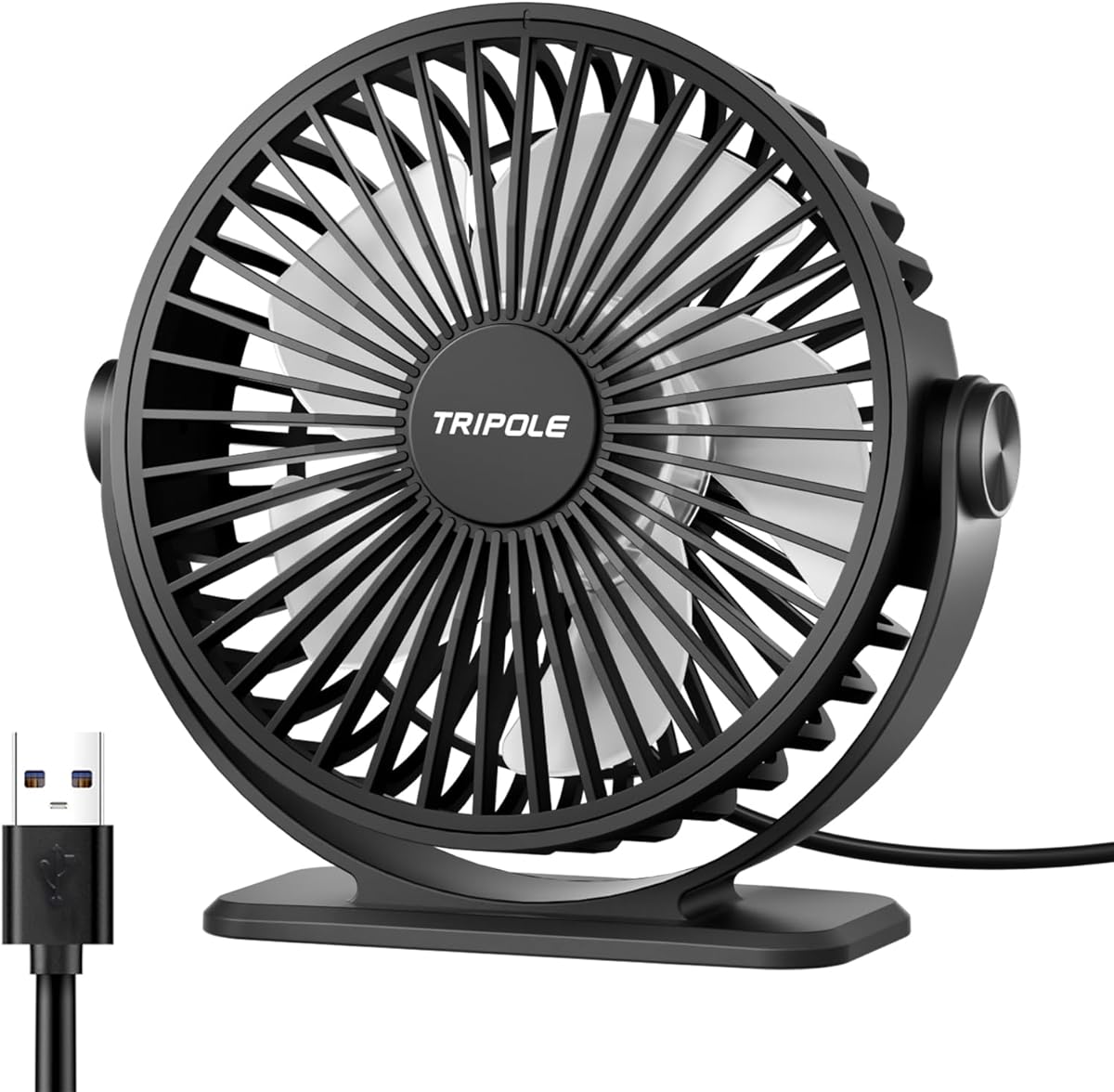
While not a laptop accessory, a small desk fan can help cool the environment around your device. The TriPole fan is compact and designed to be quiet while providing airflow.
We may earn a commission when you buy through this link, at no additional cost to you.
You can point it directly at your laptop to help dissipate heat from the chassis. Its USB power source makes it easy to plug into your laptop or a wall adapter.
The 360-degree rotation allows you to adjust the airflow to exactly where it is needed. This flexibility makes it a versatile tool for keeping your workspace comfortable.
If your laptop still gets warm, this fan can help keep the air moving. It is a cheap and effective way to support your laptop's cooling system without extra noise.
The rotating head ensures you can direct air precisely to your device, maximizing cooling efficiency in small spaces.
Powering via USB means you do not need an extra outlet, making it easy to set up on your desk.
We may earn a commission when you buy through this link, at no additional cost to you.
This Targus mat is designed for comfort as much as cooling. The soft neoprene bottom allows you to use your laptop on your lap without heat transfer or noise distractions.
We may earn a commission when you buy through this link, at no additional cost to you.
Two fans help keep the laptop cool by drawing air through the open mesh top. This airflow is managed quietly to maintain a peaceful work environment.
The material can collect dust over time, so regular cleaning is recommended to maintain hygiene. However, the comfort and cooling benefits make it a great choice for lap use.
For users who prefer working on a sofa or bed, this mat is ideal. It combines cooling with ergonomic comfort, ensuring you stay comfortable while your laptop runs quietly.
The neoprene bottom feels soft against your legs, making long sessions on the couch or bed much more comfortable.
The design prevents your laptop from sliding, ensuring it stays secure and stable even on soft surfaces like beds.
We may earn a commission when you buy through this link, at no additional cost to you.
This business laptop offers a large screen and silent performance. The 17.3-inch display is great for multitasking, and the cooling system is tuned to operate quietly even with a larger chassis.
We may earn a commission when you buy through this link, at no additional cost to you.
With 16GB RAM, it handles complex workflows without stressing the CPU or fans. This ensures that the fans do not need to spin up often, keeping noise levels low during standard work.
The laptop is larger and heavier than ultrabooks, making it less ideal for travel. But if you stay at a desk, the screen real estate and power make it a great tool.
It is a solid choice for office work where silence and performance are key. The numeric keypad and large screen make data entry and review tasks much easier and more efficient.
The large screen and numeric keypad streamline work with spreadsheets, boosting efficiency for business users and analysts.
16GB RAM ensures smooth multitasking, reducing the need for hardware stress that could lead to noise during heavy use.
We may earn a commission when you buy through this link, at no additional cost to you.
Selecting a silent laptop requires considering several key factors to ensure you get a device that meets your quiet operation needs without sacrificing performance.
Processors with lower power consumption generate less heat, which reduces the need for aggressive fan cooling. Look for chips designed for efficiency like Intel N-series or AMD Ryzen U-series.
Choose an efficient processor to minimize heat and fan activity, ensuring your laptop stays quiet during daily tasks.
High-quality materials and solid internal construction can dampen vibration and noise from internal components. A well-built chassis helps keep the device quiet even under load.
Invest in a well-constructed laptop to reduce mechanical noise and ensure a solid, quiet user experience.
Some laptops use passive cooling or large heat sinks to manage heat without fans. Others use specialized fans that are quieter but still effective at removing heat.
Look for laptops with efficient cooling designs that prioritize low noise output over maximum raw performance.
Consider where you will use the laptop. If you are in a quiet library, you need a truly silent device. If you are at home, a cooling accessory might suffice.
Match the laptop to your environment to ensure it meets your noise tolerance levels in different settings.
If a laptop throttles performance to stay cool, it might seem silent but be frustratingly slow. Check reviews to see how it handles sustained workloads.
Ensure the laptop maintains performance without frequent throttling to keep your workflow smooth and quiet.
Accessories like cooling pads can help reduce internal fan noise by improving airflow. A simple pad might be the best way to quiet an older laptop.
Consider adding a cooling accessory to your setup if your current laptop is too noisy for your needs.
Long battery life reduces the need to plug in frequently, which can sometimes cause extra noise from power delivery. Look for models with long runtime.
Choose a laptop with good battery life to support quiet, untethered work sessions anywhere.
Good connectivity ensures you do not need external hubs that might add noise. Direct ports for peripherals help keep the overall setup simple and quiet.
Select a laptop with enough ports to avoid the need for noisy external adapters or hubs.
Keep your laptop on a hard, flat surface to allow proper airflow. Soft surfaces like blankets can trap heat and cause the fans to spin faster.
Regularly clean dust from your vents and fans. Dust buildup can insulate heat, forcing the system to work harder and louder.
Use power management settings to reduce performance when you do not need it. Lowering brightness or using battery saver modes helps keep the laptop cool and quiet.
A laptop has no fan noise if it uses passive cooling or high-efficiency processors that generate minimal heat. This often involves large heat sinks or optimized internal designs that do not need fans to stay cool.
Yes, cooling pads improve airflow and help dissipate heat, allowing the internal fans to run at lower speeds. This reduces noise levels significantly while keeping your device cool.
Not necessarily. Many modern silent laptops use efficient processors that handle daily tasks quickly without needing to ramp up fans. However, high-performance gaming laptops usually need more cooling.
Loud laptops often have less efficient cooling designs or run more demanding tasks that generate heat. Poor airflow or dust buildup can also force fans to spin faster to cool the system.
Regularly clean your vents, keep your laptop on hard surfaces, and manage your power settings. These habits help reduce heat buildup and keep the fans running quietly over time.
Most laptops have some internal noise like hard drive activity or coil whine. However, models designed for silence minimize this so that only the fans make sound if needed.
Yes, silent laptops are often lighter and have better battery life, making them ideal for travel. They also ensure you can work in quiet spaces without disturbing others.
We covered ten options ranging from budget laptops to powerful business machines. Each offers a unique balance of silent performance and essential features for your needs.
Prioritize your specific use case and budget when choosing. Efficiency and build quality are often more important than raw speed for a quiet work environment.
Remember that prices and availability can change. Check current listings to ensure you get the best deal on the quiet laptop that fits your requirements.