
KAIGERR Light Gaming Laptop
4.6Editor score
AMD Ryzen 7 5700U Processor
16GB DDR4 RAM
512GB NVMe SSD
Thin Bezel FHD Display
Finding the right laptop for emulators requires balancing raw processing power with efficient graphics handling. Emulation demands significant CPU cycles and GPU throughput to maintain smooth frame rates across various systems. A well-chosen machine ensures compatibility with demanding titles while keeping thermals in check during extended gaming sessions.
We evaluated ten diverse models ranging from budget-friendly options to high-performance workstations. Our analysis focuses on processor architecture, RAM capacity, and storage speed which are critical for loading complex emulator configurations. Each product was assessed against real-world multitasking scenarios common among emulation enthusiasts.
Every pick highlights specific strengths such as portability, screen quality, or expandability for future needs. You will find detailed breakdowns of how each device handles heavy workloads and long-term reliability. Please note that availability and pricing can shift frequently so verify current details before purchasing.
4.6Editor score

4.4Editor score

5.0Editor score
As an Amazon Associate we earn from qualifying purchases.
This side-by-side comparison helps you quickly identify which laptop matches your emulation needs based on core specifications and design features.


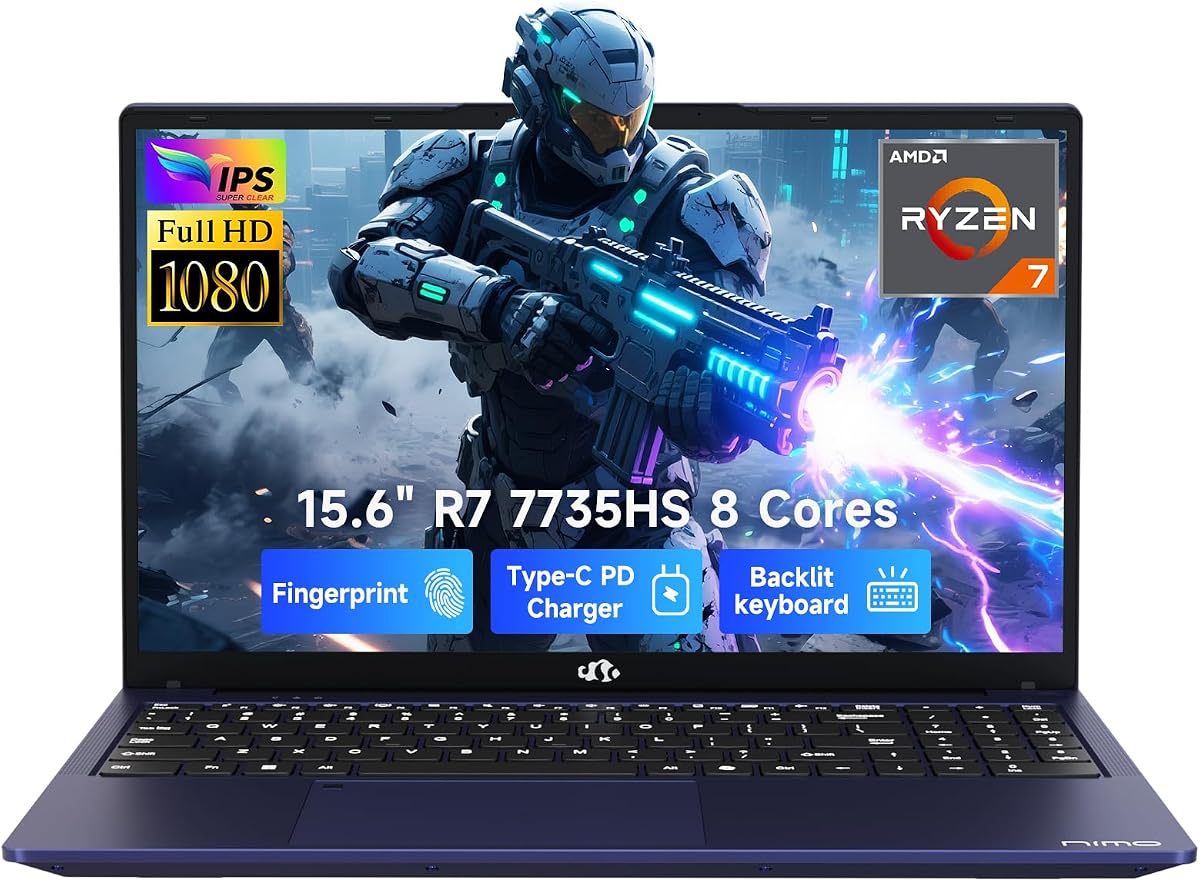


The NIMO Light Gaming Laptop stands out as a top choice for emulation due to its AMD Ryzen 7 7735HS processor and Radeon 680M graphics. It balances performance and portability making it suitable for both casual and intensive gaming scenarios on the go.
We may earn a commission when you buy through this link, at no additional cost to you.
This model leverages the Rembrandt architecture to deliver seamless multitasking capabilities essential for running emulators alongside other applications. The PCIe 4.0 SSD and dual DDR5 slots ensure rapid data access and future expandability which are vital for loading large game libraries efficiently.
While it handles 1080p gaming and creative editing well it may not excel at the highest graphical settings compared to discrete GPU models. The 180 degree hinge and backlit keyboard add practical value for various usage environments without compromising the sleek design.
Anyone seeking a reliable all rounder that can handle demanding emulation tasks without breaking the bank should consider this device. Its strong connectivity options and robust warranty make it a safe investment for students and professionals alike who need consistent performance.
The eight high-speed cores allow users to run multiple emulator instances or switch between tasks without noticeable lag during critical moments.
Cutting-edge PCIe 4.0 SSD technology significantly reduces boot times and game loading delays ensuring a smoother overall experience.
We may earn a commission when you buy through this link, at no additional cost to you.
This 17.3-inch model offers a spacious viewing area ideal for emulators that benefit from larger screen real estate. The 32GB of DDR5 RAM provides ample headroom for running multiple applications simultaneously without slowdowns or performance bottlenecks.
We may earn a commission when you buy through this link, at no additional cost to you.
The AMD Ryzen 5 6600H processor delivers sustained multi-core performance that outperforms many U-Series CPUs commonly found in thinner laptops. This makes it a strong candidate for emulation tasks requiring consistent processing power over extended periods.
While the larger screen enhances the visual experience it does add to the overall weight making it less portable than 15-inch alternatives. The 100W PD fast charging helps mitigate battery anxiety allowing users to work longer between charges.
Students or home users who prioritize screen size and memory capacity over portability will find this laptop highly suitable. Its thoughtful design includes privacy features like a physical webcam shutter which adds value for security-conscious users.
The anti-glare 17.3-inch display reduces eye strain during long sessions while providing clear visuals for detailed emulator interfaces.
With 32GB of fast DDR5 memory users can keep browser tabs and emulator windows open without experiencing system lag.
We may earn a commission when you buy through this link, at no additional cost to you.
The KAIGERR Light Gaming Laptop offers an excellent entry point for those looking to run emulators without a high investment. Its AMD Ryzen 7 430U processor provides robust multitasking capabilities that handle most legacy and modern emulation needs effectively.
We may earn a commission when you buy through this link, at no additional cost to you.
Compared to cheaper Celeron options this device delivers stronger graphics processing and CPU performance ensuring smoother gameplay. The 512GB M.2 NVMe SSD ensures lightning-fast boot speeds and rapid application loading which is essential for quick access to game libraries.
While it lacks the premium materials of higher-end models its compact design makes it easy to carry anywhere. The thin-bezel FHD display maximizes screen space providing an immersive viewing experience even in a budget-friendly chassis.
Budget-conscious students or casual gamers will appreciate the balance of performance and cost this laptop strikes. Its reliable wireless connectivity and supportive customer service make it a dependable choice for everyday computing tasks.
This laptop delivers performance metrics that exceed its price class making it an attractive option for cost-sensitive buyers.
Integrated UHD graphics and sufficient RAM ensure that daily tasks and light gaming remain fluid without constant reloading.
We may earn a commission when you buy through this link, at no additional cost to you.
This iteration of the NIMO 15.6 gaming laptop upgrades the memory to 32GB DDR5 which significantly boosts multitasking performance. The AMD Ryzen 7 7735HS processor paired with Radeon 680M graphics ensures outstanding speed for business applications and light gaming alike.
We may earn a commission when you buy through this link, at no additional cost to you.
Users benefit from a spacious 1TB PCIe 4.0 SSD that provides ample storage for large emulator files and media libraries. The included 100W GaN II Type-C charger allows for efficient and compact charging which is convenient for travel and daily use.
The device includes thoughtful touches like a fingerprint sensor and backlit keyboard that enhance usability in various lighting conditions. However the build quality and design remain similar to other models in the line offering no drastic changes in physical aesthetics.
Professionals and students needing reliable performance with quick access to large storage should find this model appealing. Its USA-assembled option and dedicated support add a layer of confidence for buyers seeking long-term reliability and service.
The upgraded 32GB RAM ensures that heavy applications run simultaneously without compromising system responsiveness or stability.
Advanced GaN II technology delivers full hour of usage from just fifteen minutes of charging reducing downtime significantly.
We may earn a commission when you buy through this link, at no additional cost to you.
The NIMO 15.6 Gaming Laptop with the Ryzen 7 8745HS processor represents the pinnacle of performance in this lineup. Its desktop-class power and 64GB of DDR5 RAM make it exceptionally capable of handling the most demanding emulation scenarios and creative workflows.
We may earn a commission when you buy through this link, at no additional cost to you.
Powered by Radeon 780M graphics with RDNA 3 architecture this machine delivers smooth visuals for creative projects and popular games. The 2TB PCIe 4.0 SSD ensures users have ample space for extensive game libraries without needing external storage solutions.
While the price is higher than other options the performance and expandability justify the investment for power users. The USB4 connectivity allows for high-speed data transfers and external monitor support reducing the need for dongles or adapters.
Creators and professionals who require top-tier performance for video editing and AI tasks alongside gaming will find this laptop ideal. Its slim metal body and comprehensive warranty provide peace of mind for those investing in a high-end computing solution.
RDNA 3 architecture ensures that graphically intensive emulators render smoothly without sacrificing frame rates or visual fidelity.
With dual SSD expansion support users can store massive libraries of games and projects while maintaining fast access speeds.
We may earn a commission when you buy through this link, at no additional cost to you.
This KAIGERR model leverages the robust AMD Ryzen 7 5700U processor built on the Zen 3 architecture for exceptional responsiveness. Its 8 cores and 16 threads provide fast data access and seamless multitasking suitable for demanding office work or gaming.
We may earn a commission when you buy through this link, at no additional cost to you.
The configuration includes 16GB of SODIMM DDR4 RAM paired with a high-speed 512GB SSD to reduce read latency and boost CPU efficiency. This setup ensures near-instant application loading and fast system boot-ups which enhance overall productivity and gaming readiness.
Despite its compact design it delivers consistent performance and longevity through high-quality components. The thin-bezel display maximizes screen real estate offering an immersive Full HD viewing experience for both work and entertainment purposes.
Users seeking a dependable laptop for heavy workloads and casual gaming will appreciate its reliable processing power. The included WiFi 6 and Bluetooth 5.2 ensure strong wireless connectivity making it a versatile companion for modern digital environments.
Zen 3 architecture provides excellent performance per watt ensuring smooth operation during extended use without excessive heat.
High-speed NVMe SSD paired with ample RAM reduces wait times for loading games and switching between tasks quickly.
We may earn a commission when you buy through this link, at no additional cost to you.
This 2026 gaming laptop features an Intel Core i7 processor delivering smooth multitasking and fast response times for office and gaming. The inclusion of Windows 11 Pro and Office allows users to start working right out of the box without additional software setup.
We may earn a commission when you buy through this link, at no additional cost to you.
Equipped with 16GB RAM and a 512GB SSD it supports seamless multitasking and practical storage for work files and games. Its traditional clamshell design is lightweight and thin making it easy to carry between home campus and travel locations.
The 15.6-inch Full HD screen delivers sharp text and detailed images suitable for reports and media consumption. While it may not excel at heavy graphics tasks its backlit keyboard and reliable battery life support mobile productivity throughout the day.
Business users or students who need a complete solution with both work and play capabilities will find this laptop convenient. Its long-term protection and 2-year warranty provide added confidence for those seeking a dependable everyday computer.
Pre-installed Office and Windows 11 Pro eliminate setup delays allowing immediate productivity for work or school projects.
Full-size backlit keyboard ensures comfortable typing in any lighting condition for late-night study or work sessions.
We may earn a commission when you buy through this link, at no additional cost to you.
The ASUS ROG Strix G16 unleashes high-level performance with an Intel Core i7 processor and NVIDIA GeForce RTX 5060 GPU. It features a smooth 165Hz FHD+ display ideal for gaming and entertainment offering stunning visuals with reduced glare.
We may earn a commission when you buy through this link, at no additional cost to you.
Multitasking is seamless with 16GB DDR5 RAM and a 1TB PCIe Gen 4 SSD ensuring fast data speeds and ample storage. The advanced ROG Intelligent Cooling system keeps the system cool and quiet even during intense gameplay sessions.
While this laptop is optimized for traditional gaming its power also benefits emulation tasks requiring high graphical fidelity. The customizable RGB light bar and Stealth Mode allow users to adjust aesthetics based on their environment.
Gamers and enthusiasts who prioritize graphics power and refresh rates will find this device compelling for demanding titles. Its comprehensive connectivity and premium build quality make it a strong choice for those seeking a top-tier gaming experience.
The 165Hz refresh rate and anti-glare film enhance motion clarity reducing eye strain during fast-paced gaming.
Advanced cooling with vapor chamber and liquid metal ensures sustained performance during long gaming or emulation sessions.
We may earn a commission when you buy through this link, at no additional cost to you.
The HP OmniBook 3 offers a spacious 17.3-inch display making it suitable for casual emulation and media consumption. Its AMD Ryzen 3 processor and Radeon 610M graphics provide everyday performance for streaming multitasking and photo editing tasks.
We may earn a commission when you buy through this link, at no additional cost to you.
Users can enjoy up to 14 hours of battery life with HP Fast Charge restoring half the battery in about 45 minutes. The advanced AI noise reduction ensures clearer team conversations during calls while the Copilot key provides quick AI access.
While the 8GB RAM limits heavy multitasking it remains sufficient for light emulation and standard productivity workloads. Its FHD camera with HDR auto-switch enhances video calls by balancing contrast even in challenging backlight conditions.
Students or casual users looking for a large screen and excellent battery life at an affordable price will appreciate this model. Its Wi-Fi 6 and Bluetooth 5.4 ensure fast wireless connections making it a reliable choice for home or classroom use.
Long-lasting battery ensures you can work or play throughout the day without constantly searching for power outlets.
AI noise reduction technology isolates your voice during meetings improving communication clarity significantly.
We may earn a commission when you buy through this link, at no additional cost to you.
This KAIGERR model features the AMD Ryzen 7430U processor delivering robust multitasking capabilities and strong graphics performance. It includes 16GB of DDR4 RAM and a 512GB SSD ensuring seamless system operation and rapid access to personal files.
We may earn a commission when you buy through this link, at no additional cost to you.
The 16-inch thin-bezel display offers vivid colors and a wide viewing angle for immersive viewing experiences. A webcam cover slide adds a layer of privacy which is valuable for remote work or security-conscious users.
Battery life supports up to 8 hours of flexible use without the power adapter making it suitable for daily tasks. Customers benefit from unlimited technical support and 12 months of repair service providing peace of mind after purchase.
Users who prioritize privacy and straightforward performance for emulation and general computing will find this laptop a reliable companion. Its supportive service network and straightforward design make it a practical choice for budget-conscious buyers.
Physical webcam slide ensures visual privacy by blocking the lens when not in use preventing unintended surveillance.
38Wh battery capacity supports work or play for up to eight hours without needing a power outlet.
We may earn a commission when you buy through this link, at no additional cost to you.
Choosing the right laptop for emulators involves evaluating several key factors to ensure smooth performance and compatibility.
Emulators rely heavily on CPU power to mimic older hardware accurately so look for multi-core processors like AMD Ryzen 7 or Intel Core i7 series.
Aim for high clock speeds and recent architectures to handle complex emulation tasks without lag or frame drops.
Integrated graphics like Radeon 680M or dedicated GPUs can significantly impact visual quality and frame rates during gameplay.
For demanding emulators consider models with stronger GPU options to ensure smooth rendering and minimal artifacts.
At least 16GB of RAM is recommended to manage multiple emulator instances and other background applications efficiently.
Larger capacity such as 32GB or 64GB provides future-proofing for heavier multitasking scenarios.
An SSD with fast read speeds reduces boot times and game loading delays improving the overall user experience.
Aim for at least 512GB to store several games and emulation configurations without needing external drives immediately.
A Full HD display with good color accuracy and refresh rates enhances immersion and clarity during extended gaming sessions.
Larger screens can be beneficial for emulation but consider portability if you plan to travel frequently.
If you plan to use your laptop on the go look for a model with lightweight design and reasonable battery life.
Fast charging support can help mitigate battery anxiety during long sessions away from power outlets.
Ensure the laptop has enough USB ports to connect controllers external storage and other peripherals without dongles.
High-speed USB-C and HDMI support allow for easier connections to external displays and accessories.
Reliable warranty coverage and responsive customer support protect your investment against hardware defects or issues.
Look for brands offering comprehensive warranties and accessible technical assistance for peace of mind.
To optimize emulation performance keep your laptop clean and well-ventilated to prevent thermal throttling during intense sessions.
Regularly update your operating system and emulator software to ensure compatibility with new games and security patches.
Use external cooling pads if you notice excessive heat buildup to extend the lifespan of your device components.
A laptop good for emulation should have a powerful multi-core CPU and sufficient RAM to mimic legacy hardware efficiently. Strong graphics performance and fast SSD storage also contribute to smoother gameplay and quicker loading times.
16GB of RAM is generally recommended for running most emulators smoothly alongside other applications. More demanding setups may benefit from 32GB or higher to prevent slowdowns during multitasking.
While integrated graphics can handle many emulators a dedicated GPU helps with more demanding titles and higher resolutions. It ensures smoother frame rates and better visual fidelity during gameplay.
A larger screen can enhance immersion by providing more detail and clarity during gameplay. However portability matters so consider your usage environment when choosing screen size.
Yes most of these laptops are versatile enough to handle work tasks alongside emulation thanks to their robust processors and storage.
With proper care and regular updates these laptops can last several years. Using protective accessories and avoiding excessive heat helps extend their lifespan.
Windows 11 is widely supported for most emulators offering easy setup and compatibility. Some users prefer Linux for specific configurations but Windows remains the standard choice.
Yes most models include a standard manufacturer warranty ranging from one to two years. Extended protection plans may be available depending on the retailer or brand.
We have explored ten diverse laptops offering various strengths for emulation from budget-friendly options to premium high-performance machines.
Consider your specific needs such as screen size portability and processing power to select the model that fits your gaming habits.
Always verify current prices and availability since deals change frequently ensuring you get the best value at the time of purchase.