
HP OmniBook 3 17.3 inch Laptop PC
4.5Editor score
AMD Ryzen 3 30 Processor
8GB RAM 512GB SSD
17.3 inch FHD Display
Choosing the right laptop for Enscape requires balancing powerful graphics, sufficient memory, and a high-resolution display for accurate rendering. Architects and designers need machines that handle real-time visualization smoothly without lag.
We evaluated ten current models based on processor speed, GPU performance, RAM capacity, and display quality. Our analysis focuses on how well each device supports complex 3D models and large architectural projects.
Each pick highlights specific strengths and trade-offs to help you find the best fit for your workflow. Please note that prices and availability change frequently, so verify current details before purchasing.
4.5Editor score

4.3Editor score

4.4Editor score
As an Amazon Associate we earn from qualifying purchases.
The following table offers a side-by-side comparison of the ten laptops reviewed in this guide to help you quickly identify the best option for your specific rendering needs.


The Lenovo V15 Gen 4 stands out as a strong contender for Enscape users needing reliable performance without excessive cost. Its Intel Core i5-13420H processor provides ample power for running architectural visualization tools alongside other productivity applications simultaneously.
We may earn a commission when you buy through this link, at no additional cost to you.
With 16GB of RAM and a 512GB SSD, this laptop ensures smooth operation when loading large project files or switching between multiple browser tabs and design software. The FHD display offers sufficient clarity for detailed work though the brightness may be limited in very bright environments.
While the battery life is decent for a productivity machine, it may not last through a full day of heavy rendering without frequent charging. However, the trade-off is acceptable given the strong performance and robust connectivity options available.
This model is ideal for students and professionals who need a dependable machine for daily Enscape work. Its balance of power and practical features makes it a top recommendation for most users looking to streamline their design workflow.
The Intel i5 processor and 16GB RAM allow seamless switching between Enscape and other heavy-duty applications without noticeable lag.
A standard FHD screen provides accurate color representation while multiple ports ensure easy connection to external monitors for expanded workspace.
We may earn a commission when you buy through this link, at no additional cost to you.
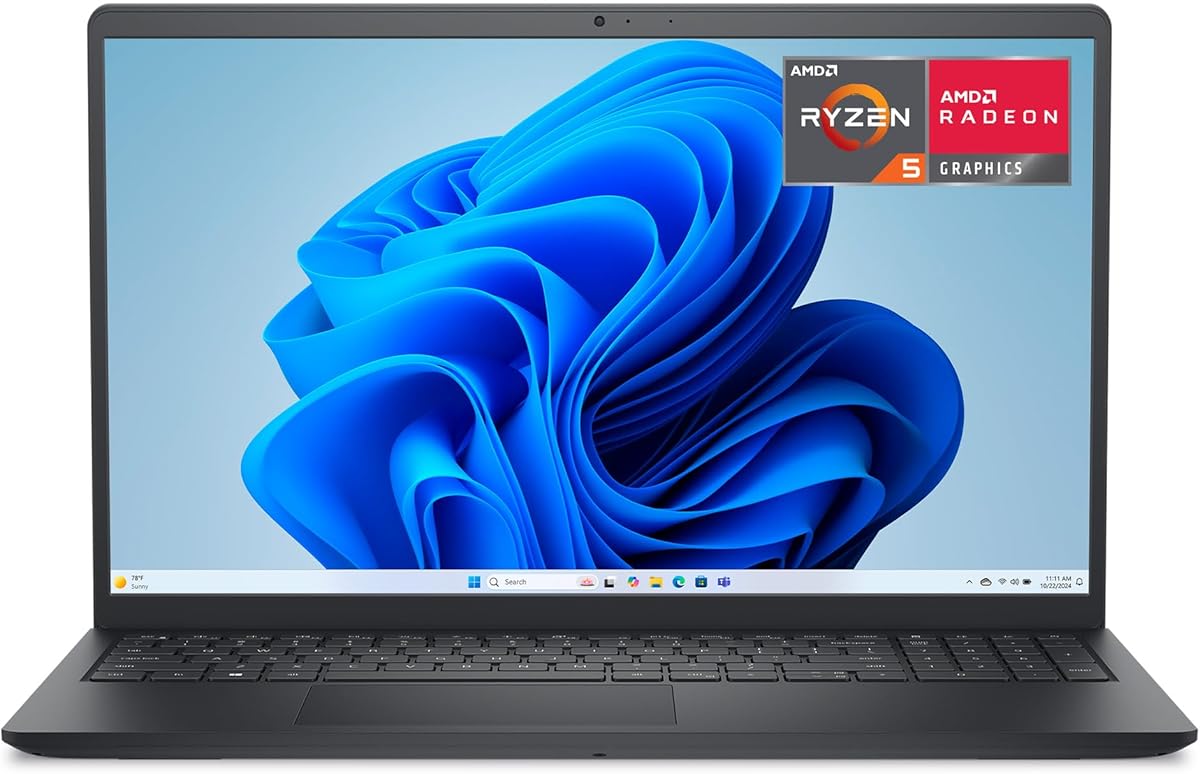
The HP OmniBook 3 17.3 inch offers a surprisingly capable experience for budget-conscious users entering the world of 3D visualization. Its large display provides ample space for viewing architectural models clearly even if the hardware is entry level.
We may earn a commission when you buy through this link, at no additional cost to you.
While the 8GB RAM may limit heavy multitasking it still handles basic Enscape projects reasonably well for small files. The integrated AMD Radeon 610M graphics ensures smooth rendering for less complex scenes without requiring a dedicated GPU.
The main limitation here is the modest memory capacity which might struggle with extremely detailed projects or multiple open applications. However for the price point this system delivers excellent value for students or hobbyists who do not require enterprise grade power.
This laptop is best suited for those who prioritize screen size and portability over raw performance. It serves as an accessible entry point for learning Enscape and performing light architectural visualization tasks effectively.
The 17.3 inch display offers more workspace for toolbars and model views which enhances efficiency during design sessions.
Up to 14 hours of battery life ensures long work sessions without needing to search for power outlets during the day.
We may earn a commission when you buy through this link, at no additional cost to you.
The Dell 16 Laptop DC16251 combines premium build quality with the performance needed for professional architectural visualization work. Its Intel Core 7 processor delivers consistent speed while rendering complex models in Enscape without unnecessary interruptions.
We may earn a commission when you buy through this link, at no additional cost to you.
The FHD+ display with a 16:10 aspect ratio provides more vertical space for tool panels and detailed views which is a significant advantage for design professionals. ComfortView Plus technology reduces blue light emissions ensuring your eyes remain comfortable during long work sessions.
Although the graphics are integrated the system handles moderate Enscape projects efficiently thanks to the strong CPU and generous RAM. The only trade-off is the higher cost compared to other models in this roundup but the premium features justify the investment for serious users.
This device is perfect for professionals who need a reliable and comfortable machine for daily design tasks. Its combination of visual fidelity and processing power makes it a top choice for those seeking a premium experience.
ComfortView Plus helps reduce eye strain during long rendering sessions ensuring sustainable productivity over extended periods.
The 16:10 aspect ratio increases vertical screen space allowing better access to palettes and settings without extra clicks.
We may earn a commission when you buy through this link, at no additional cost to you.
The HP 17 inch Business Laptop is a robust machine designed to handle demanding workloads with ease. Its AMD Ryzen 5 CPU and 16GB RAM provide the necessary horsepower to run Enscape and other design applications smoothly.
We may earn a commission when you buy through this link, at no additional cost to you.
The large 17.3 inch display offers a spacious workspace which is beneficial when working with detailed architectural models. The inclusion of a numeric keypad is a thoughtful addition for users who frequently input data or use spreadsheet applications alongside their design tools.
While the laptop is slightly heavy for daily commuting its performance and storage capabilities make it a reliable choice for stationary work or home office setups. The battery life supports all-day productivity ensuring you stay connected and efficient during long work hours.
This laptop is well suited for professionals who prioritize screen size and input efficiency over extreme portability. It offers a balanced package of power and practical features that support a productive architectural visualization workflow.
The full-size numeric keypad enhances data entry speed which is useful for managing project budgets or specs.
The anti-glare FHD screen reduces eye strain while providing clear visuals for detailed architectural drawings.
We may earn a commission when you buy through this link, at no additional cost to you.
The Light Gaming Laptop delivers impressive performance for its price range making it a viable option for Enscape users. Its AMD Ryzen 7430U processor offers high clock speeds that help accelerate rendering times and improve overall system responsiveness.
We may earn a commission when you buy through this link, at no additional cost to you.
With 16GB of RAM and a 512GB NVMe SSD this laptop ensures quick boot times and smooth multitasking capabilities. The FHD display with a thin bezel maximizes screen space providing a more immersive viewing experience for design work.
While the build quality is decent the battery life may not sustain long remote work sessions without a power source. However for the performance it provides this system remains a strong candidate for users needing reliable power at a competitive price.
This laptop is best suited for those who need raw processing speed for architectural tasks without paying for premium features. It offers a solid foundation for running Enscape effectively while maintaining good value for the investment.
The high clock speed of the Ryzen processor ensures that complex models load quickly and render efficiently.
Wi-Fi 6 and multiple USB ports ensure fast data transfers and easy connection to peripherals for expanded setups.
We may earn a commission when you buy through this link, at no additional cost to you.
The HP OmniBook 3 14 inch introduces a new level of portability with its Snapdragon processor and OLED display. This device excels in battery life offering up to 41 hours which is ideal for designers working remotely or traveling frequently.
We may earn a commission when you buy through this link, at no additional cost to you.
Its 2K OLED display provides rich colors and deep blacks which help in accurately visualizing textures and materials in Enscape. The lightweight design makes it easy to carry ensuring that your workstation is always with you when inspiration strikes.
However compatibility with certain x86 based software like Enscape may vary depending on your specific workflow requirements. Additionally the 256GB storage might fill up quickly with large architectural files necessitating external storage solutions.
This laptop is best suited for users prioritizing extreme battery life and visual quality over heavy processing power. It offers a unique mobile experience for light architectural work and presentation purposes.
The OLED panel delivers exceptional contrast and color accuracy which helps in reviewing material textures with precision.
The extended battery life ensures you can work unplugged for days without worrying about running out of power.
We may earn a commission when you buy through this link, at no additional cost to you.
The HP Laptop 14 is an affordable entry-level device suitable for basic computing and light design tasks. It features an Intel N150 processor and 4GB RAM which may struggle with complex Enscape projects but works for simple tasks.
We may earn a commission when you buy through this link, at no additional cost to you.
Its compact 14-inch design makes it easy to transport for students or casual users who need occasional access to architectural tools. The inclusion of a year of Office 365 adds significant value for those who need to manage project documentation.
Due to limited RAM and storage this machine is not recommended for heavy rendering or large file management. Users will likely need to upgrade storage or keep files on cloud services to work effectively with this model.
This laptop is best suited for students on a strict budget who primarily need a machine for learning basics. It serves as a starting point but may require upgrades or external help for advanced Enscape use.
The low price point makes this an accessible option for beginners who want to start learning design tools.
Its lightweight form factor ensures it fits easily into small bags for easy transport to classes or meetings.
We may earn a commission when you buy through this link, at no additional cost to you.
The HP 2025 New 17 inch stands out with its massive 32GB RAM and 1.5TB storage capacity making it a powerhouse for data-heavy workflows. This configuration is ideal for storing large project archives and running multiple applications simultaneously.
We may earn a commission when you buy through this link, at no additional cost to you.
The included portable SSD ensures you have extra space for backups and transfers which is crucial for managing large architectural files. The 17.3 inch display provides a detailed workspace allowing for precise work on complex models and presentations.
While the hardware is impressive the weight of the device might make it less convenient for frequent travelers. However for stationary work environments or home studios this level of storage and memory is highly beneficial for uninterrupted productivity.
This laptop is best suited for professionals who deal with extensive libraries and large datasets regularly. The combination of high RAM and storage ensures that you never face bottlenecks during your design process.
With 32GB of RAM you can run Enscape alongside multiple browsers and apps without any noticeable performance drop.
The 1.5TB total storage including the portable drive allows for keeping years of project history on hand.
We may earn a commission when you buy through this link, at no additional cost to you.
The HP OmniBook 3 16 inch offers a modern interface with its 2K touchscreen display which adds flexibility to your workflow. While the specs are entry-level the high-resolution screen provides excellent clarity for reviewing models and presentations.
We may earn a commission when you buy through this link, at no additional cost to you.
The AMD Ryzen 3 30 processor handles everyday tasks smoothly making it suitable for basic architectural visualization work. With up to 14 hours of battery life you can work anywhere without worrying about power availability for long periods.
Limited RAM and storage are the main constraints here meaning you may need to manage files carefully or use cloud storage. Despite this the touchscreen adds an intuitive element to design work that can be particularly useful for quick edits.
This model is best suited for users who value touch interaction and screen quality over raw processing power. It provides a good balance of features for light professional tasks and client presentations.
The touch interface allows for intuitive navigation and quick interactions which can speed up review processes.
AI noise reduction ensures clear communication during project meetings which is essential for remote collaboration.
We may earn a commission when you buy through this link, at no additional cost to you.
The Dell 15.6 Laptop is designed for efficiency with its ergonomic lifted hinges and adaptive thermals ensuring comfortable use. The AMD Ryzen 5 processor delivers reliable performance for daily tasks including light architectural modeling and rendering.
We may earn a commission when you buy through this link, at no additional cost to you.
Dell's adaptive thermals keep the system cool and efficient which helps maintain performance during longer work sessions. The full-size keyboard with a numeric keypad supports accurate data entry which is useful for managing project specifications.
While it lacks high-end specs the included onsite service provides peace of mind for business users needing reliable support. This laptop is a solid choice for professionals who need a stable and comfortable machine for regular work duties.
This model is best suited for users who value ergonomics and support over maximum raw power. It offers a practical solution for maintaining productivity throughout the workday.
The lifted hinges improve typing comfort and cooling which helps prevent fatigue during extended writing or coding sessions.
Dell provides onsite support that ensures any hardware issues are resolved quickly without interrupting your workflow.
We may earn a commission when you buy through this link, at no additional cost to you.
Selecting the right laptop for Enscape involves evaluating several key hardware factors that directly impact rendering speed and visual accuracy.
The processor is the brain of your laptop and significantly impacts how quickly Enscape can calculate rendering tasks. Look for modern multi-core processors like Intel Core i5 or higher and AMD Ryzen 5 or higher to ensure smooth performance.
Random Access Memory (RAM) determines how many applications you can run simultaneously without slowdowns. For Enscape work aim for at least 16GB of RAM to handle complex models and multitasking effectively.
While Enscape utilizes GPU acceleration integrated graphics may suffice for small projects. However for larger and more detailed scenes a dedicated GPU is recommended to avoid lag and ensure real-time visualization quality.
A high-resolution display with accurate colors is crucial for reviewing architectural materials and lighting. FHD or higher resolution screens with good color gamut coverage will help you make precise design decisions.
Solid State Drives (SSD) are essential for fast boot times and quick file access. Aim for at least 512GB of storage to accommodate your operating system software and large project files comfortably.
Consider how often you will need to work away from a desk. A lightweight laptop with solid battery life ensures you can stay productive in different environments without constant access to power outlets.
Ensure that the laptop runs a compatible version of Windows or Mac OS that supports Enscape. Most professional rendering tools are optimized for Windows so verify system requirements before purchasing.
Sufficient USB ports and video outputs are necessary for connecting external monitors and peripherals. Check that the laptop has the necessary ports to expand your workspace with dual screens or drawing tablets.
Always update your graphics drivers regularly to ensure optimal compatibility with Enscape and other design software. This helps prevent crashes and ensures you benefit from the latest performance improvements provided by hardware manufacturers.
Keep your laptop in a well-ventilated area during rendering tasks to prevent overheating which can degrade performance over time. Consider using a cooling pad if you plan on running intensive workloads for extended periods.
Back up your project files frequently to an external drive or cloud storage to protect your work from data loss. Regular maintenance of your storage and system health ensures your laptop remains reliable for future projects.
To run Enscape smoothly you should have a modern multi-core processor at least 16GB of RAM and a dedicated graphics card. A minimum of 256GB storage is recommended for system files and smaller projects though more space is better for larger work.
For complex and high-resolution projects a dedicated GPU is highly recommended to ensure real-time rendering without lag. However entry-level integrated graphics may suffice for small projects or learning purposes depending on your tolerance for performance trade-offs.
At least 16GB of RAM is recommended for architectural visualization tasks to handle multiple applications and large files smoothly. If you work with very large datasets consider upgrading to 32GB to future-proof your system against increasing software demands.
Yes you can use a laptop with a smaller screen but using an external monitor can significantly improve your workflow efficiency. A larger display helps you see details more clearly and manage toolbars without cluttering your main workspace area.
Enscape supports Mac operating systems but performance can vary depending on the specific hardware and software version. Check the official system requirements to ensure your MacBook meets the necessary criteria for optimal rendering results.
Optimize your laptop by closing unnecessary background applications and ensuring your graphics drivers are up to date. Adjusting Enscape settings to balance quality and speed can also help maintain smooth performance on less powerful hardware configurations.
We have reviewed ten laptops that offer a range of options for architects and designers looking to run Enscape efficiently. Our top picks include the Lenovo V15 Gen 4 for overall performance the HP OmniBook 3 17.3 inch for budget-conscious buyers and the Dell 16 for premium users.
When choosing a machine prioritize processing power and RAM capacity to ensure smooth rendering and multitasking capabilities. A high-quality display is equally important for accurate color representation and detailed viewing of your architectural models.
Remember that prices and availability fluctuate regularly so check current listings before making your final decision. Investing in the right laptop will significantly enhance your workflow and allow you to focus on creative design rather than technical limitations.