
VSD Mini Macro Pad
4.1Editor score
6 programmable LCD keys
Compact portable design
Dual side RGB lighting
Discover the top macro pads for streaming in October 2026. We compare customizable keys, RGB lighting, software compatibility, and build quality to help you
Streaming has evolved into a professional craft requiring precise control over audio, video, and chat interactions. A dedicated macro pad allows creators to execute complex commands instantly without disrupting their flow or relying on keyboard shortcuts that might conflict with other tools.
We evaluated ten leading macro pads for streaming based on key count, customization options, software ecosystem, and hardware durability. Our analysis focuses on real-world performance during live broadcasts, ease of setup, and the versatility each device offers for different streaming scenarios.
Each selection highlights specific strengths such as LCD screen clarity, RGB ambient lighting, and integration with platforms like OBS and Twitch. While features vary widely, all options aim to streamline your workflow. Keep in mind that availability and pricing may change frequently depending on market conditions.
4.1Editor score

4.4Editor score

4.8Editor score
This side-by-side comparison breaks down the key specifications and capabilities of each macro pad to help you decide which device aligns best with your streaming needs and technical requirements.





The VSD M18 Macro Pad stands out as a versatile tool for streamers needing extensive control. With 18 keys including LCD visuals, it offers immediate visual confirmation for every action. This device excels at organizing complex workflows into simple taps.
We may earn a commission when you buy through this link, at no additional cost to you.
Its customization capabilities are robust, allowing users to assign single or multi-step sequences for gaming combos, app launches, and media control. The ability to upload GIFs and animations ensures icons remain clear even during fast-paced broadcasts.
While the software is powerful, the lack of native Linux support limits access for open-source users. Additionally, reliance on the specific app means you cannot use it as a basic keyboard without installation.
Creators seeking a balanced mix of affordability and feature depth will find this macro pad ideal. It delivers professional-level control without breaking the bank, making it a top contender for both new and experienced streamers.
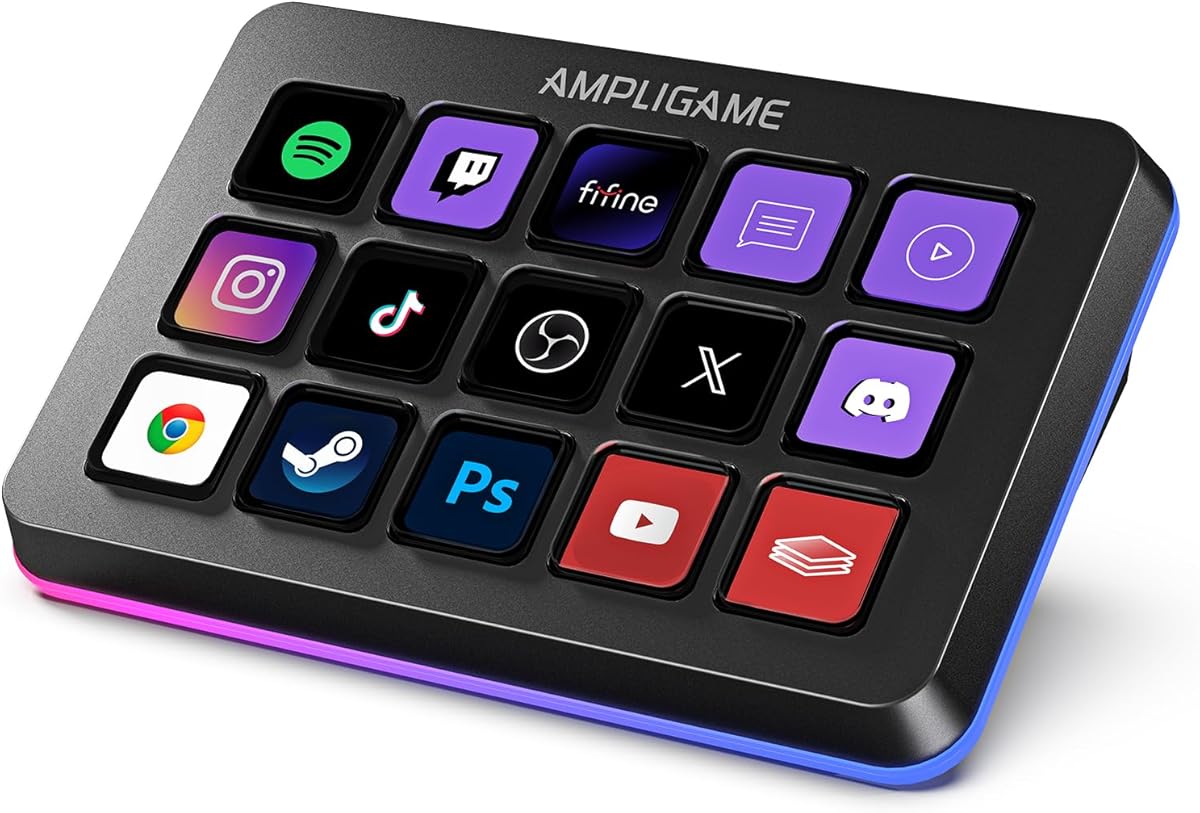
Each of the 15 LCD keys supports dynamic images to ensure you never press the wrong button during a live stream.
The outer RGB light ring adds aesthetic appeal and can be customized to match your streaming theme or ambient lighting.
We may earn a commission when you buy through this link, at no additional cost to you.
The Stream Dock N1 addresses a common pain point in streaming setups: desk clutter. Its vertical orientation saves valuable horizontal space while still providing 15 customizable LCD keys. This design is particularly beneficial for those with multiple monitors or limited desk depth.
We may earn a commission when you buy through this link, at no additional cost to you.
Unique to this model are its three switchable modes including calculator, numeric keypad, and shortcut keyboard. This versatility allows it to double as a utility tool beyond just streaming controls. The dedicated plugins further expand its functional range significantly.
While the hardware is robust, users might find the initial software configuration slightly complex compared to plug-and-play alternatives. Additionally, Linux users may face compatibility hurdles as the device relies on proprietary software for full functionality.
Streamers needing extra desktop real estate will appreciate this device. The ergonomic layout reduces wrist strain, and the multi-mode capability makes it a valuable all-in-one addition to any productive setup.
By standing upright, the N1 frees up critical desk space for your mouse, notes, or other peripherals.
Switch between shortcut, calculator, and numeric modes to handle diverse tasks without switching devices.
We may earn a commission when you buy through this link, at no additional cost to you.
Another offering from VSDinside, this M18 model focuses heavily on streamlined one-tap operations. It features 18 programmable keys that allow for rapid execution of macros, which is critical during live streams. The visual feedback system ensures you know exactly what action you triggered.
We may earn a commission when you buy through this link, at no additional cost to you.
The device supports dynamic icons and animations, helping to differentiate between similar functions quickly. Its RGB light ring adds a professional touch to your setup, providing ambient lighting that complements darker streaming environments effectively.
Although the feature set is impressive, it relies on specific software which may not appeal to those seeking simple hardware solutions. Linux users will find limited support here, requiring alternative workarounds for full functionality on that OS.
For those prioritizing speed and visual organization, this controller is a strong candidate. It balances advanced features with usability, making it suitable for creators who demand precision and reliability during broadcasts.
Execute complex sequences with a single tap, allowing you to manage multiple tasks without lifting your hands.
Use GIFs and animations to create intuitive interfaces that reduce errors during high-pressure situations.
We may earn a commission when you buy through this link, at no additional cost to you.
The VSD Mini Macro Pad proves you do not need a full-size deck to get the benefits of macro control. With 6 programmable LCD keys, it offers essential functionality in a footprint that fits anywhere. This is ideal for beginners or those with tight desk spaces.
We may earn a commission when you buy through this link, at no additional cost to you.
Despite its size, it retains core features like custom animations and dual side RGB lighting. These elements maintain a professional aesthetic without consuming much physical area. The USB-powered design ensures it stays operational as long as your computer is on.
The primary trade-off is the reduced number of keys compared to full models, which limits workflow complexity. Linux users must rely on open-source SDK files for adaptation rather than out-of-the-box support.
For budget-conscious streamers or laptop users, this pad is a smart choice. It delivers the essential tools needed to automate tasks without a significant financial commitment, bridging the gap between manual control and automation.
The small footprint makes it perfect for travel or setups where space is at a premium.
Unique lighting on both sides adds a distinctive look to your desktop even with limited hardware.
We may earn a commission when you buy through this link, at no additional cost to you.
The VSD N4 Pro is designed for streamers who need precise audio management alongside standard macro controls. It features 10 LCD keys plus four programmable RGB knobs and an interactive touch bar, offering a hybrid interface. This setup is particularly useful for music production and live mixing.
We may earn a commission when you buy through this link, at no additional cost to you.
Beyond standard macros, it acts as a USB soundboard allowing you to trigger sound effects instantly. The built-in passive USB dock adds extra connectivity options, reducing cable clutter and allowing you to connect multiple peripherals easily without external hubs.
While the feature set is premium, the higher price may not fit every budget. Additionally, the reliance on specific software means you need to allocate time for configuration before it integrates seamlessly into your workflow.
Content creators who mix audio and visuals will find this controller unmatched in utility. It brings studio-grade control to the desk, enhancing production quality and simplifying the technical demands of live broadcasting.
Trigger sound effects and manage audio levels directly from the deck without opening software menus.
The passive dock allows you to connect mice or drives directly, keeping your cable management organized.
We may earn a commission when you buy through this link, at no additional cost to you.
Fifine delivers a strong contender with the D6 RGB Macro-Keyboard. It features 15 programmable buttons with visual LCD feedback, ensuring you never lose your place during a stream. The bright RGB ring adds a professional vibe that appeals to gaming and content creators.
We may earn a commission when you buy through this link, at no additional cost to you.
Its compatibility with major streaming platforms like OBS and Twitch is seamless. The dedicated store offers a wide array of icons and plugins, allowing you to tailor the device to your specific workflow needs without technical coding skills.
Users must ensure firmware and software are updated to the latest versions to avoid connectivity issues. Some third-party integrations might require active subscriptions, which adds a layer of complexity for those seeking free alternatives.
For those looking for a reliable device from a trusted audio brand, this is a great choice. It balances ease of use with powerful customization, making it a staple for organized and efficient streaming sessions.
See your applications on the touchscreen and press directly to control them without switching windows.
Download from a vast store to fill your stream with custom icons and commands effortlessly.
We may earn a commission when you buy through this link, at no additional cost to you.
The TreasLin N1 offers a unique twist on traditional stream controllers by including a rotary knob and multiple switchable modes. With 18 customizable macro keys, it provides ample space for complex setups. The ability to switch between calculator, numeric, and shortcut modes adds significant utility.
We may earn a commission when you buy through this link, at no additional cost to you.
It supports dynamic animated icons which bring your interface to life beyond static images. The extensive marketplace offers thousands of options including icons and scenes, ensuring you can customize every aspect of your control deck to match your brand.
Users note that certain features like Spotify integration require a premium account, which may limit free-tier users. Additionally, the need for dedicated software means you cannot use it as a standalone hardware keyboard without setup.
This deck is ideal for those who want a single device to handle varied tasks. The combination of visual customization and functional flexibility makes it a top-tier tool for streamers who value efficiency and personal expression.
Use your favorite animations to create custom scenes that add personality to your setup.
Rotate the knob to instantly switch between calculator, numeric, and shortcut modes for different tasks.
We may earn a commission when you buy through this link, at no additional cost to you.
The Streonor S15 sets itself apart with three non-touch status display panels. These allow you to view real-time information like weather or system performance while managing your stream. This is a critical feature for maintaining optimal broadcasting conditions without switching windows.
We may earn a commission when you buy through this link, at no additional cost to you.
With 15 customizable LCD keys, you can assign different layouts for editing, streaming, or gaming. The software supports complex action flows that trigger multiple commands at once, streamlining your workflow significantly. It also offers extensive GIF and icon customization.
Linux is not supported for this device, which restricts its user base. You must also connect it directly via USB for stability and avoid software conflicts by uninstalling similar tools before setup.
Streamers who need constant system oversight will find this deck invaluable. The combination of macro control and status monitoring creates a centralized command center that keeps your broadcast smooth and error-free.
Keep track of CPU temperature or weather without looking at your main screen during a stream.
Build complex workflows that execute multiple commands with a single press to save time.
We may earn a commission when you buy through this link, at no additional cost to you.
The Streonor S10 is a premium hybrid controller that combines LCD keys, knobs, and a touchscreen. This multi-input design caters to advanced creators needing both instant commands and precise adjustments. With a 4.9 rating, it clearly satisfies a high percentage of users.
We may earn a commission when you buy through this link, at no additional cost to you.
The integrated touchscreen allows access to information and controls without leaving the device. Knobs can be assigned to volume or timeline adjustments making it a versatile tool for music and video production. It serves as a central hub to reduce window switching.
While powerful, the higher price may be a barrier for casual users. Additionally, some plugins require active subscriptions to work which can add to the operational costs. It is best suited for dedicated professionals.
For those seeking a comprehensive control solution, this model excels. It reduces the need for external tools and keeps your workflow streamlined, ensuring you stay focused on content creation rather than technical management.
Access controls and information directly on the screen to keep your hands on the deck.
Assign knobs to volume or scrolling to handle precise tasks with physical precision.
We may earn a commission when you buy through this link, at no additional cost to you.
The Elgato Stream Deck MK.2 is the industry standard for stream control. With 15 customizable LCD keys, it offers precise one-touch operation for any app. Its proven reliability ensures you do not face unexpected downtime during critical broadcasts.
We may earn a commission when you buy through this link, at no additional cost to you.
The plugin ecosystem is unmatched, covering everything from OBS to Philips Hue. Visual feedback guarantees you know a command has been executed which builds confidence in your setup. It also streamlines hotkey actions for various creative workflows.
The hardware is straightforward without extra lights or knobs which may disappoint some. The price is higher than many competitors, reflecting the brand premium and stability. It is an investment in consistency.
For professional streamers who prioritize stability and community support, this is the top choice. It is a tool designed to last and perform flawlessly, making it a worthy investment for serious creators.
Access a vast library of plugins to extend functionality beyond standard shortcuts.
Know immediately when your command has been executed to maintain confidence during live shows.
We may earn a commission when you buy through this link, at no additional cost to you.
Selecting the right macro pad involves balancing key count, screen clarity, and software compatibility. Understanding your specific workflow needs will guide you to a device that enhances rather than complicates your routine.
The number of keys determines how many actions you can map simultaneously. Devices like the VSD M18 offer 18 keys while the VSD Mini offers 6. Choose a count that matches the complexity of your scripts without overcrowding your desk.
Consider the physical layout and whether a vertical design like the Stream Dock N1 fits your desk space better than a traditional horizontal layout.
LCD screens provide visual labels for your actions preventing errors. Look for devices that support GIFs or dynamic icons to keep labels clear during fast action.
Visual feedback is crucial for confidence. Ensure the screen brightness and size are sufficient for your ambient lighting conditions.
The quality of the companion software defines usability. Robust apps offer plugin marketplaces and custom scripts. Check if the software supports your specific operating system like Windows or macOS.
A large plugin store allows you to control apps like Discord or Spotify without coding. Prioritize vendors with active development and update schedules.
Many streamers use macro pads to enhance their visual setup. Look for adjustable RGB rings or bars that match your theme. These can be automated to sync with your stream content.
Aesthetic features also help with orientation. Distinctive lighting can help you find the device quickly in dark setups.
Some models like the VSD N4 Pro include audio controls or mixers. If you manage music or sound effects live, these features save time. Check if the device can trigger soundboards effectively.
Multi-mode devices that support calculator or numeric modes add versatility beyond streaming. This makes the device useful for general productivity tasks too.
Streaming sessions can be long. Ensure the device has sturdy keys and a solid chassis. High-quality materials ensure the device withstands daily wear and tear over years.
Check for warranties and customer support quality. A reliable vendor ensures help if hardware issues arise during critical usage.
Verify that the device supports your current operating system. While most support Windows and macOS, Linux users should check for open-source SDK support or compatibility notes.
Also consider connection methods. USB-C is standard but ensure your computer has the necessary ports for direct connection to avoid adapter issues.
Prices vary from budget-friendly compact pads to premium controllers. Determine which features are essential versus optional to stay within budget. Often the cheapest option lacks critical software support.
Value lies in longevity. A slightly higher cost device that works reliably for years is often a better investment than a low-cost alternative that fails quickly.
Connect your macro pad via USB or USB-C to a dedicated port for stability. Install the official software on your system to unlock all features and customize your keys. Use the initial setup wizard to map your most frequent actions like scene switching or muting audio.
Organize your layouts by scenario such as Gaming, Streaming, or Work. Most devices allow multiple profiles so you can switch instantly. Use clear icons or GIFs on the LCD keys to distinguish between functions visually without confusion.
Maintain your device by keeping it clean and dry. Dust can accumulate on keys and screens so gently wipe it with a soft cloth. Regularly update the software to ensure security patches and new features are available for your workflow.
Most advanced macro pads require software installation to map functions and utilize LCD keys. Some basic models may allow plug-and-play for simple keyboard emulation, but full features like custom icons and macros need the companion app.
Support for Linux varies. While many mainstream controllers focus on Windows and macOS, some brands provide open-source SDKs for Linux users. Always check the product specifications to confirm native or community-driven support.
Modern streaming decks usually support unlimited macro storage or multiple profiles. You can save different layouts for different activities. The limitation is typically determined by the software interface rather than the hardware storage.
Yes, most LCD macro pads support custom JPG or PNG images for keys. Some even support GIFs for dynamic feedback. You can upload these through the software to make your controls visually distinct and easier to identify.
Macro pads provide visual feedback and reduce physical strain. They are especially useful for complex actions that involve multiple keys. While keyboard shortcuts are fast, a macro pad organizes them neatly without requiring you to remember complex combos.
Yes, most modern macro pads integrate seamlessly with OBS Studio. You can map actions to start recording, switch scenes, or mute audio. Look for devices that list OBS in their plugin or compatibility list for easy setup.
Choosing the right macro pad depends on your specific workflow needs and desk space. Whether you prefer the visual flexibility of the VSD M18 or the ergonomic design of the Stream Deck N1, all selected models offer substantial improvements over standard keyboards.
Prioritize compatibility with your streaming software and the ability to visualize your actions. A well-designed macro pad transforms your streaming experience by reducing clutter and increasing efficiency. Ensure the device fits your budget while offering the reliability you need.
Always check current availability and specifications before purchasing as software updates can change functionality. Investing in a quality controller now can save time and effort during your future broadcasts. Equip your setup with the tools that best support your content creation goals.